Meta Ads MCP is the official way to connect an AI assistant to Facebook and Instagram advertising through Meta Ads AI Connectors. It is a bigger shift than a reporting shortcut. Unlike Google's official Google Ads and GA4 MCP servers, Meta's connector can move from analysis to action: it can create and edit campaigns.
Meta Ads MCP is Meta's official MCP connector for ad accounts. It lets compatible AI clients read Meta Ads data and, when permissions allow, make campaign, ad set, ad, catalogue and signal-related changes through natural language. That makes it useful for advertisers and agencies, but also turns access control, confirmation and logging into first-order operational issues.
For global brands and agencies working across English-speaking markets, this is where the conversation should start. The connector can speed up reporting and repetitive account work. It can also make it easier to change live spend across several markets with one ambiguous instruction.
TL;DR
- Meta Ads MCP is Meta's official Model Context Protocol connector for Meta Ads, under the Meta Ads AI Connectors umbrella.
- Meta launched the open beta on 29 April 2026.
- The connector is added through an MCP-capable AI client and authenticated with Facebook/Meta OAuth.
- It can be used for reporting and account work, but the important distinction is that it can also support write actions.
- Write access changes the risk profile: budgets, campaigns, ads and catalogues are live business assets.
- Agencies should separate read and write roles, test on safe accounts, require explicit confirmations and maintain logs.
- The strongest use case is not "let AI run Meta Ads." It is "use AI to compress analysis and produce controlled change proposals."
What is Meta Ads MCP?
Model Context Protocol (MCP) is an open standard that lets AI assistants connect to external tools and data through a common interface. Instead of every AI client needing a custom integration, a product can expose an MCP server that compliant clients can use.
Meta Ads MCP is Meta's server for the Meta advertising ecosystem. You add the connector to a supported client, sign in with a Meta account, authorize the ad account, and the assistant can use Meta Ads tools in the conversation.
That means a media buyer can ask questions like:
- "Which campaigns had the highest cost per purchase in the last seven days?"
- "Show ad sets where frequency increased but conversion rate dropped."
- "Find catalog items with delivery issues."
- "Create a draft structure for a US prospecting campaign based on last month's winners."
The first two examples are analysis. The last two can move toward account changes. That is why governance matters.
Why this is different from the Google MCP servers
Google's official Google Ads MCP is read-only. It queries Google Ads data through the API and returns reports. Google's Google Analytics MCP is also read-only. It helps an assistant chat with GA4 data, but it cannot change property settings.
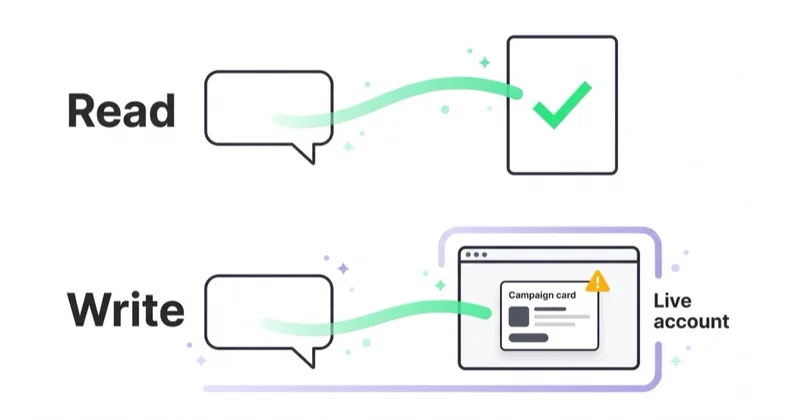
Meta's connector is more operational. It can bridge the gap between a question and a campaign change. That is useful, because Meta Ads Manager work often involves repetitive analysis, duplicating structures, checking signals, reviewing catalogues and editing campaigns.
It also means the connector belongs in the same risk category as any tool that can touch:
- campaign budgets,
- bid and optimization settings,
- ad set structure,
- creative status,
- catalogue assets,
- dataset and signal diagnostics,
- account-level permissions and business context.
For an advertiser spending in one account, that risk is manageable. For an agency managing several markets or brands, it needs policy.
What Meta Ads MCP can help with
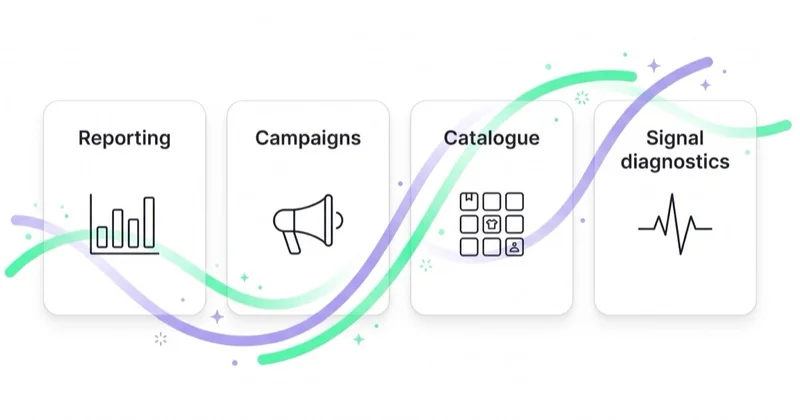
The practical use cases fall into four groups.
| Area | Useful AI-assisted work |
|---|---|
| Reporting and insights | Summarize performance, find outliers, compare campaigns, explain week-on-week changes. |
| Campaign and ad set management | Draft structures, duplicate proven setups, propose budget changes, adjust campaign elements when approved. |
| Catalogue work | Review product and feed issues, surface catalogue gaps, support Advantage+ Shopping workflows. |
| Signal diagnostics | Check whether conversion signals, datasets and account events are healthy enough to scale. |
The connector is most valuable when the user already understands Meta Ads strategy. AI can retrieve, organize and execute faster. It does not replace judgment about audience, offer, margin, incrementality or creative fatigue.
Example: a safer AI-assisted workflow
An unsafe prompt is:
"Increase budgets on the best campaigns by 25%."
It sounds simple, but it leaves too much open. Which campaigns? Which attribution window? Which market? Which objective? What budget cap? What if a campaign looks efficient because it is mostly retargeting?
A safer prompt is:
"Read only. List purchase campaigns in the US, UK, Canada and Australia from the last 14 days. Show spend, purchases, CPA, ROAS, frequency and budget utilization. Then recommend changes in a table. Do not apply anything."
Then follow with:
"Prepare a change proposal only. Include campaign ID, current budget, proposed budget, reason, expected risk and rollback condition. Ask for confirmation before any write action."
This prompt pattern does three things:
- it separates reading from writing;
- it forces the assistant to show evidence;
- it creates a reviewable change set.
That is the operating model serious teams should use.
How to set up Meta Ads MCP
The exact interface depends on the AI client, but the general flow is consistent.
1. Start with the right account
Use a Meta Business account with the minimum permissions needed. Avoid connecting broad admin access by default. If the goal is reporting, start with read-only access where the client and permission model allow it.
2. Add the connector
In the AI client, add Meta's Ads MCP endpoint as a custom connector. The client should start a Meta OAuth sign-in flow.
3. Authorize deliberately
Check which business, ad account, page, catalogue and permission level the connector will reach. This is the step where teams often move too fast.
4. Run read-only checks first
Ask the assistant to list accessible accounts and summarize recent performance. Confirm it is reading the right account before any write scenario.
5. Test writes on low-risk assets
Before a client or high-budget account, test create and edit flows somewhere safe. Learn how your AI client displays confirmations and how changes appear in Meta's change history.
Governance for agencies and global teams
The bigger the account portfolio, the more important governance becomes.
Separate read users from write users. Analysts can use AI for reporting without needing the ability to edit campaigns. Operators who can write should be a smaller group.
Use explicit account and market naming. "Scale the best campaign" is risky. "Prepare a proposal for account X, market UK, campaign objective purchases, last 14 days" is safer.
Require evidence before action. The assistant should show the data behind every recommendation. No budget movement should happen from a summary sentence alone.
Make change sets reviewable. Campaign ID, object type, current value, proposed value, reason and rollback rule should be visible before approval.
Keep client consent and data terms in view. Performance data and account structures can be commercially sensitive. Confirm that AI tooling fits your client terms.
Log everything. You need to know who connected the account, which prompt led to a change, what changed and when.
This is not bureaucracy. It is the difference between a productivity gain and an untraceable account change.
Official vs community Meta Ads MCP servers
Before Meta's official connector, the market had community MCP servers for Meta Ads. Some are useful and may still be valuable, especially where they join Meta with Google Ads, GA4, Shopify, TikTok, CRM or warehouse data.
The difference is not only features. It is trust surface.
| Factor | Official Meta connector | Community or third-party connector |
|---|---|---|
| Maintainer | Meta | External developer or vendor |
| Authentication | Meta/Facebook OAuth flow | Depends on implementation |
| API alignment | First-party | Depends on maintainer |
| Cross-platform context | Meta-focused | Often broader |
| Governance features | Depends on client and Meta surface | Depends on vendor |
Default to the official connector when the work is Meta-only and you want first-party access. Consider third-party or internal tooling when you need cross-channel context, approval workflows, reporting automation or client-specific controls.
Common mistakes
Treating the connector like a strategist. It can access tools. It does not know your margin, inventory constraints, brand rules, creative pipeline or board-level growth target unless you provide that context.
Moving from insight to action in one sentence. "Find winners and scale them" is convenient, but it skips the review step where most expensive mistakes are caught.
Ignoring market differences. A campaign performing well in the US may not behave the same in the UK or Australia. Currency, delivery costs, seasonality, creative resonance and competition all matter.
Letting AI interpret vague labels. Campaign names are often messy. The assistant may infer that "prospecting" or "BAU" means something different from your team.
No rollback rule. Every change should have a condition for reversal: spend cap, CPA threshold, ROAS floor, frequency ceiling or learning-phase constraint.
How we approach this at Space Ads
At Space Ads, we treat Meta Ads MCP as an interface for analysis and change preparation, not a shortcut for the model to manage an account on its own. A safe workflow looks like this:
- AI retrieves performance data.
- AI groups problems and opportunities.
- AI drafts a recommendation.
- A human reviews the evidence.
- Approved changes are applied through a controlled path.
- The team reviews impact after a fixed window.
Before any write action, we define the account, market, KPI, budget limit, evidence table and rollback condition. The official connector can speed up reporting, Pixel and CAPI diagnostics, catalogue checks and draft campaign structures, but implementation decisions need GA4, CRM, margin, feed status and media plan context. AI should compress analysis and turn data into reviewable recommendations; the specialist still owns approval, timing and risk.
For the broader operating model, see Space Ads OS.
FAQ
Is Meta Ads MCP official?
Yes. Meta Ads MCP is part of Meta Ads AI Connectors, Meta's official route for connecting AI assistants to Meta Ads.
Can Meta Ads MCP change campaigns?
Yes, when the connected account and permission scope allow it. That is the major difference from Google's official read-only MCP servers.
Does it replace Meta Ads Manager?
No. It gives an AI assistant a conversational layer over account work. Ads Manager, Events Manager, Commerce Manager and reporting tools still matter for review, setup and troubleshooting.
Is it safe for high-budget accounts?
It can be used safely only with governance: limited access, read-first workflows, explicit confirmations, logs and testing. Do not give broad write access without a policy.
Is the official connector always better than community MCP servers?
Not always. The official connector is the default for Meta-only access. Third-party tools can still be useful for cross-platform analysis, dashboards, approval layers and data joins.
Should agencies allow clients to use it directly?
Only if roles are clear. A client using AI to read reports is different from a client using AI to change campaigns your team is accountable for.
Key takeaways
- Meta Ads MCP is important because it can connect AI to live Meta Ads work, not only reporting.
- Write access is useful, but it changes the governance requirement.
- Global advertisers should use market-specific prompts and reviewable change sets.
- Agencies should separate reading from writing and keep logs.
- The best workflow is AI-assisted operations with human approval, not unsupervised campaign management.
Sources and further reading
- Meta for Business: Introducing Meta Ads AI Connectors
- Model Context Protocol official standard site
- GitHub: pipeboard-co/meta-ads-mcp community server
- Space Ads: Google Ads MCP server
- Space Ads: Google Analytics MCP server
- Space Ads: What a Facebook Ads audit is and why it matters
- Space Ads: AI agents in agency workflows
Continue reading
Google Merchant Center MCP: What Is Official and What Is Not
Google Merchant Center MCP usually means Google's official MAPI Docs MCP: a documentation assistant for Merchant API developers, not a tool for editing product feeds. This guide explains where official support stops, when custom integration is needed and how to use AI around catalogue data, diagnostics and controlled writes without putting feed quality at risk.
Google Analytics MCP Server: Connect AI to GA4 Safely
Google Analytics MCP is Google's official read-only server for connecting AI to GA4 through the Admin API and Data API. This guide explains when it speeds up ad-hoc analysis, how to verify model answers and why clean events, UTM discipline and consent-aware measurement still decide whether the output is usable.
Google Ads MCP Server: Connect AI to Google Ads Data Safely
Google Ads MCP is Google's official open-source server for reading Google Ads data through the API and GAQL. This guide explains how to use it for audits, ad-hoc reports and campaign diagnostics, and where MCP stops before specialist review, API automation, Editor work or a controlled change process begins.