The Google Ads MCP server is Google's official open-source way to connect an AI assistant to Google Ads data. It lets a model answer account questions using the Google Ads API instead of guessing from training data or relying on exported spreadsheets.
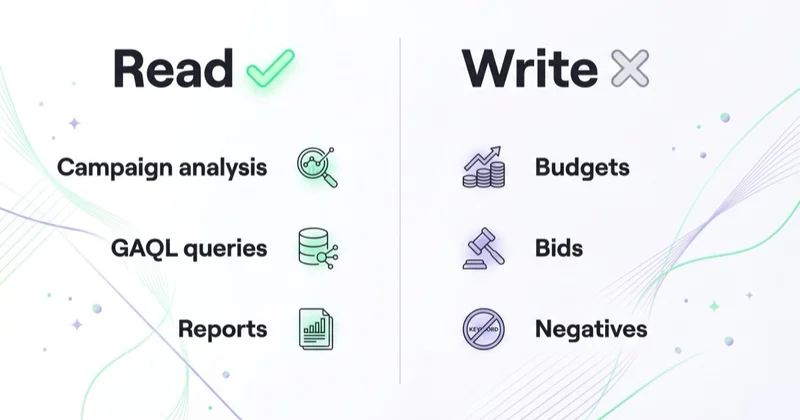
Google Ads MCP connects an MCP-capable AI client to Google Ads through the Google Ads API. It can list accessible customers, inspect Google Ads API resource metadata and run GAQL queries for reporting and diagnostics. The initial official release is read-only: it does not change budgets, bids, negatives, assets or campaign settings.
For agencies and global advertisers, read-only is not a weakness. It is the reason this is a sensible first step. A model can help find waste, summarize performance and speed up audits without being able to edit live spend.
TL;DR
- Google Ads MCP is Google's official MCP server for Google Ads data.
- Google released it as open source on 7 October 2025.
- It is designed for reporting, diagnostics and account analysis through the Google Ads API.
- It exposes tools such as
search,get_resource_metadataandlist_accessible_customers. - It is read-only. It will not pause campaigns, raise budgets, add negatives or change bidding.
- Setup requires Google Ads API access, credentials and an MCP-capable AI client.
- Agencies should treat account access, client consent and logs as part of the rollout.
What is the Google Ads MCP server?
Model Context Protocol (MCP) is a standard that lets AI assistants use external tools and data sources. The Google Ads MCP server is a tool layer over the Google Ads API. Once connected, an assistant can retrieve real account data and answer questions in natural language.
Without MCP, a specialist often has to:
- open the interface;
- find the right view;
- apply filters;
- export data;
- write or adjust a GAQL query;
- summarize the result manually.
With MCP, the operator can ask:
- "Which Search campaigns had the worst cost per conversion in the last 30 days?"
- "Show non-brand keywords with spend and no conversions."
- "Compare Performance Max spend by account this week versus last week."
- "Which campaigns are limited by budget?"
- "List accessible customer accounts."
The assistant turns intent into a Google Ads API query and returns account data.
What the official server can do
The official repository documents a focused set of tools.
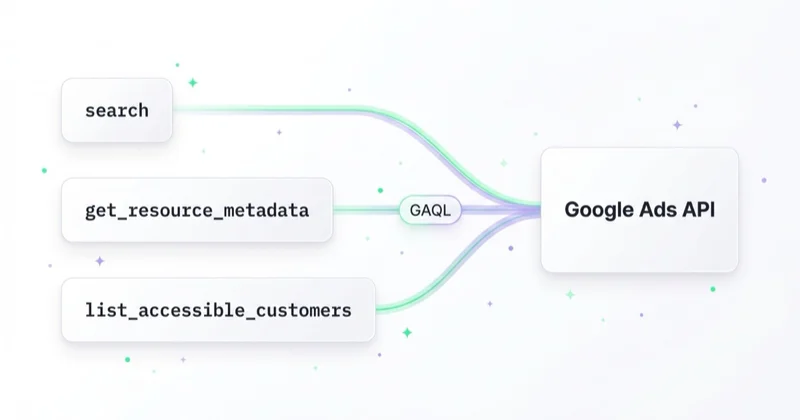
| Tool | What it does |
|---|---|
list_accessible_customers |
Lists customer IDs the authenticated user can access. |
get_resource_metadata |
Retrieves metadata about Google Ads API resources, such as fields available on campaign. |
search |
Runs Google Ads API queries and retrieves account data. |
It also exposes supporting resources such as API discovery information, metrics, segments and release notes. Those resources help the model avoid invalid fields and build more accurate queries.
This looks minimal, but it is powerful. The Google Ads API exposes a large reporting surface. The server's value is that the model can navigate it faster than most users can by hand.
Example: from question to data
Suppose you ask:
"Show the 10 Search campaigns with the highest cost per conversion over the last 30 days. Include cost, conversions and cost per conversion."
The assistant can inspect metadata, build a GAQL query and call search. A simplified query might look like:
SELECT campaign.name, metrics.cost_micros, metrics.conversions,
       metrics.cost_per_conversion
FROM campaign
WHERE campaign.advertising_channel_type = 'SEARCH'
  AND segments.date DURING LAST_30_DAYS
ORDER BY metrics.cost_per_conversion DESC
LIMIT 10
The output is useful because it is account data. The risk is that the assistant may still interpret it badly. Numbers come from the API. Strategy still belongs to a person who understands the business.
Why this matters for global advertisers
Google Ads accounts are getting harder to read manually. Automated bidding, Performance Max, Shopping, Demand Gen, YouTube and multi-country structures create more data than a person can comfortably inspect every day.
For a brand operating across the US, UK, Canada, Australia and other markets, the same question often needs several cuts:
- market,
- currency,
- campaign type,
- brand vs non-brand,
- device,
- new vs returning demand,
- Shopping vs Search,
- account or manager account level.
Google Ads MCP is useful because it reduces the friction of asking those follow-up questions. It does not remove the need to define the commercial question clearly.
Better prompts for Google Ads MCP
Good prompts are specific about account, market, period, metric and output format.
Use prompts like:
- "Read only. For customer ID X, show Search campaigns in the UK over the last 30 days by cost, conversions, CPA and impression share."
- "List non-brand search terms with spend above 100 USD and zero conversions in the last 14 days."
- "Compare Performance Max campaigns by product category label, showing spend, revenue, ROAS and conversion value."
- "Return the GAQL query you used before summarizing the result."
- "Do not recommend budget changes until I ask for a proposal."
Avoid:
- "Optimize the account."
- "Pause the worst campaigns."
- "Tell me what is wrong."
- "Scale winners."
Those prompts either ask for actions the official server cannot take or invite a broad story without enough evidence.
How to set up Google Ads MCP
Setup is more technical than adding a browser extension. That is normal: the server uses the Google Ads API.
1. Prepare Google Ads API access
You need:
- a Google Cloud project;
- the Google Ads API enabled;
- a developer token, usually from a Google Ads manager account;
- credentials for the user or service context that will read the account.
Use the least access that solves the job. A reporting workflow should not require broad administrative permissions.
2. Install and run the server
The official quick-start commonly uses pipx from the GitHub repository:
pipx run --spec git+https://github.com/googleads/google-ads-mcp.git google-ads-mcp
Team deployments can use a more controlled environment, but the principle is the same: the MCP client calls a server that has access to the Google Ads API.
3. Connect an AI client
Add the server to an MCP-capable client such as Gemini CLI, Gemini Code Assist, Claude Code, Cursor or an editor integration that supports MCP.
4. Start with account discovery
The first check should be:
"Which Google Ads customer IDs can I access?"
Confirm the assistant is reading the right account before asking performance questions.
Governance for agencies
The official server is read-only, but that does not mean governance is optional.
Client data is still client data. Campaign names, budgets, revenue and search terms can be commercially sensitive.
Access should be scoped. If one set of credentials can read every account in a manager account, the assistant can potentially retrieve data across the portfolio.
Prompts should be logged for important decisions. If a recommendation leads to a budget shift, save the prompt, date range, fields and output.
Model output needs review. The server returns data. The model writes the interpretation. That is where mistakes happen.
Read-only should stay read-only. If you later add write-capable tools around Google Ads, put them behind a different approval process.
For agencies, this is the difference between "a useful analyst shortcut" and "an uncontrolled data access layer."
Google Ads MCP vs other ways to work with Google Ads
| Approach | Best for | Limitation |
|---|---|---|
| Google Ads MCP | Natural-language reporting and diagnostics | Read-only and model-mediated |
| Google Ads API | Custom integrations, read/write automation | Requires engineering and governance |
| Google Ads Editor | Bulk manual editing | Desktop workflow, not conversational |
| Google Ads Scripts | Repeatable rules inside accounts | Limited to script logic and platform constraints |
| BI dashboards | Standing reporting | Less flexible for ad-hoc questions |
MCP sits between the interface and the API. It gives non-developers a faster way to query data, while keeping the official server away from live edits.
For API fundamentals, see what the Google Ads API is and what it is used for. For operational review, see what a Google Ads audit is and how to do it.
Common mistakes
Expecting the server to fix campaigns. It cannot. It reads and reports. It does not make changes.
Asking vague strategy questions. "Why is performance down?" needs to become a chain of evidence: spend, conversion volume, search terms, auction metrics, tracking status, market split and landing pages.
Ignoring attribution differences. Google Ads, GA4 and finance may all show different numbers. The assistant should not be asked to reconcile them without context.
Querying the wrong account. Manager accounts make access broad. Always confirm the customer ID.
Treating AI confidence as proof. A polished explanation can still be wrong. Ask for fields, date ranges and the query used.
How we approach this at Space Ads
At Space Ads, we use Google Ads MCP as a safe diagnostic layer: first the account, date range, segments and source table, then hypotheses. The read-only boundary is useful because it lets us find anomalies, rising CPA, channel mismatches or missing data without the risk of an accidental live edit.
An API report alone is not enough for a budget decision. We compare Google Ads output with GA4, CRM, feed quality, margin and seasonality before changing spend, bidding, structure or exclusions. When a finding should become an action, it moves into a separate workflow with a clear decision owner, reviewable evidence and specialist approval.
For the broader operating model, see Space Ads OS.
FAQ
Is Google Ads MCP official?
Yes. The official repository is maintained by Google for the Google Ads API MCP server.
Can it change campaign settings?
No. The official initial release is read-only. It can retrieve data for reporting and diagnostics, but it does not edit campaigns.
What does it use under the hood?
It uses the Google Ads API, including GAQL queries and API metadata.
Which AI clients can use it?
Any compatible MCP client can potentially use it. Google documents Gemini workflows, and the broader MCP ecosystem includes clients such as Claude Code, Cursor and editor integrations.
Do I need a developer token?
Yes. Because the server uses the Google Ads API, you need appropriate Google Ads API access and credentials.
Is it safe for client accounts?
The read-only design reduces operational risk, but data access still needs governance. Scope credentials, confirm client terms and avoid exposing more accounts than necessary.
Key takeaways
- Google Ads MCP is a serious official bridge between AI assistants and Google Ads data.
- It is read-only, which makes it practical for reporting, diagnostics and audits.
- The model can query data quickly, but its interpretation still needs human review.
- Global account structures need precise prompts by market, account and period.
- Agencies should treat MCP access as part of client-data governance, not as a casual productivity add-on.
Sources and further reading
- Google Ads Developer Blog: Open Source Google Ads API MCP Server
- GitHub: googleads/google-ads-mcp
- Model Context Protocol official standard site
- Space Ads: Google Analytics MCP server
- Space Ads: Meta Ads MCP and AI Connectors
- Space Ads: Google Merchant Center MCP
- Space Ads: What the Google Ads API is and what it is used for
- Space Ads: What a Google Ads audit is and how to do it
- Space Ads: AI agents in agency workflows
Continue reading
Google Merchant Center MCP: What Is Official and What Is Not
Google Merchant Center MCP usually means Google's official MAPI Docs MCP: a documentation assistant for Merchant API developers, not a tool for editing product feeds. This guide explains where official support stops, when custom integration is needed and how to use AI around catalogue data, diagnostics and controlled writes without putting feed quality at risk.
Can ChatGPT Manage Your Google Ads? What AI Agents Can and Can't Do Safely
A raw model is useful for reasoning, not for unrestricted account changes. The article lays out the control layer a team needs around AI work: data access, proposed edits, approval rules, budget limits and logs.
AI for Google Ads in 2026: Google's Native AI vs a Control Layer on Top
Google's AI and third-party AI tools solve different problems. This guide draws the line between platform automation that already controls bidding and creative assembly, and external control layers that audit, explain, propose changes and help teams govern execution.