
Google Ads API is the developer interface that lets software read Google Ads data and make account changes programmatically. It is used when the Google Ads interface, Google Ads Editor, scripts or manual reporting are no longer enough. Agencies, large advertisers, SaaS tools and in-house data teams use it to automate reporting, manage many accounts, upload conversion data, build budget alerts, run audits and connect ad performance with business systems.
TL;DR
- Google Ads API connects external software with Google Ads accounts. Code can retrieve data, create or update entities and support account operations at scale.
- It is built for automation and integration. Common use cases include custom dashboards, account audits, budget pacing, conversion uploads, bulk changes and MCC-level tooling.
- It is not the same as Google Ads Scripts. Scripts run inside Google Ads and are good for lighter automation; the API connects Google Ads with external systems.
- It requires setup. Google documentation lists a developer token, Google Ads manager account, Google Cloud project, OAuth 2.0 credentials and access to the target client account as core concepts.
- It has quotas and limits. Daily operations depend on developer-token access level, and mutate requests have operation limits.
- It needs maintenance. Google Ads API versions are released regularly and older versions eventually sunset, so integrations need planned upgrades.
- Small accounts usually do not need it. For one account, the interface, Editor, built-in reports or simple scripts are often enough.
What Google Ads API is
Google Ads API is an application programming interface for Google Ads. In simple terms, it lets one system talk to Google Ads through code.
Instead of opening the Google Ads interface and exporting reports manually, a system can request campaign, ad group, keyword, asset, conversion or performance data. Instead of changing budgets manually across many accounts, software can apply rules, alerts or workflows to the accounts it is allowed to manage.
This matters when paid media operations become too large or too repetitive for manual work. A single advertiser with one account may not need API access. An agency managing many clients, a marketplace with thousands of campaigns, a SaaS reporting tool, or an internal analytics team usually needs a more scalable connection.
What Google Ads API is used for
Reporting and dashboards
The API is often used to pull Google Ads data into a warehouse, BI tool, dashboard or internal reporting system. This allows teams to combine ad data with revenue, margin, stock, CRM stages, refunds, new customers or offline sales.
Examples:
- daily spend and conversion dashboards;
- account-level performance alerts;
- campaign trend reports;
- client-facing agency dashboards;
- blended reporting across Google Ads, Meta Ads, TikTok Ads and analytics;
- warehouse tables for long-term performance analysis.
The business value is not only automation. The value is better context. Platform metrics are useful, but performance decisions are stronger when they are connected with profit, customer quality and operational constraints.
Bulk account management
Google Ads API can create, update or pause entities at scale. This can include campaigns, ad groups, criteria, assets, budgets, audiences or other resources, depending on API support and account permissions.
Typical use cases:
- creating campaign structures from a product feed;
- applying naming conventions;
- pausing campaigns when stock is unavailable;
- updating budgets based on pacing rules;
- adding negative keywords from search term analysis;
- checking policy or status issues across many accounts;
- rebuilding large account structures faster than manual workflows allow.
This is where API work must be controlled carefully. A small logic error can affect many accounts. Read-only reporting should usually be built and tested before automated changes are introduced.
Conversion and offline data workflows
Many businesses need to connect Google Ads with data that appears outside the ad platform. Examples include CRM-qualified leads, phone calls, offline sales, subscription upgrades, refunds or margin values.
Google Ads API can be part of a workflow that uploads or adjusts conversion data, depending on the exact conversion source and implementation. This is especially useful for lead generation and B2B, where the first form submission may not represent real business value.
The goal is not to send as much data as possible. The goal is to send accurate, consented and meaningful conversion data that improves optimisation and reporting.
Audits and monitoring
Agencies and internal teams can use the API to build audit systems that detect issues automatically.
Examples:
- campaigns without conversion tracking;
- budgets that are limited too early in the day;
- ad groups without active ads;
- disapproved assets;
- missing final URLs;
- sudden spend changes;
- conversion drops;
- duplicate keywords or inconsistent naming;
- Performance Max asset or feed issues;
- accounts that do not follow internal standards.
This type of monitoring is useful because it reduces reliance on memory. The system checks every account every day and flags what requires human attention.
Agency and MCC operations
For agencies, Google Ads API is often part of the operating system. It can help standardise reporting, onboarding, audits, budget pacing, access checks and client dashboards across multiple accounts.
The API does not replace a strategist. It removes repetitive work so that specialists can spend more time on diagnosis, account decisions and communication with clients.
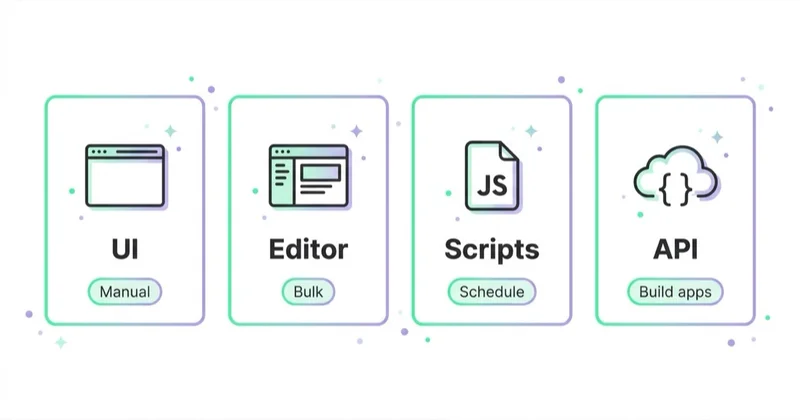
Google Ads API vs Google Ads interface, Editor and scripts
| Tool | Best use case | Main limitation |
|---|---|---|
| Google Ads interface | Daily account work, review, setup and troubleshooting | Manual and slower at scale |
| Google Ads Editor | Offline bulk edits and account restructuring | Not built for live integrations or custom systems |
| Google Ads Scripts | Lightweight automation inside Google Ads | Limited compared with external software architecture |
| Google Ads API | External integrations, large-scale reporting, many accounts and custom tools | Requires developer work, credentials, quotas and maintenance |
| Looker Studio connectors | Faster visual reporting | Less control than a custom API and warehouse setup |
A useful rule: use the simplest tool that solves the real problem. If a script or Editor workflow is enough, the API may be unnecessary overhead. If the process needs external data, many accounts, custom interfaces, automated pipelines or internal tools, the API becomes more appropriate.
What is needed to start
Google documentation describes several core concepts required for a first API call.
| Requirement | Meaning |
|---|---|
| Developer token | Identifies the application to Google Ads API servers and controls API access level. |
| Google Ads manager account | Used to obtain a developer token and manage client accounts. |
| Google Ads client account | The target account that API calls act on. |
| Client customer ID | The 10-digit account ID used when making calls against a client account. |
| Google Cloud project | Used to configure APIs and credentials. |
| OAuth 2.0 credentials | Authorise the application to access allowed Google Ads accounts. |
| Client library or REST setup | The practical method used to make requests. |
Google provides official client libraries for Java, .NET, PHP, Python, Ruby and Perl. Google documentation also lists community-maintained libraries for NodeJS and Go, but notes that those community libraries are not tested, contributed to or maintained by Google.
For most teams, an official client library is the safest starting point. A REST integration can make sense when a team wants more direct control, but it usually increases implementation responsibility.
GAQL and data retrieval
Google Ads API uses Google Ads Query Language, usually shortened to GAQL, to query reporting and resource data. GAQL looks similar to SQL in the sense that it selects fields from resources, but it follows Google Ads API rules and resource relationships.
A reporting workflow usually needs to answer:
- which resource is the base of the query;
- which metrics and segments are allowed together;
- which date range is required;
- whether data should be streamed or paginated;
- how results should be stored;
- how costs, currencies and time zones should be handled;
- how the system should retry failed requests.
The most common implementation mistake is treating API reporting like a simple export. A stable pipeline needs schema planning, request limits, error handling, version control and monitoring.
Quotas, limits and access levels
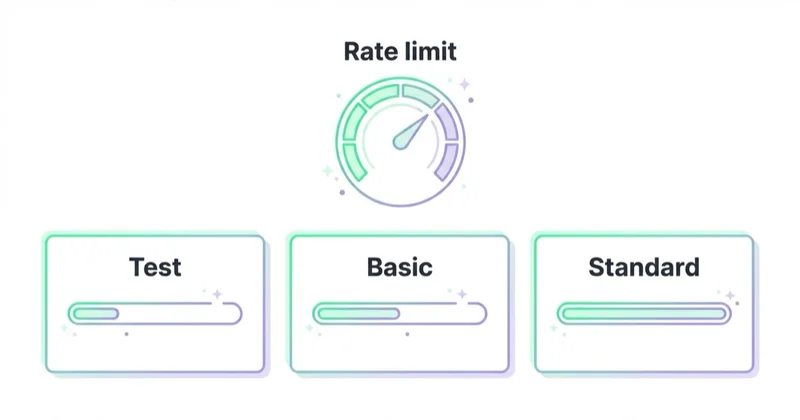
Google Ads API has limits. Google documentation says daily API usage is based on the number of get requests and mutate operations per developer token, with limits depending on access level. The same documentation also notes gRPC response message-size limits and mutate request limits.
Important practical implications:
- dashboards should avoid unnecessary fields;
- huge reports should be split by date, account or resource where needed;
- mutates should be batched carefully;
- retries should use sensible backoff logic;
- integrations should log request IDs and errors;
- development and production access should be separated where possible;
- API usage should be monitored before limits become operational issues.
A reporting tool that works for one account may fail when scaled to 50 accounts if query design and quota usage are not considered early.
Versioning and maintenance
Google Ads API is not a set-and-forget integration. Google updates the API regularly. The official deprecation and sunset documentation says new versions are released on average every 3 to 4 months, and a version is generally sunset around one year after release.
That means every serious integration needs a maintenance plan:
- track API release notes and sunset dates;
- keep client libraries updated;
- test migrations in staging before production;
- avoid hardcoding assumptions that often change;
- document the version used by each internal tool;
- add monitoring for deprecated API usage;
- plan engineering time for upgrades.
Ignoring versioning is one of the fastest ways for a useful reporting or automation tool to break unexpectedly.
When Google Ads API is worth it
Google Ads API is worth considering when at least one of these conditions is true:
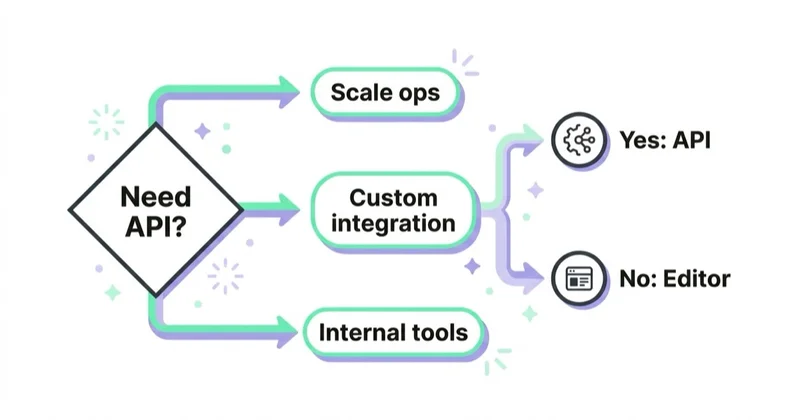
- many accounts need to be monitored or managed;
- manual reports take too much time;
- advertising data must be joined with business data;
- campaign changes depend on inventory, margin, CRM or custom rules;
- the team needs an internal dashboard or audit system;
- conversion data needs to be uploaded from offline or CRM systems;
- account standards must be checked automatically;
- the organisation sells a software product connected with Google Ads.
For a small advertiser with one account, these conditions may not apply. In that case, API work can become expensive complexity. A better first step may be cleaner conversion tracking, a reporting template, Google Ads Editor or a focused script.
Implementation roadmap
1. Define the business problem
Start with the process, not the API. Useful questions:
- What manual task should disappear?
- What decision will improve because of the integration?
- Which data source must be connected with Google Ads?
- Who will use the output?
- How often does the data need to refresh?
- What happens if the automation fails?
If the answer is only "we want API access", the project is not ready.
2. Build read-only reporting first
A read-only integration is safer than an integration that changes accounts. It helps verify credentials, query design, account access, quotas, data freshness and storage.
Good first outputs:
- spend by account and day;
- conversions by campaign;
- cost and conversion value by channel type;
- alerts for missing data;
- account access inventory;
- API error logs.
3. Add controlled automation
After reporting works, automation can be added with guardrails.
Useful safeguards:
- dry-run mode;
- small account subset;
- daily change limits;
- approval step for high-risk changes;
- audit log of every mutate request;
- rollback procedure;
- alerting after failed or unexpected changes.
The best automation is boring. It should be predictable, logged and easy to stop.
4. Connect business data
The strongest API projects connect advertising data with business reality. That might include product margin, stock, CRM stage, lead quality, refunds, recurring revenue or geographic availability.
This is where the API can create an advantage: not by pulling the same report faster, but by helping campaigns react to information that is not visible inside Google Ads by default.
Security and governance
API access should be treated as sensitive infrastructure.
Minimum practices:
- use least-privilege account access;
- store credentials in a secure secret manager;
- avoid committing tokens or keys to code repositories;
- rotate credentials when needed;
- restrict access to production tools;
- log changes and API errors;
- document ownership of the integration;
- review data retention and privacy obligations;
- separate test and production workflows.
For agencies, governance is even more important because one system may touch many client accounts. A credential mistake, access leak or automated change can affect trust immediately.
How we approach this at Space Ads
For us the Google Ads API is the way out of the panel: pulling data across many accounts at once, building audits and anomaly detection, making changes in bulk and repeatably. Our own system, Space Ads OS, is built on it — it's how we connect to accounts and run the analysis. The rule, though, is firm: by default we read, and every change passes a safety check, a human confirmation and a log. Leverage is the API's strength — one query does what would take hours by hand — and that same leverage cuts both ways, since a mistake run automatically across twenty accounts is twenty times as expensive. Guardrails first, automation second. It isn't a toy for firing off changes on a whim; it's a tool for scale and vigilance, used carefully.
Common mistakes
| Mistake | Why it hurts | Better approach |
|---|---|---|
| Starting with automation before reporting | Changes may happen before data quality is understood | Build read-only pipelines first |
| Using API when Editor or scripts are enough | Adds cost and maintenance | Match the tool to the problem |
| Ignoring quotas | Requests fail under scale | Design queries and batching early |
| Hardcoding API versions | Integrations break after sunset | Track versions and plan upgrades |
| No error handling | Small failures become silent data gaps | Log errors, request IDs and retries |
| No dry-run mode | Bad logic can change many accounts | Test changes safely before mutating |
| Weak credential storage | Creates security risk | Use secure secrets and least privilege |
| Reporting only platform metrics | Decisions lack business context | Join Google Ads data with margin, CRM or revenue data |
FAQ
What is Google Ads API in simple terms?
Google Ads API is the developer interface for Google Ads. It lets approved software read account data and make account changes through code.
Who needs Google Ads API?
Agencies, large advertisers, data teams, SaaS tools and organisations managing many accounts or custom reporting workflows are the most common users. Small single-account advertisers usually do not need it.
Is Google Ads API free?
Google does not charge a separate fee for using the API in the normal documentation flow, but implementation has engineering cost. Usage is also governed by access levels, quotas and Google Ads API terms.
What is a developer token?
A developer token identifies the application to Google Ads API servers and is required for API calls. Its access level controls where and how many calls can be made.
Is Google Ads API the same as Google Ads Scripts?
No. Google Ads Scripts are a lighter automation option that runs inside Google Ads. Google Ads API is for external applications, custom systems, reporting pipelines and larger-scale integrations.
Can Google Ads API change campaigns automatically?
Yes, if the app has the right access and uses mutate operations. This should be implemented carefully with testing, limits, logs and rollback logic.
What language should be used for Google Ads API?
Google provides official client libraries for Java, .NET, PHP, Python, Ruby and Perl. The best choice depends on the existing engineering stack and maintenance responsibility.
How often does Google Ads API change?
Google documentation says new versions are released on average every 3 to 4 months and versions are generally sunset around one year after release. Integrations should monitor release notes and sunset dates.
Key takeaways
Google Ads API is powerful when the problem is scale, integration or automation. It can turn Google Ads from a manually operated platform into part of a wider business system: dashboards, alerts, conversion uploads, feed logic, budget pacing, audits and internal tools.
It is not the right first step for every advertiser. Before using it, define the process, prove read-only reporting, understand quotas, plan version maintenance and secure credentials properly. When those foundations are in place, the API can reduce repetitive work and improve decisions by connecting ad data with business data.
Sources and further reading
- Google for Developers - Google Ads API quick start
- Google for Developers - Google Ads API client libraries
- Google for Developers - Google Ads API limits and quotas
- Google for Developers - Google Ads API deprecation and sunset dates
- Google for Developers - OAuth overview for Google Ads API
- Space Ads - Google Ads service
Continue learning
Continue reading

Gemini Ad Formats: When the Ad Is Generated, Not Written
Google is testing and announcing Gemini-powered ad experiences across AI Mode and Search. Learn what each format does, what remains uncertain and how to prepare data, content and measurement.

Google Ads Experiments: Testing That Produces a Decision
A useful Google Ads experiment starts with a decision, an effect worth detecting and enough statistical power. Learn how to choose the test, split, metric and interpretation.

Google Ads Account Suspended: Why It Happens and What to Do
A Google Ads suspension requires evidence, not panic. Learn how suspension differs from a hold or pause, what the strike system covers and how to diagnose and appeal safely.


































