If googleads.g.doubleclick.net or tpc.googlesyndication.com appears as a referral source in Google Analytics, the traffic is often not a new marketing channel. It is usually Google advertising traffic that GA4 could not classify correctly because the click identifier, redirect chain, Google Ads link or referral handling is not working as expected.
The fix is not to rename the source in a report and move on. Start with Google Ads auto-tagging, confirm that gclid reaches the final landing page, check the GA4 and Google Ads link, then use GA4 unwanted referrals only as a supporting cleanup step. Otherwise the traffic may simply move from a misleading referral into direct traffic, while the real attribution problem remains.
TL;DR
- These domains are usually Google ad infrastructure, not a strategy channel. They can appear when ad traffic is misclassified as referral traffic.
- The first check is auto-tagging. Google Ads auto-tagging appends a Google Click ID, or
gclid, to ad URLs. - Redirects often cause the issue. Google says redirects should preserve the
gclidURL parameter to the final landing page. - GA4 should be linked with Google Ads. The link allows data to flow between products and supports more complete advertising reporting.
- Unwanted referrals is not the first fix. It can prevent selected domains from being shown as referrers, but it does not recreate a lost click ID.
- Do not apply Universal Analytics filter advice blindly. GA4 does not use UA views and old view filters in the same way.
- Historical data will not magically change. Most fixes affect future collection and reporting, so the before/after analysis must use new data.
- E-commerce and lead-gen teams should also store click IDs and UTMs where useful. GA4 is only one reporting layer.
What the problem looks like
In GA4 acquisition reports, the source or source/medium may include values such as:
googleads.g.doubleclick.net / referral;tpc.googlesyndication.com / referral;doubleclick.net / referral;googleadservices.com / referral.
This usually means GA4 saw a referrer domain from Google's advertising infrastructure, but did not receive enough usable information to classify the session as Google Ads traffic. The result is a reporting problem: spend sits in Google Ads, but some sessions or conversions appear under a technical referral source in GA4.
The business impact is practical:
- Google Ads traffic can look smaller than it is;
- referral traffic can look inflated;
- landing-page reports become harder to read;
- campaign ROI analysis becomes inconsistent;
- imported GA4 conversions may be less reliable for optimization;
- teams may make wrong budget decisions.
Why these referrals appear
The most common causes are below.
| Cause | What happens | How to diagnose |
|---|---|---|
| Auto-tagging is off | Google Ads does not append gclid |
Check Google Ads account settings |
gclid is stripped by redirect |
The click ID never reaches the page where GA4 loads | Test the final URL in Chrome DevTools |
gclid is changed |
Case or characters are modified | Compare original and final URL parameters |
| GA4 and Google Ads are not linked | GA4 has less campaign context | Check Product links in GA4 |
| Landing page tag is missing | GA4 cannot collect the session correctly | Use Tag Assistant or network requests |
| Cross-domain flow is wrong | Sessions restart between domains | Check cross-domain measurement and unwanted referrals |
| Manual UTMs conflict with setup | Reports show mixed or incomplete data | Audit final URLs and tracking templates |
| Embedded frames are involved | Tags may not see the parent page URL | Check whether tracking runs in the parent page |
The problem can occur across Search, Shopping, Performance Max, Display, YouTube and Demand Gen traffic, but the root cause is usually technical rather than channel-specific.
Why gclid matters
Google Ads auto-tagging adds a Google Click ID parameter to URLs after a person clicks an ad. Google documents that auto-tagging is needed for several important integrations, including importing Google Ads campaign and cost data into Analytics reports and importing key event data into Google Ads.
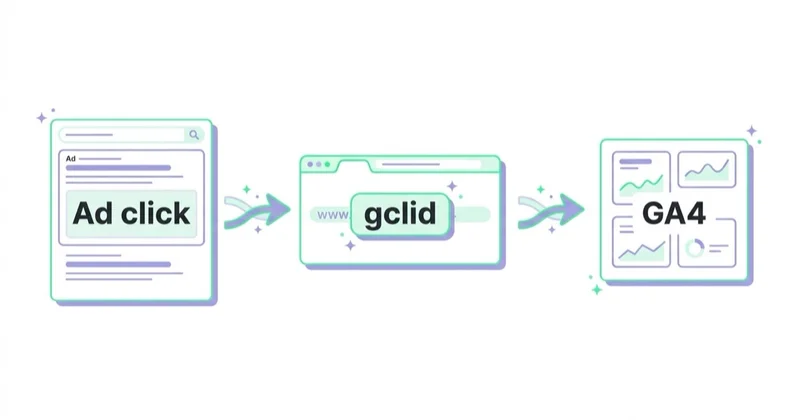
A simplified ad click may look like this:
https://example.com/landing-page?gclid=TeSter-123
If the site redirects to another URL, that parameter should survive:
https://example.com/final-landing-page?gclid=TeSter-123
If the final URL becomes this, attribution can break:
https://example.com/final-landing-page
Google's own troubleshooting guidance says that if a website uses redirects, it is important to make sure the gclid is passed to the final landing page. Google Analytics and gtag.js expect to observe the gclid as a top-level parameter on the page where tags are loaded.
Diagnosis checklist
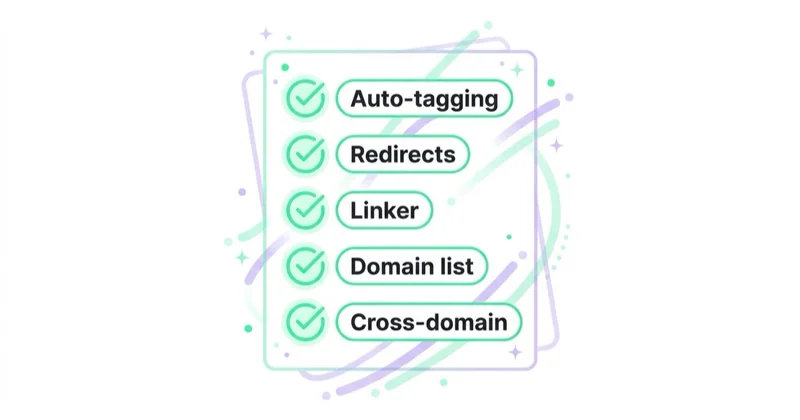
1. Check Google Ads auto-tagging
In Google Ads, check account settings and confirm that auto-tagging is enabled. Google says auto-tagging is on by default for new accounts, but existing accounts, manager account setups, tracking templates or unusual integrations can still create exceptions.
Do not disable auto-tagging just because UTMs exist. Manual tagging can be useful, but for Google Ads and GA4 integration, auto-tagging is normally the safer default.
2. Test whether gclid survives redirects
Use a test URL with a fake gclid value and inspect the redirect chain in Chrome DevTools. Google recommends this type of test for confirming whether auto-tagging works.
Check:
- 301 and 302 redirects;
- HTTP to HTTPS redirects;
- trailing-slash redirects;
- language or country redirects;
- A/B testing tools;
- CMS plugins;
- server rules;
- tracking templates;
- landing-page builders;
- app deep-link flows.
The parameter should not disappear, become lowercase, become truncated or move into a place where the tag cannot read it.
3. Confirm the GA4 tag fires on the final page
Even if gclid survives, GA4 still needs to fire correctly on the final landing page.
Check:
- the GA4 tag ID;
- Google Tag Manager container publication;
- consent mode behavior;
- page_view firing;
- blocked scripts;
- duplicate or missing tags;
- whether the tag fires before another redirect;
- whether the page runs inside an iframe.
If GA4 does not collect the session on the right page, source attribution will be unreliable.
4. Link GA4 with Google Ads
In GA4, review the Google Ads product link. Google describes the link as a way to see the customer cycle from ad interaction to key events and to allow data to flow between Google Analytics and Google Ads.
The link supports use cases such as:
- creating Google Ads conversions from GA4 key events;
- viewing Google Ads conversion performance;
- sharing audiences;
- improving reporting context between tools.
The link is not a replacement for gclid preservation, but it is part of a complete setup.
5. Audit source/medium and landing pages
Do not only look at the source name. Segment the problem by:
- landing page;
- campaign type;
- device;
- browser;
- country;
- final URL;
- tracking template;
- conversion path;
- date of first appearance.
If the issue happens only on one landing page, the likely cause is local to that page or redirect. If it happens across the whole account, start with auto-tagging, account linking and global tag implementation.
How to fix it
Fix 1: preserve gclid through redirects
The most important fix is often the simplest: preserve query parameters through every redirect. That usually means updating server rules, CMS redirect plugins, edge middleware, landing-page builders or tracking templates.
A redirect that drops the query string is dangerous for paid media. It can affect not only gclid, but also gbraid, wbraid, UTMs, Microsoft click IDs, TikTok click IDs and affiliate parameters.
Fix 2: use the final URL directly where possible
If Google Ads points to an intermediate URL that always redirects to a final landing page, consider using the final landing page as the ad final URL. Google also recommends updating destination URLs to the final URL when redirects are causing the auto-tagging parameter to be removed.
This reduces the number of places where tracking can fail.
Fix 3: repair GA4 and Google Ads linking
If the accounts are not linked, link the correct GA4 property with the correct Google Ads account or manager account. Check permissions, linked accounts and whether the right property is used on the website.
Also verify that conversions imported into Google Ads are the right ones. Importing a noisy GA4 event can create optimization problems even if source/medium looks cleaner.
Fix 4: use unwanted referrals carefully
GA4's unwanted referrals feature lets a site define domains that should not be treated as referral sources. Google explains that Analytics evaluates events and appends ignore_referrer=true when the conditions match, which tells Analytics not to display the referrer as a traffic source.
This can help with technical domains, payment processors and cross-domain flows. But it should be used after the click ID diagnosis, not instead of it.
A careful unwanted referrals list may include domains such as:
googleads.g.doubleclick.net;doubleclick.net;tpc.googlesyndication.com;googlesyndication.com;googleadservices.com.
Before adding broad domain patterns, confirm they do not hide a separate analytics issue. GA4 allows up to 50 unwanted referrals per data stream, so the list should remain intentional.
Fix 5: clean reporting with BigQuery only when needed
BigQuery can be useful for post-processing historical reporting, but it should not be the first fix. Use BigQuery when:
- historical dashboards need a cleaned view;
- leadership needs consistent trend reporting;
- GA4 UI limitations block analysis;
- the business has analysts who can maintain SQL logic;
- the cleaned model is clearly labelled as adjusted data.
Do not rewrite history in dashboards without explaining the rule. Adjusted attribution should be transparent.
What not to do
| Mistake | Why it hurts | Better approach |
|---|---|---|
| Add unwanted referrals first | It may hide the symptom without restoring Google Ads attribution | Test and preserve gclid first |
| Strip all URL parameters | Campaign and click data can be lost | Preserve known ad and campaign parameters |
| Lowercase the full URL | gclid is case-sensitive |
Preserve parameter values exactly |
| Apply old UA view filters | GA4 does not use Universal Analytics views | Use GA4-native settings and collection fixes |
| Assume it is bot traffic | It is often real ad traffic misclassified | Diagnose campaign, redirect and tag behavior |
| Ignore new data after the fix | The issue may continue on specific landing pages | Monitor source/medium and landing-page segments |
E-commerce considerations
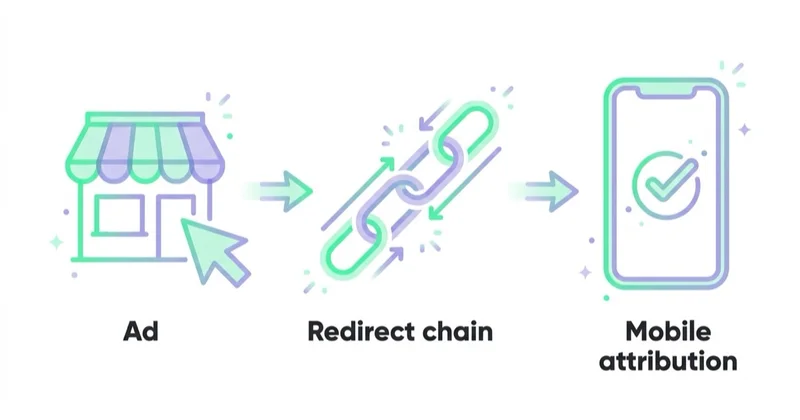
For e-commerce, this problem can distort revenue analysis. A purchase that should help evaluate Shopping, Performance Max or Display may appear under a technical referral source.
Check:
- Merchant Center final URLs;
- product feed links;
- tracking templates;
- product page redirects;
- checkout and payment flows;
- GA4 purchase events;
- Google Ads conversion imports;
- enhanced conversions;
- server-side tagging;
- order-level storage of UTMs and click IDs.
If the store relies on imported GA4 conversions for bidding, poor attribution setup can affect both reporting and optimization. For stores with larger budgets, order-level tracking in the backend is often as important as GA4 UI reporting.
B2B and lead-generation considerations
For lead generation, the issue may not show up as revenue immediately. It may appear as mismatched lead source, unclear campaign ROI or weak offline conversion imports.
A stronger setup stores campaign data with the lead:
- landing page;
- Google click IDs where appropriate;
- UTMs;
- form timestamp;
- consent state;
- CRM campaign;
- lead quality stage;
- opportunity and revenue data.
If a lead becomes revenue weeks later, GA4 source/medium alone may not be enough. Preserving click and campaign IDs in the CRM gives more reliable analysis.
How we approach this at Space Ads
Domains like googleads.g.doubleclick.net or googlesyndication turning up in GA4 are a classic sign of broken attribution, usually down to auto-tagging or account-linking errors that log paid traffic as "referral" instead of cpc. The result is always the same: ad conversions land in the wrong source, channels get cluttered, and budget calls get made on distorted data. So this is one of the first things we check on any account we take over — almost a reflex. The fix is dull and technical: correct Google Ads–GA4 linking, auto-tagging, referral exclusions. Dull, but it guards the credibility of every report downstream — without it you can spend weeks optimising on numbers that credit the sale to the wrong thing.
FAQ
What is googleads.g.doubleclick.net in GA4?
It is usually a Google advertising infrastructure domain appearing as a referral source. In many cases, it means GA4 did not classify a Google Ads visit correctly.
What is tpc.googlesyndication.com in GA4?
It is another Google ad-related domain that can appear in referral reports when the session is not attributed correctly. Treat it as a signal to inspect Google Ads tagging, redirects and GA4 setup.
Is this bot traffic?
Usually no. It is often real advertising traffic that has been misclassified. Bot and invalid traffic checks can be done later, but the first step is attribution diagnostics.
Should these domains be added to unwanted referrals?
Sometimes, yes, but only after checking auto-tagging and redirect behavior. If gclid is being removed, unwanted referrals can hide the symptom without restoring proper Google Ads attribution.
How can gclid be tested?
Append a test gclid value to the final URL, load the page with Chrome DevTools open and check whether the parameter survives all redirects and appears in the request collected by the analytics tag.
Does GA4 rewrite old data after the fix?
No. Most collection and referral configuration changes affect future events. Historical analysis requires a separate reporting adjustment, often in BigQuery or Looker Studio.
Can manual UTMs replace auto-tagging?
Manual UTMs can describe campaigns, but Google recommends auto-tagging for Google Ads and Analytics integrations. In GA4, auto-tagging is prioritized over manual tagging in many reporting scenarios.
Does this affect Google Ads bidding?
It can, depending on the conversion setup. If Google Ads uses its own conversion tag, the GA4 referral issue may mainly affect Analytics reporting. If Google Ads imports GA4 key events, then weak GA4 collection or misconfigured events can influence optimization quality.
What should be checked first?
Start with auto-tagging, gclid preservation, GA4 tag firing and the GA4-Google Ads link. Only then add unwanted referrals or build reporting cleanup rules.
Key takeaways
googleads.g.doubleclick.net and tpc.googlesyndication.com in GA4 are usually symptoms of an attribution setup problem, not sources that should be optimized as separate channels.
The reliable fix is sequential: keep Google Ads auto-tagging on, preserve gclid through redirects, make sure GA4 fires on the final landing page, link GA4 with Google Ads, then use unwanted referrals where they genuinely help. This keeps reporting cleaner without masking the underlying measurement issue.
Sources and further reading
- Google Ads Help - About auto-tagging
- Google Analytics Help - Check if Google Ads auto-tagging works
- Google Analytics Help - Connect Google Ads to Google Analytics
- Google Analytics Help - Identify unwanted referrals
- Google Analytics Help - Set up cross-domain measurement
Continue learning
Continue reading
Referrals from banks and payment intermediaries in Google Analytics - solution
Payment gateway, bank and hosted checkout referrals can overwrite attribution in GA4. Learn how to fix them with unwanted referrals, cross-domain measurement, checkout testing and ecommerce validation.
What Are Dynamic Search Ads (DSA) and Are They Worth Using?
Dynamic Search Ads use website content to match searches, generate headlines and choose landing pages. In 2026, DSA strategy should focus on AI Max migration and URL control.
What Are Keyword Match Types in Google Ads and How to Choose Them?
Google Ads keyword match types control how search queries match keywords. Learn broad, phrase, exact, negatives, Smart Bidding, campaign structure and search term workflows.