fbclid is a Facebook Click Identifier that can appear in URLs after a person clicks a link from Facebook, Instagram or a Meta ad. It is not usually a website error. The real problem is that analytics tools may treat every unique fbclid value as a separate page URL, which makes reports harder to read. The safest fix is usually to clean the URL that is sent to analytics reports while preserving the click information needed for Meta Pixel, Conversions API, UTMs and other tracking systems.
In other words: do not blindly strip every tracking parameter at the CDN or redirect level. First decide what should remain available for advertising measurement, what should be removed from GA4 page reports, and what should be shown as the canonical URL for SEO.
TL;DR
fbclidmeans Facebook Click Identifier. It is a click parameter associated with traffic from Meta platforms.- The parameter is not automatically an SEO problem. The bigger issue is usually messy analytics reporting and duplicated page URLs in reports.
- Do not remove it blindly. If Meta Ads, Meta Pixel or Conversions API are active, removing click identifiers before tags can process them may reduce measurement quality.
- Clean reports without breaking measurement. Prefer cleaning
page_locationin GA4, using GA4 data redaction/query parameter settings where appropriate, or sending a cleaned URL through Google Tag Manager. - Keep UTMs. UTMs describe source, medium, campaign and creative. Removing them can damage campaign reporting.
- Use canonical URLs for SEO hygiene. Google recommends canonical signals for duplicate or similar URLs, including URL variants with tracking parameters.
- Server-side handling needs care. If a redirect removes
fbclid, capture and process needed identifiers first. - Document a URL parameter policy. The same logic should cover
fbclid,gclid,gbraid,wbraid,msclkid,ttclidand other ad click IDs.
What is fbclid?
fbclid is a query parameter added to some links after a click from Meta-owned environments such as Facebook or Instagram. A URL may look like this:
https://example.com/product-page?utm_source=facebook&utm_medium=paid_social&fbclid=IwAR...
The part after the question mark is the query string. Some query parameters describe the campaign, such as utm_source or utm_campaign. Others are click identifiers, such as fbclid, gclid, msclkid or ttclid.
A click identifier can help advertising systems connect an ad click with a later website visit, event or conversion. In Meta implementations, the fbc value used by server-side tracking is commonly derived from a Meta click identifier when it exists. The related fbp value identifies the browser. These signals are only one part of matching and attribution, but they can matter when Meta Pixel and Conversions API are used.
Why fbclid appears in analytics reports
Analytics platforms collect page URLs. If a tool stores the full URL including query parameters, the same page can appear as many different rows:
https://example.com/blog/post https://example.com/blog/post?fbclid=abc123 https://example.com/blog/post?fbclid=def456 https://example.com/blog/post?utm_source=facebook&utm_medium=social&fbclid=ghi789
For a user and search engine, these may represent the same content. For a report, they can become separate rows. That creates three practical problems:
- page reports become fragmented;
- content performance is harder to evaluate;
- landing-page analysis becomes noisy;
- dashboards may show many variants of one URL;
- teams may misread which pages actually perform.
This affects more than e-commerce. It can happen on service sites, B2B landing pages, blogs, recruitment pages, event registration pages, SaaS apps and publisher sites.
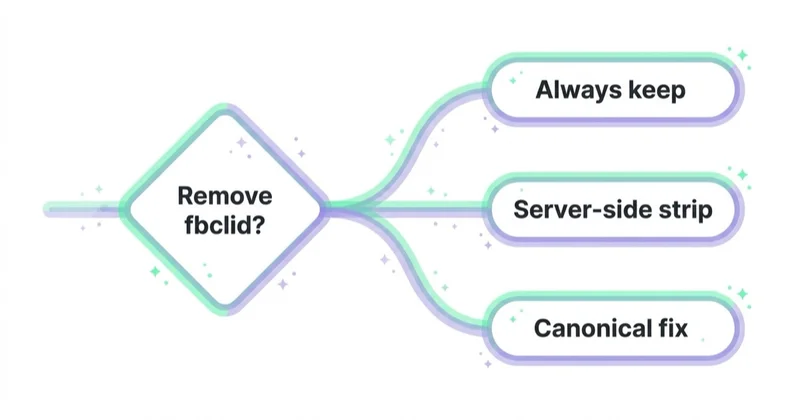
Should fbclid be removed?
The right answer depends on what “removed” means.
| Action | Usually safe? | Notes |
|---|---|---|
Remove fbclid from GA4 page reporting |
Often yes | Keep ad measurement intact while cleaning reports |
Remove fbclid from canonical URLs |
Yes | Canonical URLs should normally point to the clean preferred page |
Remove fbclid after tags have processed it |
Sometimes | Requires testing with Meta Pixel, CAPI and analytics |
Strip fbclid at CDN before the page loads |
Risky | May prevent tags or server logic from seeing the click ID |
| Strip all query parameters | Risky | May remove UTMs, click IDs, affiliate IDs, search parameters or product logic |
The safest default is: preserve tracking inputs long enough for measurement, but avoid sending messy URL variants into reporting and canonical signals.
Why blindly stripping fbclid can hurt measurement
If Meta Ads is active, fbclid may be part of the measurement chain. Removing it too early can create several issues:
- the Meta Pixel may not receive the same landing context;
- server-side tracking may lose the click value that would help build or pass
fbc; - Event Match Quality may be weaker if other customer information parameters are also limited;
- campaign reporting can become less consistent between Meta, GA4 and backend data;
- debugging becomes harder because the original landing URL has been changed.
This does not mean every website must show fbclid forever in the address bar. It means the implementation should be deliberate. Read the parameter, let the relevant tags or server logic use it, then clean analytics reporting and user-visible URLs only after testing.
Deduplication is a separate concept. Meta Pixel and Conversions API deduplicate duplicate browser/server events primarily through matching event names and event IDs. The fbclid/fbc signal is more about matching and attribution quality than simple duplicate removal. Treating all of these as the same problem leads to bad fixes.
The best-practice approach
A practical setup has four layers.
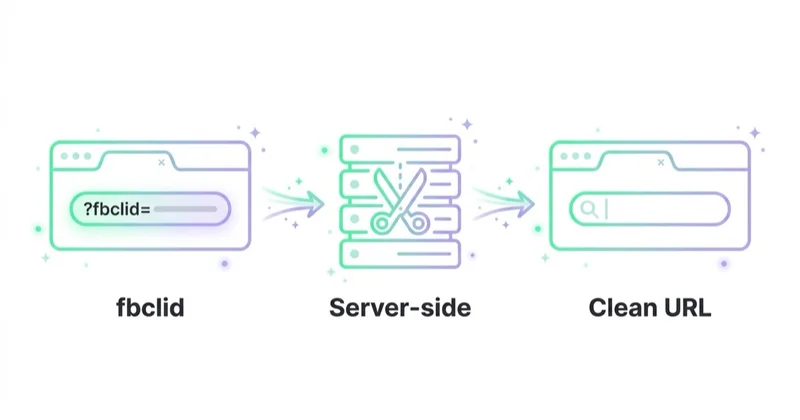
1. Keep UTMs and click IDs on landing
When a user first lands on the page, important campaign parameters should not be removed before tags and server logic have a chance to process them.
Keep or process:
utm_source;utm_medium;utm_campaign;utm_content;utm_term;fbclid;gclid;gbraid;wbraid;msclkid;ttclid;- affiliate or partner IDs that the business actually uses.
Do not use a generic rule that removes everything after the question mark. That can break attribution, site search, filters, coupon logic, affiliate tracking, lead forms or checkout flows.
2. Clean what GA4 receives as page location
GA4 collects page URLs, and Google warns that page URLs and URL parameters should not contain personally identifiable information. Google also documents data redaction options that can remove specified query parameters for web data streams. This is useful when parameters should not be visible in reports or should not be sent as collected URL data.
For marketing click IDs, there are two common approaches:
- configure available GA4 data redaction/query parameter settings for the web stream;
- use Google Tag Manager or gtag configuration to send a cleaned
page_locationvalue to GA4.
The second approach gives more control. For example, the page can physically keep fbclid in the browser while GA4 receives a normalized URL without noisy click identifiers.
A cleaned reporting URL might remove click IDs but keep useful campaign UTMs, depending on reporting needs:
https://example.com/product-page?utm_source=facebook&utm_medium=paid_social
Some teams prefer to remove UTMs from page paths too and rely on GA4 campaign dimensions instead. That can be valid, but it should be a reporting decision, not an accidental side effect.
3. Use canonical URLs for SEO
For SEO, the clean canonical URL should normally point to the preferred version of the page without tracking parameters. Google explains that canonicalization helps select a representative URL from duplicate or similar URLs and can simplify tracking metrics for the same content.
For a product page, the canonical should usually look like this:
not this:
This does not mean blocking fbclid URLs in robots.txt. Google specifically advises not to use robots.txt for canonicalization purposes. The clean canonical, consistent internal links and clean sitemap URLs are usually the better approach.
4. Test Meta Pixel and Conversions API after changes
After any URL cleanup, test whether advertising and analytics tags still receive what they need.
Check:
- GA4 DebugView;
- Google Tag Assistant;
- Meta Pixel Helper;
- Meta Events Manager diagnostics;
- server event payloads if Conversions API is used;
- whether
fbp,fbcor equivalent values are still available where expected; - whether UTMs still populate acquisition reports;
- whether backend orders or leads still store campaign parameters where needed.
A visually cleaner URL is not a successful fix if it quietly reduces measurement quality.
How to clean fbclid in GA4
The exact GA4 interface can change, so treat this as a workflow rather than a promise about button names.
Option A: GA4 data redaction or query parameter settings
Use GA4 Admin settings for the relevant web data stream. Google documents that Analytics data redaction can remove specified URL query parameters for web streams. This can help prevent unwanted parameters from being collected in page URLs.
A practical list may include:
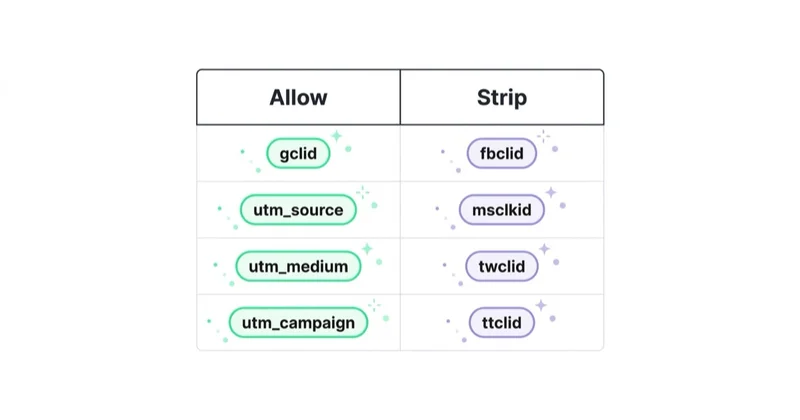
fbclid;msclkid;ttclid;twclid;li_fat_id.
Be careful with Google click identifiers such as gclid, gbraid and wbraid. They may be important for Google Ads and Analytics integration. If they are removed from the reporting URL, confirm that Google Ads attribution and auto-tagging still work as intended.
Option B: send a cleaned page_location via GTM
If more control is needed, create a cleaned URL variable in Google Tag Manager and send it as the GA4 page location.
The logic is simple:
- Read the current URL.
- Remove only noisy click identifiers.
- Keep UTMs or other business parameters if they are needed.
- Send the cleaned value as
page_locationto GA4. - Leave the physical URL unchanged unless there is a separate reason to alter it.
This approach is usually safer than redirecting because it changes reporting data rather than the user's landing URL.
Option C: clean the visible URL after processing
Some teams want to remove fbclid from the address bar for UX or sharing reasons. This can be done with client-side history handling or a server-side redirect, but only after measurement needs are covered.
Use this only when:
- the original parameter is captured first;
- Meta Pixel and CAPI have been tested;
- UTMs are preserved or stored;
- redirects do not break landing-page speed or campaign attribution;
- QA includes mobile browsers and in-app browsers.
In many cases, cleaning GA4 reporting and canonical URLs is enough. The user-visible URL does not always need aggressive manipulation.
What not to do
| Risky action | Why it is risky | Better approach |
|---|---|---|
| Strip every query parameter | Can remove UTMs, click IDs, search filters, coupons or affiliate IDs | Maintain an allowlist/denylist by parameter purpose |
Redirect all ?fbclid= URLs immediately |
Tags may never see the click ID | Process first, clean later if needed |
Remove UTMs with fbclid |
Campaign reporting becomes weaker | Keep UTMs or map them before cleanup |
| Use robots.txt to block parameter URLs | Google says robots.txt should not be used for canonicalization | Use canonical tags and clean internal links |
| Judge Meta Ads only in GA4 | GA4 and Meta use different attribution logic | Compare GA4, Meta, backend and CRM data separately |
| Change production tracking without QA | Measurement issues can remain hidden for weeks | Test in DebugView, Tag Assistant, Events Manager and backend logs |
URL parameter policy checklist
For a clean long-term setup, document each parameter type.
| Parameter type | Examples | Keep on landing? | Send to GA4 page URL? | Store server-side? |
|---|---|---|---|---|
| Campaign UTMs | utm_source, utm_medium, utm_campaign |
Yes | Depends on reporting model | Often yes for leads/orders |
| Meta click ID | fbclid |
Yes, at least until processed | Usually no | Yes if CAPI/offline tracking uses it |
| Google click IDs | gclid, gbraid, wbraid |
Yes | Depends; test carefully | Often yes for offline conversions |
| Microsoft click ID | msclkid |
Yes if Microsoft Ads is active | Usually no | Often yes for offline conversions |
| TikTok click ID | ttclid |
Yes if TikTok Ads is active | Usually no | Often yes for Events API/offline use |
| Product parameters | filters, size, color, variant | Depends on site logic | Depends on content differences | Usually not as marketing IDs |
| PII parameters | email, phone, name | No | No | Avoid sending to analytics; handle legally if needed |
The policy should be owned by marketing analytics and development together. Marketing knows which parameters are valuable; development knows where they are read, stored, cached or stripped.
E-commerce considerations
For e-commerce, fbclid cleanup is often connected to feed, Pixel, CAPI and checkout tracking.
Important checks:
- product IDs in Meta Catalog, Pixel events and server events match;
- purchase events use consistent value and currency;
- browser and server events use the same event ID for deduplication;
- landing page parameters survive redirects to product pages and checkout where needed;
- payment gateways do not wipe campaign data before purchase;
- GA4 page reports are clean enough to evaluate product and category pages;
- canonical tags do not include tracking parameters;
- UTM and click ID values are stored with orders when offline analysis is needed.
For stores, the goal is not just a clean page report. The goal is to preserve the chain from ad click to product view, add to cart, checkout and purchase.
B2B and lead-generation considerations
For B2B and services, the most important issue is often offline attribution. A click may become a lead today, an opportunity in three weeks and revenue in three months.
In that case, consider storing useful campaign fields with the lead:
- landing page;
- UTMs;
- click IDs where legally and technically appropriate;
- form submission timestamp;
- consent state;
- CRM source and campaign;
- qualified lead status;
- opportunity and revenue data.
If only GA4 has the original URL and the CRM stores none of it, later analysis becomes weak. Clean GA4 reports are useful, but CRM attribution usually matters more for B2B decision-making.
How we approach this at Space Ads
At Space Ads, we treat fbclid cleanup as a parameter policy, not a cosmetic URL change. We first map which systems use Meta click IDs, UTMs, Google click IDs, affiliate IDs, product parameters and CRM fields, then decide where each parameter should be kept, reported, stored or removed. In practice, we usually preserve the landing context for Pixel, CAPI and server-side logic, send cleaner page_location values to GA4, keep canonical URLs clean and test the full path in Meta Events Manager, GA4 DebugView, Tag Assistant and backend data. The goal is cleaner reporting without weakening attribution, remarketing or lead/order source analysis.
FAQ
What is fbclid in a URL?
fbclid is a Facebook Click Identifier. It is a query parameter that can appear after a click from Facebook, Instagram or Meta advertising traffic.
Is fbclid bad for SEO?
Usually, fbclid itself is not the core SEO problem. The safer SEO setup is to use clean canonical URLs, clean internal links and clean sitemap URLs. Google recommends canonicalization methods for duplicate or very similar URLs and says robots.txt should not be used for canonicalization.
Should fbclid be removed from GA4?
It is usually useful to remove fbclid from the URL value reported to GA4 so page reports are cleaner. That is different from removing it physically before Meta or server-side tracking can process it.
Can fbclid be removed from the browser address bar?
Yes, but it should be tested carefully. If the parameter is removed too early, tracking tools may lose useful click context. In many cases it is enough to clean analytics reporting and canonical URLs.
Does removing fbclid break Meta Ads?
It can reduce measurement quality if the parameter is removed before Meta Pixel, Conversions API or server logic can use it. It should not be removed blindly. Test Meta Events Manager, Pixel Helper and server event payloads after any change.
Is fbclid the same as gclid?
No. fbclid is associated with Meta traffic, while gclid is associated with Google Ads auto-tagging. They play similar roles as click identifiers, but they belong to different platforms and integrations.
Should gclid, gbraid and wbraid also be removed?
Do not remove them blindly. Google uses click and aggregate identifiers for advertising measurement. If they are cleaned from reporting URLs, confirm that Google Ads, GA4 and offline conversion tracking still receive the data they need.
Should UTMs be removed with fbclid?
Usually no. UTMs describe campaign source, medium, name, term and content. Removing them can make campaign reporting worse. If the page URL is normalized, make sure campaign dimensions are still captured elsewhere.
What is the safest setup?
The safest setup is to preserve tracking inputs on landing, send a cleaned page URL to GA4, use clean canonical URLs for SEO and test Meta/Google tracking after the change.
Key takeaways
The goal is not simply to hide fbclid. The goal is to keep analytics clean without damaging advertising measurement. A good implementation separates the needs of Meta Ads, GA4, SEO, CRM and the user-visible URL.
For most sites, the best approach is to let measurement systems process the click parameter, clean page_location or GA4 query-parameter reporting, keep UTMs, use a clean canonical URL and document how every marketing parameter should behave.
Sources and further reading
- Meta for Developers - Conversions API customer information parameters
- Google Analytics Help - Best practices to avoid sending Personally Identifiable Information
- Google Analytics Help - Set up cross-domain measurement
- Google Search Central - How to specify a canonical URL with rel=canonical and other methods
- Google Search Console Help - Duplicate URL
Continue learning
- Meta Andromeda - what it is and how to adapt your Meta Ads in 2026
- How to fix googleads.g.doubleclick.net sources and tpc.googlesyndication.com in Google Analytics
- Referrals from banks and payment intermediaries in Google Analytics - solution
- What is PPC - ultimate guide to pay-per-click advertising
Continue reading
What Is Meta Pixel and How to Use It?
Meta Pixel is browser-side tracking for Meta Ads, but a useful setup depends on event design, parameters, consent, CAPI and deduplication. This guide explains which events to configure for ecommerce and lead generation, how to test them, and why Pixel data should be checked against GA4, CRM or backend results before campaigns rely on it.
What Is a Sales Campaign and How to Plan It?
A sales campaign needs a clear offer, conversion goal, tracking, creative, landing page and optimisation plan across Meta, Google and owned channels.
Messenger Ads: What You Need to Know
Messenger Ads can generate valuable conversations, but performance depends on channel fit, response speed, automation, CRM handoff and business outcomes.