
Server-side tagging is no longer a niche analytics setup for enterprise teams. In 2026, it is becoming a practical measurement layer for e-commerce, lead generation, SaaS and international performance marketing teams that need better data quality without sending every event directly from the browser to every advertising platform.
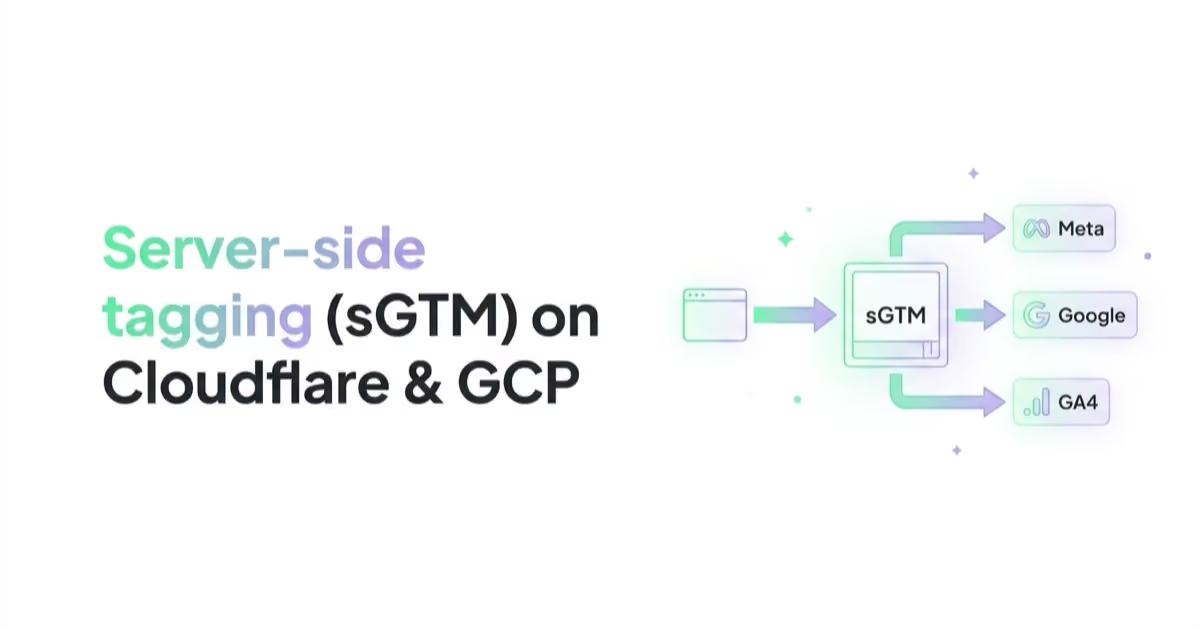
Server-side tagging, often implemented through server-side Google Tag Manager (sGTM), sends browser or app events to a controlled server endpoint first. The server container then validates, enriches, filters and forwards events to tools such as GA4, Google Ads, Meta Conversions API, TikTok or other platforms. It can improve data governance and first-party measurement, but it does not replace user consent or fix a bad data layer.
The main mistake is treating sGTM as a magic tracking hack. It is not. A good setup is a measurement architecture: web tags, consent signals, server clients, event naming, payload inspection, deduplication, conversion APIs and business validation all need to work together.
TL;DR
- Server-side tagging means that marketing events are routed through a server controlled by the business before they are sent to analytics and ad platforms.
- sGTM usually works together with web GTM. The browser still collects events and consent signals; the server container processes and forwards them.
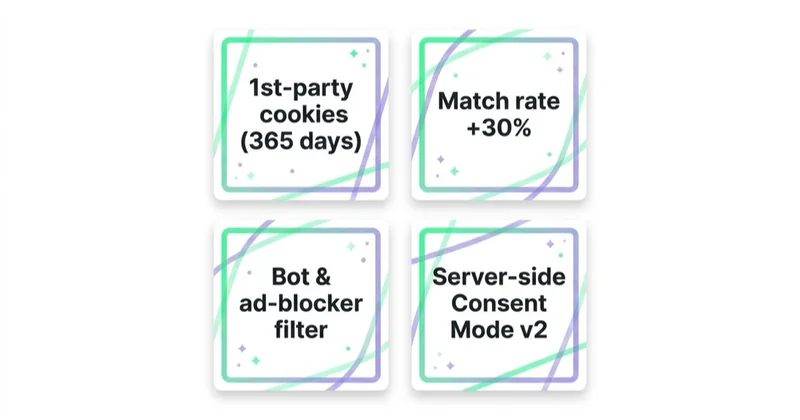
- The biggest benefits are better control over outgoing data, improved event quality, reduced browser-side tag load and more reliable first-party context.
- sGTM supports important integrations such as Meta CAPI, Google Enhanced Conversions, GA4 server-side events and conversion APIs.
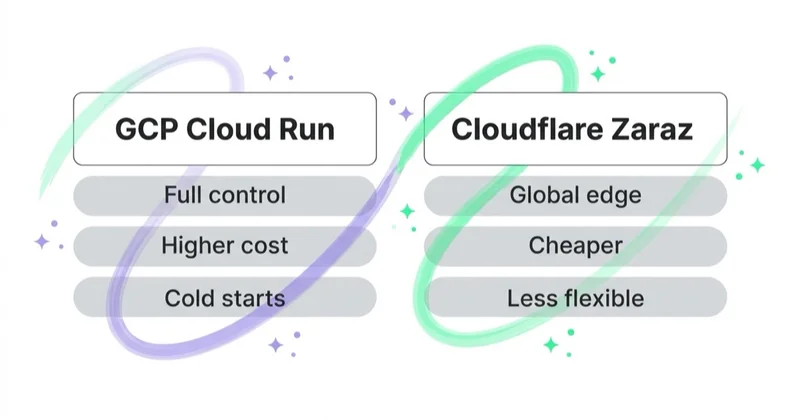
- Google Cloud Run is the official Google path for server-side Tag Manager hosting. Cloudflare Zaraz can be a simpler cloud-based alternative for some use cases, but it is not the same as full sGTM.
- Server-side tagging is not a legal workaround. Consent Mode, ePrivacy, GDPR and platform policies still apply.
- A simple proof of concept can be launched quickly, but a production-ready setup usually requires several days of QA, consent testing and payload validation.
- The right KPI is not "more tracked conversions" alone. The right KPI is better match quality, cleaner deduplication, more reliable optimisation signal and trustworthy reporting.
What Is Server-Side Tagging?
In classic client-side tracking, the browser loads multiple scripts: GA4, Google Ads, Meta Pixel, TikTok Pixel, Microsoft UET, Hotjar, Clarity and other vendors. Each script can read or set cookies, execute JavaScript and send requests directly to its own servers.
In server-side tagging, the browser sends an event to a first-party endpoint such as:
https://metrics.example.comhttps://sgtm.example.comhttps://www.example.com/metrics
That endpoint is connected to a server container or cloud collection layer. The server receives the event, decides which client should process it, transforms the payload if needed and forwards only the approved data to selected platforms.
This creates a control layer between the user browser and the vendor ecosystem.
Client-Side GTM vs Server-Side GTM
| Area | Client-side GTM | Server-side GTM |
|---|---|---|
| Where tags run | Browser | Server container |
| Control over outgoing data | Limited | Higher |
| Browser load | Higher if many tags run | Can be reduced |
| Consent handling | Collected in browser | Must be passed to server and respected |
| Cookie context | Browser/vendor-dependent | Can support first-party context |
| Cost | Usually no separate hosting | Hosting cost or vendor cost |
| Complexity | Lower | Higher |
| Best use | Basic analytics and marketing tags | CAPI, Enhanced Conversions, data governance, large budgets |
The two approaches are not mutually exclusive. Most real setups use both:
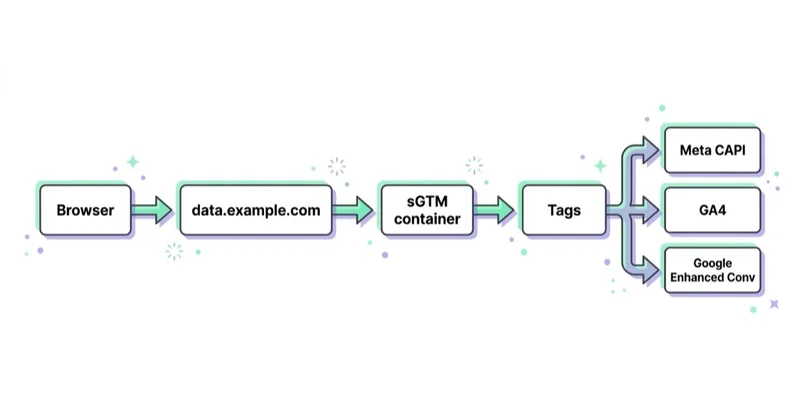
- Web GTM collects events, consent and browser identifiers.
- Events are sent to the server endpoint.
- sGTM validates and transforms the data.
- Server-side tags send events to GA4, Google Ads, Meta and other platforms.
What Server-Side Tagging Really Improves
Better Data Governance
sGTM makes it easier to decide what data leaves the website. For example, a server container can remove unnecessary parameters, normalise event names, block accidental PII, transform values and control which vendors receive which fields.
This is a governance benefit, not only a tracking benefit.
Cleaner Conversion APIs
Meta CAPI, Google Enhanced Conversions and other conversion APIs work best when event names, IDs, user data, click identifiers and timestamps are consistent. A server container can standardise these fields before sending them to platforms.
For Meta, the most important practical issue is deduplication: browser and server events should share a stable event ID so Meta understands they represent the same conversion, not two separate conversions.
More Reliable First-Party Context
Google recommends using a custom tagging server domain in the same first-party context as the website. This can support more durable first-party measurement than sending events directly to default vendor domains.
This does not mean "infinite cookies" or consent bypassing. It means that the business has more control over the measurement endpoint and data flow.
Reduced Browser-Side Weight
Some vendor logic can move away from the browser. This can reduce the number of scripts, requests and third-party calls running on the page. The performance impact depends on the actual implementation.
Better Debugging
A server setup can expose payloads, event transformations and outgoing requests in a more structured way. That makes it easier to answer questions such as:
- did the purchase event contain value and currency?
- was
event_idsent to Meta Pixel and CAPI? - did the event carry consent parameters?
- was the email hashed before sending?
- did GA4 receive the right client ID?
What sGTM Does Not Do
Server-side tagging does not:
- replace consent management;
- make unlawful tracking lawful;
- repair a broken data layer;
- guarantee higher ROAS;
- bypass platform policies;
- automatically improve conversion quality;
- remove the need for QA;
- make analytics match finance perfectly.
If the website sends wrong events, the server will forward wrong events more efficiently. The foundation still matters: data layer, consent banner, event taxonomy, identifiers and backend validation.
Cloud Run, App Engine, Cloudflare Or Vendor Hosting?
Google Cloud Run
Google's current server-side Tag Manager setup path points teams toward Google Cloud Run. This is often the best fit when the business wants the standard Google stack, scalable hosting and full sGTM control.
Use Cloud Run when:
- the team wants full server-side GTM;
- Google Ads and GA4 are central;
- engineering can handle DNS and deployment;
- production reliability matters;
- the account needs custom clients, tags and transformations.
Cloudflare Zaraz
Cloudflare Zaraz is a cloud-based third-party tool manager that can reduce browser-side scripts and route tool calls through Cloudflare. It can be very useful for simpler setups, especially when a site already uses Cloudflare.
However, Zaraz should not be described as identical to sGTM. It is a different product with different control, tooling and ecosystem fit.
Use Cloudflare or Zaraz-style setups when:
- the website already runs on Cloudflare;
- the team wants simpler cloud tag management;
- the setup does not need advanced sGTM customisation;
- performance and script reduction are major goals.
Managed sGTM Vendors
Managed platforms can host server-side tagging without the team operating cloud infrastructure directly. This can be practical for agencies and mid-market brands, but vendor lock-in, cost and data processing terms need review.
Recommended Production Architecture
A robust setup often looks like this:
- Consent management platform collects user consent.
- Web GTM reads consent state and pushes clean events.
- GA4 event tags send data to the server endpoint.
- sGTM receives events through a GA4 client or custom client.
- The server container validates required fields.
- Meta CAPI, Google Ads, GA4 and other tags fire only when allowed.
- Event IDs are used for browser/server deduplication.
- Debugging logs confirm payload quality.
- GA4, ad platforms and backend orders are compared after launch.
This is why a "4-hour setup" is possible only for a narrow proof of concept. A proper rollout needs planning, access, DNS, consent QA, checkout testing and post-launch monitoring.
Meta CAPI Through sGTM
Meta Conversions API is one of the strongest reasons to implement server-side tagging. The objective is to create a more reliable connection between marketing events and Meta's ad systems.
The important fields usually include:
- event name,
- event time,
- event ID,
- action source,
- value and currency,
- content IDs,
- client IP and user agent where allowed,
- hashed email or phone where consent and policy allow,
fbpandfbcidentifiers.
The implementation should send both browser and server events for key actions such as Purchase, Lead, AddToCart and CompleteRegistration, then deduplicate them correctly.
More context is available in What is Meta Pixel and how to use it.
Google Enhanced Conversions Through sGTM
Enhanced Conversions help Google Ads improve conversion measurement by using consented, hashed first-party user data. Server-side tagging can make this cleaner because data can be normalised and controlled before it is sent.
The setup should be aligned with:
- Google Ads conversion actions,
- GA4 events where relevant,
- Consent Mode v2,
- transaction IDs,
- form or checkout data,
- hashing and data processing requirements.
For a deeper tactical overview, see Enhanced Conversions in Google Ads.
Consent Mode And Server-Side Tagging
Consent Mode still matters. The consent decision usually happens in the browser. The server container needs to receive and respect the relevant consent state.
A good audit checks:
- whether the CMP fires before marketing tags;
- whether consent defaults are correct by region;
- whether denied consent prevents unauthorised processing;
- whether server-side tags receive consent parameters;
- whether Google tags behave correctly under Consent Mode v2;
- whether Meta, TikTok and other vendors are governed consistently.
Server-side tagging should make privacy governance easier, not more obscure. See Consent Mode v2 for the broader consent setup.
How To Audit Whether sGTM Works
Use a technical and business checklist:
| Audit area | What to check |
|---|---|
| DNS | Custom server endpoint resolves correctly |
| Web GTM | Events are sent to the server endpoint |
| Consent | Consent state is passed and respected |
| GA4 | Events appear with correct names and parameters |
| Meta CAPI | Event match quality and deduplication are healthy |
| Google Ads | Enhanced Conversions diagnostics show expected status |
| Payloads | PII is hashed or removed correctly |
| Backend | Orders and leads reconcile with platform data |
| Performance | Browser requests and tag load are reduced where expected |
The most useful debugging session is a real checkout or lead submission with all tools open: browser network tab, GTM preview, server container preview, GA4 DebugView, Meta Events Manager and Google Ads diagnostics.
How we approach this at Space Ads
We run server-side tagging for clients who genuinely need it — it's how we keep the conversion signal alive as browsers and consent prompts erode more and more of the client-side measurement. From one server we feed Meta CAPI and Google Enhanced Conversions, lift event match quality, and recover conversions the blockers would otherwise swallow. It isn't a default for everyone, though: standing sGTM up and maintaining it costs, so it only pays off above a certain budget and complexity. We deploy it where the recovered signal is worth the overhead, not because it sounds advanced. And we always check the effect in the data — did match quality actually rise, are conversions not double-counting — because "it works" is not the same as "it works correctly". The server was never the goal; measurement you can trust is.
Common Mistakes
Implementing sGTM Without A Measurement Plan
The server is not the strategy. Define events, conversion priorities, consent rules and reporting requirements first.
Forgetting Deduplication
Meta browser and server events need shared event IDs. Without deduplication, reporting can be inflated.
Sending Too Much Data
Server control should reduce unnecessary data sharing. Sending every parameter to every vendor defeats the governance benefit.
Ignoring Legal Review
Server-side tagging changes data flows. Consent text, privacy policy and vendor agreements may need review.
Not Comparing Against Backend Truth
Platform diagnostics can look good while business reporting is still wrong. Compare with orders, leads, CRM and finance data.
FAQ
What is server-side tagging?
Server-side tagging routes marketing events through a controlled server endpoint before sending them to analytics and advertising platforms. It improves control over data quality and vendor payloads.
Is sGTM the same as Google Tag Manager?
sGTM is the server-side version of Google Tag Manager. It usually works alongside a web GTM container rather than replacing it completely.
Does server-side tagging bypass ad blockers?
It can reduce reliance on some third-party browser requests, but it should not be positioned as an ad-blocker bypass strategy. Consent, privacy law and platform rules still apply.
Is Cloudflare Zaraz the same as server-side GTM?
No. Cloudflare Zaraz is a cloud-based third-party tool manager. It can solve some similar problems, but it is not the same as a full sGTM container.
How long does implementation take?
A simple proof of concept can be done quickly if the data layer is ready. A production setup with CAPI, Enhanced Conversions, Consent Mode and QA usually takes several working days.
Which businesses need sGTM first?
Businesses with meaningful ad spend, multiple platforms, high conversion value, consent complexity, lead quality issues or poor browser-side data reliability should prioritise it first.
Key Takeaways
Server-side tagging is a measurement infrastructure decision, not a tracking trick. It can improve data quality, governance, CAPI reliability, Enhanced Conversions and first-party measurement, but only when the underlying event and consent architecture is sound.
For performance teams, the best starting point is a narrow implementation around the most valuable events: purchases, qualified leads, checkout steps and high-value signups. Once those events are clean, the setup can be expanded to more platforms and richer measurement.
Measurement quality is the foundation of every optimisation — we check it (Pixel, CAPI, Enhanced Conversions, EMQ) in a marketing audit of your ad accounts.
Sources and further reading
- Google Developers: Server-side tagging
- Google Developers: Cloud Run setup guide
- Google Developers: Set up a custom domain
- Google Developers: Send data from a website to a server container
- Google Developers: Debug server-side tagging
- Google Developers: Consent mode for server-side tagging
- Cloudflare Zaraz
- Meta Business Help: About Conversions API
Continue Learning
Continue reading

What Is Google Tag Manager and How to Use It?
Google Tag Manager manages analytics and advertising tags from one interface. Learn tags, triggers, variables, data layer, consent mode, server-side tagging and QA.

What Is Ecommerce Analytics and Why Is It So Important?
Ecommerce analytics should connect GA4 events, backend orders, ad costs, product margin, refunds, stock, retention and LTV so decisions are based on profit quality, not only revenue. This guide explains what to measure, how to QA data and how to turn ecommerce reports into budget, UX, feed and merchandising actions.
ChatGPT Ads Conversion Tracking: Measurement Pixel and the Conversions API
ChatGPT Ads conversion tracking combines a browser pixel with the server-side Conversions API, which OpenAI describes as the more reliable source. This guide covers 12 standard events plus custom, deduplication, oppref and obref attribution identifiers, SHA-256 normalization, consent, CSP, attribution and oCPC testing.


































