
Meta Pixel, still widely searched as Facebook Pixel, is a browser-side tracking code that sends website events to Meta. It helps Meta Ads measure conversions, build remarketing audiences, optimise delivery and understand which ads lead to valuable actions such as leads, purchases, registrations or add-to-cart events.
Meta Pixel is no longer enough as a standalone measurement setup in many accounts. Browser restrictions, consent choices, ad blockers, checkout redirects and server-side events can all affect what reaches the ad platform. A stronger 2026 setup usually combines Meta Pixel with Meta Conversions API, uses consistent event names, passes useful parameters and deduplicates shared browser and server events with an event ID.
TL;DR
- Meta Pixel measures website events in the browser and sends them to Meta Events Manager.
- It is used for conversion tracking, remarketing, audience building and ad optimisation across Facebook, Instagram and other Meta placements.
- Pixel and Conversions API should usually work together, especially for purchases, leads and other high-value events.
- Deduplication matters when the same event is sent from both Pixel and CAPI.
- Standard events are better than random custom events when Meta already has a recognised event name for the action.
- Event parameters such as value, currency, content IDs and event ID make the signal more useful.
- Consent and privacy setup are part of the implementation, not a separate legal afterthought.
- A working Pixel is not the same as a good Pixel setup. Events, parameters, diagnostics and test purchases still need QA.
What is Meta Pixel?
Meta Pixel is a small JavaScript snippet installed on a website. When a visitor loads a page or completes a tracked action, the Pixel can send an event to Meta. The basic event is PageView, but most advertising accounts need more than page views.
Examples of events include:
- viewing a product or service page;
- adding a product to cart;
- starting checkout;
- completing a purchase;
- submitting a lead form;
- registering for an account;
- searching on-site;
- booking a call;
- starting a trial;
- clicking a key CTA.
Meta uses these events to support reporting, attribution, optimisation and audiences. For example, a Sales campaign can optimise toward purchases only when Meta receives purchase events. A remarketing campaign can target cart abandoners only when cart events are captured and audience rules are configured correctly.
The older name, Facebook Pixel, is still common because the tool existed before the wider Meta rebrand. In current documentation and interfaces, Meta Pixel is the more accurate name.
What Meta Pixel is used for
Meta Pixel has four main jobs.
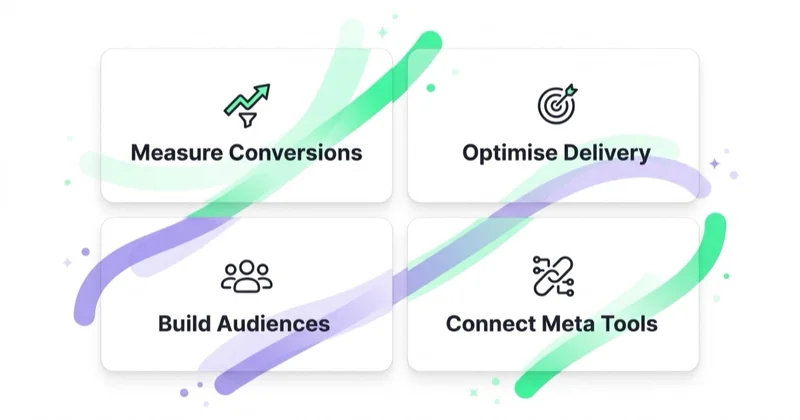
First, it helps measure outcomes from ads. If a user clicks or views an ad and later submits a form or buys a product, Pixel events can appear in Meta Ads reporting according to the selected attribution settings.
Second, it helps optimise campaigns. Meta's delivery system needs a conversion event to learn what a valuable action looks like. If the goal is qualified leads, the account should not optimise only for cheap page views. If the goal is ecommerce revenue, the purchase event should carry value and currency.
Third, it creates audiences. Website visitors, product viewers, cart abandoners, purchasers, lead form visitors and high-intent page visitors can become Custom Audiences when the required conditions and consent are in place.
Fourth, it connects website behaviour with broader Meta Ads infrastructure: Events Manager, Ads Manager, catalog ads, Advantage+ campaigns, remarketing, lookalike modelling and campaign diagnostics.
For campaign setup context, read What Is Facebook Ads Manager and How to Use It?.
Pixel vs Conversions API
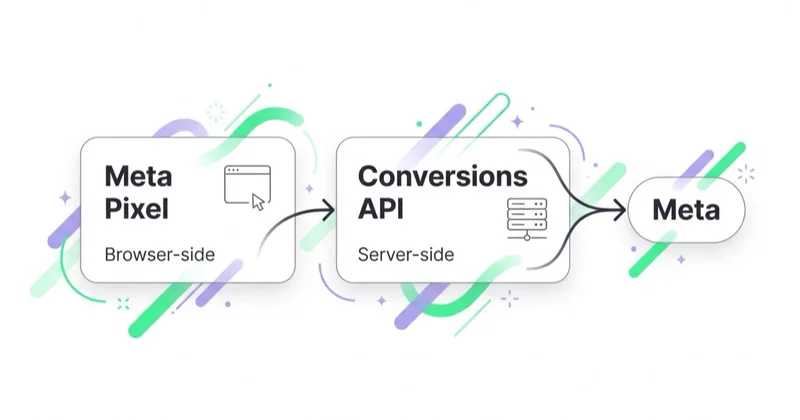
Meta Pixel works in the browser. Conversions API works from a server, ecommerce platform, CRM, app or partner integration. They are complementary, not interchangeable.
| Area | Meta Pixel | Conversions API |
|---|---|---|
| Event path | Browser | Server, platform, CRM, app or partner |
| Typical strength | Front-end behaviour and page context | More reliable server-side conversion data |
| Typical weakness | Browser blocking, consent limits, lost redirects | Requires integration quality and deduplication |
| Best use | Page views, product views, add-to-cart, front-end actions | Purchases, leads, qualified leads, offline or CRM events |
| Main risk | Missing events or weak parameters | Duplicate events or mismatched user data |
The strongest setup usually sends important events through both paths where appropriate. For example, a purchase can be sent by Pixel when the thank-you page loads and by CAPI from the server after the order is confirmed. If both are sent, Meta needs a shared event ID so it can deduplicate the event and count it once.
Pixel alone may still be acceptable for a small account with simple reporting needs, but it is fragile for serious ecommerce, lead generation, subscriptions, marketplaces, SaaS trials and sales funnels where reliable measurement affects bidding decisions.
Standard events to configure first
Meta supports standard event names that describe common business actions. Use standard events whenever the action fits. Custom events are useful, but they should not replace standard events without a reason.
| Event | Typical use | Important parameters |
|---|---|---|
| PageView | Page loaded | page URL and referrer context |
| ViewContent | Product, service or key content viewed | content ID, content type, value when useful |
| Search | On-site search | search string |
| AddToCart | Product added to cart | content IDs, value, currency |
| InitiateCheckout | Checkout started | content IDs, value, currency |
| AddPaymentInfo | Payment step reached | value, currency |
| Purchase | Order completed | value, currency, content IDs, order context |
| Lead | Lead submitted | lead type, value when modelled |
| CompleteRegistration | Registration completed | registration type |
| Contact | Contact action completed | contact method |
The event list should match the actual funnel. A service business may need Lead, Contact, Schedule or CompleteRegistration more than AddToCart. A SaaS company may need trial sign-up, demo request and activation events. An ecommerce store needs product-level events, purchase value and product IDs that match the catalog.
Parameters that make Pixel data useful
An event name says what happened. Parameters explain the event.
For ecommerce, the most important parameters are usually:
- value;
- currency;
- content_ids;
- content_type;
- contents;
- number of items;
- event_id when deduplication is used.
For lead generation, useful parameters can include:
- lead type;
- funnel step;
- form name;
- estimated value;
- content category;
- event_id for deduplication with CAPI or CRM events.
For remarketing, product IDs and page categories matter because they decide whether dynamic ads can match a person to the correct product or set. For optimisation, value and event quality matter because the system needs a signal that reflects business value, not only cheap activity.
The common mistake is to install the base Pixel and stop. That creates PageView data, but it does not give Meta enough context to optimise a sales or lead account properly.
How to implement Meta Pixel
There are three common implementation paths.
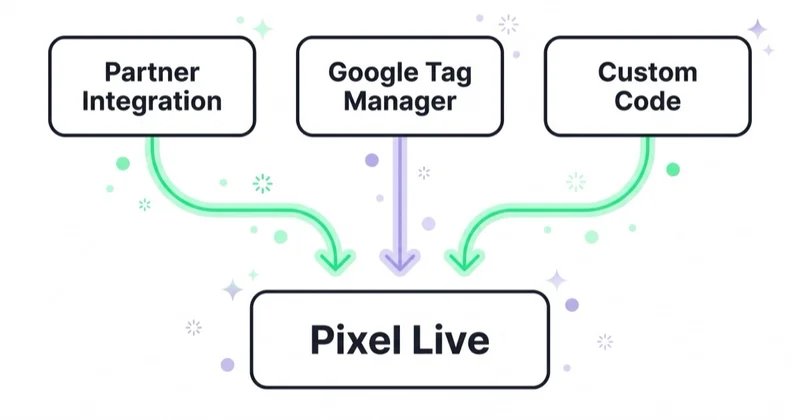
1. Partner integration
Many ecommerce platforms, CMS tools and CRM systems provide a Meta integration. This is often the fastest route for Shopify, WooCommerce, Magento, BigCommerce and similar platforms.
The advantage is speed. The risk is assuming that the integration is correct without checking events, parameters, consent behaviour and deduplication. Platform apps can be excellent, but they still need QA.
2. Google Tag Manager
Google Tag Manager is flexible when the website already has a good data layer. GTM can fire Meta Pixel events based on page views, clicks, form submissions, ecommerce events and custom data layer pushes.
GTM works best when the site exposes clean event data. It works poorly when tags rely on fragile CSS selectors, button text or URL guesses. For ecommerce, GA4-style dataLayer events can often be reused as the basis for Meta events, but parameter mapping must be checked carefully.
For the broader tag setup, read What Is Google Tag Manager and How to Use It?.
3. Custom implementation
A custom implementation gives the most control. It is useful for SaaS products, custom checkout flows, marketplaces, headless ecommerce, booking systems and websites where business logic happens outside a standard platform.
The drawback is maintenance. Developers need clear event documentation, version control, test environments, consent rules and a way to coordinate Pixel events with server-side events.
Recommended setup process
A practical setup should follow this order:
- Define the business goal: purchase, lead, qualified lead, booking, trial, subscription or another outcome.
- Map the funnel and decide which actions are conversion events, micro-conversions and diagnostic events.
- Choose standard events where possible.
- Decide which events should be sent by Pixel, CAPI or both.
- Define parameters for each event.
- Implement consent logic before tags send marketing data.
- Install the base Pixel and priority events.
- Add CAPI for high-value events where appropriate.
- Configure deduplication for shared browser and server events.
- Test in Events Manager, browser tools and analytics reports.
- Monitor diagnostics after launch.
This order prevents the most common failure: installing tracking first and deciding what it should measure later.
Consent, privacy and data governance
Meta Pixel is a marketing technology, so it has privacy implications. The correct implementation depends on market, business model, consent platform, legal basis and local regulation. In GDPR, UK GDPR and ePrivacy contexts, marketing tags typically need consent before they are allowed to run. In other markets, disclosure, opt-out rules and platform terms may still apply.
From an implementation perspective, the important points are:
- do not fire marketing events before the required consent state allows it;
- document what data is sent and why;
- avoid sending sensitive data in URLs, event names or custom parameters;
- hash customer information where required by Meta's documentation;
- respect user controls and platform policies;
- keep privacy policy language consistent with the actual setup;
- test what happens when consent is denied, granted, withdrawn or changed.
Conversions API is not a way to bypass consent. Meta's own help materials frame CAPI as a more direct connection for business data, not as permission to ignore privacy rules. Server-side tracking can improve data quality, but it must follow the same governance standard as browser tracking.
How Meta Pixel supports remarketing
Remarketing audiences depend on event quality. A broad website visitor audience is easy to create, but it is rarely the best audience.
Better audience examples:
- product viewers in the last 14 days who did not purchase;
- cart abandoners in the last 7 days;
- checkout starters in the last 3 days;
- service page visitors who did not submit a lead;
- pricing page visitors in the last 30 days;
- past purchasers excluded from acquisition campaigns;
- high-value purchasers used for lookalike or value-based modelling where available.
The audience window should match the buying cycle. A £30 impulse product may need a shorter window than a B2B software purchase. A local service emergency query may convert within hours. A considered ecommerce purchase may need several days of comparison.
For more on this topic, read Facebook Remarketing: How Meta Retargeting Works and Why Use It.
How this applies to ecommerce
For ecommerce, Meta Pixel must connect product behaviour, catalog data and purchase value.
The critical checks are:
- product IDs in Pixel events match product IDs in the Meta catalog;
- product variants are handled consistently;
- purchase value excludes or includes tax and shipping according to the reporting policy;
- currency is passed correctly;
- out-of-stock products are not promoted through stale catalogs;
- checkout redirects do not drop events;
- refunds, cancellations and offline order updates are considered in reporting;
- Pixel and CAPI purchase events are deduplicated.
Catalog campaigns, dynamic remarketing and Advantage+ Sales setups become weaker when product IDs do not match. Meta may know that someone viewed a product, but it cannot reliably connect that event to the right catalog item.
For product data context, read What Is a Product Feed and How to Use It?.
How this applies to lead generation and B2B
Lead generation accounts often install Pixel only on the thank-you page. That is a start, but it is usually too shallow.
A better setup may distinguish:
- generic contact form submissions;
- demo requests;
- quote requests;
- booking confirmations;
- newsletter sign-ups;
- file downloads;
- pricing page visits;
- qualified leads imported from CRM;
- closed opportunities or offline conversions where the setup supports it.
The advertising system should learn from leads that matter, not only from forms that are easy to submit. For this reason, many B2B and service accounts should connect Meta Pixel with CAPI, CRM events or offline lead quality feedback.
For native form campaigns, read Facebook Lead Ads: What They Are and How to Launch Instant Forms.
How to test whether Meta Pixel works
Testing should cover more than "the Pixel fires".
Use this checklist:
- Open Meta Events Manager and confirm the Pixel is connected to the correct business and ad account.
- Use the Test Events tool while browsing the website.
- Use Meta Pixel Helper or browser developer tools to inspect fired events.
- Run a test lead, booking or purchase.
- Check whether event names are correct.
- Check whether value, currency and product IDs are present where needed.
- Check whether duplicate events appear.
- Confirm deduplication when Pixel and CAPI send the same event.
- Compare event counts with GA4, backend orders, CRM submissions or ecommerce platform data.
- Recheck after cookie banner changes, checkout changes, theme updates and plugin updates.
Small differences between platforms are normal because attribution, consent, time zones and counting methods differ. Large unexplained differences should be investigated before campaigns depend on the data.
Common mistakes
| Mistake | Why it hurts | Better approach |
|---|---|---|
| Only PageView is installed | Meta cannot optimise toward meaningful outcomes | Add standard events mapped to the funnel |
| Purchase has no value or currency | Revenue reporting and value optimisation suffer | Pass value and currency consistently |
| Product IDs do not match the catalog | Dynamic ads cannot reliably match products | Align content IDs with catalog item IDs |
| Pixel and CAPI both send events without deduplication | Conversions can be inflated | Use shared event IDs |
| Tags fire before consent | Privacy and compliance risk | Connect Pixel firing to the consent state |
| Every form is treated as the same lead | Optimisation favours cheap low-quality forms | Separate lead types and import quality data where possible |
| Test purchases are left in reporting | Revenue and ROAS become distorted | Filter or annotate test events and reconcile with backend data |
| No one monitors diagnostics | Problems stay hidden after launch | Check Events Manager after website and platform changes |
How we approach this at Space Ads
At Space Ads, we treat Meta Pixel as one part of signal quality, not as a script that is "installed and done". We start with the business outcome: purchase, qualified lead, booking, trial or another event that should influence delivery. Then we map which events come from Pixel, which should also come from CAPI, which parameters are required and how deduplication will work. Ecommerce setups need product IDs, value, currency and catalog consistency; lead generation setups need lead type, form context and CRM feedback, not just a generic Lead event. Before scaling Meta Ads, we compare Events Manager, GA4, backend or CRM data and check consent behavior, because optimization is only as good as the permitted signal the account sends.
FAQ
Is Facebook Pixel the same as Meta Pixel?
Yes. Facebook Pixel is the older and still common name. Meta Pixel is the current name used by Meta for the same browser-side website tracking technology.
Is Meta Pixel still needed if Conversions API is implemented?
Usually yes. CAPI can send server-side events, but Pixel still captures browser-side behaviour and page context. Many strong setups use both, with deduplication for shared events.
Does Meta Pixel work without cookies?
Meta Pixel can send browser events, but cookie availability, consent choices, browser restrictions and user settings affect what can be stored or matched. That is one reason CAPI is often added.
What events should be configured first?
Start with the events that represent business value. Ecommerce usually needs ViewContent, AddToCart, InitiateCheckout and Purchase. Lead generation usually needs Lead, Contact, CompleteRegistration or custom funnel events.
Can Meta Pixel track offline sales?
Pixel itself tracks browser-side website events. Offline or CRM-based outcomes usually require Conversions API, CRM integration or another server-side/offline data path.
Why are Meta Pixel conversions different from GA4?
Meta Ads and GA4 use different attribution models, event collection methods, consent behaviour, time zones, lookback windows and reporting logic. Differences are expected; unexplained large gaps should be audited.
Summary
Meta Pixel is the foundation of Meta Ads measurement, but it should be treated as part of a measurement system rather than a single script. A strong setup defines meaningful events, passes useful parameters, respects consent, connects with Conversions API where needed and is tested against real business data.
The goal is not to send as much data as possible. The goal is to send accurate, permitted and useful event data that helps campaigns optimise toward the actions that actually matter.
We configure the Pixel and events for campaigns within Facebook and Instagram ads.
Sources and further reading
- Meta for Developers: Meta Pixel documentation
- Meta for Developers: Conversions API documentation
- Meta for Developers: Deduplicate Pixel and server events
- Meta for Developers: Customer information parameters for Conversions API
- Meta Business Help Center: About Conversions API
Continue learning
Continue reading
Facebook Remarketing: How Meta Retargeting Works and Why Use It
Facebook remarketing reaches people who already interacted with a brand. Learn how Meta retargeting works, which audiences to build, how to use Pixel, CAPI and catalog ads, and how to measure incrementality.

How to Hide FBCLID From Your URL & Why It’s Actually Important?
FBCLID is not just URL clutter: it can be useful for Meta measurement while also making GA4 page reports and shared URLs messy. This guide explains how to clean fbclid from analytics and canonical URLs without breaking Meta Pixel, Conversions API, UTMs, CRM attribution or other click IDs.

What Is a Sales Campaign and How to Plan It?
A sales campaign needs a clear offer, conversion goal, tracking, creative, landing page and optimisation plan across Meta, Google and owned channels.


































