
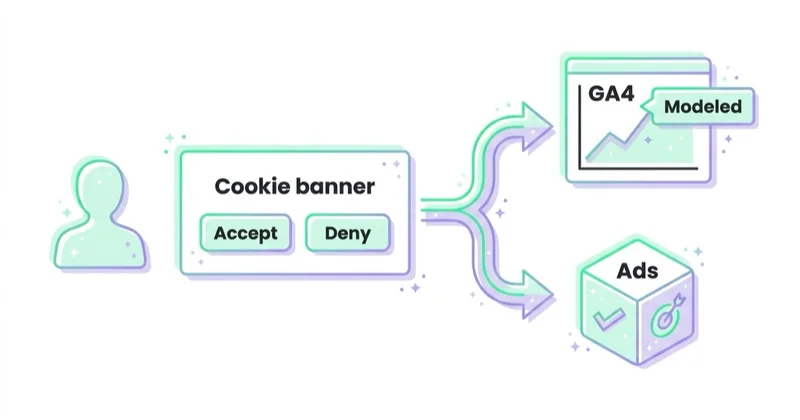
Consent Mode v2 is the Google tag framework that tells Google products how a website or app visitor has consented to analytics storage, advertising storage, sending user data to Google for ads and ads personalisation. It does not replace a cookie banner or Consent Management Platform. The banner collects the user choice. Consent Mode passes that choice to Google tags so Google Ads, GA4, Floodlight and related products can adjust behaviour, measurement and audience use.
TL;DR
- Consent Mode is a technical bridge. It connects the consent choice collected by a CMP with Google tags and SDKs.
- Consent Mode v2 uses four key signals. ad_storage, analytics_storage, ad_user_data and ad_personalization.
- It is not legal advice or a consent banner. A CMP and legal review are still needed for consent wording, categories and records.
- EEA, UK and Switzerland matter. Google EU User Consent Policy requires valid consent for cookies or local storage where legally required and for collection, sharing and use of personal data for ads personalisation in these regions.
- Google enforcement changed in 2024. Google Analytics Help says that without action, only users outside the EEA would be included in audiences used by linked advertising products starting early March 2024.
- Basic and advanced setups differ. Basic mode blocks Google tags before consent. Advanced mode loads tags and sends cookieless pings under denied consent states where implemented.
- Bad implementation can hurt measurement. Incorrect signals can limit remarketing, audiences, conversion exports, Smart Bidding and GA4-to-Google-Ads workflows.
What Consent Mode v2 is
Consent Mode is a Google mechanism that controls how Google tags and SDKs behave based on user consent choices. It helps Google products understand whether storage and data-use permissions have been granted or denied.
Consent Mode v2 is the current four-signal model used for Google advertising and analytics consent handling.
The core signals are:
| Consent signal | Meaning |
|---|---|
| ad_storage | Controls storage such as cookies related to advertising |
| analytics_storage | Controls storage such as cookies related to analytics |
| ad_user_data | Sets consent for sending user data related to advertising to Google |
| ad_personalization | Sets consent for personalised advertising |
Google consent reference documentation states that both ad_user_data and ad_personalization need to be granted to enable personalised advertising in Google advertising platforms.
What Consent Mode v2 is not
Consent Mode is often confused with the cookie banner.
It is not:
- a CMP by itself;
- a cookie banner;
- a legal basis for processing;
- a privacy policy;
- a replacement for user consent records;
- a way to bypass consent;
- a universal GDPR compliance solution.
A proper setup has at least three layers:
- Legal and policy layer: what consent is needed, what the wording says and how records are retained.
- CMP layer: the banner or consent platform that collects and stores user choices.
- Tag layer: Consent Mode signals that tell Google tags how to behave.
This article covers the technical and marketing implications. It is not legal advice.
Implementation architecture
A reliable Consent Mode v2 setup usually has several moving parts:
- CMP or cookie banner that collects the choice;
- consent defaults set before Google tags process user data;
- consent update after the user accepts, rejects or changes settings;
- Google Tag Manager or Google tag configuration;
- GA4 tags and events;
- Google Ads conversion tags;
- enhanced conversions where used;
- server-side tagging or conversion imports where used;
- diagnostics in GA4, Google Ads and Tag Assistant.
The key rule is timing. Consent defaults must be known before tags fire. Then user choices must update the consent state consistently across page views, route changes and returning sessions.
For implementation context, see Google Tag Manager guide and Google Analytics audit.
Why Consent Mode v2 matters
Consent Mode v2 matters because Google Ads and GA4 workflows depend on consent signals for measurement, audiences and personalisation.
If consent signals are missing or wrong, the impact may include:
- reduced remarketing eligibility;
- smaller audience lists;
- limited use of GA4 audiences in Google Ads;
- weaker conversion exports from GA4 to Google Ads;
- lower conversion modelling quality;
- less useful bidding signals;
- reporting gaps between ad platforms and analytics.
For advertisers targeting or measuring users in the EEA, UK or Switzerland, Consent Mode is no longer a nice-to-have technical detail. It is part of the measurement and advertising infrastructure.
What changed with v2
The earlier Consent Mode model focused mainly on two storage signals:
- ad_storage;
- analytics_storage.
The v2 model adds two advertising data-use signals:
- ad_user_data;
- ad_personalization.
These new signals matter because modern Google Ads measurement and personalisation are not only about whether a cookie can be stored. They also control whether user data can be sent to Google for advertising use and whether that data can be used for ad personalisation.
Google consent reference documentation states that when ad_user_data is denied, ad measurement and personalisation for online advertising are disabled, including use cases supported by user_id and user-provided data. It also states that when ad_personalization is denied, personalised advertising is disabled and features such as remarketing in Google Ads, DV360 and SA360 do not receive data.
Basic mode vs advanced mode
Consent Mode is commonly implemented in two patterns.
| Mode | How it works | Main trade-off |
|---|---|---|
| Basic mode | Google tags are blocked before consent and fire only after consent is granted | Simpler privacy posture, less pre-consent measurement signal |
| Advanced mode | Google tags load before consent and adjust behaviour based on denied or granted consent, including cookieless pings where applicable | Better modelling signal, more technical and legal review required |
In advanced mode, if storage is denied, Google tags can send cookieless pings. Google documentation says that when analytics_storage is denied, cookieless pings are sent to Google Analytics. For ad_storage denied, Google documents several behaviours, including no new advertising cookies written and no existing first-party advertising cookies read.
The choice between basic and advanced mode should not be made only by marketing. It should involve analytics, development, legal or privacy teams and the CMP owner.
How Consent Mode affects Google Ads
Consent Mode v2 affects Google Ads in several areas.
Remarketing and audiences
When ad_personalization is denied, personalised advertising is disabled. This affects remarketing and audience-based advertising workflows.
Conversion measurement
When ad_user_data is denied, Google says ad measurement and personalisation for online advertising are disabled, including use cases supported by user-provided data. This can affect enhanced conversions and tag-based conversion tracking.
GA4 conversion exports
Google consent reference documentation says click-ID keyed conversion data export to Ads platforms is limited, for example bidding optimisation in Google Ads based on Google Analytics conversions, when ad_user_data is denied.
Smart Bidding
Smart Bidding depends on conversion signals. If conversion measurement is degraded by missing consent signals, bidding quality can also suffer.
How Consent Mode affects GA4
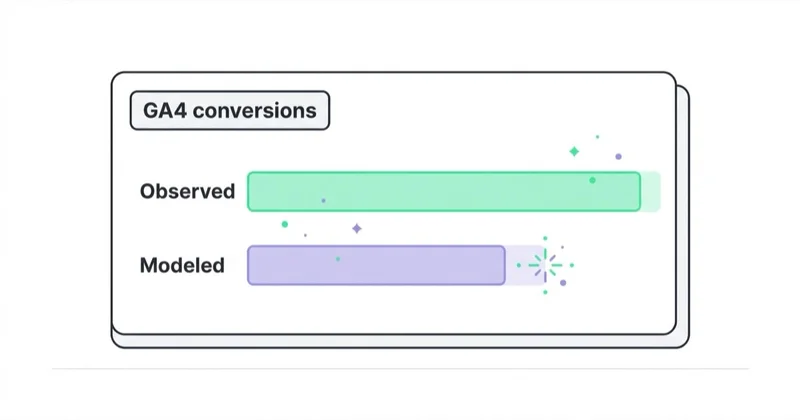
GA4 can continue to operate under consent constraints, but behaviour changes depending on the consent state.
Examples:
- analytics_storage granted allows analytics storage such as cookies;
- analytics_storage denied limits cookie-based analytics storage;
- cookieless pings may be sent under denied states where Consent Mode is implemented;
- Google Signals features do not accumulate data for traffic where relevant advertising storage is denied;
- audiences used by linked advertising products are affected when required consent signals are missing.
The key point: GA4 reporting, Google Ads audiences and exported conversions can behave differently depending on consent state and linking settings.
Implementation workflow
1. Audit the current setup
Check:
- which CMP is installed;
- which Google tags fire;
- whether Google Tag Manager is used;
- whether GA4 is linked to Google Ads;
- whether remarketing and audiences are used;
- whether enhanced conversions are used;
- which markets receive traffic;
- whether EEA, UK or Swiss users are included.
2. Define consent categories
Map CMP categories to Google consent signals.
Common mapping example:
| CMP category | Possible Google signal mapping |
|---|---|
| Analytics | analytics_storage |
| Marketing or advertising | ad_storage, ad_user_data, ad_personalization |
| Functional | functionality_storage where used |
| Security | security_storage where used |
This mapping should be confirmed with the CMP documentation and legal requirements.
3. Set default denied states before tags fire
Consent defaults should be set before Google tags run. In many EEA-focused setups, the default state is denied until the user grants consent.
If defaults are set too late, tags may fire before consent state is known.
4. Update consent after user choice
When the user accepts, rejects or customises consent, the CMP should send updated consent states to Google tags.
The setup should handle:
- accept all;
- reject all;
- partial consent;
- returning users;
- consent withdrawal;
- regional behaviour;
- page navigation and single-page apps where relevant.
5. Validate in Tag Assistant and platforms
Validation should include:
- Tag Assistant Consent tab;
- GTM preview mode;
- GA4 DebugView where useful;
- Google Ads conversion diagnostics;
- browser developer tools;
- real consent banner flows;
- separate tests for accepted and denied states;
- mobile and desktop;
- first visit and returning visit.
Do not assume Consent Mode works because a banner appears.
How we approach this at Space Ads
For clients with EEA and UK traffic, Consent Mode v2 isn't optional; without it Google Ads throttles the data anyway. But "implemented" isn't the bar we work to. We default to advanced mode, because it lets Google model the conversions lost when someone declines instead of simply dropping them, and on larger accounts that shows up in the reports. We also watch the part that's easy to miss: whether the banner truly passes the signals or merely looks the part. A badly wired Consent Mode trims measurement in silence — everything appears to work while the data quietly leaves. After going live we always confirm consent is firing correctly, and we treat the whole thing as a legal requirement and a measurement lever at once, never a box to tick.
Common implementation mistakes
| Mistake | Why it hurts | Better approach |
|---|---|---|
| Cookie banner without Consent Mode | Google does not receive structured consent signals | Integrate CMP with Google tags |
| v1 signals only | Missing ad_user_data and ad_personalization | Implement the full v2 signal set |
| Consent defaults set too late | Tags may fire before consent is known | Set defaults before Google tags load |
| Blocking all tags but expecting modelling | Basic mode gives less pre-consent signal | Choose basic or advanced intentionally |
| Advanced mode without legal review | Cookieless pings may need policy review | Involve privacy stakeholders |
| No rejection testing | Only accept-all path works | Test deny and partial consent states |
| Inconsistent CMP wording and tag behaviour | Compliance and trust risk | Align legal text with technical reality |
| Ignoring GA4-Google Ads links | Audiences and exports can break | Validate linked product behaviour |
E-commerce implications
For ecommerce, Consent Mode v2 affects:
- Google Ads conversion tracking;
- GA4 ecommerce events;
- remarketing lists;
- customer lists and enhanced conversions where user data is used;
- product remarketing;
- Smart Bidding signal quality;
- channel reporting and attribution.
A good ecommerce implementation should test the full purchase journey under accepted and denied consent states, including checkout, payment return, thank-you page and server-side events where used.
Lead-generation implications
For lead generation, Consent Mode v2 affects:
- form submissions;
- enhanced conversions for leads;
- GA4 events exported to Google Ads;
- remarketing from service pages;
- qualified-lead import workflows;
- audience creation for nurture campaigns.
The CRM team should be involved if consent state affects which lead data can be sent to Google or used for offline conversion import.
Offline conversions and customer data
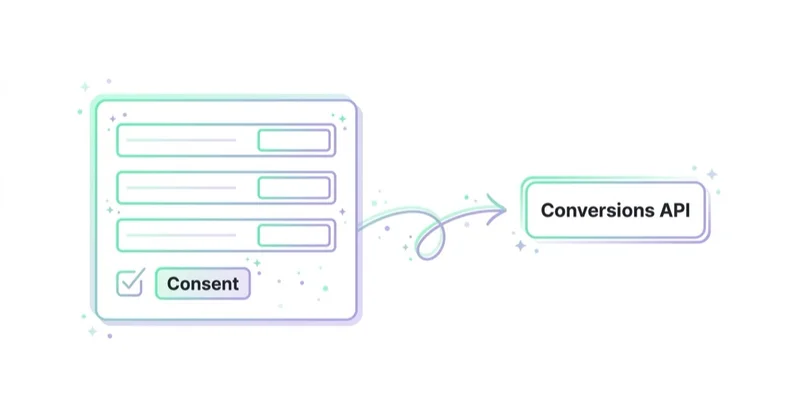
Consent Mode v2 also matters when user data is uploaded or shared later, not only when a browser tag fires.
Examples:
- enhanced conversions for leads;
- offline conversion imports;
- Customer Match lists;
- store sales uploads;
- CRM-to-Google Ads integrations;
- server-side event forwarding.
If a lead is captured on the website and later qualified in CRM, the business needs a governance process for whether that data can be sent to Google for measurement or advertising use. Consent state, privacy policy, data retention, hashing, CRM fields and upload rules should be reviewed together.
This is why Consent Mode should not be treated as only a front-end banner task. Marketing, analytics, CRM, development and privacy stakeholders may all affect the final setup.
Testing scenarios
Test Consent Mode with real user paths, not only one accept-all click.
| Scenario | What to verify |
|---|---|
| First visit, no choice yet | default consent states are set before tags process data |
| Accept all | all intended consent signals update to granted |
| Reject all | denied states remain denied and tags behave accordingly |
| Partial consent | analytics and advertising categories map correctly |
| Returning user | stored choice is applied before tags fire |
| Consent withdrawal | consent update changes tag behaviour after opt-out |
| Single-page app route change | consent state persists across virtual page views |
| Checkout and payment return | ecommerce events respect consent state |
| Lead form and CRM handoff | user data use matches consent and policy decisions |
Save screenshots or logs from Tag Assistant and platform diagnostics. They help future teams understand what was tested and why the setup is trusted.
Troubleshooting diagnostics
Common symptoms:
- GA4 says ads personalisation consent signals are not detected;
- Google Ads shows conversion or consent warnings;
- audiences stop growing for affected regions;
- Tag Assistant shows consent updated after tags already fired;
- only accept-all was configured correctly;
- ad_user_data or ad_personalization is missing;
- server-side events are sent without the expected consent context;
- CMP wording does not match tag behaviour.
Debug in this order:
- Check CMP category mapping.
- Check default consent timing.
- Check consent update event.
- Check GTM tag consent settings.
- Check Google tag and GA4 configuration.
- Check Ads conversion tags and enhanced conversions.
- Check linked product diagnostics.
- Test accepted, denied and partial states on a clean browser session.
FAQ
What is Consent Mode v2?
Consent Mode v2 is the Google consent-signal framework that tells Google tags whether analytics storage, advertising storage, advertising user data and ads personalisation are granted or denied.
Is Consent Mode v2 the same as a cookie banner?
No. A cookie banner or CMP collects the user choice. Consent Mode passes that choice to Google tags and adjusts tag behaviour.
What are the four main Consent Mode v2 signals?
The four main signals are ad_storage, analytics_storage, ad_user_data and ad_personalization.
Is Consent Mode v2 legally required?
This is a legal question and depends on the market, setup and Google product use. Google EU User Consent Policy requires valid consent for certain actions in the EEA, UK and Switzerland. Advertisers should get legal or privacy advice for their implementation.
What happens without Consent Mode v2?
Google products may limit remarketing, audience use, conversion exports and advertising personalisation for users in affected regions. Measurement and bidding signals may become weaker.
What is advanced Consent Mode?
Advanced mode loads Google tags before consent and sends cookieless pings under denied consent states where implemented. It can improve modelling signal but requires careful legal and technical review.
What is basic Consent Mode?
Basic mode blocks Google tags before consent and fires them only after consent is granted. It is simpler, but it provides less pre-consent measurement signal.
How should Consent Mode v2 be tested?
Test accept, reject and partial-consent paths in Tag Assistant, GTM preview, GA4 DebugView and Google Ads diagnostics. Verify that defaults are set before tags fire.
Does Consent Mode v2 apply to server-side tracking?
It can. If server-side tagging or offline uploads send data to Google, consent context and data-use permissions still need governance. Browser Consent Mode does not automatically solve every server-side workflow.
Can a CMP be installed and Consent Mode still be wrong?
Yes. A banner can appear correctly while signals are missing, mapped incorrectly, updated too late or not passed to Google products.
Key takeaways
Consent Mode v2 is a core part of Google measurement infrastructure for advertisers dealing with EEA, UK or Swiss users. It connects consent choices with Google tags and affects analytics, advertising storage, user data, personalisation, audiences and conversion measurement.
The strongest implementation is not just installing a banner. It is aligning legal requirements, CMP configuration, Google Tag Manager, GA4, Google Ads, enhanced conversions and platform diagnostics. A correct setup protects both compliance posture and data quality.
Sources and further reading
- Google Analytics Help - Consent mode reference
- Google Analytics Help - Verify and update consent settings in Google Analytics
- Google Tag Platform - Consent mode overview
- Google - EU user consent policy
- Google - Help with the EU user consent policy
- Space Ads - Google Ads service
Continue learning
- Enhanced Conversions in Google Ads: What They Are and How to Set Them Up
- Customer Match in Google Ads: What It Is and How to Use It
- Referrals from banks and payment intermediaries in Google Analytics - solution
- How to fix googleads.g.doubleclick.net and tpc.googlesyndication.com sources in Google Analytics
Continue reading

What Is a Google Analytics Audit and Is It Worth Doing?
A Google Analytics audit checks whether GA4 data is reliable enough for marketing, product and budget decisions. This guide explains how to review events, ecommerce tracking, Consent Mode, referrals, UTMs, cross-domain journeys, reconciliation and reporting so fixes are prioritized by business impact.

How to Tag Transactional Emails with UTM Parameters
Transactional email UTM tagging helps separate order confirmations, invoices, shipping updates and account emails from newsletters, lifecycle flows and marketing automation in GA4.
How to fix googleads.g.doubleclick.net sources and tpc.googlesyndication.com in Google Analytics
Fix googleads.g.doubleclick.net and tpc.googlesyndication.com referrals in GA4 by checking auto-tagging, gclid redirects, Google Ads linking and unwanted referrals in the right order.


































