
Enhanced Conversions in Google Ads improve conversion measurement by supplementing standard conversion tags or offline imports with hashed first-party customer data, such as email address, phone number or address data. Google uses a secure one-way hashing algorithm called SHA256 before matching the data with signed-in Google accounts. The goal is more accurate attribution and better bidding signals in a world where cookies, browsers and consent choices reduce direct measurement.
TL;DR
- Enhanced Conversions supplement existing conversion tracking. They do not replace the Google Ads conversion tag, CRM import or Consent Mode.
- First-party data is hashed with SHA256. Hashing is one-way. It is not reversible encryption.
- There are two main variants. Enhanced conversions for web support website conversions. Enhanced conversions for leads support offline lead outcomes imported from CRM or similar systems.
- Setup methods differ. Google supports Google tag, Google Tag Manager, Google Ads API, Data Manager and partner or CRM workflows depending on the use case.
- Consent is central. Enhanced conversions must be implemented in line with Google policies, local law and consent settings.
- Impact is not instant. Google documentation notes that after setup, reporting impact may be visible after about 30 days.
- The main value is better signal quality. More accurate conversion measurement can improve Smart Bidding, reporting and budget decisions.
What enhanced conversions are
Enhanced conversions are a Google Ads measurement feature. They add hashed user-provided data to existing conversion signals so Google can match a conversion more accurately to an ad interaction.
Example for an online purchase:
- A user clicks a Google ad.
- The user buys on the website.
- The conversion tag fires on the purchase confirmation page.
- The tag also sends hashed first-party data, such as email address, if available and allowed.
- Google compares the hashed data with signed-in Google accounts.
- Attribution and bidding signals may become more accurate.
This is useful because standard cookie-based tracking can lose signal due to browser restrictions, consent choices, device changes and cross-device journeys.
Hashing vs encryption
Enhanced conversions use hashing. Google documentation describes SHA256 as a secure one-way hashing algorithm.
This distinction matters.
| Term | Meaning |
|---|---|
| Hashing | One-way transformation used for matching. The original value is not meant to be recovered. |
| Encryption | Reversible transformation when the correct key is available. |
| SHA256 | A common one-way hashing algorithm used by Google for enhanced conversions and Customer Match workflows. |
In plain language: the email address is turned into a fixed hashed value before matching. Google compares hashed values. The implementation still requires consent and policy compliance, because hashed personal data is still derived from personal data.
Data quality requirements
Enhanced conversions are only as useful as the data sent.
Check:
- email is captured accurately;
- phone numbers use a consistent country format;
- names and addresses are not mixed into one field;
- values are trimmed and normalised before hashing where needed;
- data is sent on the correct conversion action;
- user-provided data is not sent for the wrong user or previous session;
- consent state allows the intended data use;
- duplicates are controlled;
- test orders and internal leads are excluded where possible.
The most common technical issue is not the hashing algorithm. It is data availability. If the email or phone number is not available at the conversion moment, or is stored only after a delayed CRM step, the implementation needs a different architecture.
Enhanced conversions for web
Enhanced conversions for web apply to website conversions such as purchases, signups, subscriptions, forms or other online actions.
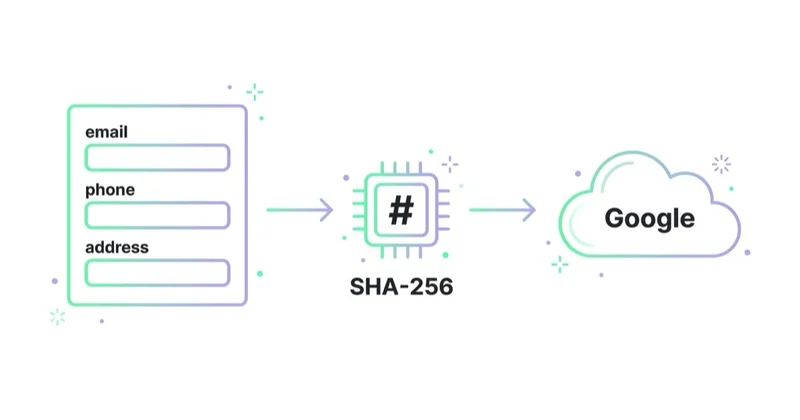
Google says enhanced conversions for web supplement existing conversion tags by sending hashed first-party conversion data from a website in a privacy-safe way. The hashed data is matched with signed-in Google accounts to attribute campaign conversions to ad events such as clicks or views.
Common use cases:
- ecommerce purchases;
- lead forms submitted on a website;
- account registrations;
- quote requests;
- paid subscriptions;
- booking confirmations;
- application submissions.
Setup can use:
- Google tag;
- Google Tag Manager;
- Google Ads API;
- server-side or partner implementations where supported.
Enhanced conversions for leads
Enhanced conversions for leads are designed for lead generation and offline sales processes. Google describes enhanced conversions for leads as an upgraded version of offline conversion import that uses user-provided data, such as email addresses, to supplement offline conversion data.
This is important for B2B, services, education, real estate, finance, clinics and other businesses where the first website form is not the final business outcome.
Example:
- A user submits a lead form after clicking a Google ad.
- The website captures user-provided data such as email or phone.
- The CRM later marks the lead as qualified, booked, sold or closed-won.
- The offline outcome is imported to Google Ads with user-provided data.
- Google uses the data to attribute the later business event back to the campaign.
Google documentation says enhanced conversions for leads can support Data Manager, Google Ads API and third-party import methods such as Zapier and HubSpot.
Enhanced conversions vs Customer Match
Enhanced conversions and Customer Match both use first-party data, but they solve different problems.
| Feature | Main purpose | Typical data flow |
|---|---|---|
| Enhanced conversions | Improve conversion measurement and attribution | User data is sent with a conversion or offline outcome |
| Customer Match | Build audience lists from customer data | Customer list is uploaded to create an audience segment |
Enhanced conversions answer: did this conversion come from an ad interaction more accurately?
Customer Match answers: can this known customer or similar first-party audience be used for targeting, exclusion or audience strategy?
They can work together, but they are not interchangeable.
Enhanced conversions vs Consent Mode
Enhanced conversions and Consent Mode are complementary.
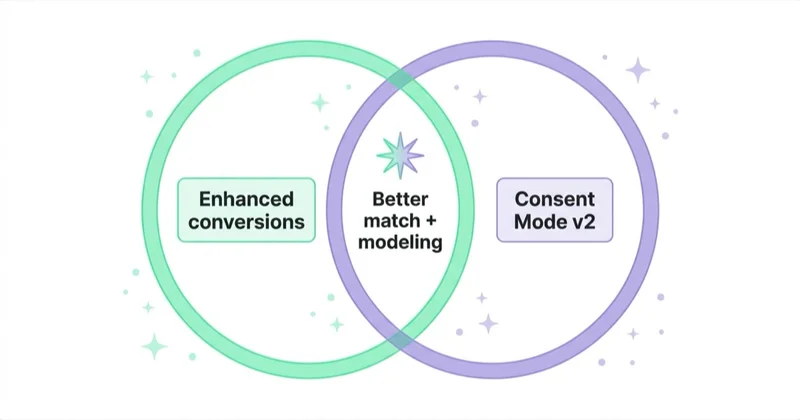
Consent Mode communicates user consent choices to Google tags and adjusts tag behaviour based on those choices. Enhanced conversions add hashed first-party data when allowed and configured.
Practical interpretation:
- Consent Mode manages whether and how tags can use storage and signals under consent states.
- Enhanced conversions improve matching and attribution when user-provided data can be sent.
- In regulated markets, both need to be aligned with consent management and privacy policy.
A setup that sends enhanced conversion data without respecting consent is not a strong setup. A setup with Consent Mode but no useful first-party data may still miss measurement opportunities.
How to set up enhanced conversions for web
A practical implementation path:
1. Confirm the conversion source
Decide which Google Ads conversion action should receive enhanced conversions. Usually this is a purchase, lead form, signup, booking or other primary conversion.
2. Choose the implementation method
| Method | Good fit |
|---|---|
| Google tag | Direct website tagging and simpler implementations |
| Google Tag Manager | Teams already managing tags through GTM |
| Google Ads API | Custom systems, server-side flows and technical teams |
| Partner or platform integration | Ecommerce or CRM platforms with supported connectors |
Google documentation says if data is sent in a way different from the method selected in Google Ads, that data may not be processed. The selected method should match the real implementation.
3. Identify user-provided data
Enhanced conversions need user-provided data such as:
- email;
- phone number;
- first name;
- last name;
- address fields where relevant.
The most stable source is usually the confirmation page, checkout data layer, form submission event or server-side order system.
4. Configure data collection
In GTM, Google documentation describes setup paths including the Google tag and user-provided data collection. Automatic collection can work when customer data is available on the conversion page or a previous page, but it should be tested carefully.
For cleaner implementations, use explicit data layer variables or server-side values rather than fragile DOM scraping where possible.
5. Validate diagnostics
After setup, check:
- tag fires on the correct conversion;
- user-provided data is present only when allowed;
- data is normalised and hashed correctly;
- conversion value and currency are still correct;
- consent behaviour is respected;
- Google Ads diagnostics do not show critical issues;
- no duplicate conversion tags were introduced.
How to set up enhanced conversions for leads
For lead-generation businesses, the setup should start with CRM architecture.
1. Define the offline outcome
Choose the conversion that should feed bidding and reporting:
- qualified lead;
- booked call;
- attended appointment;
- submitted application;
- quote accepted;
- closed-won sale;
- revenue event.
Do not optimise only to form submissions if sales quality varies strongly.
2. Capture user-provided data at lead creation
The form or CRM should store the identifiers needed for matching, such as email or phone, along with campaign and timing information where applicable.
3. Import offline outcomes
Use Data Manager, Google Ads API or supported partner integrations to send offline conversion events. If the business already uses offline conversion import, Google recommends upgrading to enhanced conversions for leads.
4. Keep CRM states clean
A lead can move through multiple stages. Decide which stages should be primary conversions and which should be secondary or diagnostic.
Example hierarchy:
- form submitted;
- qualified lead;
- booked meeting;
- attended meeting;
- sale;
- revenue.
The bidding system should learn from meaningful downstream outcomes, not only the easiest event to collect.
Primary and secondary conversion planning
Enhanced conversions can improve signals, but the account still needs the right conversion hierarchy.
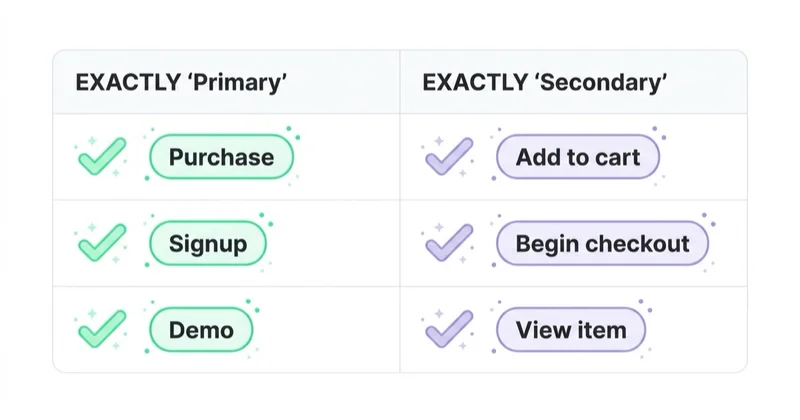
Example for lead generation:
| Event | Suggested role | Why |
|---|---|---|
| Form submitted | Secondary or diagnostic when lead quality varies | Useful for volume but often too soft for bidding |
| Qualified lead | Primary candidate | Closer to sales value |
| Booked meeting | Primary or value-based signal | Shows intent and availability |
| Closed-won sale | Primary or imported value | Best business outcome when volume allows |
| Revenue | Value-based optimisation | Helps Smart Bidding learn value, not only count |
For small accounts, the final sale may be too rare to use as the only bidding signal. In that case, use the best available proxy and keep improving CRM feedback over time.
How we approach this at Space Ads
We turn enhanced conversions on almost by default now, because cookie consent and browser limits clip some conversions before they ever reach the report. The mechanism is simple: the purchase event carries hashed data the customer supplied — usually an email — and Google reattaches the conversion when it recognises a logged-in user. Across the industry that typically claws back a few to low double-digit percent of events otherwise lost to measurement. They don't work in isolation for us, though: we wire them to Consent Mode, and on bigger accounts to server-side measurement, since only the pieces together give a stable picture. Better measurement is no report cosmetic — bidding learns from conversion data, so the fuller the signal, the sharper the automation's calls on bids.
Common implementation mistakes
| Mistake | Why it hurts | Better approach |
|---|---|---|
| Calling hashing encryption | Creates privacy misunderstanding | Explain SHA256 as one-way hashing |
| No consent alignment | Policy and legal risk | Connect enhanced conversions with consent management |
| Data not available on conversion event | Google receives no useful signal | Use data layer, previous-page capture or server-side source |
| Selecting the wrong setup method | Data may not be processed | Match Google Ads setting to real implementation |
| Duplicate conversion tags | Inflated conversions | Audit tags before and after setup |
| No validation after GTM changes | Silent data gaps | Use diagnostics and test conversions |
| Optimising lead campaigns only to forms | Low-quality leads | Use enhanced conversions for leads and CRM outcomes |
| Expecting immediate impact | Learning and reporting take time | Monitor over several weeks |
E-commerce use cases
Enhanced conversions for web are often useful for ecommerce because purchases include user-provided data and values.
Checklist:
- purchase conversion fires once;
- email or phone is available on confirmation or checkout flow;
- value and currency are correct;
- order ID is present for deduplication and reporting;
- consent state is respected;
- refunds and cancellations are handled in business reporting;
- Google Ads data is compared with backend orders.
Enhanced conversions can improve attribution, but they do not replace clean ecommerce analytics.
Ecommerce validation checklist
Validate:
- purchase tag fires once per order;
- transaction ID is stable;
- email or phone belongs to the purchaser;
- refunds are not accidentally counted as new purchases;
- customer data is not collected from browser autofill in the wrong context;
- consent-denied paths behave as intended;
- Google Ads revenue is reconciled with backend revenue;
- enhanced conversions diagnostics improve after enough data is collected.
This validation should be part of a wider Google Analytics audit, especially when ecommerce events, Consent Mode and Google Ads bidding depend on the same checkout flow.
Lead generation and B2B use cases
Enhanced conversions for leads are especially useful when form leads vary in quality.
Examples:
- SaaS demo request becomes sales-qualified opportunity;
- course enquiry becomes accepted application;
- clinic form becomes booked appointment;
- B2B audit request becomes proposal;
- local service form becomes completed job.
The business value is downstream. The measurement setup should reflect that.
Troubleshooting enhanced conversions
Common symptoms:
- diagnostics say no user-provided data was found;
- match rate is lower than expected;
- conversions still appear as unenhanced;
- offline imports show errors;
- HubSpot, Zapier or Data Manager mapping skips user fields;
- duplicate conversion actions inflate reporting;
- consent settings prevent data from being processed;
- the selected setup method in Google Ads does not match the real implementation.
Debug in this order:
- Confirm the conversion action is the correct one.
- Confirm enhanced conversions are enabled for that action.
- Confirm the setup method matches GTM, Google tag, API or Data Manager.
- Confirm user-provided data is available at the event.
- Confirm data layer or CRM fields are mapped correctly.
- Confirm consent state and Google policies are respected.
- Confirm test conversions appear in diagnostics after enough time.
FAQ
What are enhanced conversions in Google Ads?
Enhanced conversions are a measurement feature that supplements existing conversion tracking with hashed first-party customer data to improve attribution accuracy.
Are enhanced conversions safe for privacy?
Google uses a one-way hashing algorithm called SHA256 before matching user-provided data. The implementation still must comply with Google policies, consent requirements and applicable privacy law.
What is the difference between enhanced conversions for web and for leads?
Enhanced conversions for web improve online conversion measurement on a website. Enhanced conversions for leads improve attribution for offline or CRM outcomes after a lead is created.
Do enhanced conversions replace Consent Mode?
No. Consent Mode and enhanced conversions are complementary. Consent Mode communicates consent states, while enhanced conversions add hashed first-party data where allowed and configured.
Do enhanced conversions replace offline conversion imports?
No. Enhanced conversions for leads upgrade and supplement offline conversion import by adding user-provided data for better matching and attribution.
How long does it take to see impact?
Google documentation notes that after setup, impact on reporting may be visible after about 30 days. Timing depends on conversion volume and implementation quality.
Should enhanced conversions be implemented through GTM?
GTM is a common method and Google provides official instructions. The best method depends on the website stack, data layer quality, consent setup and whether server-side or API implementation is needed.
What data is commonly used?
Email, phone number, first name, last name and address fields can be used where available, allowed and formatted correctly. Email is often the simplest starting point.
What should not be sent?
Do not send data that is not allowed by policy, consent, law or internal governance. Avoid accidental collection from unrelated users, test data, sensitive unsupported data or fields that do not belong to the conversion.
Do enhanced conversions guarantee better performance?
No. They can improve measurement quality, but bidding results still depend on conversion volume, business value, account structure, creative, landing pages and data quality.
Key takeaways
Enhanced conversions improve Google Ads measurement by adding hashed first-party data to conversion tracking and offline lead imports. They are especially valuable when cookie-based measurement loses signal and when Smart Bidding needs more accurate conversion data.
The strongest implementation is not just a checkbox in Google Ads. It needs consent alignment, clean data sources, the right setup method, validation, CRM discipline for leads and ongoing diagnostics. Better measurement only helps when the data being sent represents real business value.
Sources and further reading
- Google Ads Help - About enhanced conversions
- Google Ads Help - Set up enhanced conversions for web using Google Tag Manager
- Google Ads Help - Enhanced conversions for leads
- Google Ads Help - Upgrade offline conversion import to enhanced conversion for leads
- Google Ads API - Enhanced conversions for web setup
- Space Ads - Google Ads service
Continue learning
Continue reading
What Are Dynamic Search Ads (DSA) and Are They Worth Using?
Dynamic Search Ads use website content to match searches, generate headlines and choose landing pages. In 2026, DSA strategy should focus on AI Max migration and URL control.
What Are Keyword Match Types in Google Ads and How to Choose Them?
Google Ads keyword match types control how search queries match keywords. Learn broad, phrase, exact, negatives, Smart Bidding, campaign structure and search term workflows.

What Are Programmatic Campaigns and Are They Worth Using?
Programmatic campaigns automate digital media buying across display, video, CTV, audio and more. Learn when they make sense, how buying models work and what risks to control.


































