
TikTok Pixel is a browser-side tracking code that sends website events to TikTok. It helps measure traffic, campaign performance, conversions and remarketing audiences. For serious TikTok Ads work in 2026, Pixel should usually be paired with Events API and correct event deduplication, so the same conversion is not counted twice when it is sent from both browser and server.

TL;DR
- TikTok Pixel is website measurement infrastructure. TikTok describes it as code placed on a website to share website events with TikTok.
- It supports measurement, optimisation and targeting. Pixel events help TikTok understand what happens after a click or view.
- Events should reflect the full journey. TikTok recommends setting events from product or content view through add to cart and purchase where relevant.
- Events API improves reliability. TikTok recommends using Events API as a second channel together with Pixel when appropriate.
- Deduplication matters. If the same event is sent through Pixel and Events API, TikTok requires event_id on both channels to deduplicate the conversion.
- GTM is a common setup path. TikTok has official instructions for setting up Pixel through Google Tag Manager.
- Consent and data governance are not optional. Legal, marketing and technical teams should agree what data is shared before server-side events are implemented.
What TikTok Pixel is
TikTok Pixel is a small piece of JavaScript installed on a website. When configured correctly, it can send event information to TikTok after a visitor loads a page, views a product, clicks a button, submits a form, adds an item to a cart or completes a purchase.
The Pixel does not make a campaign profitable by itself. It gives TikTok data that can be used for:
- measuring website traffic;
- measuring ad campaign performance;
- optimising campaigns toward valuable actions;
- creating website custom audiences;
- retargeting people who interacted with the site;
- excluding recent buyers or leads;
- building a cleaner feedback loop between ads and business outcomes.
Without Pixel or another event connection, TikTok Ads can still drive traffic. The problem is that the platform has less reliable information about what happens after the click. That makes sales, lead and booking campaigns harder to optimise.
What TikTok Pixel collects
TikTok documentation says the Pixel can collect information available through standard browsers, including ad and event information, timestamp, IP address, user agent, cookies, metadata and button clicks.
This is why implementation should be treated as data infrastructure, not only a marketing tag. The team should decide:
- which events are needed;
- which parameters are required;
- which user identifiers or match keys are allowed;
- which consent states permit data sharing;
- how sensitive data is prevented from being sent;
- how testing and diagnostics are documented.
A strong setup sends useful conversion signals while avoiding unnecessary or sensitive data sharing.
Why TikTok Pixel matters for campaigns
Measurement
Pixel helps answer basic questions:
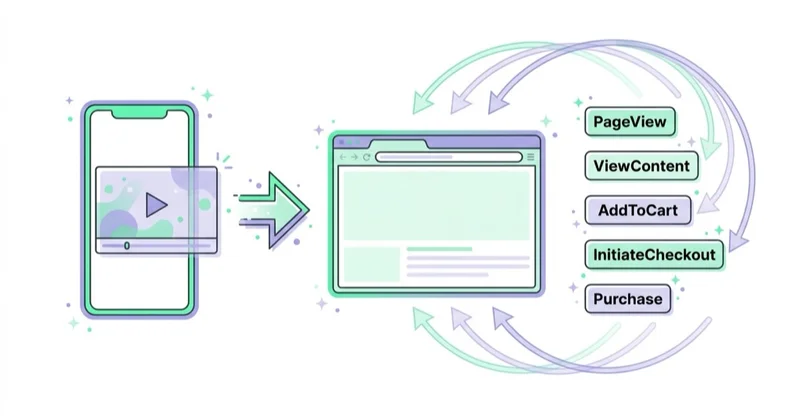
- Did users from TikTok reach the website?
- Which pages did they visit?
- Did they add products to cart?
- Did they complete a form, booking or purchase?
- Which campaigns, ad groups and ads contributed to valuable actions?
This is the foundation for reporting. Without it, a TikTok campaign may look successful because clicks are cheap, while the business receives low-quality traffic.
Optimisation
TikTok optimisation needs event signals. If the campaign objective is sales, leads or app-like website actions, the platform needs to see enough conversion events to learn which people are more likely to take those actions.
A campaign optimised only for traffic can find people likely to click. A campaign optimised toward a purchase or qualified lead can learn from a stronger signal, assuming tracking is accurate.
Remarketing and exclusions
Pixel events can feed audiences such as:
- all website visitors;
- product or content viewers;
- add-to-cart users;
- checkout starters;
- buyers;
- lead form submitters;
- people who visited specific pages.
These audiences can be used for remarketing, exclusions, sequential messaging and measurement. For example, a brand can exclude recent buyers from acquisition campaigns or show a different message to people who viewed pricing but did not enquire.
TikTok Pixel events: what should be tracked
The right event setup depends on the business model.
| Business model | Useful event examples |
|---|---|
| E-commerce | page view, product view, add to cart, checkout start, purchase, value and currency |
| Lead generation | page view, service page view, form start, form submit, qualified lead where possible |
| SaaS | landing page view, signup, trial start, demo request, subscription event |
| Local services | contact click, booking form, call click, appointment request, route or location page view |
| Education | course page view, application start, application submit, brochure download |
| Content or media | article view, newsletter signup, resource download, account registration |
E-commerce is the most obvious use case, but it is not the only one. A B2B or service business can still use Pixel data to understand content quality, lead intent and retargeting audiences.
TikTok Pixel vs Events API
| Area | TikTok Pixel | Events API |
|---|---|---|
| Where it sends from | Browser | Server or partner integration |
| Main role | Fast website event tracking and audience building | More resilient event sharing and server-side control |
| Sensitivity to browser limits | Higher | Lower |
| Setup difficulty | Lower | Medium to high, depending on method |
| Best use | Baseline measurement and retargeting | Stronger conversion data, deduplication and better data governance |
| Common risk | Missing or blocked browser events | Poor event matching, bad permissions or duplicate conversions |
TikTok says Events API can be used to set up web events with TikTok Pixel, and recommends using Events API as a second channel together with Pixel. That does not mean every small account needs a custom engineering project from day one. It means that serious performance accounts should plan for browser and server-side event sharing, especially when campaign decisions depend on conversion quality.
Why deduplication is important
When Pixel and Events API send the same conversion, TikTok needs to know that both signals refer to one event. Otherwise, reporting can count one purchase or lead twice.
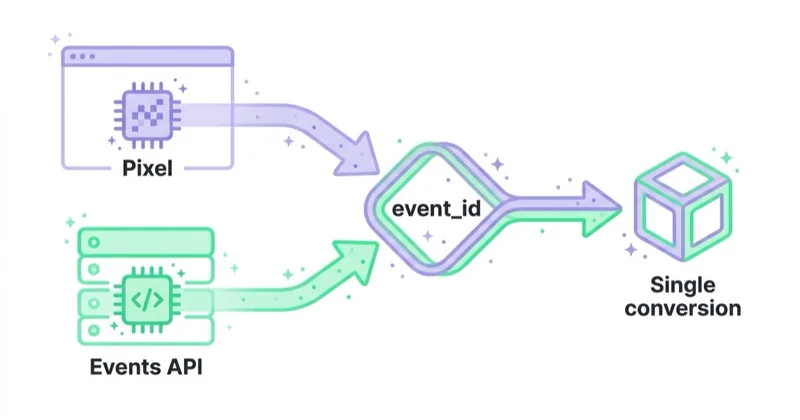
TikTok documentation says event deduplication is required when both Pixel and Events API share duplicate copies of the same conversion. TikTok also says event_id must be shared through both Pixel and Events API to make deduplication work.
Practical example:
- a user completes a purchase;
- the browser sends a Purchase event through Pixel;
- the server sends the same Purchase event through Events API;
- both events use the same event_id;
- TikTok recognises the overlap and records one conversion for measurement.
Deduplication should be tested before campaign budgets are scaled. If event_id differs between browser and server, reports may be inflated or inconsistent.
How to set up TikTok Pixel
1. Create the Pixel in TikTok Events Manager
Start in TikTok Ads Manager or Events Manager and create a Pixel for the website. Keep naming simple and consistent, especially if multiple markets, stores or domains are involved.
A common naming pattern:
- brand or client name;
- domain;
- market;
- environment if needed, such as production or staging.
2. Choose the installation method
There are several implementation paths:
| Method | Good fit |
|---|---|
| Partner integration | Shopify, WooCommerce or other supported commerce systems where a native connector exists |
| Google Tag Manager | Teams that already manage web tags through GTM |
| Direct code | Custom sites with developer support |
| Server-side Events API | Larger accounts, stricter data workflows or better event reliability |
| Data partner or CDP | Companies already using a customer data platform or tag-management partner |
TikTok official GTM documentation says there are two ways to set up TikTok Pixel with Google Tag Manager: install it in TikTok Events Manager, which is recommended, or install TikTok Pixel in the GTM account.
3. Install the base Pixel
The base Pixel should usually fire on all pages, unless consent or a specific data policy prevents it. If GTM is used, TikTok documentation describes steps such as adding the TikTok Pixel template, copying the base code from Events Manager, creating a tag and setting the trigger to all pages.
This gives TikTok the foundation for page-level activity, but it is not enough for conversion optimisation. Events must also be configured.
4. Configure events and parameters
Events should match the journey. For e-commerce, that usually means product view, add to cart, checkout and purchase. For services or lead generation, that may mean contact click, form start, form submit and qualified lead.
Useful parameters may include:
- value;
- currency;
- content or product IDs;
- content category;
- quantity;
- event_id;
- page URL;
- hashed match keys where allowed and appropriate.
Value and currency are especially important when revenue or ROAS is part of reporting. Product IDs are important when catalogue or shopping campaigns depend on item-level matching.
5. Add Events API where appropriate
Before implementing Events API, TikTok recommends working with marketing, legal and technical teams to determine the scope of data shared. The setup can use partner integrations, data partners, direct API integration or other supported methods.
Events API can be standalone, but in many performance setups it is used as a second channel together with Pixel. That hybrid setup needs deduplication.
6. Set up event deduplication
For overlapping events sent by both Pixel and Events API, use the same event_id on both sides. The event_id should be generated once for the conversion and passed consistently through browser and server flows.
Common mistakes:
- event_id generated separately in browser and server;
- purchase event uses event_id but add-to-cart does not;
- one channel sends Purchase while the other sends a different event name;
- server event arrives without the same value or currency;
- testing only browser events and forgetting server diagnostics.
7. Validate before scaling spend
Do not assume the Pixel works because the base code exists. Validate the full funnel.
Check:
- Pixel loads only when allowed by consent policy;
- page view fires on all required pages;
- events fire at the correct moment;
- purchase or lead events include value where relevant;
- event_id is present where deduplication is needed;
- browser and server events are not counted twice;
- TikTok diagnostics do not show critical errors;
- backend orders or leads broadly reconcile with platform reporting;
- test data does not pollute production reporting.
A good implementation is measured by event quality, not by the mere presence of a tag.
Consent, privacy and data quality
TikTok Pixel and Events API should be implemented with consent and privacy requirements in mind. This is especially important in the EU, UK and other regulated markets.
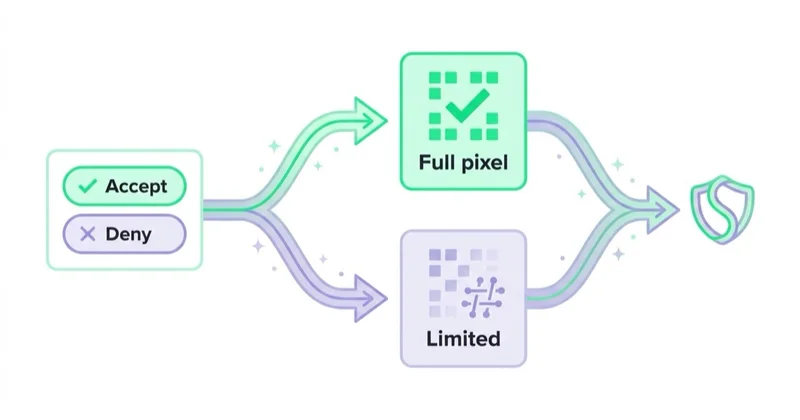
Practical principles:
- map which events fire before and after consent;
- avoid sending sensitive personal information;
- hash customer data where required by the implementation method;
- document what is shared and why;
- involve legal or privacy teams for Events API scope;
- keep privacy policy and cookie information aligned with the setup;
- respect user choices and applicable law.
Server-side tracking should not be treated as a way to bypass consent. It is a way to improve event reliability and control when used correctly.
TikTok Pixel for e-commerce
For e-commerce, Pixel quality affects campaign learning, catalogue performance, remarketing and ROAS reporting.
Important checks:
- product IDs in events match catalogue IDs;
- purchase value excludes or includes tax and shipping consistently with reporting rules;
- currency is sent correctly for every market;
- refunds and cancelled orders are considered in business reporting;
- checkout events fire once, not on every reload;
- thank-you pages cannot be refreshed to create duplicate purchases;
- consent mode and cookie banner behaviour are tested on mobile;
- events are tested across payment providers and external checkout flows.
The most common mistake is treating a purchase event as complete because it appears in Events Manager. A production-grade setup also checks values, IDs, deduplication, consent and reconciliation with real orders.
TikTok Pixel beyond e-commerce
For lead generation, services and B2B, TikTok Pixel should focus on meaningful intent, not only page views.
Possible event structure:
- service page view;
- pricing page view;
- form start;
- form submit;
- booked meeting;
- qualified lead imported later;
- newsletter or resource signup;
- call click or contact click.
If all form submissions are treated as equal, TikTok may optimise toward low-quality leads. Whenever possible, connect downstream quality signals through CRM or server-side workflows so optimisation and reporting reflect business value.
How we approach this at Space Ads
On its own the TikTok Pixel loses events — browser blockers and consent see to that — and on TikTok it stings twice, because Smart+ and automated bidding only work on a clean signal. So we never run the Pixel alone: it's wired to the Events API server-side, deduplicated, with event match quality (EMQ) under watch. While match quality is low we hold campaigns back from Smart+, since automation fed leaky data learns badly and burns budget. Measurement is the gate here, not an afterthought; without solid conversion tracking every "smart" campaign on TikTok is really just guessing. Pixel and Events API go in properly first, and only then does the automation switch on with something real to stand on.
FAQ
What is TikTok Pixel?
TikTok Pixel is a website code that shares website events with TikTok. It helps measure traffic, campaign performance and user actions after someone interacts with TikTok content or ads.
Is TikTok Pixel required for TikTok Ads?
It is not required for every awareness or traffic campaign, but it is essential for serious conversion, sales, lead generation and remarketing work. Without it, TikTok has limited information about what happens on the website.
What is the difference between TikTok Pixel and Events API?
Pixel sends events from the browser. Events API sends events from a server or partner integration. The strongest setup often uses both, with deduplication for overlapping events.
What is event deduplication?
Deduplication prevents the same conversion from being counted twice when it is sent through both Pixel and Events API. TikTok requires event_id on both channels when duplicate copies of the same event are shared.
Can TikTok Pixel be installed through Google Tag Manager?
Yes. TikTok has official instructions for installing TikTok Pixel through Google Tag Manager, including the TikTok Pixel template and base-code setup.
Does TikTok Pixel work only for online stores?
No. E-commerce is a common use case, but service businesses, B2B companies, SaaS companies, education providers and local businesses can also use Pixel events to measure leads, signups, bookings and high-intent website actions.
Should Events API be implemented immediately?
For small test campaigns, Pixel may be enough at the beginning. For larger budgets, stricter measurement needs or sales and lead campaigns, Events API should be planned early because it improves event reliability and control.
How should a TikTok Pixel setup be tested?
Test page views, events, values, event_id, consent behaviour, mobile checkout, payment flows and diagnostics. Compare TikTok reporting with backend sales or lead data before scaling budget.
Key takeaways
TikTok Pixel is the baseline measurement layer for website campaigns on TikTok. It helps the platform measure traffic, optimise ads, build audiences and report conversions. For modern performance work, the Pixel should not be treated as a one-time snippet. It should be part of a broader tracking architecture that includes Events API, deduplication, consent rules, diagnostics and business-data validation.
The strongest setup sends the right events, at the right moment, with the right parameters, under the right consent conditions. That is what turns TikTok Ads from traffic buying into measurable growth work.
Sources and further reading
- TikTok for Business Help Center - About TikTok Pixel
- TikTok for Business Help Center - How to get started with Events API
- TikTok for Business Help Center - About event deduplication
- TikTok for Business Help Center - How to set up TikTok Pixel in Google Tag Manager
- Space Ads - TikTok Ads service
Continue learning
- How to Increase TikTok Reach: Promote Your Account and Grow Followers
- What is PPC - the ultimate guide to pay-per-click advertising
- How to fix googleads.g.doubleclick.net and tpc.googlesyndication.com sources in Google Analytics
- Referrals from banks and payment intermediaries in Google Analytics - solution
Continue reading
TikTok Smart+: When to Hand Over the Campaign
TikTok Smart+ now supports full, partial and manual control across key campaign modules. Learn when automation has enough measurement, budget and creative signal to help—and how to test it without confusing attribution with business value.

How Much Does TikTok Advertising Cost? Budgets, Minimums and CPM in 2026
TikTok advertising has no fixed price, and its technical minimums do not define a useful test. Learn how to budget for media, creative and measurement, calculate qualified CPA and read Spark Ads or GMV Max without confusing attributed GMV with incremental profit.

TikTok GMV Max: What It Is, When to Use It and How to Measure It
TikTok GMV Max is an automated campaign type for TikTok Shop that optimizes toward gross merchandise value and target ROI. This guide explains Product and LIVE GMV Max, readiness requirements, creative inputs, automation risks, measurement and when manual control still matters.


































