
Customer Match in Google Ads lets advertisers use first-party customer data, such as emails, phone numbers and mailing-address data, to create audience lists in Google Ads. Google matches the uploaded data with signed-in Google users and lets advertisers reach, re-engage or exclude those audiences across supported Google surfaces. It is powerful, but it depends on list quality, consent, policy eligibility, correct hashing and realistic expectations about match rate.
TL;DR
- Customer Match uses first-party customer data. Lists can come from CRM, ecommerce, newsletter, offline sales or lead databases when collected and shared in line with policy and law.
- Google matches uploaded identifiers to Google users. Google documentation says private customer data can be hashed with SHA256 before upload, or Google Ads can hash it for plain-text uploads before sending it securely.
- It works for remarketing and exclusions. Use it to re-engage customers, exclude buyers, separate existing customers from prospecting or adjust messaging by lifecycle stage.
- It is not the old Similar Audiences feature. Customer Match can support first-party audience strategies and Demand Gen lookalike workflows where supported, but old Similar Audiences should not be treated as the same thing.
- Match rate is not performance. A high match rate means more records matched to Google users; it does not guarantee conversion performance.
- EEA consent matters. Google says advertisers using Customer Match for users in the EEA must adhere to the EU user consent policy and pass required consent signals.
- Account eligibility matters. Google Customer Match policy requires a good history of policy compliance and a good payment history.
What Customer Match is
Customer Match is a Google Ads feature that turns first-party customer data into audience segments. Instead of building audiences only from website visitors or app users, an advertiser can use known customer data collected through CRM, purchases, subscriptions, newsletter signups, offline sales or lead generation.
The list may include identifiers such as:
- email address;
- phone number;
- first name and last name;
- country;
- zip or postal code;
- address data where supported.
Google then compares the uploaded data with Google account data and creates an audience list from matched users. That list can be used for targeting, observation, exclusions or other audience workflows where Customer Match is supported.
How Customer Match works
The matching process is privacy-sensitive and follows a defined technical flow.
Google documentation explains that advertisers create a customer data file from information shared by customers. Private data such as email, phone, first name and last name can be hashed with SHA256 before upload, or Google Ads can hash it using the same SHA256 algorithm. Country and zip data are not hashed.
A simplified process:
- Collect first-party customer data with proper consent and policy basis.
- Clean and format the data.
- Upload the list through Google Ads, Google Ads API or an approved integration.
- Google matches hashed identifiers against Google users.
- Google creates a Customer Match audience segment from matched users.
- The advertiser uses the segment in campaigns where eligible.
Google also says the uploaded data file is deleted after matching and is not kept for other purposes when there is no match, aside from policy compliance checks.
What Customer Match is used for
Re-engaging known customers
Customer Match can help reach existing customers with messages based on their relationship with the brand.
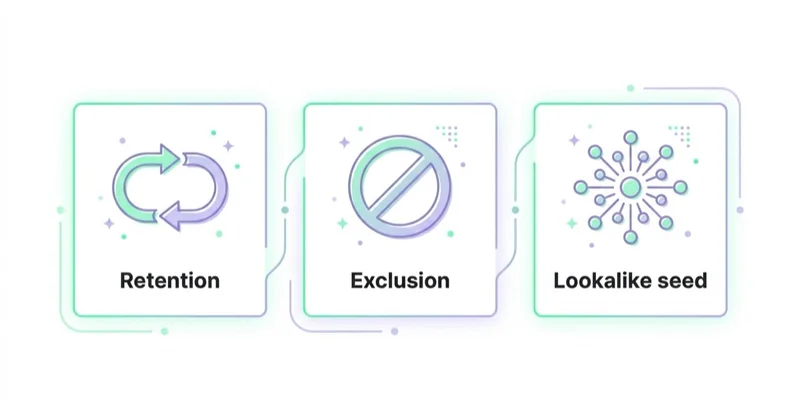
Examples:
- repeat purchase campaigns;
- loyalty offers;
- subscription renewal reminders;
- abandoned account or churn-prevention campaigns;
- product education for recent buyers;
- seasonal reactivation.
Excluding existing customers
Exclusions are often the most underrated use case. If a campaign is meant for new customers, it may be wasteful to show it to recent buyers or current subscribers.
Examples:
- exclude purchasers from first-purchase offers;
- exclude active customers from acquisition campaigns;
- exclude low-margin customer segments from high-cost prospecting;
- separate current customers from new-customer reporting.
Adjusting bidding and messaging
In Search and Shopping-style campaigns, Customer Match can help separate people who already know the brand from completely new users. That can support bid adjustments, audience observation, custom messaging or lifecycle-based structure where supported.
First-party signals for Demand Gen
Demand Gen can use first-party audience inputs and lookalike segments where supported. This should not be confused with the old Similar Audiences feature. The strategic idea is still useful: use high-quality first-party customer lists to help Google find or prioritise people who resemble valuable customers.
B2B and lead generation
For B2B, Customer Match can support account nurturing, webinar follow-up, sales-stage messaging and exclusions. The important point is list quality. A list of every low-intent ebook downloader is not the same as a list of qualified opportunities or closed-won customers.
Where Customer Match can be used
Google documentation describes Customer Match as a way to use online and offline data to reach and re-engage customers across Google properties such as Search, the Shopping tab, Gmail, YouTube and Display.
In practice, availability depends on campaign type, account eligibility, list size, policy, region, consent and current Google Ads interface support.
Useful planning rule:
- use Customer Match where the interface explicitly allows the segment;
- check list eligibility and size before building a campaign around it;
- avoid assuming every campaign type supports every Customer Match use case;
- check current Google Ads documentation for Demand Gen, Performance Max and any newer surfaces before launch.
Match rate: what it means and what it does not mean
Customer Match match rate is the percentage of uploaded customer data that matches Google users. Google says a high match rate suggests the data is correctly formatted and viable, but it does not guarantee list performance.
That distinction is important.
A high match rate can still perform poorly if:
- the list includes weak customers;
- the offer is irrelevant;
- the campaign objective is wrong;
- the landing page is poor;
- the audience is too small for delivery;
- the segment is used in the wrong funnel stage;
- consent or eligibility limits reduce usable reach.
A lower match rate may still be useful if the list contains high-value customers and strong intent.
How to improve Customer Match list quality
Better list quality usually matters more than list size alone.
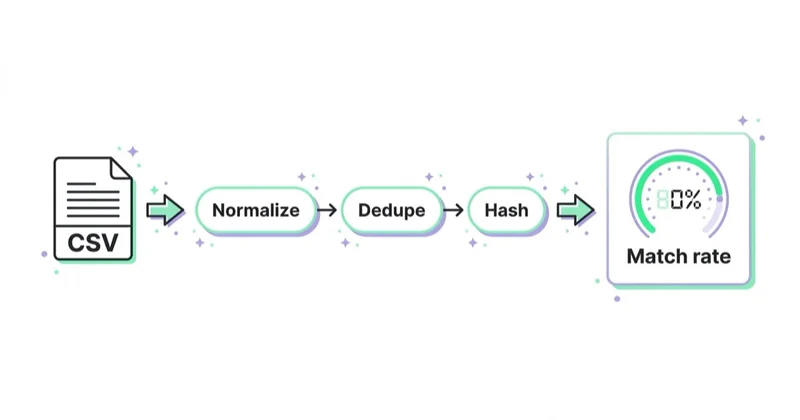
Practical improvements:
- remove duplicates;
- remove old or invalid records;
- use recent customer data;
- segment buyers, leads, subscribers and churned customers separately;
- include more than email where allowed, such as phone or address data;
- format names, phone numbers and countries correctly;
- keep country and zip un-hashed when uploading a hashed file;
- refresh lists regularly;
- remove users who no longer have valid consent or should be excluded;
- separate high-LTV customers from low-value customers.
The best Customer Match strategy often starts in CRM hygiene, not in Google Ads.
Consent, privacy and policy requirements
Customer Match uses personal data, so consent and policy compliance are central.
Google Customer Match policy says accounts or manager accounts must have a good policy-compliance history and a good payment history to access Customer Match. The policy also applies personalised advertising rules and prohibits use of sensitive interest categories.
For users in the EEA, Google says advertisers must adhere to the EU user consent policy to use Customer Match for ad personalisation. Google documentation explains that advertisers need to pass granted consent signals for EEA users and lists several ways to provide consent, including Google Ads API, partner and Audience Partner API workflows, manual Audience Manager upload and conversion-based customer lists for online first-party data ingestion.
Practical governance checklist:
- confirm that the data is first-party and permissioned;
- document the data source;
- maintain a privacy policy that covers advertising use;
- respect opt-outs and suppression lists;
- do not use sensitive categories;
- pass EEA consent signals where required;
- limit access to customer lists inside the ad account;
- keep upload and refresh processes documented.
Hashing is not a replacement for consent. Hashing protects transmission and matching, but the advertiser still needs a lawful and policy-compliant basis to use the data.
Customer Match for e-commerce
E-commerce use cases:
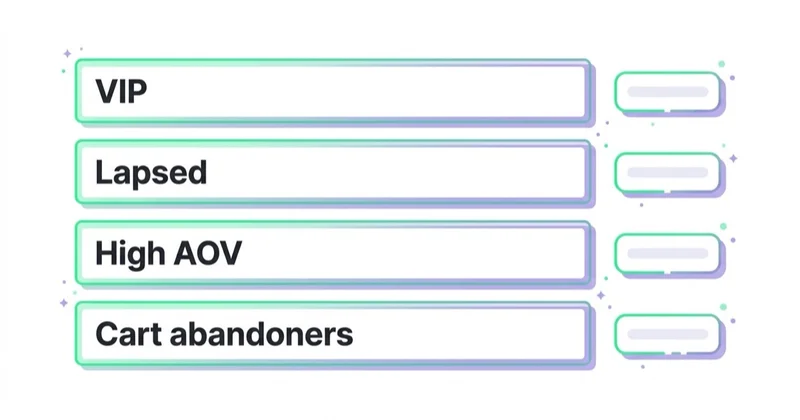
- exclude recent buyers from acquisition campaigns;
- target lapsed customers with return offers;
- separate high-LTV customers from one-time discount buyers;
- promote complementary products after purchase;
- build Demand Gen lookalike workflows from best customers where supported;
- create seasonal or category-based reactivation lists;
- suppress refunded or cancelled customers from value-based tests.
The strongest e-commerce lists are usually not all customers. They are segmented by recency, category, value, margin and purchase quality.
Customer Match for B2B and services
B2B Customer Match should be tied to pipeline stage.
Useful lists:
- qualified leads;
- webinar attendees;
- open opportunities;
- closed-won customers;
- churned customers;
- target account contacts;
- inactive CRM contacts;
- event or conference leads.
Avoid uploading every contact as one list. A cold newsletter subscriber and a sales-qualified opportunity should not receive the same message or be used as the same signal.
Customer Match versus website remarketing
| Area | Customer Match | Website remarketing |
|---|---|---|
| Data source | CRM or customer database | Website or app behaviour |
| Time horizon | Can include older customers | Usually based on recent visits or events |
| Dependence on tags | Less dependent on recent site visit | Depends on tag, cookies and consent |
| Best use | Known customers, lifecycle, exclusions | Recent intent, page behaviour, cart actions |
| Main risk | Data quality and consent | Tag quality, cookie limits and event accuracy |
The strongest setup usually uses both. Website remarketing captures recent behaviour. Customer Match brings known relationship data into the account.
How we approach this at Space Ads
As cookies lose their grip, first-party data turns into a durable advantage, and Customer Match is far more than "showing ads to existing customers". We put it to three uses. As exclusions, it keeps existing customers out of acquisition campaigns, so the budget buys new people rather than reaching the ones we already have. As value segments, a list of best customers is worth bidding harder on than random traffic. And as seed material, it feeds similar audiences. A list is only as good as its freshness, though — stale, un-refreshed databases match poorly, so we keep them current. Customer Match, for us, is a lever across the whole audience strategy, not a single remarketing feature.
Common mistakes
| Mistake | Why it hurts | Better approach |
|---|---|---|
| Uploading one generic master list | All customers are treated the same | Segment by lifecycle, value and intent |
| Ignoring consent requirements | Policy and legal risk | Confirm consent and pass signals where required |
| Expecting 100 percent match rate | Not all records match Google users | Use match rate as a diagnostic, not a promise |
| Using old or dirty data | Lower match rate and weaker performance | Clean, deduplicate and refresh lists |
| Forgetting exclusions | Wasted budget on current customers | Exclude buyers where acquisition is the goal |
| Confusing Customer Match with Similar Audiences | Old feature logic may be outdated | Use current Demand Gen and audience workflows |
| Uploading sensitive categories | Policy violation risk | Follow Customer Match and personalised ads policies |
| Judging only platform ROAS | Customer lists can shift attribution | Compare with CRM, revenue and margin data |
FAQ
What is Customer Match in Google Ads?
Customer Match is a Google Ads feature that uses first-party customer data to create audience lists for targeting, re-engagement, exclusions and supported audience workflows.
What data can be used for Customer Match?
Common identifiers include email, phone number, first name, last name, country and zip or postal code where supported. Data should be collected and shared in line with Google policies and applicable law.
Is Customer Match data hashed?
Google says private customer data can be hashed with SHA256 before upload, or Google Ads can hash plain-text private data on the computer before secure transfer. Country and zip data are not hashed.
Does a high match rate guarantee good results?
No. Google states that a high match rate suggests correct data and viability, but it does not guarantee list performance. The offer, campaign setup and customer quality still matter.
Can Customer Match be used for exclusions?
Yes. Exclusions are one of the most useful Customer Match applications, especially when campaigns should focus on new customers or avoid current subscribers and recent buyers.
Does Customer Match replace remarketing tags?
No. It complements tag-based remarketing. Customer Match uses CRM or customer data, while website remarketing uses recent site or app behaviour.
Is consent required for Customer Match in the EEA?
Yes. Google says advertisers using Customer Match for EEA users must adhere to the EU user consent policy and pass required consent signals for ad personalisation where applicable.
Who should use Customer Match?
It is most useful for advertisers with clean first-party data, enough list size, clear consent, lifecycle segmentation and a plan for using those audiences in remarketing, exclusions or acquisition signals.
Key takeaways
Customer Match is one of the most useful first-party data tools in Google Ads, but it is not a simple upload-and-profit feature. The result depends on data quality, segmentation, consent, account eligibility, audience strategy and campaign execution.
Use it to re-engage known customers, exclude buyers, separate lifecycle stages and strengthen supported first-party audience workflows. Keep lists clean, pass consent where required and judge performance with real business data, not match rate alone.
Sources and further reading
- Google Ads Help - About Customer Match
- Google Ads Help - About Customer Match match rates
- Google Ads Help - About the customer matching process
- Google Ads Help - How to provide consent for Customer Match
- Google Advertising Policies Help - Customer Match policy
- Space Ads - Google Ads service
Continue learning
Continue reading

Gemini Ad Formats: When the Ad Is Generated, Not Written
Google is testing and announcing Gemini-powered ad experiences across AI Mode and Search. Learn what each format does, what remains uncertain and how to prepare data, content and measurement.

Google Ads Experiments: Testing That Produces a Decision
A useful Google Ads experiment starts with a decision, an effect worth detecting and enough statistical power. Learn how to choose the test, split, metric and interpretation.

Google Ads Account Suspended: Why It Happens and What to Do
A Google Ads suspension requires evidence, not panic. Learn how suspension differs from a hold or pause, what the strike system covers and how to diagnose and appeal safely.


































