
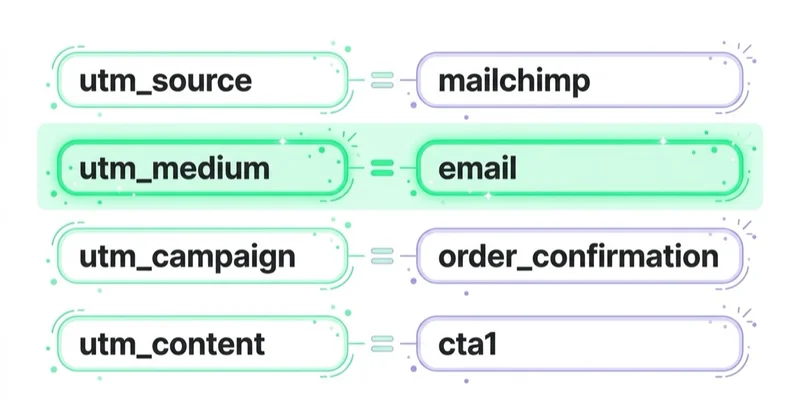
Transactional emails should be tagged with UTM parameters when clicks from those emails matter for analytics, customer journeys or CRM reporting. Use a consistent convention such as utm_medium=email, a separate source like utm_source=transactional or utm_source=system-email, a campaign value that names the email type, and utm_content to identify the specific link.
Transactional email tagging needs more discipline than newsletter tagging. These emails are triggered by user actions or account events, so they should not be mixed with promotional campaigns, acquisition reporting or newsletter traffic. The goal is to measure post-purchase, account, booking, invoice, delivery and support journeys without polluting marketing attribution.
TL;DR
- Transactional emails are triggered by user actions, such as order confirmations, invoices, shipping updates, account alerts or password resets.
- UTM tagging helps identify clicks from these emails in GA4, CRM and ecommerce reports.
- Use utm_medium=email so GA4 can classify the traffic as Email in default channel grouping.
- Separate transactional emails from newsletters and automation with a clear utm_source convention.
- Use utm_campaign for the email type, such as order-confirmation, shipping-update or invoice.
- Use utm_content when an email contains more than one link, such as header-logo, track-order-button or download-invoice.
- Abandoned cart emails are usually marketing or sales automation, not purely transactional emails.
- Do not collect or reuse data without consent and a valid basis. Email analytics should match privacy and consent rules.
What are transactional emails?
Transactional emails are messages sent because a user, customer or account triggered an event. They are not sent mainly as mass promotional campaigns.
Examples include:
- order confirmation;
- payment confirmation;
- shipping update;
- invoice;
- password reset;
- account alert;
- booking confirmation;
- appointment reminder;
- subscription renewal notice;
- ticket update;
- product access email;
- onboarding system message.
These emails often have very high open intent because users expect them. That is why their links can generate important return visits.
Why tag transactional emails with UTM parameters?
Without UTM parameters, clicks from transactional emails may be hard to recognise. They can appear as direct traffic, referral traffic, email platform traffic or unclear source values depending on the email client, redirect path and analytics setup.
UTM tagging helps answer questions such as:
- How many users return from order confirmation emails?
- Which link in the shipping email gets clicked?
- Do invoice emails bring users back to account pages?
- Does a post-purchase cross-sell link generate revenue?
- Do booking reminders reduce no-shows?
- Which account alert drives product reactivation?
- Which transactional templates create support load?
- Are transactional email clicks being misreported as direct?
This is not only an ecommerce topic. Transactional email tagging is useful for SaaS, marketplaces, apps, booking systems, education, events, subscriptions, local services and B2B lead workflows.
Recommended UTM convention
A simple convention is usually best:
| Parameter | Recommended role | Example |
|---|---|---|
| utm_source | Type or system source | transactional, system-email |
| utm_medium | Channel | |
| utm_campaign | Email template or flow | order-confirmation |
| utm_content | Specific link or CTA | track-order-button |
| utm_term | Usually not needed | leave empty unless there is a clear taxonomy |
Example for an order confirmation button:
Example for an invoice download link:
The exact values can differ by company, but the naming rules should be stable.
Do not change UTM names every time a template is edited. If the order confirmation email receives a new design, the campaign value can stay order-confirmation. Use utm_content or an internal version field when the goal is to compare button variants, not a new campaign name.
Why utm_medium should usually be email
GA4 default channel grouping recognises Email when source or medium matches email-style values such as email, e-mail, e_mail or e mail. The cleanest convention is to use utm_medium=email.
Avoid using medium values such as transactional, newsletter, lifecycle or automation if GA4 default channel grouping matters. Those are better used as source, campaign or a custom dimension, depending on the reporting model.
Recommended:
- utm_source=transactional
- utm_medium=email
- utm_campaign=order-confirmation
Risky:
- utm_source=email
- utm_medium=transactional
- utm_campaign=order-confirmation
The risky version may make channel reporting harder because medium no longer clearly says email.
Transactional vs newsletter vs automation
Do not put every email into one bucket.
| Email type | Character | Recommended source example |
|---|---|---|
| Order confirmation | transactional | transactional |
| Invoice | transactional | transactional |
| Password reset | transactional | transactional |
| Shipping update | transactional | transactional |
| Newsletter | marketing | newsletter |
| Sale email | marketing | newsletter or promo-email |
| Abandoned cart | sales automation | automation |
| Win-back flow | marketing automation | automation |
| Webinar follow-up | lifecycle or event automation | automation or webinar |
| Trial onboarding | lifecycle automation | lifecycle |
Abandoned cart is the important edge case. It is triggered by behaviour, but it usually has a sales or marketing purpose. In reporting, consent and UTM taxonomy, it should normally be separated from purely transactional messages.
For ecommerce recovery strategy, read Abandoned Carts: What They Are and How to Recover Them.
When not to tag or when to tag lightly
Not every link in every transactional email needs UTM parameters.
Be careful with:
- password reset links;
- magic login links;
- one-time payment links;
- security alerts;
- sensitive account actions;
- links that pass through authentication or payment gateways;
- links where URL length or redirect chains can create failure risk.
In those cases, the priority is reliability and user safety. If tracking is needed, test carefully and avoid adding anything that could break the flow. For sensitive account or security emails, internal event tracking after login may be safer than relying only on campaign parameters in the public URL.
The practical rule is simple: tag links that help understand customer journeys, but do not turn operational emails into fragile marketing experiments.
UTM examples by email type
| utm_source | utm_medium | utm_campaign | utm_content | |
|---|---|---|---|---|
| Order confirmation | transactional | order-confirmation | view-order-button | |
| Shipping update | transactional | shipping-update | tracking-link | |
| Invoice | transactional | invoice | download-invoice | |
| Password reset | transactional | password-reset | reset-password-button | |
| Booking confirmation | transactional | booking-confirmation | manage-booking | |
| Appointment reminder | transactional | appointment-reminder | reschedule-link | |
| Account alert | transactional | account-alert | login-button | |
| Subscription renewal | transactional | renewal-notice | manage-subscription | |
| Abandoned cart | automation | abandoned-cart | return-to-cart | |
| Post-purchase cross-sell | automation | post-purchase-cross-sell | recommended-product |
Keep everything lowercase. Avoid spaces. Use hyphens or underscores consistently, not both randomly.
How to implement UTM tagging
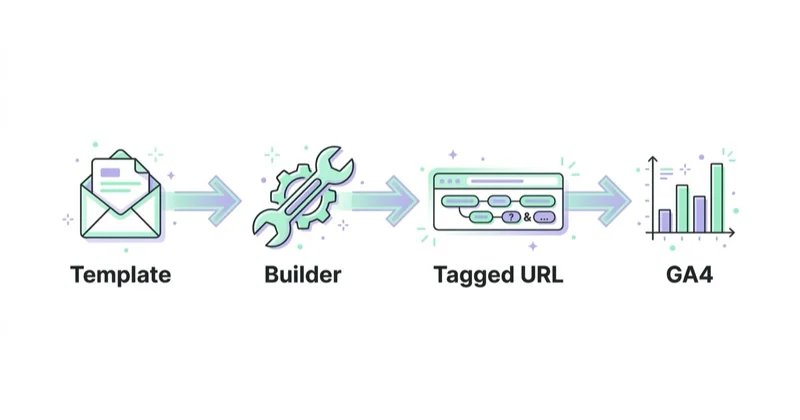
1. List all email templates
Create an inventory of:
- ecommerce system emails;
- account emails;
- billing emails;
- booking emails;
- SaaS lifecycle emails;
- CRM automation;
- support notifications;
- abandoned cart flows;
- post-purchase flows;
- invoice and payment emails.
Many teams discover hidden templates only after analytics becomes messy.
2. Classify each email
Mark each template as:
- transactional;
- marketing;
- lifecycle;
- sales automation;
- support;
- internal or operational.
This classification decides source and reporting logic.
3. Create a UTM dictionary
Document allowed values:
- allowed sources;
- allowed media;
- campaign naming pattern;
- content naming pattern;
- date or campaign period rules;
- owner of the taxonomy;
- examples.
The dictionary prevents duplicates such as order-confirmation, order_confirmation and orderconfirm.
A useful dictionary should include:
| Field | Rule | Example |
|---|---|---|
| Source | lowercase traffic family or system source | transactional |
| Medium | keep email for GA4 channel grouping | |
| Campaign | stable template or flow name | order-confirmation |
| Content | link or CTA position | track-order-button |
| Owner | team responsible for changes | ecommerce-ops |
| Notes | special rule or exception | do not tag reset token link |
This kind of dictionary becomes more valuable as the company adds new email tools, markets or templates.
4. Update templates
Add UTM parameters inside:
- ecommerce platform templates;
- ESP templates;
- CRM workflows;
- booking system emails;
- invoice software;
- SaaS product notification templates;
- support system templates.
Check every link, not only the main CTA.
5. Test redirects
Some systems redirect links for click tracking. Test whether UTM parameters survive:
- email platform click tracking;
- login redirects;
- checkout redirects;
- payment redirects;
- language redirects;
- app deep links;
- URL shorteners.
If UTMs disappear before the final page load, analytics will not receive them.
6. Validate in GA4 and CRM
After test clicks, check:
- realtime or debug reports;
- traffic acquisition reports after processing;
- source/medium;
- campaign;
- manual ad content dimensions;
- CRM hidden fields;
- ecommerce attribution;
- Looker Studio dashboards.
Do not assume parameters work because the URL looks correct in the email.
Attribution risks
Transactional emails can distort marketing reporting if they are tagged carelessly.
Common risks:
- a post-purchase click receives credit for a sale that already happened;
- a customer returning from an invoice email is counted as a new marketing session;
- abandoned cart emails are mixed with order confirmations;
- newsletter and transactional traffic share the same source;
- email links overwrite the original acquisition source too aggressively in downstream reports;
- CRM fields treat operational clicks as campaign engagement.
The solution is not to avoid tagging completely. The solution is to separate reporting views. Acquisition reports, retention reports and operational email reports should answer different questions.
For example, an order-confirmation click may be useful for customer experience analysis, but it should not be celebrated as a new acquisition campaign.
How to use utm_content
utm_content is useful when the same email contains multiple links.
Examples:
- logo-header;
- view-order-button;
- track-order-button;
- download-invoice;
- product-recommendation-1;
- support-link;
- footer-account-link;
- unsubscribe-link if tracked for internal analysis;
- app-store-button;
- manage-booking-link.
Without utm_content, GA4 may show the email template but not which link drove the visit.
Privacy and consent considerations
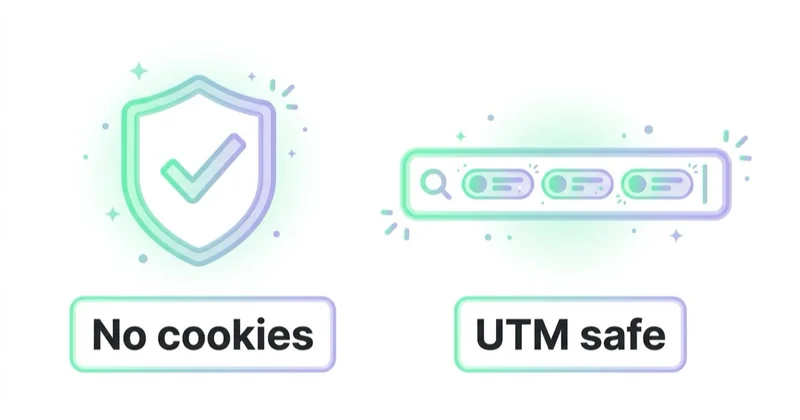
Transactional email analytics should respect privacy rules and consent setup.
Practical principles:
- explain tracking where required;
- do not use transactional consent as marketing consent;
- collect only data needed for the purpose;
- do not add users to marketing lists just because they clicked a transactional email;
- separate operational messages from promotional automation;
- define retention for exported click data;
- avoid sensitive personal data in URL parameters;
- do not put names, emails, order values or IDs that identify a person directly in UTM values.
UTM parameters can be stored in analytics, logs, CRM systems and browser history. Keep them descriptive but not personal.
How to report transactional email traffic
Useful reports include:
- sessions by source / medium;
- campaign by transactional email type;
- link clicks by utm_content;
- revenue from post-purchase links;
- account reactivation from lifecycle emails;
- invoice download journeys;
- booking management journeys;
- support deflection from help links;
- abandoned cart automation separately from transactional email.
In GA4, build explorations or Looker Studio reports that separate:
- newsletter;
- transactional;
- automation;
- lifecycle;
- support.
For dashboard work, read How to Use Google Data Studio (Looker Studio).
Recommended dashboard sections:
- transactional email sessions by template;
- top clicked links by utm_content;
- post-purchase revenue from cross-sell links;
- account or booking management clicks;
- password reset and security emails excluded from marketing views;
- automation traffic separated from transactional traffic;
- newsletter, lifecycle and transactional email compared only in a dedicated email report.
This keeps operational analysis useful without letting transactional email inflate campaign performance.
Examples by business model
Ecommerce
Useful templates:
- order confirmation;
- shipping update;
- invoice;
- return status;
- review request;
- post-purchase education;
- replenishment reminder if treated as lifecycle or automation.
The key separation is between operational order emails and sales automation. A shipping link is transactional. A recommended-product block inside a post-purchase email may need separate campaign and content naming.
SaaS and apps
Useful templates:
- account activation;
- password reset;
- trial onboarding;
- billing update;
- subscription renewal;
- product usage alert;
- workspace invitation.
Some of these are operational and some are lifecycle. The taxonomy should show the difference.
B2B lead generation
Useful templates:
- meeting confirmation;
- webinar access;
- proposal follow-up;
- document delivery;
- support ticket update;
- event reminder.
Here, CRM alignment matters. A clicked proposal link should be visible to sales, but it should not be confused with newsletter engagement.
How we approach this at Space Ads
Transactional emails — order confirmations, shipping updates — quietly send customers back to the site. If their links aren't tagged, that traffic lands in "direct" or as a self-referral from your own domain, stealing credit from the channels that actually drove the sale, and the wrong source swells in the reports. We tag transactional mail with a consistent convention so post-purchase clicks don't muddy the channel report. We also keep it separable from the newsletter rather than lumping the two together, because they tell two different stories. It's a small, unglamorous fix, but credible attribution is built from exactly these, and every budget decision rests on it.
Common mistakes
| Mistake | Why it hurts | Better approach |
|---|---|---|
| No UTMs on transactional emails | Clicks look like direct or unclear traffic | Tag important templates |
| Using utm_medium=transactional | GA4 channel reporting may be harder | Use utm_medium=email |
| Mixing newsletter and transactional | Email performance becomes unclear | Use separate source values |
| One UTM for all links | Link-level analysis is lost | Use utm_content |
| Tagging abandoned cart as transactional | Sales automation is misclassified | Use automation or lifecycle |
| Personal data in UTM values | Privacy and leakage risk | Use non-personal labels |
| Inconsistent casing | Duplicate rows in reports | Use lowercase taxonomy |
| Not testing redirects | Parameters disappear | Test final landing page URLs |
FAQ
Should transactional emails have UTM parameters?
Yes, when clicks from those emails matter for analytics, CRM, ecommerce reporting or product usage analysis. Not every purely operational link needs marketing-style reporting, but important templates should be tagged.
What should utm_medium be for transactional emails?
Use utm_medium=email. This keeps GA4 channel grouping clean and avoids treating transactional email as a non-email medium.
What should utm_source be?
Use a value that separates the traffic from newsletters, such as transactional, system-email or a documented email system name. Keep it consistent.
Should abandoned cart emails be transactional?
Usually no. Abandoned cart emails are typically sales or marketing automation. They should be separated from order confirmations, invoices and password resets.
Should every link use utm_content?
Use utm_content when an email has more than one important link. It helps identify whether users clicked the button, logo, tracking link, invoice link, product recommendation or footer link.
Can UTM parameters break attribution?
They can make reporting harder if used inconsistently. They are helpful when transactional, newsletter and automation traffic are clearly separated.
Should personal data be placed in UTM parameters?
No. Avoid names, email addresses, order IDs or other directly identifying values in UTM parameters. Use generic link and template labels.
Should password reset emails use UTM parameters?
Usually not on the sensitive reset link itself unless the flow has been tested carefully and the organisation has a clear reason. Security and reliability are more important than campaign reporting.
Should transactional email be counted as marketing performance?
Not by default. It can support customer experience, retention and post-purchase journeys, but it should be reported separately from acquisition campaigns and newsletters.
Conclusion
UTM tagging for transactional emails is about clarity. The goal is to see operational and post-action journeys without mixing them with newsletters, acquisition campaigns or sales automations.
Use utm_medium=email, separate transactional source values, campaign names based on email type and utm_content for link-level detail. Test redirects, validate GA4 and CRM reporting, and keep personal data out of URL parameters. Done well, transactional email tagging improves analytics without distorting marketing attribution.
Sources and further reading
- Google Analytics Help: URL builders - collect campaign data with custom URLs
- Google Analytics Campaign URL Builder
- Google Analytics Help: GA4 default channel group
- Google Analytics Help: Traffic-source dimensions, manual tagging and auto-tagging
- Google Analytics Help: Campaigns and traffic sources
Continue learning
- What Are UTM Parameters and How to Create UTM URLs for Google Analytics?
- What Is Ecommerce Analytics and Why Is It So Important?
- What Is a Google Analytics Audit and Is It Worth Doing?
- How to Use Google Data Studio (Looker Studio)
- Abandoned Carts: What They Are and How to Recover Them
- What Is Google Tag Manager and How to Use It?
Continue reading

What Is a Google Analytics Audit and Is It Worth Doing?
A Google Analytics audit checks whether GA4 data is reliable enough for marketing, product and budget decisions. This guide explains how to review events, ecommerce tracking, Consent Mode, referrals, UTMs, cross-domain journeys, reconciliation and reporting so fixes are prioritized by business impact.
Consent Mode v2: What It Is and How to Implement It
Consent Mode v2 passes analytics, advertising and personalisation consent signals to Google tags. Implementation depends on CMP mapping, timing, testing and diagnostics.
Referrals from banks and payment intermediaries in Google Analytics - solution
Payment gateway, bank and hosted checkout referrals can overwrite attribution in GA4. Learn how to fix them with unwanted referrals, cross-domain measurement, checkout testing and ecommerce validation.


































