
Facebook Lead Ads are Meta ads that collect contact information through forms on Facebook or Instagram. The most common version uses Instant Forms, which open inside the app and can pre-fill details such as name, email or phone number. They reduce friction and can generate many leads, but lead quality depends on form design, offer clarity, qualifying questions, CRM speed and whether Meta receives feedback about which leads actually become qualified opportunities or customers.
TL;DR
- Lead Ads collect leads inside Meta apps. People can submit information without leaving Facebook or Instagram.
- Instant Forms reduce friction. Pre-filled fields can increase form submissions, but low friction can also lower intent.
- Meta supports different lead form paths. Meta says lead ads with forms can open directly from the ad or let people click through to a form hosted on a website.
- More volume is not always better. A cheap lead that never answers the phone or never qualifies can be more expensive than a higher-CPL website lead.
- Lead quality is designed, not wished for. Use clear offers, qualifying questions, higher-intent forms, CRM integration and fast follow-up.
- CRM feedback matters. Meta guidance highlights optimisation for conversion leads and the use of Conversions API with CRM data for lead quality.
- Compliance matters. Meta Lead Ad Terms say advertisers are responsible for ensuring lead generation features comply with Meta terms, policies and applicable requirements.
What Facebook Lead Ads are
Facebook Lead Ads, often called Meta Lead Ads, are ads that collect user information through a form experience connected with Facebook or Instagram. The user clicks an ad, opens a form and submits information such as name, email, phone number or answers to custom questions.
The main advantage is reduced friction. The user does not need to wait for a landing page to load, type every contact detail manually or leave the app. That can increase the number of leads.
The main risk is also reduced friction. If submitting is too easy, the campaign may collect people who clicked impulsively, misunderstood the offer or are not ready for sales contact. That is why Lead Ads should be built as a lead-quality system, not only as a cheap lead source.
How Instant Forms work
An Instant Form opens inside Facebook or Instagram after a user clicks the ad. Some fields can be pre-filled from the user profile, depending on the field and available data. The user reviews the information, answers any custom questions and submits the form.
The lead can then be:
- downloaded manually from Meta;
- sent to a CRM through native integration;
- passed through a connector such as Zapier, Make or another integration platform;
- routed through webhooks or an internal lead-management system;
- used in reporting and follow-up workflows.
Manual download is rarely the best process. Speed matters in lead generation. If the sales team contacts a lead hours or days later, intent may already be gone.
Lead Ads vs website landing-page forms
| Area | Instant Form Lead Ads | Website landing-page form |
|---|---|---|
| User friction | Low | Higher |
| Page load risk | Low inside app | Depends on site speed |
| Data entry | Often pre-filled | Usually manual |
| Lead volume | Often higher | Often lower |
| Lead intent | Can be lower if form is too easy | Often higher because the user takes more steps |
| Brand education | Limited form space | Full landing-page control |
| Tracking | Meta lead event and CRM sync | Pixel, CAPI, analytics and backend tracking |
| Best fit | Simple offers, fast callbacks, early-funnel capture | Complex offers, high-ticket decisions, stronger qualification |
Neither path is universally better. Instant Forms can be excellent for fast lead capture. Landing pages can be better when the prospect needs more context before requesting contact.
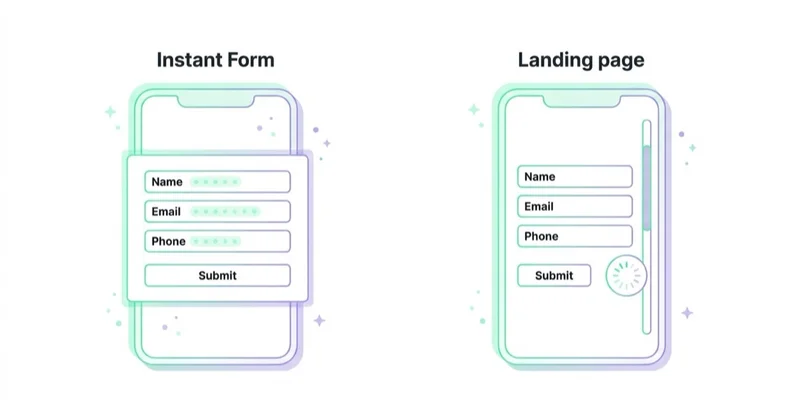
A serious account should test both if lead quality is uncertain.
Form intent: More Volume vs Higher Intent
Lead forms usually involve a trade-off between volume and quality.
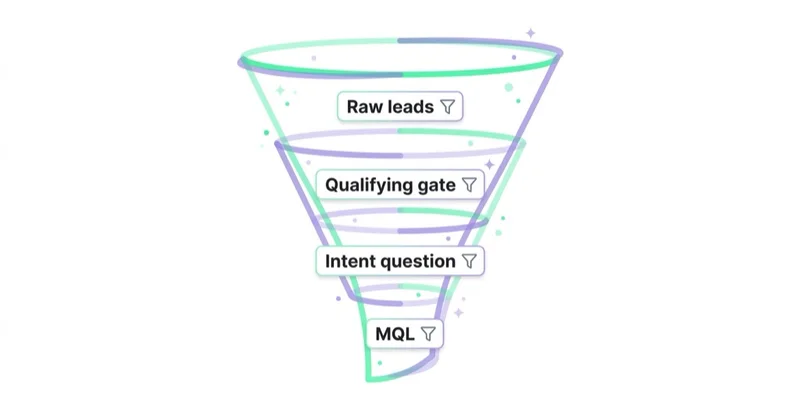
A low-friction form can produce more submissions at a lower cost per lead. A higher-intent form adds more steps or review, which can reduce accidental submissions and filter weaker prospects.
Use a higher-intent structure when:
- each lead is expensive to follow up;
- the sales team has limited capacity;
- the product or service has a high order value;
- accidental submissions are common;
- the CRM shows many unqualified leads;
- the business cares more about meetings, deals or revenue than raw CPL.
Use a lower-friction structure when:
- the offer is simple;
- the team can handle high volume;
- the goal is newsletter, sample, event or low-commitment interest;
- the business has automated qualification after submission;
- the first contact can happen almost immediately.
What to include in a strong Instant Form
A good form should make the offer clear and filter the worst-fit leads without creating unnecessary complexity.
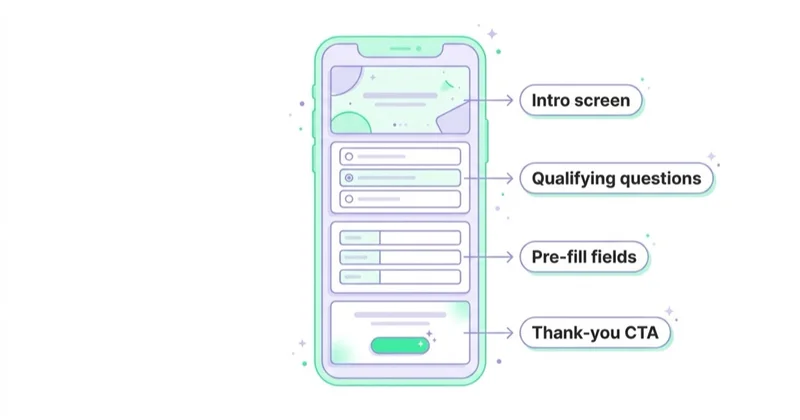
Useful elements:
- a direct headline that repeats the ad promise;
- a short explanation of what happens after submission;
- a privacy policy link;
- the minimum required contact fields;
- one to three qualifying questions;
- a custom thank-you screen with the next step;
- a CTA that matches the follow-up process;
- consent or disclosure language required by the business and market.
Qualifying questions should be practical. Do not ask questions only to make the form look serious. Ask questions that change routing, sales priority, offer fit or lead scoring.
Examples:
| Business type | Useful qualifying question |
|---|---|
| B2B service | What is the main problem to solve this quarter? |
| Real estate | What is the expected purchase timeline? |
| Education | Which course or programme is relevant? |
| Local service | Which city or service area applies? |
| SaaS | Which tool or process is currently used? |
| High-ticket ecommerce | What budget range or product category is relevant? |
How to improve lead quality
1. Make the ad promise specific
Weak promises create weak leads. If the ad says only "get a free consultation", the campaign may attract people who want free advice but have no buying intent.
Better promises explain:
- who the offer is for;
- what problem it solves;
- what the user receives;
- what happens after submission;
- any important limits, price context or eligibility criteria.
2. Use qualifying questions
A few questions can reduce poor-fit submissions. The goal is not to make the form long. The goal is to make the lead meaningful.
Good questions are easy to answer and useful for routing. Bad questions are vague, repetitive or irrelevant to sales.
3. Connect leads to CRM automatically
Leads should move to CRM or a sales workflow immediately. The CRM should store:
- campaign;
- ad set;
- ad;
- form name;
- submission time;
- answers;
- contact status;
- lead quality;
- sales stage;
- revenue outcome where available.
Without CRM data, the team may optimise toward the cheapest form submissions instead of the best customers.
4. Follow up fast
Lead Ads work best when the follow-up process is fast and clear. For many service and sales teams, the difference between a lead contacted in minutes and a lead contacted tomorrow can be the difference between a booked call and a lost opportunity.
Operational options:
- instant CRM notification;
- automatic email confirmation;
- SMS or WhatsApp workflow where legally allowed;
- calendar booking link on the thank-you screen;
- sales routing by territory or offer;
- lead scoring before human outreach.
5. Optimise for conversion leads when possible
Meta says lead ads can use a performance goal to maximise the number of conversion leads and that Conversions API can upload offline events when Facebook or Instagram generate leads.
This matters because Meta can learn from downstream quality signals, not only from form submissions. If CRM data identifies which leads become qualified, booked, sold or high value, that feedback can help the platform optimise toward better leads.
Setup process
1. Define the lead outcome
Before building the ad, decide what counts as success:
- form submission;
- qualified lead;
- booked call;
- attended appointment;
- quote request;
- opportunity;
- sale;
- revenue;
- customer lifetime value.
The campaign should be judged against the real outcome, not only Meta lead count.
2. Choose form or website path
Use Instant Forms when speed and low friction are valuable. Use a website form when the prospect needs education, proof, pricing context or a more controlled decision path.
For expensive or complex offers, test both. Instant Forms may deliver volume. Website forms may deliver higher intent.
3. Build the form
Include:
- intro or context where useful;
- fields required by sales;
- qualifying questions;
- privacy policy;
- consent and disclaimers;
- thank-you screen;
- next-step CTA.
Keep forms short enough to complete, but not so easy that low-intent leads flood the CRM.
4. Connect CRM and notifications
Test the integration before launch. Confirm every field arrives correctly and sales receives the information needed to act.
Check:
- field mapping;
- timestamp;
- source campaign;
- answers;
- consent fields;
- duplicate handling;
- assignment rules;
- notification speed;
- failed-sync alerts.
5. Launch with quality thresholds
Do not scale because CPL is cheap on day one. Define quality thresholds first.
Examples:
- minimum contact rate;
- minimum qualified-lead rate;
- maximum cost per qualified lead;
- minimum booked-call rate;
- minimum close rate;
- acceptable spam or invalid lead rate;
- sales feedback score.
6. Feed quality back into Meta
When possible, pass lead outcomes back through Conversions API or an approved CRM integration. This closes the loop between Meta delivery and real lead quality.
Best-fit use cases
Facebook Lead Ads can work well for:
- local services;
- real estate;
- education and courses;
- clinics and private services where policy allows;
- B2B audits or consultations;
- insurance and finance where compliant;
- events and webinars;
- recruitment;
- demo requests;
- quote requests;
- newsletter or resource offers.
They are weaker when the offer is unclear, sales response is slow, price context is hidden or qualification happens only after many poor-fit leads enter the CRM.
How we approach this at Space Ads
Lead Ads are so easy to set up that they'll happily pour out cheap leads — and "cheap lead" is not the same as "good lead". We don't optimise for raw submission count. A qualifying question or two on the form adds just enough friction to filter the casual clicks and keep the people who actually mean it. Leads sync to the CRM instantly, because response speed often decides the outcome: reaching someone in minutes rather than hours changes everything. The decisive part comes next — whether the lead proved valuable, whether they bought, fed back to Meta through offline conversions. That teaches the system to find buyers, not form-fillers; without the loop, the campaign optimises for a number that looks good in the panel and means nothing.
Common mistakes
| Mistake | Why it hurts | Better approach |
|---|---|---|
| Optimising only for CPL | Cheap leads can be low quality | Measure qualified leads and sales outcomes |
| No CRM integration | Follow-up is slow and data is lost | Sync leads automatically |
| Too few qualifying questions | Accidental or weak leads enter sales | Add 1-3 useful questions |
| Too many fields | Good prospects abandon the form | Ask only what changes follow-up |
| Vague ad promise | People submit without understanding the offer | Make the offer specific |
| Slow follow-up | Intent decays quickly | Contact or route leads immediately |
| No privacy policy or consent logic | Compliance risk | Align with Meta terms and local law |
| No feedback loop to Meta | Platform optimises for submissions only | Upload CRM quality events where possible |
FAQ
What are Facebook Lead Ads?
Facebook Lead Ads are Meta ads that collect contact information through forms connected with Facebook or Instagram. The most common format uses Instant Forms that open inside the app.
Do Facebook Lead Ads require a landing page?
No. Instant Forms can collect leads without sending users to a website. Meta also supports lead campaigns that send people to a form hosted on a website.
Why are Lead Ads sometimes low quality?
Low friction can create accidental or low-intent submissions. Lead quality usually improves when the offer is specific, the form includes qualifying questions, CRM follow-up is fast and Meta receives feedback about qualified leads.
What is a higher-intent Instant Form?
A higher-intent form adds more confirmation or review friction before submission. It can reduce volume but often improves quality by filtering accidental leads.
How should Lead Ads be connected to CRM?
Use native CRM integration, webhooks, a connector platform or an internal lead-routing system. The goal is to send leads to sales immediately with campaign source, answers and consent data.
Can Meta optimise for qualified leads?
Yes, where the setup supports it. Meta describes a performance goal for maximising conversion leads and the use of Conversions API to upload offline events from lead generation workflows.
Are Lead Ads good for B2B?
They can be, especially for audits, consultations, webinars, demos and problem-led offers. B2B campaigns should qualify leads carefully and measure pipeline quality, not only form volume.
Are Lead Ads better than landing pages?
Not always. Instant Forms reduce friction and often increase volume. Landing pages can provide more context and may produce higher-intent leads. The best choice depends on offer complexity and sales process.
Key takeaways
Facebook Lead Ads are useful because they remove friction from lead capture. That same convenience can also create low-quality leads if the campaign is built only around cheap submissions.
A strong setup defines the real lead outcome, uses the right form type, asks useful qualifying questions, syncs leads to CRM instantly, follows up fast and feeds qualified-lead data back into Meta where possible. The goal is not more leads at any cost. The goal is more leads that sales can actually convert.
Sources and further reading
- Meta for Business - Lead ads with forms
- Meta - Lead Ad Terms
- Meta Business Help - Lead ads help center
- Meta Business Help - About Instant Forms
- Space Ads - Meta Ads service
Continue learning
Continue reading

The Webinar Funnel: From Ad to Sale
A webinar does not create pipeline because people registered. Learn how to design the offer, attendance, live experience, follow-up and measurement as one conversion system.

Value-Based Bidding for Lead Gen: Closing the Loop from CRM
A form submission tells Google Ads that a lead exists—not whether sales accepted it or revenue followed. Learn how to return CRM outcomes and values without corrupting the bidding signal.
How to Choose a Lead Generation Agency (Questions to Ask, Red Flags)
A practical framework for comparing lead generation agencies: scope, measurement, pricing, account ownership, security, contracts and the questions worth asking before you sign.


































