
Google Analytics 4, usually called GA4, is Google's current analytics standard for measuring user behavior across websites and apps. It replaced Universal Analytics and uses an event-based data model instead of the older session-and-pageview model.
That change matters because modern measurement is no longer only about counting visits. Businesses need to measure purchases, leads, form submissions, app actions, subscriptions, engagement, consent behavior, advertising signals and customer journeys across multiple touchpoints.
GA4 is not perfect and it is not a one-click analytics solution. Its value depends on the implementation: event map, naming conventions, consent setup, ecommerce events, Google Ads integration, BigQuery export, reporting and documentation.
TL;DR
- GA4 is the current Google Analytics property type and has replaced Universal Analytics.
- Standard Universal Analytics properties stopped processing new hits on July 1, 2023; Universal Analytics 360 received a one-time extension ending July 1, 2024.
- GA4 uses event-based data, so page views, purchases, leads, scrolls, forms and app actions are all events with parameters.
- Key events should represent meaningful business actions, not every minor interaction.
- Consent Mode, Google tag setup, GA4 events and ad platform integrations should be planned together.
- Ecommerce needs proper GA4 ecommerce events such as view_item, add_to_cart, begin_checkout and purchase.
- B2B, SaaS and service businesses need a lead and lifecycle event model, not an ecommerce model forced onto every page.
- BigQuery Export gives access to raw event data, but it requires data ownership, cost awareness and analytics maturity.
What is Google Analytics 4?
Google Analytics 4 is Google's next-generation measurement solution. It collects event-based data from websites and apps and can connect that data with Google Ads, Search Console, BigQuery and other reporting tools.
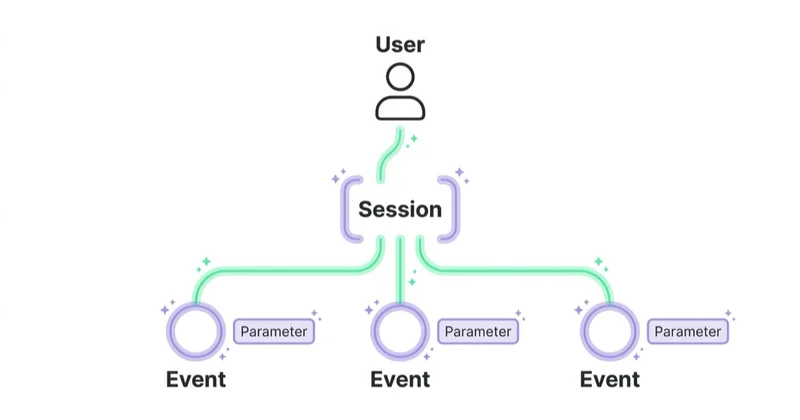
In GA4, events are the foundation. A page view is an event. A purchase is an event. A form submission can be an event. A video interaction, sign-up, trial activation or app action can also be an event.
Each event can include parameters. For example:
- purchase value;
- currency;
- item ID;
- item category;
- form type;
- lead type;
- subscription plan;
- content category;
- checkout step;
- traffic source;
- user property.
This creates a more flexible model than Universal Analytics, but it also requires more discipline. If events are named badly, duplicated or disconnected from business goals, GA4 reports become confusing quickly.
GA4 vs Universal Analytics
GA4 is not just a newer interface for Universal Analytics. It is a different measurement model.
| Area | Universal Analytics | Google Analytics 4 |
|---|---|---|
| Data model | Sessions and pageviews | Events and parameters |
| Web and app | Usually separate setups | One property can include web and app streams |
| Conversions | Goals and ecommerce transactions | Key events and ecommerce events |
| Reporting | More predefined session reports | Reports, Explorations and event-based analysis |
| Privacy | More cookie/session-oriented | Consent Mode, modeling and privacy controls |
| Raw export | Mainly GA360 | GA4 BigQuery Export available |
| Status | Replaced | Current Google Analytics standard |
Trying to rebuild Universal Analytics one-to-one is a common mistake. A better GA4 migration starts with business questions:
- Which actions matter?
- Which events should be key events?
- Which parameters are required?
- Which data should be sent to Google Ads?
- Which reports will be used by marketing, sales and leadership?
- Which consent states should change tag behavior?
Why GA4 is important now
Universal Analytics is no longer the live measurement standard
Universal Analytics is now historical. Standard Universal Analytics properties stopped processing new data on July 1, 2023. Universal Analytics 360 properties with eligible orders received a one-time extension that ended on July 1, 2024.
That means new measurement projects should be designed around GA4, Google Tag Manager, Consent Mode, server-side considerations, business event mapping and advertising integrations.
User journeys are less linear
A user can discover a brand on social media, search on Google, read an article, return through email, compare options, click a remarketing ad and convert later. GA4 does not solve every attribution problem, but it provides a more flexible event model for analyzing behavior across these interactions.
Privacy and consent affect measurement
Cookie consent, browser restrictions and privacy expectations have changed analytics. GA4 works with Consent Mode and Google tag behavior, but implementation details matter. A cookie banner is not the same thing as correctly configured consent signaling.
For a dedicated guide, see Consent Mode v2 and how to implement it.
Ad platforms need better signals
Google Ads, Performance Max, Demand Gen and Search campaigns perform better when conversion signals represent real business value. If GA4 imports weak events into Google Ads, bidding may optimize toward the wrong behavior.
For Google Ads measurement, see enhanced conversions in Google Ads.
Key GA4 concepts
Event
An event is a user interaction or system action. Examples include page_view, scroll, form_submit, generate_lead, add_to_cart, begin_checkout, purchase and sign_up.
Event parameter
A parameter gives context to an event. A generate_lead event may include form_type or service_category. A purchase event should include value, currency and item data.
Key event
A key event is an event marked as important for the business. In GA4, this term replaced the older "conversion" naming in the GA4 interface, while ad platforms still use conversion language.
Not every event should become a key event. Key events should represent meaningful actions such as purchases, qualified leads, trial starts or bookings.
User property
A user property describes a user or account state, such as customer type, subscription tier, logged-in status or loyalty level. It should be used carefully and with privacy rules in mind.
Data stream
A data stream is a source of data within a GA4 property, such as a website, iOS app or Android app.
Exploration
Explorations are GA4's advanced analysis workspace. They are useful for funnels, paths, segments and custom analysis that standard reports do not answer.
BigQuery Export
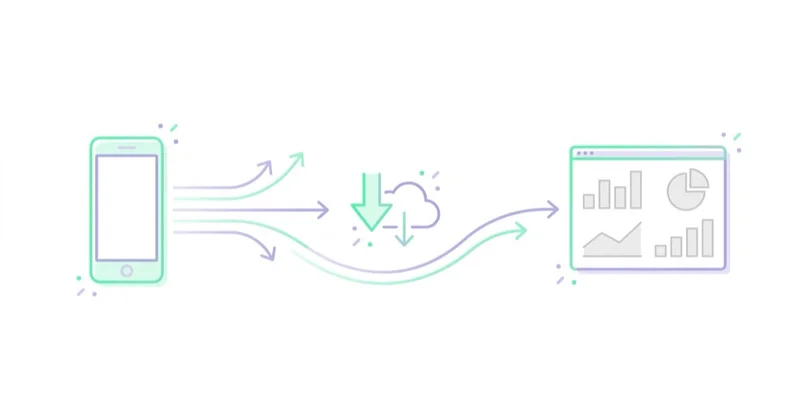
BigQuery Export sends raw GA4 event data to BigQuery. This enables deeper analysis, longer-term data ownership and joins with CRM, media cost or warehouse data.
Benefits of GA4
Flexible event model
GA4 can support ecommerce, lead generation, SaaS, apps, content websites and hybrid journeys through one event-based model. The flexibility is useful when the implementation is planned.
Web and app measurement
If a business has both a website and app, GA4 can help analyze user activity across data streams in one property.
Google Ads integration
GA4 can share audiences and key events with Google Ads. This supports remarketing, bidding and campaign analysis when events are trustworthy.
Explorations
Explorations allow deeper analysis of funnels, paths and user segments. They are especially useful for diagnosing checkout drops, lead funnel friction and content journeys.
BigQuery access
Raw event export is valuable for companies that need data modeling, LTV analysis, cohort analysis, attribution experiments, CRM joins or custom reporting.
Privacy controls and modeling
GA4 includes privacy-oriented features such as consent-related behavior and modeling capabilities. These are not a substitute for legal compliance, but they are part of modern measurement architecture.
What a good GA4 implementation includes
| Area | Good implementation | Common risk |
|---|---|---|
| Event map | Events reflect real business actions | Random event names with no owner |
| Key events | Only meaningful actions are marked | Too many soft events treated as conversions |
| Ecommerce | Correct items, value, currency and transaction IDs | Purchase only, missing funnel steps |
| Lead generation | Lead events include type and quality context | Every form submission treated equally |
| Consent | Tags react to consent states | Banner exists but tags ignore consent |
| Google Ads | Only useful events are imported | Bidding optimizes toward low-value signals |
| BigQuery | Export used where raw data is needed | No export despite advanced reporting needs |
| Documentation | Event definitions are documented | Nobody knows why events exist |
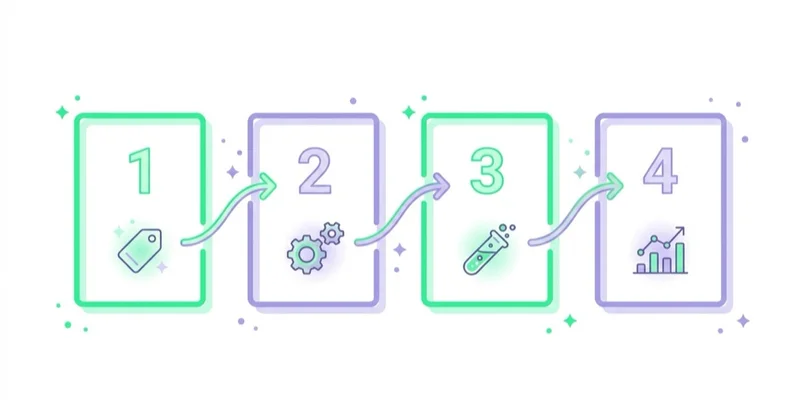
How to implement GA4 step by step
1. Define measurement goals
List the business actions that matter:
- purchase;
- qualified lead;
- booking;
- trial start;
- account registration;
- subscription;
- app activation;
- phone click;
- download;
- content engagement.
Separate main goals from diagnostic micro-events.
2. Create an event map
For each event, define:
- event name;
- trigger condition;
- parameters;
- data source;
- whether it is a key event;
- where it will be used;
- owner;
- test method.
This prevents future chaos.
3. Implement with Google Tag Manager or code
Many sites use Google Tag Manager. Ecommerce, apps and complex sites often need developer support. Server-side tagging can be useful at higher maturity, but it should not be used to hide poor event planning.
4. Configure consent
Consent behavior should be tested before and after user choices. Review analytics_storage, ad_storage, ad_user_data and ad_personalization where relevant.
5. Connect integrations
Useful integrations include:
- Google Ads;
- Search Console;
- BigQuery;
- Looker Studio;
- CRM or offline conversion processes;
- ecommerce platform or product data where relevant.
6. Test events
Use DebugView, Realtime reports, Tag Assistant and controlled test conversions. Confirm that events fire once, parameters are present, transaction IDs are unique and consent behavior works.
7. Build reporting
Do not rely only on default reports. Build reporting around business questions:
- Which channels bring qualified traffic?
- Where does the funnel drop?
- Which campaigns generate valuable leads?
- Which products or categories drive margin?
- Which content supports conversion?
- How do new and returning users behave?
GA4 for ecommerce
Ecommerce needs proper event structure.
Important events include:
- view_item;
- view_item_list;
- select_item;
- add_to_cart;
- view_cart;
- begin_checkout;
- add_shipping_info;
- add_payment_info;
- purchase;
- refund where relevant.
Parameters should include value, currency, item_id, item_name, item_category and transaction_id where applicable.
Without this structure, campaigns may optimize only toward final purchases while losing visibility into product page, cart and checkout friction.
GA4 for services and B2B
Service and B2B sites should not force ecommerce logic into the measurement plan.
Useful events include:
- generate_lead;
- form_start;
- form_submit;
- phone_click;
- meeting_booked;
- file_download;
- pricing_view;
- case_study_view;
- webinar_signup;
- qualified_lead_import;
- opportunity_created.
The biggest improvement often comes from connecting CRM quality back to marketing. Raw leads are not enough. Qualified pipeline matters more.
GA4 for SaaS and apps
SaaS and app measurement should go beyond registration.
Useful events:
- sign_up;
- login;
- trial_start;
- onboarding_step_complete;
- key_feature_use;
- subscription_start;
- upgrade;
- cancellation;
- renewal;
- invite_sent;
- activation milestone.
For SaaS, activation and retention can be more meaningful than the first visit.
Common GA4 mistakes
- Recreating Universal Analytics reports instead of designing an event model.
- Marking too many soft events as key events.
- Importing weak GA4 events into Google Ads.
- Missing ecommerce parameters.
- Duplicate purchase or form events.
- No transaction ID validation.
- No consent-state testing.
- No documentation.
- Treating GA4 as the only source of truth for revenue, CRM and ad platform data.
- Ignoring BigQuery until historical raw data is needed.
- Building dashboards before fixing event quality.
30-day GA4 cleanup plan
Week 1: audit
Review property settings, data streams, tags, events, key events, consent setup, ecommerce events, Google Ads links and reporting problems.
Week 2: rebuild the event map
Define business events, parameters, naming, owners and key-event status. Remove or deprecate events that do not support decisions.
Week 3: implement and test
Update GTM or code, test in DebugView and Tag Assistant, check duplicates, test consent behavior and confirm ecommerce or lead parameters.
Week 4: reporting and activation
Connect Google Ads, Search Console and BigQuery where needed. Build reporting for marketing, sales and leadership. Decide which events should be imported into ad platforms.
How we approach this at Space Ads
At Space Ads, we implement GA4 from the business event map, not from the default report menu. We first define which actions should influence decisions in marketing, sales and product: purchases, qualified leads, bookings, trials, calls, cart steps or lifecycle events. Then we decide which events are diagnostic, which become key events and which should be sent to Google Ads. Consent behavior, ecommerce parameters, transaction IDs, CRM feedback and UTM rules are tested before dashboards are treated as reliable. GA4 is valuable when it gives teams a shared measurement language; if nobody can explain what an event means or how it should be used, the setup still needs work.
FAQ
Does Universal Analytics still work?
Not as a live measurement platform. Standard Universal Analytics properties stopped processing new data on July 1, 2023, and eligible Universal Analytics 360 properties had a one-time extension ending July 1, 2024.
Is GA4 free?
Standard GA4 is free. Costs can appear when using Google Cloud services such as BigQuery, depending on data storage, queries and export usage.
Is GA4 only for ecommerce?
No. GA4 supports ecommerce, lead generation, services, B2B, SaaS, apps, content sites and hybrid models. The event map should match the business model.
Should every event be a key event?
No. Key events should represent meaningful business actions. Too many key events can make reporting and ad optimization less useful.
Why do GA4 and Google Ads show different numbers?
They use different attribution, reporting logic, conversion windows, consent behavior and data processing. Differences are normal. The goal is to understand the reason and use each platform consistently.
Is BigQuery Export necessary?
Not for every business. It is valuable when raw event data, longer retention, CRM joins, advanced analysis or data warehouse ownership are needed.
Conclusion
GA4 is the current Google Analytics standard, but its value depends on implementation quality. The key work is not creating a property. The key work is defining meaningful events, configuring consent, testing data quality, connecting the right integrations and building reports that support decisions.
The best GA4 setups are understandable, documented and connected to business outcomes. They measure what matters across ecommerce, lead generation, SaaS, services and content instead of treating every website like the same template.
Sources and further reading
- Google Analytics Help: GA4 has replaced Universal Analytics
- Google Analytics Help: Introducing Google Analytics 4
- Google Analytics Help: Consent types
- Google Analytics Help: BigQuery Export
- Google Analytics Help: Set up BigQuery Export
Continue learning
Continue reading

Source / Medium and Traffic Sources in GA4, Explained
Source and medium describe traffic origin in GA4, but their meaning changes with user, session and event scope. Learn how UTMs, auto-tagging, channel groups, Direct, Unassigned and cross-domain tracking work.
Google Analytics MCP Server: Connect AI to GA4 Safely
Google Analytics MCP is Google's official read-only server for connecting AI to GA4 through the Admin API and Data API. This guide explains when it speeds up ad-hoc analysis, how to verify model answers and why clean events, UTM discipline and consent-aware measurement still decide whether the output is usable.

What Are UTM Parameters and How to Create UTM URLs for Google Analytics?
UTM parameters help Google Analytics identify campaign traffic from email, social, partners, QR codes and other external links when they are used with a clear naming convention.


































