
Google Shopping campaigns work effectively when product data, Merchant Center health, campaign structure, bidding, margins, landing pages and measurement are managed together. Shopping is not driven by keywords in the same way as Search ads. Google uses product data from Merchant Center to decide when and where products are eligible to appear.
For ecommerce teams, the biggest Google Shopping gains usually come from feed quality and business segmentation, not from changing one campaign setting. Titles, images, GTINs, prices, availability, shipping, product pages, margin tiers and conversion tracking all influence whether Shopping can scale profitably.
TL;DR
- Google Shopping uses Merchant Center product data, not ordinary Search keyword lists, to match products with relevant queries and placements.
- Retailers can use Standard Shopping or Performance Max with a Merchant Center feed to promote products.
- Performance Max gives broader Google inventory and more automation, while Standard Shopping gives more product-level control.
- Feed quality is the foundation: titles, images, prices, availability, GTINs, categories, shipping and landing page consistency matter.
- Merchant Center diagnostics should be checked before scaling spend. Disapproved products and warnings can block revenue.
- Free listings can show eligible products at no cost across Google surfaces, but eligibility does not guarantee visibility.
- Shopping performance should be measured by profit and product contribution, not only revenue or blended ROAS.
- The best structure follows business logic: margin, category, bestseller status, availability, seasonality, price competitiveness and strategic priority.
What is Google Shopping?
Google Shopping is the product advertising and product discovery ecosystem connected to Google Merchant Center and Google Ads. A Shopping ad can show product information such as image, title, price, store name, availability and other product details.
Google explains that Shopping ads use product data from Merchant Center rather than keywords to decide how and where ads show. That difference changes the optimisation process. In Search, a keyword list is the main control layer. In Shopping, the product feed is the main control layer.
Shopping can appear through:
- Standard Shopping campaigns;
- Performance Max campaigns with a Merchant Center feed;
- free product listings;
- local inventory ads and local listings where eligible;
- product surfaces across Google depending on country, eligibility and setup.
For a basic introduction, read Google PLA / Shopping Campaigns in Google Ads: What to Know.
How Google Shopping works
The simplified flow is:
- Products are added to Google Merchant Center.
- Product data is submitted through a feed, API, ecommerce platform integration or Merchant Center tools.
- Merchant Center checks product data, policies, prices, availability, shipping and other requirements.
- Google Ads is linked with Merchant Center.
- Campaigns use the product data to create Shopping-style ads and match products to relevant opportunities.
- Performance data feeds back into optimisation.
The campaign cannot outperform the product system for long. If prices are wrong, products are disapproved, images are poor or availability is stale, bidding cannot fix the foundation.
Merchant Center health comes first
Before optimising bids, check Merchant Center.
Important checks:
- account issues;
- product disapprovals;
- limited visibility;
- price mismatches;
- availability mismatches;
- missing GTINs where they exist;
- missing brand or MPN;
- weak product titles;
- low-quality images;
- shipping and return settings;
- policy warnings;
- destination settings;
- feed processing errors.
This should be a recurring workflow, not a one-time setup task. A high-margin bestseller that becomes disapproved can hurt performance more than a small bidding mistake.
For Merchant Center operations, read What Is Google Merchant Center and How to Manage It?.
Product feed optimisation
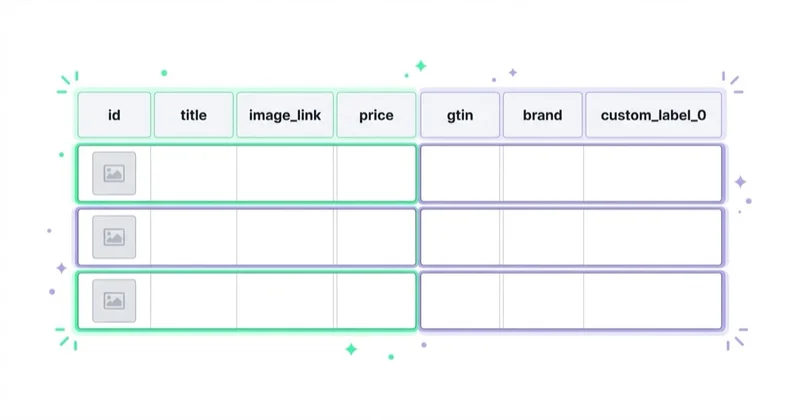
The product feed is the language Google uses to understand the catalogue.
Product titles
Titles should describe the product in the way customers search for it. Useful elements may include:
- brand;
- product type;
- model;
- key attribute;
- material;
- colour;
- size;
- gender or audience where relevant;
- quantity or pack size;
- compatibility;
- use case.
The best title structure depends on the category. A fashion product, replacement part, supplement, furniture item and electronics accessory should not use the same title logic.
Avoid keyword stuffing. A title should be specific, readable and accurate.
Images
Shopping is visual. Images affect whether users understand the product before clicking.
Check:
- correct variant image;
- clear product view;
- no misleading background;
- strong resolution;
- no watermark where prohibited;
- no promotional text if not allowed;
- additional images where useful;
- consistency between ad image and product page.
For categories where appearance matters, product image testing can affect performance as much as bidding.
GTIN, brand and identifiers
Product identifiers help Google understand exactly what is being sold. GTIN should be provided when it exists. Brand and MPN can also matter depending on product type.
Incorrect identifiers can cause matching issues, disapprovals or poor product understanding.
Price and availability
Price and availability must match the landing page. Mismatches can cause Merchant Center issues and damage user trust.
For competitive categories, price is also part of performance. If the same product is available from many sellers and the offer is not competitive, Shopping may struggle even with a technically correct feed.
Standard Shopping vs Performance Max
Google Ads supports Shopping through Standard Shopping campaigns and Performance Max campaigns with a Merchant Center feed.
| Area | Standard Shopping | Performance Max with feed |
|---|---|---|
| Inventory | Shopping-focused Google surfaces | Broader Google Ads inventory |
| Control | More product and structure control | More automation |
| Query visibility | Often more direct for Shopping analysis | More limited and broader reporting |
| Creative | Product-feed led | Product feed plus assets |
| Scaling | Useful for controlled retail tests | Useful for broader automated growth |
| Best fit | Control, diagnostics, product segmentation | Scale, automation, multi-channel retail |
Performance Max is often the main retail growth campaign type, but Standard Shopping still has value where control, diagnostics or structured testing matter.
Google provides experiments to compare Standard Shopping with Performance Max. That is often better than arguing from general rules.
For broader context, read Performance Max Campaigns: What to Know and How to Create Them.
Free listings and Shopping ads
Free listings allow eligible products to appear across Google at no cost. Google Merchant Center documentation says eligible products may show in places such as Search, Maps, Images, Lens, YouTube, Gemini, the Shopping tab and product modules on Business Profile.
Free listings are not a replacement for paid Shopping campaigns. They are an additional visibility layer. Eligibility does not guarantee that products will be shown.
Free listings still need:
- accurate product data;
- policy compliance;
- shipping information where required;
- return policy information;
- useful product pages;
- structured product information;
- Merchant Center health.
Paid Shopping is controlled through Google Ads budgets and bidding. Free listings are organic product visibility based on eligibility, data and relevance.
Campaign structure by business logic
A weak Shopping structure groups products only by catalogue hierarchy. A better structure considers commercial reality.
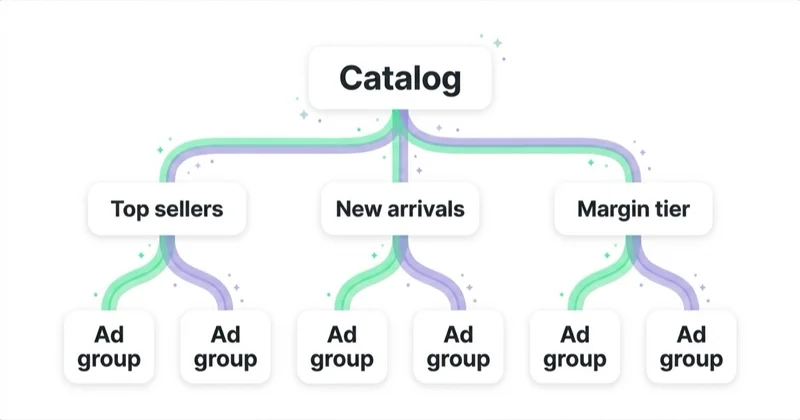
Useful segmentation dimensions:
- margin;
- category;
- brand;
- price range;
- bestseller status;
- seasonality;
- stock level;
- return rate;
- new customer value;
- promotional calendar;
- product lifecycle;
- shipping cost;
- strategic priority;
- local availability.
Example: two products may belong to the same category, but one has strong margin, stable stock and low return rate while the other has low margin, frequent returns and supply issues. They should not necessarily receive the same budget pressure.
How to use Shopping with Search and PMax
Shopping does not remove the need for Search campaigns. They solve different problems.
Use Shopping or PMax when:
- the product image and price help the decision;
- catalogue scale is large;
- product feed coverage matters;
- users compare product options visually;
- ecommerce revenue is the main goal.
Use Search when:
- query wording needs tighter control;
- category messaging matters;
- the landing page should be a category or guide;
- brand protection is important;
- competitor or generic terms need separate reporting.
Use both when the business needs product visibility and message control.
For search context, read What Is the Google Search Network and How to Use It?.
Shopping optimisation workflow
1. Fix Merchant Center issues
Do not scale spend while major products are disapproved or limited. Check diagnostics, policy issues and product visibility first.
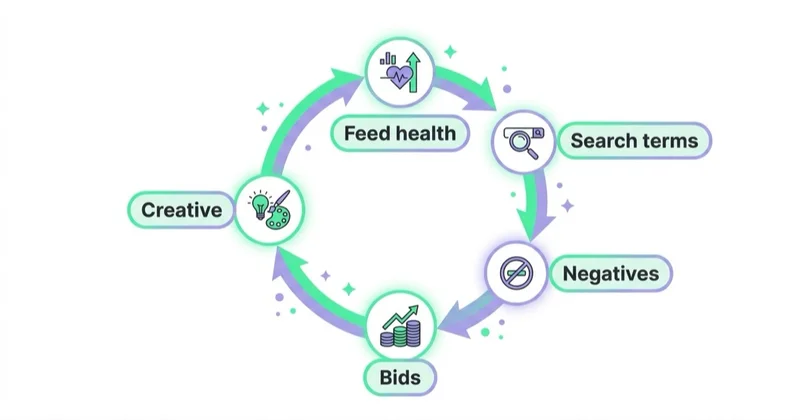
2. Improve the feed
Prioritise products that matter commercially:
- top revenue products;
- high-margin products;
- high-stock products;
- strategic categories;
- products with impressions but poor CTR;
- products with clicks but no sales;
- products with feed warnings.
3. Segment by profitability
ROAS without margin can be misleading. A product with lower ROAS may be more profitable than a product with high ROAS and poor margin.
Where possible, connect product margin or value tiers to campaign structure, custom labels or reporting.
4. Review search and product demand
Shopping uses product data, but search demand still matters. Review which categories, brands and product types users search for. Use Search Console, Google Ads, Merchant Center, internal search and ecommerce analytics.
5. Align landing pages
The product page should confirm what the ad showed:
- same price;
- same image or variant;
- availability;
- shipping;
- returns;
- reviews;
- product details;
- size or compatibility information;
- clear add-to-cart path.
6. Test campaign type
If there is enough data, test Standard Shopping vs Performance Max instead of guessing. Keep the comparison clean and avoid overlapping products without a reason.
7. Monitor product-level performance
Look for:
- products with spend and no sales;
- products with high conversion value;
- products with high clicks and poor conversion rate;
- products with low impressions despite commercial priority;
- disapproved bestsellers;
- seasonal winners;
- categories losing impression share.
Measurement: beyond ROAS
Shopping reporting should include:
- revenue;
- conversion value;
- ROAS;
- gross margin;
- contribution margin where available;
- product-level spend;
- category performance;
- new vs returning customers;
- average order value;
- return rate;
- stock availability;
- rejected products;
- click share and impression share where available;
- assisted impact across channels.
Do not judge Shopping only by blended campaign ROAS. Blended reporting can hide weak products, underfunded winners and categories that drive first purchases.
For analytics depth, read What Is Ecommerce Analytics and Why Is It So Important?.
How we approach this at Space Ads
At Space Ads, we start Google Shopping work from the product system: Merchant Center diagnostics, feed titles, identifiers, images, price and availability consistency, landing pages, margin and stock. We do not treat the catalogue equally, because products differ in profitability, demand, returns, competitiveness and strategic value. Priority products need cleaner data, stronger product pages, better labels and enough budget to learn; weak or low-margin products may need to be fixed, separated or excluded. We judge Shopping by product contribution, margin, revenue quality and feed health, not one blended campaign ROAS. Scaling happens only when the product data and the commercial logic can support it.
Common mistakes
| Mistake | Why it hurts | Better approach |
|---|---|---|
| Launching before Merchant Center is healthy | Products cannot serve or have limited visibility | Fix diagnostics first |
| Weak product titles | Google and users understand less | Use category-specific title logic |
| Ignoring images | CTR and trust suffer | Improve main and additional images |
| Treating all products equally | Budget flows to the wrong items | Segment by margin and priority |
| Looking only at revenue | Profitability can be hidden | Include margin and returns |
| No landing page QA | Clicks do not convert | Match price, variant and availability |
| Running PMax blindly | Reporting and control are weaker | Use experiments and clear structure |
| Forgetting free listings | Organic product visibility is missed | Keep free listings eligible and monitored |
30-day optimisation plan
Week 1: Merchant Center audit
Check account issues, diagnostics, disapprovals, limited visibility, shipping, returns, prices and availability. Prioritise products that matter commercially.
Week 2: Feed improvements
Rewrite titles for priority categories, improve images, fill missing identifiers, review Google product categories and apply custom labels for margin, seasonality or priority.
Week 3: Campaign structure
Review Standard Shopping and Performance Max structure. Separate products where business logic requires different targets, budgets or reporting.
Week 4: Measurement and scaling
Review product-level performance, margin, query demand, landing page quality and conversion tracking. Increase spend only where products can support profitable growth.
FAQ
What is Google Shopping?
Google Shopping is a product advertising and product discovery system that uses Merchant Center product data to show product information across eligible Google surfaces and campaigns.
Does Google Shopping use keywords?
Shopping ads use product data from Merchant Center rather than ordinary keyword lists. Product titles, descriptions, categories, identifiers and landing pages influence matching.
Is Performance Max better than Standard Shopping?
Not always. Performance Max gives broader automation and inventory. Standard Shopping gives more direct control. The better choice depends on data quality, volume, control needs and business goals.
Are free listings the same as Shopping ads?
No. Free listings can show eligible products at no cost. Shopping ads are paid placements controlled through Google Ads campaigns, budgets and bidding.
What should be optimised first?
Merchant Center health and product feed quality should come first. Campaign changes are weaker when product data, prices, availability or landing pages are wrong.
Why are Shopping campaigns not profitable?
Common reasons include poor feed quality, uncompetitive pricing, low margin, weak product pages, bad tracking, wrong product segmentation, stock problems or too much spend on low-priority products.
Should every product be advertised?
Not necessarily. Products with poor margin, low stock, high return rate, weak images or uncompetitive pricing may need to be excluded, fixed or deprioritised.
Conclusion
Effective Google Shopping is a retail system, not only a campaign type. Merchant Center, product data, pricing, stock, landing pages, campaign structure and measurement all work together.
Start with the feed and Merchant Center health. Then structure products around business value, choose the right balance between Standard Shopping and Performance Max, monitor free listings, and judge results by profitability instead of surface-level revenue. The strongest Shopping accounts are usually the ones where marketing, merchandising, analytics and operations share the same product-level view.
If you run a store and want Shopping to actually earn, we run Google Ads campaigns for e-commerce from Merchant Center to product strategy.
Sources and further reading
- Google Ads Help: About Shopping ads
- Google Ads Help: Link a Google Ads account to Merchant Center
- Google Merchant Center Help: Product data specification
- Google Merchant Center Help: Free listings for products
- Google Merchant Center Help: Viewing and understanding product data
- Google Ads Help: Standard Shopping vs Performance Max experiments
- Google Ads API: Performance Max for online sales with a product feed
Continue learning
- Google PLA / Shopping Campaigns in Google Ads: What to Know
- What Is Google Merchant Center and How to Manage It?
- What Is a Product Feed and How to Use It?
- Performance Max Campaigns: What to Know and How to Create Them
- What Is Ecommerce Analytics and Why Is It So Important?
- How to Audit an Ecommerce Store
Continue reading
What Is a Google Ads Audit and How to Do It?
A Google Ads audit should show whether spend, conversion data, account structure, search demand, Merchant Center quality and landing pages support the actual business goal. This guide explains how to turn tracking gaps, wasted queries and Performance Max risks into a prioritised roadmap, not a list of generic settings.
What Is Google Merchant Center and How to Manage It?
Google Merchant Center is the product data hub behind Shopping ads, Performance Max, free listings and product-rich Google experiences.

Performance Max Campaigns: What to Know and How to Create Them
Performance Max is a goal-based Google Ads campaign type powered by Google AI, but its results depend on inputs: conversion quality, values, assets, feeds, landing pages and business rules. This guide explains when to use PMax, how to structure ecommerce and lead generation campaigns, and how to measure performance beyond one blended ROAS number.


































