
Product videos show a product in motion, in use and in context. They help users understand scale, function, texture, assembly, before-and-after effects, packaging and differences between variants. Not every product needs video, but in many categories a short, clear product video reduces uncertainty before purchase.
The best product videos are not decorative. They answer buying questions. They show what photos cannot fully explain: how the product moves, how it fits, how it works, how large it is and what the customer can expect after delivery.
For ecommerce, product videos can support product pages, paid social, YouTube, Performance Max, remarketing, Merchant Center video assets, email flows and customer support. For services and B2B, similar formats can explain demos, technical equipment, productised services or complex offers.
TL;DR
- Product videos are worth using when they reduce buyer uncertainty.
- They work best for products that need demonstration, scale, fit, texture, assembly, movement or comparison.
- Good product videos show the product in the first seconds and avoid slow brand intros.
- Captions and visual clarity matter because many users watch without sound.
- Video can hurt Core Web Vitals if it is embedded or loaded poorly.
- Use poster images, compression, lazy loading and careful preload settings.
- Video SEO needs titles, descriptions, transcripts, thumbnails and VideoObject structured data where relevant.
- AI can support editing and variation, but should not misrepresent the real product.
- A reusable product video plan should include product page, paid social, email, support and sales enablement use cases.
What is a product video?
A product video is a short video that presents a specific product, product category or product use case.
It may show:
- the product in motion;
- how it is used;
- scale and fit;
- texture and material;
- key features;
- assembly or installation;
- unboxing;
- accessories included in the package;
- variant comparison;
- customer-style use context;
- before and after effect where truthful and allowed.
The goal is to help the user make a better decision. A product video should not be a generic brand film that happens to include the product for a few seconds.
When are product videos worth it?
Video is most useful when photos and text leave important questions unanswered.
It is especially valuable for products that:
- move or fold;
- need assembly;
- are worn on the body;
- have important texture or shine;
- have many functions;
- have size or scale risk;
- differ from cheaper alternatives through detail;
- are often returned because expectations are unclear;
- receive many pre-purchase support questions;
- require demonstration to understand value.
Video is less urgent for very simple, low-cost or self-explanatory products. In those cases, strong product photography and clear copy may be enough.
For the visual foundation, see product photography and packshots.
Product video types
| Video type | What it shows | Best for |
|---|---|---|
| Demo | How the product works | Electronics, tools, equipment, software-connected devices |
| Lifestyle | Product in a real situation | Fashion, beauty, sport, home, premium goods |
| Detail | Texture, mechanism, material, finish | Jewellery, apparel, handmade, technical products |
| Comparison | Differences between variants or models | Size, bundles, colours, product tiers |
| Tutorial | Assembly, setup, use or care | DIY, furniture, electronics, equipment |
| Unboxing | Package contents and first impression | Electronics, gifts, subscription boxes |
| UGC-style | Natural customer-like context | Social ads, TikTok, Reels, creator-led campaigns |
| Short vertical | Fast mobile-first demonstration | Paid social, organic social, remarketing |
Many strong product videos combine several functions: product reveal, scale, detail and use case in one short format.
Where to use product videos
Product videos should not be treated as a single asset uploaded once and forgotten. One good recording session can produce several useful formats for different parts of the customer journey.
High-value placements include:
- product gallery near the main image;
- comparison section on a category or landing page;
- how-it-works section for complex products;
- FAQ section when the same question appears repeatedly;
- abandoned cart and browse abandonment emails;
- onboarding or post-purchase instructions;
- sales enablement pages for B2B teams;
- paid social variations for cold and warm audiences;
- retargeting ads for users who viewed the product;
- support articles that reduce repetitive questions.
The placement should match the user intent. A product page video should remove purchase uncertainty. A paid social video should stop attention quickly and explain one reason to care. A support video should be precise, calm and easy to pause. A B2B demo may need more context, proof and integration detail than a consumer product clip.
This reuse changes the business case. A simple product video may be too expensive if it is used only on one product page. It becomes more valuable when the same shoot also supports ads, email flows, sales conversations and customer support.
What a good product video should include
A useful product video should:
- show the product immediately;
- make the main benefit clear quickly;
- keep the frame clean;
- use enough light;
- show real scale;
- include close-ups for important features;
- use captions or text overlays where helpful;
- work without sound;
- avoid misleading filters;
- avoid exaggerated effects;
- match the product page and product data;
- end with a clear next step when used in advertising.
Long cinematic intros rarely help on product pages. Users usually want the answer quickly.
Simple product video script
A useful product video does not require a complex script. It needs a clear sequence of buying questions.
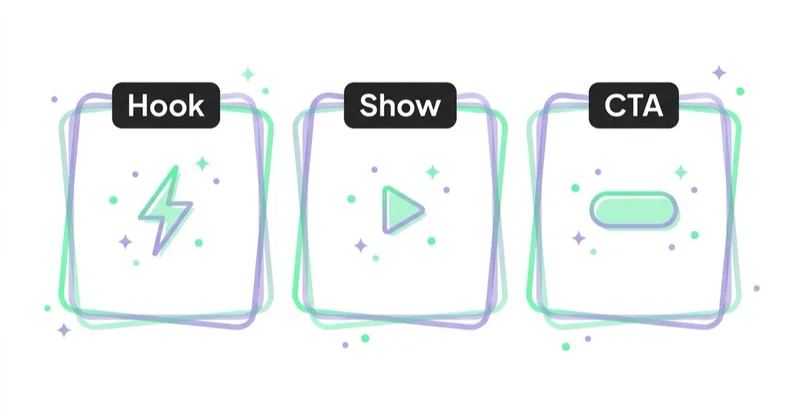
Example structure:
- Show the product immediately.
- Name the product or variant.
- Show scale, fit or dimensions in context.
- Demonstrate the main use case.
- Show one or two important details in close-up.
- Address a common objection, such as assembly, texture, durability or compatibility.
- Show what is included in the box or package when relevant.
- End with the next step: choose size, compare variants, add to cart or request a quote.
For a 15-second product page video, this can be extremely simple: product reveal, use in context, close-up, result. For a 45-second tutorial, the script can include setup, use, care and storage. For a B2B product, the script should show process fit, compatibility, maintenance and operational value.
The script should be written around questions from real customers. Support tickets, live chat logs, return reasons, product reviews and sales objections are better inputs than a generic creative brief. If customers keep asking whether a material is flexible, whether a device is loud or whether a product fits a specific use case, the video should answer that directly.
Product videos by category
| Category | Useful video content |
|---|---|
| Fashion | fit, movement, fabric, size, styling, model height |
| Beauty | texture, application, finish, shade, realistic result |
| Electronics | ports, setup, interface, included accessories, scale |
| Furniture | room scale, material, assembly, storage, movement |
| Sports | product in use, grip, durability, fit, motion |
| Toys | interaction, sound, size, safety-related details |
| B2B equipment | installation, process use, compatibility, maintenance |
| Food and beverage | preparation, texture, packaging, serving context |
The category should decide the format. A fashion product may need movement and fit. A technical product may need a functional demo. A premium item may need detail and finish.
Product video for ecommerce
In an online store, product videos can support:
- product page galleries;
- product detail sections;
- variant comparison;
- size and fit guidance;
- abandoned cart emails;
- remarketing ads;
- paid social;
- short-form organic social;
- Google Merchant Center video assets;
- YouTube and product-led campaigns;
- customer support and FAQs.
The best starting point is not the whole catalogue. Start with:
- bestsellers;
- high-margin products;
- high-traffic product pages with weak conversion;
- products with high return rates;
- products with many support questions;
- new launches;
- products used in paid media.
For the wider sales funnel, see how to increase online sales.
Product video and category pages
Product videos are often discussed only at product page level, but category pages can also benefit from video when the category needs explanation. A short category-level video can show differences between product lines, use cases, sizes, materials or bundles.
Useful category video topics:
- how to choose between variants;
- what the product category is for;
- which model fits which user;
- how premium and entry-level options differ;
- what accessories are needed;
- what common mistakes to avoid before purchase.
This is especially useful when many products look similar in static thumbnails. The goal is not to make category pages heavy. The goal is to help users choose faster and reduce pogo-sticking between similar products.
Product video and Merchant Center
Google Merchant Center has a Video assets page that helps merchants view and manage videos from sources such as websites, YouTube, Instagram, TikTok and Product Studio. Google says these video assets can help enrich product listings and may be shared with the Google Ads asset library when Google Ads is linked.
That does not mean every video will appear everywhere. Eligibility depends on Google systems, product mapping, account setup, market availability and quality.
Practical Merchant Center checks:
- connect videos to the right products;
- make sure the product shown is the product sold;
- avoid misleading edits;
- use product videos that support the listing;
- review AI-generated videos before saving;
- check whether video assets are correctly mapped;
- keep product data, images and videos consistent.
For the product data layer, see Google Merchant Center.
Product video in ads
Product videos can support Meta Ads, TikTok Ads, YouTube, Performance Max and Demand Gen campaigns.

Useful ad formats:
- short demo;
- problem and solution;
- product in hand;
- before and after where truthful and allowed;
- unboxing;
- creator-style review;
- comparison against a common alternative;
- feature breakdown;
- social proof;
- product bundle explanation.
Ad videos should be made for the placement. A horizontal product demo may work on YouTube. A vertical 9:16 demo may work better for Reels, Shorts or TikTok-style placements. A product page video may need less persuasion and more clarity.
How to repurpose one product video shoot
A practical production plan should define outputs before filming. Otherwise the team may finish with one polished horizontal video that is difficult to use in vertical ads, email thumbnails or product galleries.
Plan deliverables such as:
- 6-10 second hook clips for paid social;
- 15-30 second product page demo;
- vertical 9:16 version for Reels, Shorts and TikTok;
- square or 4:5 version for feeds;
- silent version with captions;
- short GIF or looping clip for email where supported;
- thumbnail and poster images;
- close-up clips for feature sections;
- longer tutorial for support or post-purchase education.
The filming setup should leave enough space for cropping into multiple ratios. Important product details should not sit too close to the edge of the frame. Text overlays should be added separately per placement rather than burned into one master file when possible.
For creative testing, connect video variants with broader messaging work. A product video can test the main benefit, the objection, the visual hook or the audience angle. For more on creative systems, see dynamic creative in Meta Ads.
Technical implementation on product pages
Poorly implemented video can slow down a product page.
Use:
- compressed video files;
- modern codecs where practical;
- a clear poster image;
- preload none or metadata depending on context;
- lazy loading for videos below the first screen;
- captions or transcript;
- a lightweight embed strategy;
- fixed dimensions to prevent layout shifts;
- a fallback image where needed;
- real-device performance testing.
If a video or poster appears high on the page, it can affect Largest Contentful Paint. Treat it as a critical performance asset, not an afterthought.
The safest pattern is often: show a fast poster image first, load the video only when the user interacts or when the video approaches the viewport.
Video SEO, AEO and LLM SEO
Search engines and AI systems need text and structured data to understand video content.
For video SEO, include:
- descriptive video title;
- short written summary;
- transcript or key points;
- thumbnail;
- publication date where relevant;
- duration;
- visible video placement on the page;
- VideoObject structured data where appropriate;
- crawlable video or thumbnail URLs;
- internal links from related content.
Google's video SEO guidance focuses on helping Google find, index and understand videos. Structured data does not guarantee a specific search feature, but it can improve understanding when implemented correctly.
For product pages, video should support the surrounding product content. A video embedded with no title, no summary and no transcript is harder for search systems to interpret.
Accessibility and captions
Many users watch product videos without sound. Some cannot hear the audio. Others are browsing in public, at work or on mobile with sound off.

Good product videos should include:
- captions for speech;
- text overlays for key points;
- visible product actions;
- enough contrast in text overlays;
- no essential information conveyed only through audio;
- controls when embedded on the website;
- transcript for longer instructional videos.
Captions are not only an accessibility feature. They improve comprehension and ad performance in sound-off environments.
AI in product video production
Generative AI and editing tools can help create more video assets at lower cost.
Useful AI applications:
- storyboard ideas;
- caption generation;
- background cleanup;
- product image animation;
- short video variants;
- resizing for placements;
- editing long footage into short clips;
- simple scene generation;
- voiceover drafts;
- translation and localisation.
Risks:
- product movement looks unrealistic;
- product size changes;
- texture or colour changes;
- AI adds features not included;
- regulated products are handled incorrectly;
- model or hand generation looks unnatural;
- output violates platform rules;
- the video creates expectations the product cannot meet.
AI should help scale production, not invent a better product.
Cost and prioritisation
Product videos can be produced at several levels:
- simple smartphone demo;
- founder or team demo;
- creator or UGC-style video;
- studio product video;
- 3D or motion graphics;
- AI-assisted video;
- full campaign production.
The best format depends on product value and use case.
Do not start with the most expensive production for the whole catalogue. Start with a commercial test:
- Choose 10-20 high-impact products.
- Create simple but clear product videos.
- Add them to product pages and ads.
- Measure conversion, add-to-cart, CTR, support questions and returns.
- Scale the formats that prove useful.
How to measure product video impact
Review:
- product page conversion rate;
- add-to-cart rate;
- video plays;
- play completion;
- scroll depth;
- product page dwell time;
- support questions;
- return reasons;
- ad CTR;
- ad conversion rate;
- revenue per session;
- assisted conversions;
- organic video visibility;
- Merchant Center or Google Ads asset usage where available.
Video should be measured as part of the funnel. A video that looks polished but does not answer buying questions may not improve sales.
Product video production checklist
Before publishing, check:
- the product shown matches the product sold;
- colours, materials and size are not distorted by lighting or editing;
- the first seconds show the product clearly;
- the video answers a real buying question;
- captions or overlays are readable on mobile;
- the file is compressed and has a poster image;
- the page layout reserves stable space for the video;
- transcript or summary text exists where useful;
- product data, claims and offer details are consistent;
- the same asset has versions for key placements;
- performance and conversion events are tracked;
- support, sales or review feedback is collected after launch.
This checklist protects both conversion rate and trust. A product video can increase confidence, but it can also increase returns if it makes the product look larger, smoother, brighter or more capable than it really is.
How we approach this at Space Ads
We try to wring the most out of a single video session. A well-planned shoot delivers several things at once — a demo loop for the product page, a vertical hook for Reels and TikTok, a square cut for the Feed. Video on the product page lifts conversion because it answers what a photo can't: how something works, the real scale, how it moves — and the same footage then feeds the video campaigns. So the session is planned around every format we'll need up front, not one striking film that's hard to carve anything out of afterwards. It's plain production economics: one shoot day serves the shop and the ads, instead of separate costs for each placement.
Common mistakes
| Mistake | Impact | Better approach |
|---|---|---|
| Slow brand intro | Users leave before seeing the product | Show the product immediately |
| No captions | Sound-off users miss the message | Add captions or text overlays |
| Huge video file | Slow page and worse UX | Compress and lazy-load |
| Misleading AI output | Trust and returns risk | Keep the product accurate |
| Video hidden low on page | Low usage | Place near product media or key explanation |
| No transcript | Weak accessibility and SEO | Add summary or transcript |
| One format for every channel | Poor fit | Adapt aspect ratio and pacing |
| Decorative video only | No commercial value | Answer buyer questions |
FAQ
Are product videos worth it?
Yes, when they reduce uncertainty, show product use or explain details that photos cannot show well. They are most valuable for products with motion, scale, fit, assembly or technical features.
How long should a product video be?
It should be as short as possible while answering the key question. Many ecommerce demos can be 10-45 seconds, while complex tutorials may need longer formats or separate chapters.
Do product videos improve conversion rate?
They can, especially when the video answers objections or explains the product more clearly. The effect should be measured by product page conversion, add-to-cart rate, ad performance and return reasons.
Can video hurt page speed?
Yes. Heavy videos, autoplay, poor embeds and missing poster images can hurt performance. Use compression, posters, careful preload settings and lazy loading.
Does product video help SEO?
It can help when Google can discover and understand the video. Use descriptive titles, summaries, transcripts, thumbnails, structured data and crawlable assets.
Should AI be used for product videos?
AI can support editing, captions, resizing and simple creative variants. It should not change how the product looks, works or is packaged.
Which products should get videos first?
Start with bestsellers, high-margin products, high-traffic pages with weak conversion, products with high return risk and categories where users need demonstration.
Where should product videos be placed on a product page?
The strongest placement is usually near the product gallery or close to the section where the buying question appears. If the video explains sizing, it should sit near size information. If it explains setup, it can sit near features or FAQs.
Should product videos autoplay?
Autoplay should be used carefully. It can distract users, consume data and harm performance when implemented poorly. A fast poster image with user-initiated playback is often safer for product pages.
Conclusion
Product videos are worth using when they explain what photos and text cannot. They show movement, scale, texture, setup and real use. They can improve product understanding, ad creative, SEO context, remarketing and buyer confidence.
The key is discipline. Product videos should be accurate, fast to load, captioned, technically optimised and connected with the product page. Start with high-impact products, measure the results and scale the formats that reduce uncertainty and improve commercial outcomes.
Sources and further reading
- Google Search Central: Video SEO best practices
- Google Search Central: Video structured data
- web.dev: Video performance
- Google Merchant Center Help: Video assets
- Google Merchant Center Help: Product Studio
Continue learning
Continue reading

Conversion Optimization: A Complete Guide for E-commerce, B2B, SaaS and Services
Conversion optimization improves the percentage and quality of visitors who become customers, leads, users or booked appointments. This guide explains how to diagnose friction before scaling paid ads.

How to Use Push Notifications
Push notifications can support sales, retention and service journeys when they are timely, permission-based, segmented, preference-aware and measured for incremental impact.

Are Product Recommendations Important?
Product recommendations can improve discovery, cross-selling, upselling and AOV when they are relevant, measured and privacy-aware.


































