
ChatGPT Ads are paid placements that appear below a ChatGPT response, selected from the context of the conversation rather than from a keyword list. On the advertiser side the platform is called OpenAI Ads, and it ships with a self-serve panel, Ads Manager Beta, plus an Ads API for programmatic work.
The real difference from classic performance marketing is not the name of the panel. It is the way intent is bought. ChatGPT Ads do not begin with a keyword list. The campaign has to be built around situations where a user is talking to an assistant, comparing options and looking for a useful next step.
This guide covers what the documentation actually says: who sees ads, the creative format and its limits, how matching works without keywords, the three billing objectives, what conversion measurement requires, how product feeds fit in and when the channel deserves budget.
TL;DR
- Ads appear below the response, clearly labeled and visually separated. They show for Free and Go users; Plus, Pro, Business, Enterprise and Edu accounts have no ads, and neither do accounts identified as belonging to users under 18.
- Creative limits from the documentation: title 3–50 characters, body up to 100 characters, destination URL up to 2,048. The "24 / 48 character" figures circulating in industry write-ups do not match the docs.
- There are no keywords and no match types. The system weighs conversation context, landing page, title, copy and advertiser-supplied context hints, then resolves eligible ads through a relevance-weighted, second-price auction.
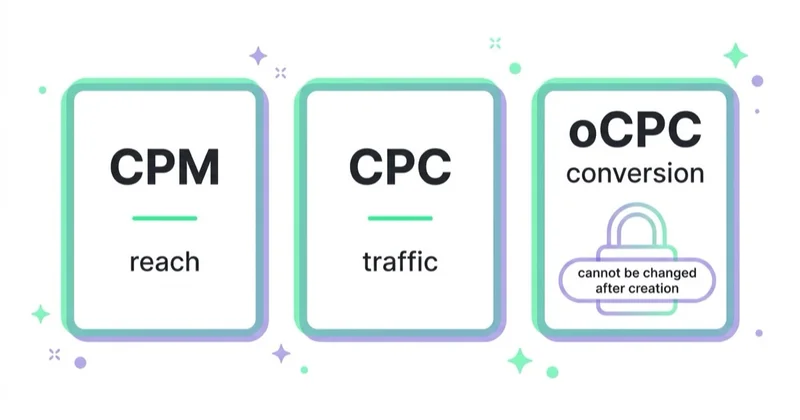
- Three objectives: CPM, CPC and oCPC. Under oCPC you pay per valid click, not per conversion — only the optimization target changes.
- Category and feature qualification must happen before budget approval. The product is still in beta, so policy fit, account setup and measurement are part of the launch work, not admin at the end.
- Measurement runs on a JavaScript pixel and the Conversions API, with 12 standard events plus
custom. OpenAI describes the Conversions API as more reliable than the pixel alone. - Several settings are permanent: selected account settings, currency, time zone, campaign objective and the selected conversion event.
What ChatGPT Ads Are
ChatGPT Ads are sponsored units displayed below a ChatGPT response. Selection is driven by the context and intent of the current conversation instead of a purchased keyword. That single difference reshapes how a campaign gets planned.
In a search box, a person types a query. In a conversation, the same person describes a situation, adds constraints, compares two or three options and then asks which one fits. The ad lands in the middle of that deliberation rather than against one query string. The planning unit stops being a keyword list and becomes a short list of conversation intents.
OpenAI states three things about these ads:
- ads are clearly labeled,
- ads are separate from the answer and do not influence its content,
- advertisers get no access to conversations, chat history, memories or personal details.
Two names are worth separating, because trade coverage mixes them. ChatGPT Ads is the ad product a user sees. OpenAI Ads is the advertiser-side platform, including Ads Manager Beta and the Ads API.
One capability is easy to miss: a user can message an advertiser through an ad, for example to ask a question while deciding. The advertiser sees only the messages sent to them directly.
Who Sees the Ads
The documentation defines the audience by exclusion. Ads are not shown to:
- Plus and Pro accounts,
- Business, Enterprise and Edu accounts,
- accounts identified as belonging to users under 18, based on account-level age information and age prediction where available.
So the reachable audience is Free and Go users. Ads do run in logged-out experiences, where creative must be appropriate for all audiences; mature-content ads are restricted to eligible logged-in users. During the test, ads do not appear in the ChatGPT Atlas browser.
Users also have controls. Under Settings > Ad Controls they can turn off ad personalization, dismiss an ad, see why a particular ad was shown, and clear the data used for ads. With personalization off, ads still appear based on the context of the current thread.
For media planning the consequence is simple. The addressable audience is not "ChatGPT users". It is the ad-supported subset, which skews away from people who chose to pay for the product. Whether that subset contains the target customer is a question for first-party data, not for assumption in either direction.
What To Confirm Before The First Campaign
Creating an account is not the same as having a campaign ready to spend. Before anyone promises a launch date, confirm the actual account permissions, advertiser verification, billing, category fit, crawler access to the destination and conversion measurement. Only then is the campaign a business test rather than a tour of a new interface.
Account setup also deserves care. Billing settings, currency and time zone should be approved before build starts, because some account-level decisions are difficult or impossible to unwind later. Each advertiser runs a separate account, so shortcuts here create operational debt immediately.
Finally, check which features are actually available for the specific setup. Audience tools, location granularity, product-feed workflows and optimization modes can have conditions attached. We do not design a media plan around a lever the account, policy or measurement layer has not confirmed.
Two Planning Constraints To Settle Early
Both constraints are simple to miss because they sit outside the ad text itself.
Audience tools are not the plan
The platform includes targeting and audience controls, but the first test should not depend on owned lists or advanced exclusions until the account and campaign setup confirm that those tools apply. What always remains important is the core of the channel: conversation intent, context hints, creative, landing page and measurement.
That makes the work less about importing a structure from Google Ads or Meta Ads and more about deciding which commercial situations deserve separate ad groups. If the same creative would run against five different intents, the structure is not ready.
Category policy can stop the campaign
OpenAI's ad policies can block categories, claims, destinations or the combination of ad and landing page. A compliant-looking creative can still fail review if the destination introduces a restricted offer or the claim is not supported. Category qualification belongs before budget planning, not after the first rejection.
Creative Format and Limits
An ad appears below the response and contains an advertiser name, a favicon, a title, body copy, a destination URL and an image. An ad unit may carry one or more items, from a single advertiser or from several.
Limits from the Ads API documentation:
| Element | Limit |
|---|---|
| Ad title | 3–50 characters |
| Ad body | up to 100 characters |
| Destination URL | up to 2,048 characters |
| Campaign and ad group names | 3–1,000 characters |
| Locations per campaign | up to 2,500 IDs |
| Context hints per ad group | up to 2,000 |
The "24 characters for the title, 48 for the body" figures repeated across industry articles do not match the documentation, which specifies 3–50 and up to 100. Creative built to the wrong numbers throws away more than half the available body copy.
Fifty characters leaves no room for a run-up. A title that restates the category name spends the limit without adding information. Titles that name a specific outcome or a decision tend to work better, with the body adding the condition, the price or the segment the offer is built for.
How Matching Works Without Keywords
There are no keywords and no match types. The documented signals are:
- the context and intent of the current conversation,
- the ad's landing page,
- the ad's title and copy,
- advertiser-provided context hints and targeting selections,
- when ads personalization is enabled, select signals from the user's broader ChatGPT experience.
Context hints describe the conversations, topics or keywords where a product may be relevant. They sit at ad group level, up to 2,000 per group, and the documentation is direct about their limits: hints are not exact-match keywords and do not guarantee delivery in any specific conversation.
Among eligible ads, a relevance-weighted, second-price auction decides. Bid is one signal, not the only one. A more relevant ad can beat a more expensive one — which is where creative and landing-page work earns its return, rather than in bid escalation.
Objectives and Billing
| Objective | What you pay for | What delivery optimizes for |
|---|---|---|
impressions (CPM) |
per 1,000 impressions | broad delivery at scale |
clicks (CPC) |
per valid click | clicks from people likely to engage |
conversions (oCPC) |
per valid click, not per conversion | clicks more likely to lead to the selected event |
That third row causes most of the confusion. oCPC changes what delivery aims at; it does not change the billing model. Cost per acquisition, post-click conversion rate, bidding and billing all stay click-based.
Bid controls depend on the objective. Reach campaigns use max CPM, Clicks campaigns use max CPC, and oCPC uses a conversion-oriented Bid Cap. That Bid Cap is an input to optimization: it is neither the amount charged per conversion nor a guaranteed CPA. For CPC, OpenAI recommends starting at a maximum bid of $3–$5 per click. Ads Manager also surfaces bid-strength guidance indicating whether a bid is likely to be competitive or may limit delivery.
Campaigns can use a daily budget or a total budget. OpenAI recommends that new advertisers start with a daily budget so spend can be adjusted while the account learns. The minimum daily amount varies by account currency; a total budget is not necessarily paced evenly across campaign days. The practical test budget must also fund enough qualified clicks to judge business outcomes rather than just delivery.
Two decisions cannot be undone after a campaign is created: the objective and, for oCPC, the selected conversion event. Changing either requires a new campaign.
What oCPC Requires Before It Will Run
All of the following must be true:
- The ad account supports conversion bidding. Without it, campaign creation returns
403withConversion bidding is not enabled. - Conversion tracking is live through the JavaScript pixel, the Conversions API, or both.
- Exactly one active standard conversion event serves as the optimization goal. Custom events cannot be oCPC goals.
- The conversion event setting belongs to the current ad account and connects to one active conversion source.
- The goal and event are settled before creation, because neither can be changed afterward.
Three of the five are measurement work, not campaign work. This is the list where "let's launch on conversions and see" quietly stops.
Measurement
The documentation defines 12 standard conversion events plus the custom type:
app_installed · app_opened · appointment_scheduled · checkout_started · contents_viewed · custom · items_added · lead_created · order_created · page_viewed · registration_completed · subscription_created · trial_started
app_installed and app_opened run through the Conversions API only, with action_source set to mobile_app. The JavaScript pixel does not support them.
Pixel, API, or both
The documentation answers this directly: the Conversions API is a more reliable tracking source than the pixel alone. In practice both go in, joined by deduplication.
Deduplication keys on three things: Pixel ID, event name, and event ID. The same value goes in the API's id field and the pixel's event_id. OpenAI keeps the first event it receives for a matching key and ignores later duplicates. Custom events must also carry the same custom_event_name on both sides.
Identifier hashing
User identifiers are sent as SHA-256 hashes, never raw. Normalize first:
- email — trim surrounding whitespace, lowercase,
- phone — keep the country calling code, strip whitespace, parentheses, periods and hyphens, then remove a leading
+and any leading zeros; hash the resulting 8–15 digits, so+1 (415) 555-2671becomes14155552671, - first and last name — lowercase, remove whitespace and ASCII punctuation, but preserve non-ASCII characters rather than transliterating them, so
Joséstaysjosé, - external ID — trim whitespace, preserve case.
Send each hash as a lowercase 64-character hex string. Geographic values — city, region, postal code — go as raw strings.
Monetary values are integers in the currency's ISO 4217 minor unit: 12999 with currency: "USD" means $129.99. Any event carrying an amount must carry a currency.
Attribution windows
Web events support click-through attribution and, on eligible accounts, view-through attribution. View-through uses a fixed one-day window after a qualifying impression. When a conversion qualifies for both, the click takes precedence.
One reporting distinction matters more than it looks: view-through conversions are reported separately at campaign level and are not included in the Conversions metric, which stays the click-through total. CPA, post-click conversion rate, bidding, billing and optimization all remain click-through-based. Adding the two numbers together inflates the channel.
Supporting pieces
- Image Tag — send events from HTML without JavaScript, with its own
event_idfor deduplication. - Multiple pixel IDs — send to several pixels or target one specific pixel.
- UTM parameters — static tracking parameters on destination URLs persist through the click and work in existing analytics.
- Reporting segments — insights break down by product, location and device.
Paid traffic from ChatGPT Ads and organic referrals from ChatGPT are different channels. Separate them on day one; untangling a merged channel later is rarely possible. Server-side implementation is covered in server-side tagging and the Conversions API.
Landing Page Requirements
The documentation sets a condition that is easy to overlook: the landing page must not block OAI-AdsBot or OAI-SearchBot. OpenAI also recommends the destination most relevant to the ad rather than a generic homepage. Creative, image and destination must comply with the ad policies consistently, end to end. The policy gives a concrete example: a food delivery ad may not link to a destination that introduces alcohol delivery.
Sites that blocked AI crawlers wholesale during a robots.txt cleanup may have blocked the two agents required for landing-page validation. That configuration must be corrected before launch. Which crawler does what is covered in AI crawlers explained, and index-level control in llms.txt and AI crawler controls.
Which Categories Are Allowed
At launch the policy limits ads primarily to consumer verticals:
- lifestyle and household goods,
- local services,
- travel and experiences,
- digital products and education.
Everything else needs careful qualification or will fail review, including dating and sexual content, health claims, alcohol and drugs, healthcare, financial and legal services, gambling, and political content. Alcohol covers beverages above 0.5% ABV; incidental references are acceptable only when alcohol is not the focus.
The practical point is the sequence. If the offer touches a sensitive or regulated area, check the policy and the landing-page promise before budget is approved. Do not discover the category issue after the creative has already been built.
Two further rules apply regardless of category. Ads for individual job listings or housing rentals and sales are prohibited, though linking to a platform that hosts listings is fine as long as the creative and landing page do not reference a specific listing. And ads must be truthful end to end: no unfounded claims about capabilities, pricing, outcomes or affiliations, no false endorsements, and nothing implying OpenAI recommends the advertiser.
Targeting and Product Feeds
Geographic targeting is set by selecting locations in the panel or API. Check the available granularity in the selector before launch instead of assuming it from another ad platform. Platform targeting covers iOS, Android and web; reporting can separate mobile and desktop. A campaign with no deliberate location targeting can deliver more broadly than the media plan intended.
Product-feed campaigns use a merchant catalog delivered through a supported feed connection. Current OpenAI materials describe hosted-URL and SFTP onboarding, while the Ads API documentation also covers linked feeds and Delta Feeds API updates. On top of the catalog sit product sets, which select one linked feed and can narrow it, for example to one brand. Automated delivery is preferable to occasional manual uploads because catalog items expire after two weeks without refresh.
Campaigns, ad groups and ads are also available through the Ads API and a Bulk API for batch operations, with keys generated in the panel settings.
Where the Channel Fits
Reasonable first tests:
- software, tools and services bought after comparison,
- considered purchases with a longer decision cycle,
- categories where people ask "how do I choose" or "what should I use instead",
- offers with a calculator, a trial or a downloadable resource,
- e-commerce categories where buyers compare specifications.
Poor first tests:
- impulse purchases with no deliberation stage,
- campaigns built purely on a discount,
- verticals the ad policy disallows or requires additional qualification for,
- offers without a landing page matched to a specific question,
- accounts with no conversion measurement, where the only available signal is clicks.
Notes for B2B and Lead Generation
The conversational context suits considered B2B purchases, but two things need settling first. The audience is the ad-supported subset of ChatGPT users, so buyer-committee reach is not a given and should be validated against CRM data rather than assumed. Any audience exclusions or owned-list logic should be treated as optional until the setup confirms they can be used.
Where B2B does fit, lead_created, appointment_scheduled and trial_started map cleanly onto the standard event taxonomy, and lead quality — not lead volume — is the metric worth carrying into the channel review.
E-commerce Notes
The strongest fit is categories where buyers compare specifications: electronics, home equipment, specialist gear, premium personal care, pet products, gifts and accessories. A conversation naturally handles "which of these two" and "what fits this budget".
Preparation on the store side:
- an automated hosted-URL or SFTP catalog, with product sets narrowed to what should actually run,
- prices and availability kept current through the Delta Feeds API, since a mismatch between feed and page causes rejection,
items_added,checkout_startedandorder_createdsent with amounts in minor units and an explicit currency,- reporting that separates ad traffic from ChatGPT's organic product results, which are selected independently,
- category pages with comparisons and a questions section, since that is where a comparison click lands.
Organic product results and ads are separate layers. Presence in organic results depends on product data and content quality, not on ad budget — the subject of agentic commerce and what it means for your store.
How we approach this at Space Ads
Our working method starts with account readiness and category eligibility before a budget is proposed. Next comes a technical check that OAI-AdsBot and OAI-SearchBot can reach every landing page. Measurement is designed before delivery: pixel and Conversions API where both are appropriate, one shared event ID and a deduplication test before spend. We then build focused ad groups around three to five conversation intents, write distinct creative angles, match each destination to the promise and evaluate cost per qualified action alongside the advertiser's other channels, never CTR in isolation.
Common Mistakes
- Planning the channel like search, around a keyword list that does not exist here.
- Building creative to the incorrect "24 / 48 character" limits and wasting half the body copy.
- Launching oCPC without meeting all five preconditions, including exactly one active standard event.
- Reading oCPC as pay-per-conversion when billing stays per click.
- Adding view-through conversions to click-through conversions in one number.
- Merging ChatGPT Ads traffic with organic ChatGPT referrals in analytics.
- Leaving
OAI-AdsBotblocked after an indiscriminaterobots.txtcleanup. - Planning budget before category qualification and discovering the policy issue after creative work is done.
- Building the plan around owned-list exclusions before the account setup confirms they apply.
- Choosing account currency or time zone casually, when neither can be changed later.
FAQ
Are there ads in ChatGPT now?
Yes. Ads appear below ChatGPT responses for users on the Free and Go plans. Plus, Pro, Business, Enterprise and Edu accounts have no ads, and neither do accounts identified as belonging to users under 18.
How do you buy ChatGPT Ads?
Launch requires an advertiser account, verification, billing, campaigns, ad groups, creative, destinations and measurement. In practice, first confirm whether the offer and setup meet the channel's requirements, then decide the test budget and timeline.
How much do ChatGPT Ads cost?
Billing runs on CPM, CPC or oCPC, and oCPC charges per valid click rather than per conversion. For CPC campaigns the documentation recommends starting at a maximum bid of $3–$5 per click. Actual cost is set by a relevance-weighted second-price auction, so ad and landing-page quality affect it alongside the bid.
What are the character limits for ChatGPT ads?
Title 3 to 50 characters, body up to 100, destination URL up to 2,048, campaign and ad group names 3 to 1,000. The "24 / 48 character" figures found in some industry write-ups do not match OpenAI's documentation.
Can sensitive or regulated categories advertise on ChatGPT?
Do not assume approval. Sensitive or regulated categories need policy qualification before budget is planned, and some claims, offers or destinations may be restricted even when the brand itself is legitimate.
Do ChatGPT Ads influence the answer?
No. OpenAI states that ads run on separate systems from the chat model, are clearly labeled and visually separated, and that advertisers cannot shape, rank or alter responses. Advertisers receive aggregated, non-identifying performance data only.
How do ChatGPT Ads differ from organic AI visibility?
They are independent mechanisms. Ads buy a placement below the answer. Being cited inside the answer depends on content, data and crawler access — covered in AI SEO. A brand can run ads and still be absent from organic answers, or the reverse.
Key Takeaways
ChatGPT Ads are now a documented channel, but a registration should never be treated as proof that a campaign is ready. Account setup, category fit, landing-page access, measurement and review status all matter before spend moves.
Two properties separate it from adjacent channels, and both should be settled before the first dollar. There are no classic keyword match types, so the work shifts onto conversation intents, context hints, creative and landing pages. And paid placement does not buy presence inside the answer, so ChatGPT Ads and organic AI visibility need to be planned as separate mechanisms.
Running the channel as a managed service is covered on the ChatGPT Ads page.
Sources and further reading
- OpenAI Help Center — Ads in ChatGPT: The Basics
- OpenAI Help Center — Ads in ChatGPT
- OpenAI Developers — Ads documentation
- OpenAI Developers — Conversion-Optimized Campaigns
- OpenAI Developers — Conversions API
- OpenAI Developers — Supported Events
- OpenAI Developers — Product Feeds
- OpenAI — Ads Content Policies
Continue Learning
- ChatGPT Ads — managed campaigns
- AI SEO — organic visibility in AI answers
- AI crawlers explained: GPTBot, ClaudeBot, PerplexityBot and what to allow
- llms.txt and AI crawler controls
- Server-side tagging, sGTM and the Conversions API
- Agentic commerce: what it means for your store
- ChatGPT SEO: how ChatGPT picks sources and how to get cited
Continue reading
OpenAI Ads Manager: How to Set Up Your First ChatGPT Ads Campaign
OpenAI Ads Manager has three campaign levels, but launch also requires advertiser verification, billing, landing-page checks, measurement and deliberate choices for settings that cannot be changed later. This guide covers the setup sequence, budgets, context hints, oCPC, targeting, review and Ads API workflows.
ChatGPT Ad Formats and Character Limits: What Actually Fits
A ChatGPT ad appears below the response and carries six elements, with specific limits: title 3–50 characters, body up to 100. The "24 / 48 character" figures in trade coverage do not match the documentation, so this guide gives the full limits table, shows how to fit a useful message, and covers the image, product ads and end-to-end consistency with the landing page.
ChatGPT Ads Conversion Tracking: Measurement Pixel and the Conversions API
ChatGPT Ads conversion tracking combines a browser pixel with the server-side Conversions API, which OpenAI describes as the more reliable source. This guide covers 12 standard events plus custom, deduplication, oppref and obref attribution identifiers, SHA-256 normalization, consent, CSP, attribution and oCPC testing.


































