Ad management software is the layer a team uses to plan, run, optimize and report on paid campaigns across more than one platform — without doing all the work inside each platform's native panel. In practice it spans everything from a single reporting dashboard pulling Google, Meta and TikTok into one view, to bid-and-budget automation, to the newer category where the whole workflow runs through a chat-and-agent interface. The point is leverage: fewer tabs, fewer manual exports, and one place where structure, signal and spend are managed as a system rather than four disconnected accounts.
TL;DR
- "Ad management software" is a broad category, not one product. It covers reporting dashboards, bid-and-budget automation, creative and feed tooling, and the new AI-workspace layer — each solves a different bottleneck.
- Native panels are where the spend lives; software is the layer on top. Google Ads, Meta Ads Manager and TikTok Ads Manager run the auctions. Third-party software exists because nobody wants to operate four panels in parallel, every day, across multiple accounts.
- The 2026 shift is from dashboards you read to workspaces you act in. Older tools showed you the numbers; the new category proposes and applies changes, then logs them.
- AI changed what "management" means. Smart Bidding, Advantage+ and Performance Max already automate the auction. The remaining human job is structure, signal quality and judgement — which is exactly what an AI workspace can speed up, with guardrails.
- Reporting is the most common entry point. Most teams adopt software first to stop rebuilding the same client report every week, then expand into optimization.
- The right tool depends on who you are. A founder running spend directly, an in-house team across three platforms, and an agency on 20+ accounts have different bottlenecks — and shouldn't buy the same thing.
- Safety matters once software can change accounts. Anything that touches budgets or bids needs limits, previews and an audit trail, or it becomes a liability.
What ad management software actually does
Strip away the category names and every ad management tool exists to remove one of four frictions.
The first is visibility. A team running Google, Meta and TikTok has its numbers in three places, on three attribution models, with three different definitions of a conversion. Pulling that into one view — reconciled against GA4 — is the single most common reason teams adopt software at all.
The second is time. Opening four panels every morning, checking pacing, spotting the campaign that quietly broke overnight, exporting numbers into a client report on Friday — none of that is strategic work, but it consumes the hours that should go to strategy.
The third is control at scale. One account is manageable by hand. Twenty accounts, each with budget caps, brand-keyword rules and target ROAS bands, is not. Software is how you enforce the same standard across all of them without relying on memory.
The fourth is signal quality. Modern bidding is only as good as the data feeding it. Conversion tracking, server-side events, value tracking and feed accuracy decide what the algorithms learn — and most "underperformance" is really a signal problem wearing a budget costume. Good tooling surfaces that before it costs a quarter.
A useful test when evaluating any tool: which of those four does it actually fix, and which does it just describe?
A quick glossary
A few terms used throughout, defined once so the rest reads cleanly:
- Ad management software — any tool that helps plan, run, optimize or report on paid campaigns across one or more platforms, sitting on top of the platforms' own APIs.
- Native panel — a platform's own interface: Google Ads, Meta Ads Manager, TikTok Ads Manager. Free, deep on one platform, not built for cross-account work.
- Bid-and-budget automation — software that adjusts bids, budgets or status by rules, layered on top of (or alongside) the platforms' own Smart Bidding.
- Blended ROAS — return on ad spend calculated across all channels against one reconciled revenue number, rather than each platform's self-reported figure.
- Reconciliation — comparing platform-reported conversions against a neutral source (GA4 or server-side data) to get one consistent number.
- Audit log — a recorded trail of every change a tool made, with the reason attached, so any action can be traced after the fact.
- Agentic workspace — the 2026 category where an AI assistant reads accounts, proposes changes, and applies them after approval, within set limits.
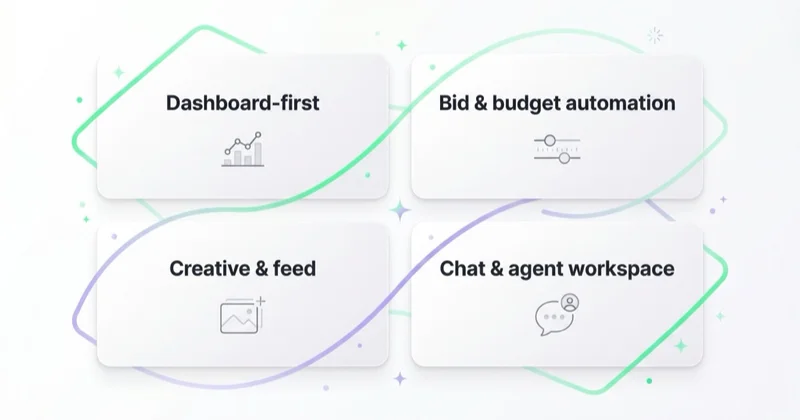
The four categories of ad management software in 2026
The market is wide and the labels overlap, but most products sit in one of four buckets. Knowing which one you're looking at prevents buying a reporting tool when you needed automation, or vice versa.
1. Dashboard-first (reporting and visibility)
These tools connect to platform APIs and unify the data into one dashboard — spend, clicks, conversions, ROAS across channels, often blended with analytics. They are excellent at showing you what happened and weak at changing it. This is where Looker Studio sits for many teams (see our guide to Looker Studio), alongside dedicated reporting platforms.
Best for: teams whose main pain is "I spend two hours building the same report every week."
Limit: a dashboard never moves a budget. You still go back into the native panel to act.
2. Bid-and-budget automation
These sit closer to the auction. They adjust bids, reallocate budgets, pause underperformers and apply rules — sometimes layered on top of the platform's own Smart Bidding. In an era where Google and Meta already automate most of the bidding, the durable value here is cross-account rule enforcement and bid logic the native tools don't expose.
Best for: accounts at the scale where manual budget management stops being feasible.
Limit: automation without business context can optimize toward the wrong metric — cheap clicks, cheap leads, cheap conversions that never become revenue.
3. Creative and feed tooling
Paid performance in e-commerce often lives or dies on the product feed, not the ad copy. This category covers feed management, creative testing and asset production. It's a different problem from campaign management, but increasingly bundled with it.
Best for: catalog-heavy advertisers, especially Shopping and Performance Max.
Limit: solves the input, not the operating workflow around it.
4. Chat-and-agent workspaces (the 2026 category)
This is the newest layer and the one reshaping the category. Instead of a dashboard you read or a rules engine you configure, you work through a chat interface: ask for an audit, get findings, request a change, review it, approve it. The system pulls live data, proposes the action, and — with limits and an audit trail — applies it across platforms. It draws on the same momentum as agentic AI in marketing more broadly.
Best for: teams running several platforms who want analysis and action in one place, not four.
Limit: only as safe as its guardrails. A workspace that can change accounts must be able to refuse, preview and log — more on that below.
The four categories at a glance
| Category | Friction it fixes | Reads or writes | Best for |
|---|---|---|---|
| Dashboard-first | Visibility | Reads | Teams drowning in manual reporting |
| Bid-and-budget automation | Control at scale | Reads + writes | Accounts past manual budget management |
| Creative and feed tooling | Signal quality (inputs) | Reads + writes | Catalog-heavy e-commerce |
| Chat-and-agent workspace | Time + visibility + control | Reads + writes | Multi-platform teams wanting analysis and action in one place |
Most teams end up combining two of these — typically reporting plus one of the action-capable categories.
Native panels vs third-party software: why teams still add a layer
Most searches for "ad management" land on the platforms' own tools — Facebook Ads Manager, Google Ads, TikTok Ads Manager. Those are not competitors to ad management software; they're the foundation it's built on. Every third-party tool reads and writes through the same APIs.
So why add a layer at all? Because the native panels are designed to manage one platform, one account, deeply. They are not designed for the cross-account, cross-platform reality most teams actually live in. The friction isn't that any single panel is bad — it's that running three of them in parallel, across a portfolio of accounts, every day, doesn't scale linearly. The work grows faster than the headcount.
That's the honest case for software: not that the platforms fall short, but that operating several of them as one connected system is a different job than operating any one of them well.
What changes when AI enters ad management
Two things are easy to confuse here, and getting them straight matters.
The first is native AI inside the platforms: Smart Bidding, Advantage+, Performance Max, and Google's broader AI Max for Search. This already runs the auction. You don't install it; it's how the platforms work now.
The second is AI in the management layer — software that uses models to read your accounts, find issues, and help you act. Here it's worth separating two sub-types:
- Read-only connectors, like the official Google Ads MCP server or the Meta Ads connectors. These let an AI assistant read account data through the API and answer questions. They're useful for analysis and ad-hoc reporting — and deliberately cannot change anything.
- Change-capable workspaces, which read and write: they propose a budget shift or a negative-keyword addition, show the exact change, and apply it after approval, through the same Google Ads API the platforms expose.
The distinction is the whole game. Read-only is safe by construction but stops at "here's what I'd do." Change-capable is faster but only trustworthy with real guardrails — which is the difference between a useful workspace and an account incident waiting to happen.
Safety: the part nobody markets but everyone needs
The moment software can move a budget or change a bid, "features" stop being the interesting question and "what stops it from doing something stupid" becomes the only one that matters.
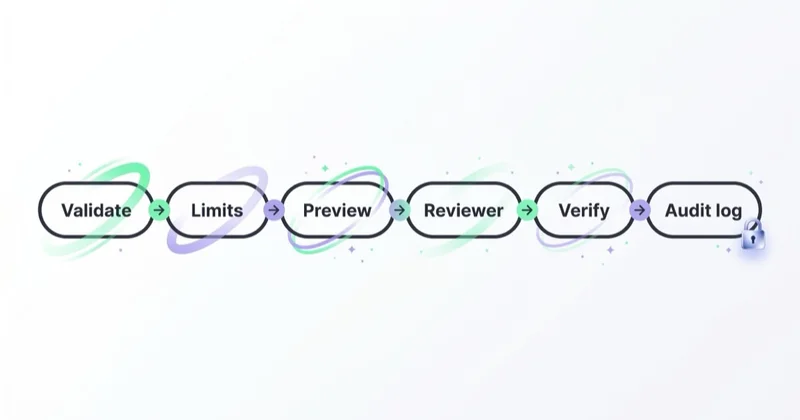
A serious change-capable system has, at minimum: hard limits per account (a maximum daily budget, a cap on how much any single change can move), a preview step that shows the exact change before anything is sent, a verification step that confirms the outcome matches the intent, and a complete log of every change with the reason attached. Without those, an AI workspace is a fast way to make an expensive mistake across several accounts at once.
This is also where experience shows. We run daily audits across 25+ client accounts and analyze roughly 14M data points monthly, and the pattern is consistent: the failures that hurt aren't dramatic, they're quiet — a tracking break that starves the bidding algorithm, a feed error that hides half the catalog, a rename that double-counts a conversion. Good tooling catches those before they compound. The headline feature is rarely the thing that protects the spend; the boring guardrail is.
How to choose ad management software
There's no universal "best" tool — there's a best fit for your bottleneck and your team. Start with who's actually doing the work.
If you're a founder running spend directly: your scarcest resource is time and your biggest risk is not knowing what you don't know. You want something that surfaces problems in plain language and helps you act without a specialist's vocabulary — not an enterprise dashboard you'll never fully configure.
If you're an in-house team across Google, Meta and TikTok: your pain is fragmentation. Reporting that reconciles all three (and GA4) is usually the highest-leverage first purchase, with optimization a close second. Be wary of tools that only deepen one platform — you already have the native panel for that.
If you're an agency on 20+ accounts: your bottleneck is consistency and reporting overhead. You need to enforce the same standard everywhere, generate client-ready reports without a manual export ritual, and keep an audit trail for every change. This is also where multi-account workflow breaks down first without tooling.
A short checklist that survives most buying decisions:
- Which of the four frictions does it fix — visibility, time, control at scale, or signal quality?
- Does it read, or read and write? And if it writes, what are the limits, previews and logs?
- Does it reconcile against business numbers, or just re-display platform-reported figures?
- How long until it's actually useful — same day, or a quarter of configuration?
- Who makes the final call? The healthiest setups keep judgement with a human and use software for speed and coverage.
By spend and team size
| Profile | Monthly spend | First purchase | Avoid |
|---|---|---|---|
| Founder running spend directly | up to ~$10k | Plain-language audit + reporting | Enterprise dashboards you won't configure |
| In-house team, 2–3 platforms | ~$10k–$200k | Reconciled cross-channel reporting | Single-platform-only tools |
| Agency / multi-account | portfolio | Reporting + change automation with audit log | Anything without per-account limits |
What it looks like by industry
- E-commerce and fashion: the product feed and Shopping/PMax structure matter as much as campaign management. Reporting needs to reconcile against revenue, not just conversions.
- Lead-gen and B2B: the risk is optimizing toward cheap form fills. Management software earns its place when it can feed lead-quality signals back, not just count conversions.
- Multi-location and local: the bottleneck is consistency across many similar accounts — exactly where rule enforcement and a shared standard pay off.
- Marketplaces and app: measurement is fragmented across platforms and stores; the reporting layer matters more than any single panel's depth.
Where Space Ads OS fits
We built Space Ads OS because our own team kept hitting the ceiling of the four-panel workflow. It's the chat-and-agent category described above: Google Ads, Meta Ads, TikTok Ads and GA4 operated from one chat, where you ask for an audit, get findings and recommendations, plan a change against the business objective, and apply it — across platforms, with the guardrails doing the quiet work.
The thing it removes is the context-switching tax. Instead of opening four dashboards on Monday morning, you ask one question and get a reconciled answer. Instead of two hours rebuilding a client report on Friday, the report is generated from live account data. And because every change runs through limits, a preview and a logged reason, the speed doesn't come at the cost of control — the same discipline we'd apply by hand, enforced by the system.
It's not for everyone, and that's deliberate. It earns its place when you're running real spend across several platforms and the manual workflow has started to cap how much you can manage well. If you're at that point — or running an agency where the reporting and consistency overhead is eating the strategy time — it's worth a closer look.
A 30-day plan to adopt ad management software without breaking anything
You don't need to switch everything at once. A staged rollout protects the spend while you learn the tool.
- Week 1 — connect and reconcile. Connect every account read-only first. Reconcile the numbers against GA4 before trusting anything. If the tool's figures don't match your analytics, fix that before going further.
- Week 2 — reporting only. Move one report — a client report or the Monday check — into the tool. Confirm it tells the same story your manual process did. This builds trust without touching budgets.
- Week 3 — first changes, with limits. Enable change capability on one account, with hard limits set low. Make a handful of small changes through the tool, review every preview, and check the audit log afterwards.
- Week 4 — widen carefully. Expand to more accounts once you trust the previews and the log. Keep the human approving anything consequential. The goal is coverage and speed, not autopilot.
If at any week the tool's numbers or behavior surprise you, stop and reconcile before widening. Trust is earned account by account.
Stop doing / do instead
| Stop doing | Do instead |
|---|---|
| Summing platform-reported conversions | Reconcile against GA4 and report the blended number |
| Buying a dashboard to fix an optimization problem | Match the tool to the friction — visibility, time, control or signal |
| Letting automation chase cheap conversions | Give it the business objective, not just the metric |
| Allowing changes without limits or logs | Require per-account caps, previews and an audit trail |
| Removing the human from consequential decisions | Keep judgement with a person; use software for speed and coverage |
| Re-displaying platform numbers as "reporting" | Lead with business-mapped numbers; keep platform figures as secondary detail |
Common mistakes when adopting ad management software
- Buying a dashboard to fix an optimization problem. Visibility is necessary but it doesn't move budgets. Match the tool to the friction.
- Trusting automation without business constraints. A rules engine optimizing for cheap conversions will happily fill your pipeline with conversions that never become revenue. Give it the objective, not just the metric.
- Letting software change accounts without limits. Speed without guardrails is just a faster path to a bad week.
- Re-displaying platform numbers and calling it reporting. Without reconciliation against GA4 and business numbers, you're reporting what the platforms claim, not what landed. Daily reconciliation between platforms and GA4 typically surfaces 15–25% of spend that's reported but not showing up in the business — that gap is the point of the exercise.
- Removing the human from the final decision. The best results we see keep judgement with a person and use the tool for coverage, speed and consistency — not for autopilot.
FAQ
What is ad management software?
Ad management software is a tool or platform that helps teams plan, run, optimize and report on paid advertising — usually across more than one platform such as Google Ads, Meta Ads and TikTok Ads. It sits on top of the platforms' native panels and connects through their APIs. Depending on the category, it can unify reporting, automate bids and budgets, manage creative and feeds, or provide a chat-and-agent workspace that proposes and applies changes.
Do agencies need ad management software?
Most agencies running more than a handful of accounts reach a point where manual management caps how much they can do well. Software helps in three ways: enforcing the same standard across every account, generating client reports without a manual export ritual, and keeping an audit trail of changes. The bottleneck for agencies is usually consistency and reporting overhead rather than any single platform's depth.
Is the native Google Ads or Meta Ads Manager panel enough?
For a single platform and a single account, often yes — the native panels are powerful and free. The case for third-party software appears when you run several platforms, several accounts, or both. Operating three panels in parallel across a portfolio doesn't scale linearly, and that operational reality, not any weakness in the panels themselves, is what software addresses.
Can AI manage ads safely?
AI can manage ads safely when it works within real guardrails: hard limits per account, a preview of every change before it's sent, verification that the outcome matched the intent, and a complete log with reasons. Read-only AI connectors are safe by design but can only analyze. Change-capable systems are faster but should never act without those controls and a human approving consequential changes.
How much does ad management software cost?
It varies widely by category and scale — from free dashboard tools to enterprise platforms priced per account or per spend. The more useful question is cost relative to what it removes: hours of manual reporting, the risk of an untracked account incident, or the ceiling on how many accounts one person can manage well. Price the time and risk it saves, not just the license.
What is the difference between ad management software and a native ad panel?
A native panel — Google Ads, Meta Ads Manager, TikTok Ads Manager — is the platform's own interface for managing that one platform. Ad management software sits on top, connecting to those platforms through their APIs to unify reporting, automate actions, or provide a single workspace across several platforms at once. The panels run the auctions; the software is the layer that makes managing several of them at scale practical.
Can one tool manage Google, Meta and TikTok together?
Yes — cross-platform tools connect to each platform's API and present one interface for all of them. Reporting tools unify the data; chat-and-agent workspaces can also propose and apply changes across platforms. The value is removing the context-switching of operating three separate panels, with the caveat that any tool changing accounts needs proper limits and an audit trail.
Is ad management software worth it for a small business?
It can be, if the bottleneck is real. A small business running a single platform by hand may not need it. One running two or three platforms, or spending enough that an untracked mistake is costly, benefits from at least reconciled reporting. The test is whether manual management is capping results or creating risk — not the size of the business itself.
In short
- Ad management software is a broad category — reporting dashboards, bid-and-budget automation, creative and feed tooling, and the new chat-and-agent workspace — each fixing a different friction.
- Native panels run the auctions; software is the layer that makes operating several platforms and accounts practical at scale.
- The 2026 shift is from dashboards you read to workspaces you act in, with AI handling analysis and proposing changes.
- The moment a tool can change accounts, guardrails — limits, previews, verification, audit log — matter more than features.
- Match the tool to your bottleneck and team: founders want clarity, in-house teams want reconciled reporting, agencies want consistency and audit trails.
- Reconcile against business numbers, keep a human on consequential decisions, and roll out account by account.
Sources and further reading
- Google Ads Help — About automated bidding
- Google Ads API — Overview
- Meta Business Help — About Ads Manager
- Space Ads — Google Ads MCP server: connecting AI to your data
- Space Ads — Agentic AI in marketing and agency workflows
Continue learning
Continue reading
What Is Performance Marketing? (And How It Differs From Growth and Brand)
Performance marketing connects media investment with measurable business outcomes and improves those outcomes through continuous testing. Learn how it works, which channels it covers, how to measure it beyond platform ROAS and how it complements growth and brand marketing.
OpenAI Ads Manager: How to Set Up Your First ChatGPT Ads Campaign
OpenAI Ads Manager has three campaign levels, but launch also requires advertiser verification, billing, landing-page checks, measurement and deliberate choices for settings that cannot be changed later. This guide covers the setup sequence, budgets, context hints, oCPC, targeting, review and Ads API workflows.

Lead Generation for Online Courses and Education Providers
Education lead generation must connect an honest promise with learner fit, enrolment and course starts—not just form volume. Learn how to design the journey, evidence claims and measure each intake.