
A shared IP is used by multiple senders, while a dedicated IP is allocated exclusively to one customer or sending environment. Shared infrastructure is usually the better choice for lower, seasonal or unpredictable volume because the provider maintains an established flow of mail. A dedicated IP becomes useful when a sender has enough consistent volume, sound list practices and the operational capacity to manage its own reputation.

There is no universal monthly volume at which every business should switch. The right decision depends on how much mail reaches each mailbox provider, how regularly it is sent, whether marketing and transactional streams need isolation, and how the email service provider manages its shared and dedicated infrastructure. A new dedicated IP also requires a controlled warm-up; sending the full database immediately can trigger throttling, spam placement or rejection.
The short answer
- Choose a shared IP when volume is low, irregular or highly seasonal, or when you want the provider to manage the sending pool.
- Consider a dedicated IP when volume is consistently high, reputation isolation matters and your team can monitor delivery by mailbox provider.
- A dedicated IP does not repair poor consent, weak engagement, bad authentication or an unhealthy sending domain.
- Do not use a single generic threshold such as 100,000 emails per month as an automatic decision rule.
- Warm up new infrastructure with wanted mail to the most engaged recipients, increasing volume only when delivery signals remain healthy.
- Plan for roughly two to six weeks in many cases, but let your provider's process and mailbox-provider feedback determine the pace.
- Monitor SMTP deferrals, hard bounces, spam complaints, authentication, domain and IP reputation—not open rate alone.
Dedicated vs shared IP: what changes?
| Area | Shared IP | Dedicated IP |
|---|---|---|
| Use | Multiple customers send through a managed pool | The address is reserved for one customer or environment |
| Reputation | Influenced by the pool and each sender's domain | IP reputation is isolated, while domain reputation remains your responsibility |
| Start-up | Usually ready to use | Requires warm-up or a provider-managed ramp |
| Volume pattern | Better suited to low or variable traffic | Best suited to steady, predictable traffic |
| Operational effort | Provider manages pool capacity and much of the IP risk | Sender and provider must monitor, warm and maintain the IP |
| Segmentation | Depends on the provider's pool architecture | Can isolate promotional, transactional or business-unit streams |
| Cost | Normally included in the service | Usually costs extra and may require multiple IPs at scale |
A dedicated IP provides isolation, not automatic inbox placement. Mailbox providers evaluate many signals, including IP and domain reputation, authentication, complaint rates, recipient behaviour and sending patterns. If a business moves a disengaged list to a clean dedicated IP, the underlying problem moves with it.
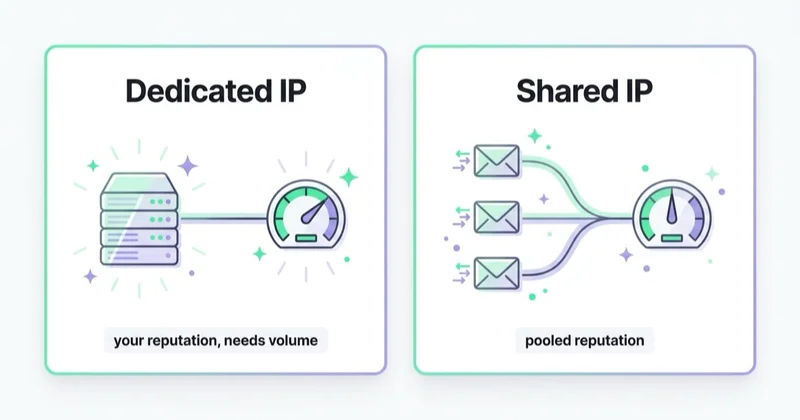
Likewise, a shared IP is not inherently poor quality. A reputable provider vets customers, separates different types of traffic, removes abusive senders and manages capacity. The relevant question is not simply “shared or dedicated?” but “how is this particular environment governed?”
Is there a minimum volume for a dedicated IP?
Providers often publish their own eligibility thresholds, but no industry-wide number determines whether a dedicated IP will perform well. A monthly total can also hide the pattern that mailbox providers actually see.
Imagine two programmes that each send 300,000 messages per month:
- Sender A distributes mail predictably across most days and has substantial volume at Gmail, Yahoo and Microsoft.
- Sender B sends almost everything in one weekend, then remains silent for the rest of the month.
Sender A is the stronger dedicated-IP candidate. Sender B may repeatedly create the pattern of a cold or suddenly spiking sender, despite having the same monthly total.
Assess at least five factors:
- Daily and weekly consistency. Can the business maintain a recognisable sending pattern after warm-up?
- Volume by mailbox provider. Total list size matters less than how much traffic each receiving network sees.
- Purpose of the stream. Does critical transactional mail need protection from promotional traffic?
- List quality and engagement. Is the programme based on permission, current data and effective suppression?
- Operational maturity. Can someone review deferrals, complaints, authentication and reputation every day during migration?
Google's threshold of more than 5,000 messages per day to personal Gmail accounts defines a bulk sender for Gmail requirements. It is not a recommendation to buy a dedicated IP. Do not confuse a compliance threshold with an infrastructure threshold.
What sender reputation belongs to the IP—and what does not?
IP reputation reflects the history of mail sent from an address. A dedicated IP limits exposure to unrelated senders and gives you more control over its traffic. But modern filtering also evaluates the sending domain, DKIM domain, From domain, message stream and recipient feedback.
This has three practical consequences:
- changing IP does not erase a damaged domain reputation;
- sharing an IP does not make your authenticated domain invisible;
- authentication and alignment remain mandatory regardless of IP model.
For bulk senders, Gmail and Yahoo require SPF, DKIM and DMARC, low spam complaint rates and easy unsubscribe for subscribed marketing messages. Both providers also require valid forward and reverse DNS for sending IPs. A dedicated address without correct PTR records, TLS and authentication is unfinished infrastructure.
When a shared IP is the better choice
A well-managed shared pool is usually the sensible default when:
- email volume is small or changes sharply from week to week;
- campaigns are seasonal and long pauses are unavoidable;
- a new programme has not yet established a reliable sending pattern;
- the organisation lacks resources for deliverability monitoring;
- the provider can place the sender in a pool matched to its traffic type and quality;
- the extra cost and complexity of dedicated infrastructure would not solve a defined problem.
Before accepting a shared pool, ask the provider:
- Are transactional and promotional messages separated?
- How are new customers vetted and abusive accounts removed?
- What happens when one sender causes a blocklisting or rate limit?
- Is traffic distributed across multiple pools, and how is placement decided?
- Which reputation and delivery data can the customer access?
The answers reveal more than the label “shared IP”. A governed pool of permission-based senders can be safer than a neglected dedicated address.
When a dedicated IP makes sense
A dedicated IP becomes attractive when the programme has:
- steady volume large enough to establish history at its main mailbox providers;
- business-critical transactional mail that should be isolated from promotions;
- different brands, regions or message classes that require separate reputation streams;
- strict allow-listing or fixed-IP requirements in a B2B environment;
- a mature data, consent and suppression process;
- a team or partner able to monitor deliverability and adjust throughput quickly.
Large programmes may need more than one dedicated IP, but adding addresses without enough volume can dilute traffic and make reputation harder to establish. Design pools around message purpose and receiving-provider capacity, not around organisational charts alone.
Some platforms also offer managed dedicated IPs. In that model, the provider can automate allocation, warm-up and scaling, sometimes routing excess traffic through a shared pool during the ramp. This can reduce operational burden, but the sender still owns list quality, authentication, content and recipient expectations.
What is IP warm-up?
IP warm-up is the controlled introduction of traffic from a new sending address. A mailbox provider has little or no history for that IP, so an immediate high-volume campaign resembles abusive behaviour. The sender begins with a smaller amount of wanted mail and expands only as the receiving networks accept it without material deterioration.
Warm-up may also be needed after:
- a long pause in sending;
- a move to a new email service provider;
- the addition of new IPs, domains or DKIM signing domains;
- a major change in message format or infrastructure;
- an abrupt and lasting increase in normal volume.
The domain and the IP form part of the same reputation system. A familiar domain can help, but it does not make a new IP instantly trusted.
Before warm-up: the non-negotiable checklist
Do not start the ramp until the foundation is ready:
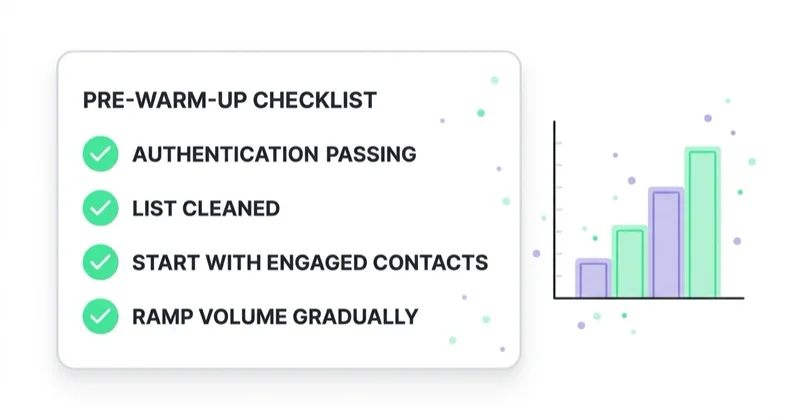
- Authenticate the stream. Configure SPF, DKIM and DMARC with correct alignment.
- Complete network identity. Confirm forward DNS, PTR/reverse DNS, HELO/EHLO and TLS.
- Implement unsubscribe. Marketing mail should include visible unsubscribe and standards-compliant one-click unsubscribe where required.
- Prepare suppression. Stop hard bounces, complaints and unsubscribed recipients from receiving further campaigns promptly.
- Validate the audience. Exclude purchased, scraped, stale and unproven addresses.
- Separate message classes. Keep transactional and promotional traffic in appropriate streams.
- Register monitoring. Set up Google Postmaster Tools and Yahoo's Complaint Feedback Loop or Sender Hub where eligible.
- Preserve the old route. If possible, keep proven infrastructure available while the provider gradually transfers traffic.
Warm-up is not the moment to reactivate an old database. New infrastructure and an uncertain audience create two variables at once, making failures harder to diagnose.
A practical IP warm-up process
There is no safe universal table of daily volumes. Capacity varies by sender history, audience mix, mailbox provider and platform. Use your ESP's plan as the baseline, then manage the ramp by evidence.
1. Segment by genuine recent engagement
Start with recipients who have recently clicked, purchased, logged in or otherwise interacted with the business. Opens can support segmentation, but privacy features and image caching make them an imperfect signal. Do not equate “opened once” with current consent or interest.
2. Distribute traffic by mailbox provider
Track Gmail, Yahoo, Microsoft and other important destinations separately. Reputation develops independently across receiving networks. A total volume that looks conservative may still be too concentrated at one provider.
3. Send at a steady rate
Avoid a single morning burst followed by silence. Spread traffic in a controlled pattern consistent with how the programme will operate after warm-up. Google explicitly warns that suddenly doubling previous volume can cause rate limits or reputation decline.
4. Expand the audience gradually
Move from the most active segment toward moderately engaged subscribers. Increase volume only after the current level is being accepted reliably. Do not add the oldest or least certain records simply to hit a planned number.
5. Review signals before each increase
Use a daily decision gate:
- Are temporary deferrals or throttling errors increasing?
- Are hard bounces controlled and invalid addresses suppressed?
- Are spam complaints safely below provider thresholds and internal targets?
- Do Google Postmaster Tools show stable domain and IP reputation where data is available?
- Has inbox placement or conversion quality deteriorated for a particular provider?
If the answer is negative, hold or reduce volume. If deferrals persist even at a lower rate, investigate authentication, audience quality, DNS, content and SMTP responses before continuing.
How long does IP warm-up take?
Many programmes need approximately two to six weeks, but this is a planning range, not a promise. AWS notes that reputation can take about two weeks at some providers and up to six at others; its standard automated warm-up runs over 45 days. Managed platforms may use adaptive schedules instead.
The target is not “day 21”. The target is stable delivery at the normal production pattern. A smaller daily sender may take longer to create meaningful history, while an established domain migrating carefully may progress faster. Seasonal pauses can require a partial ramp again.
Metrics that determine whether to continue
During warm-up, monitor:
| Signal | Why it matters |
|---|---|
| SMTP deferrals and rate limits | Early evidence that a receiving network wants less traffic |
| Hard-bounce rate | Reveals invalid or obsolete addresses and list-quality problems |
| Spam complaint rate | Direct recipient feedback with major reputation impact |
| Domain and IP reputation | Shows how providers assess the sending identity over time |
| Authentication pass and alignment | Confirms the infrastructure is recognised correctly |
| Inbox placement | Distinguishes accepted mail from mail reaching the inbox |
| Clicks, conversions and unsubscribes | Indicates whether the audience actually wants the programme |
Do not manage warm-up on open rate alone. Google states that it does not track opens and cannot verify third-party open-rate accuracy. Apple Mail Privacy Protection and automated security tools further weaken opens as a standalone engagement measure.
How we approach IP strategy at Space Ads
We treat the IP model as an infrastructure decision, not a premium feature to upsell. The process starts with a traffic map: volume by day, mailbox provider, brand and message class. We then review consent, suppression, authentication, domain health, provider capabilities and the operational cost of maintaining isolated reputation.
For a migration, we define the audience sequence, the old and new routing split, daily decision gates and rollback conditions before the first production send. Transactional continuity takes priority over promotional speed. If the data does not support a dedicated IP, a well-managed shared pool is the stronger recommendation.
This work sits alongside the broader email deliverability framework and SPF, DKIM and DMARC configuration. An IP change should never be used to avoid fixing the list or the sending domain.
Common mistakes
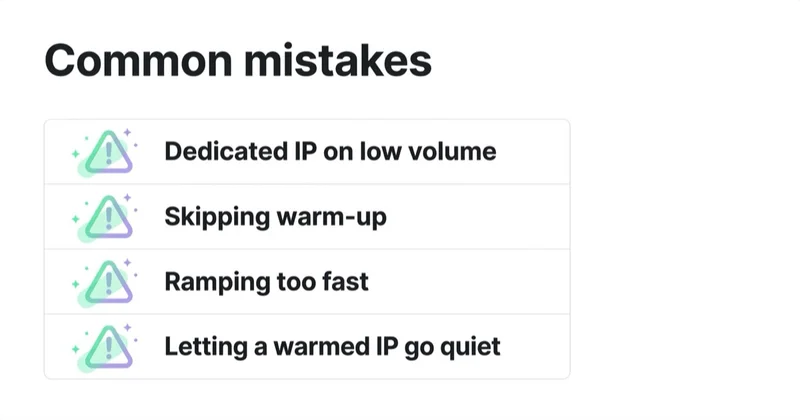
- Buying a dedicated IP for status rather than a defined operational need.
- Treating 100,000 monthly emails as a universal migration threshold.
- Sending the full database on day one or automatically doubling volume every day.
- Warming on old, inactive or weakly permissioned records.
- Looking only at aggregate results instead of mailbox-provider-level signals.
- Protecting promotional traffic while leaving transactional mail in the same reputation stream.
- Assuming a new IP resets domain reputation or fixes authentication.
- Letting a warmed address sit idle, then returning immediately at peak volume.
Frequently asked questions
Is a dedicated IP always better for deliverability?
No. A dedicated IP isolates IP reputation, but it also removes the stabilising volume and provider management of a shared pool. If sending is too low or irregular, the dedicated address may struggle to establish a consistent history. Deliverability also depends on domain reputation, consent, engagement, authentication and message practices.
How many emails do I need for a dedicated IP?
There is no universal number. Evaluate daily consistency, volume at each major mailbox provider, message type, list health and your ability to monitor reputation. Ask the email service provider for the minimum volume its own infrastructure requires. The Gmail bulk-sender threshold of more than 5,000 messages per day is a compliance definition, not a dedicated-IP recommendation.
Can another sender damage my reputation on a shared IP?
Shared IP reputation can be affected by other traffic in the pool, and severe abuse can cause throttling or blocklisting. However, mailbox providers also evaluate authenticated domains, and responsible ESPs segment customers and remove bad actors. Review the provider's governance rather than assuming every shared pool is equally risky.
Can I warm up an IP by sending only transactional email?
High-quality transactional mail can contribute positive, consistent traffic, but do not jeopardise critical messages or mix streams without a deliberate architecture. The warm-up plan should protect password resets, receipts and account alerts. Many organisations keep transactional and promotional traffic on separate IP pools or DKIM domains.
Should warm-up volume double every day?
Not as a default rule. Google warns that abruptly doubling established volume can cause rate limiting or reputation decline. Increase according to your ESP's plan and observed acceptance at each mailbox provider. Hold or reduce volume when deferrals, bounces, complaints or reputation signals deteriorate.
Does a dedicated IP need to be warmed again after a pause?
Often, yes. The required ramp depends on the length of the pause, previous reputation and intended volume. After a material interruption, do not assume the old capacity remains available. Resume with a controlled segment and watch provider responses before returning to full traffic.
Key takeaways
- Shared IPs suit lower, irregular and seasonal volume; dedicated IPs suit mature, predictable programmes that need isolation.
- There is no industry-wide monthly threshold that automatically makes a dedicated IP the right choice.
- A dedicated IP isolates one reputation layer but does not replace strong domain reputation, permission or authentication.
- Warm-up should be gradual, provider-aware and driven by delivery signals—not a rigid doubling schedule.
- Prepare DNS, SPF, DKIM, DMARC, unsubscribe, suppression and monitoring before routing production mail.
- Evaluate the decision by stream and mailbox provider, not by total database size alone.
Sources and further reading
- Gmail Help — email sender guidelines
- Gmail Help — email sender guidelines FAQ
- Yahoo Sender Hub — sender requirements and best practices
- Amazon SES — dedicated IP options and decision criteria
- Amazon SES — warming up standard dedicated IP addresses
- M3AAWG — Sender Best Common Practices
Continue learning
Continue reading

Email Deliverability: Why Emails Land in Spam and How to Fix It
A message marked delivered may still be in spam. Learn how to distinguish acceptance, deferral, rejection and inbox placement; diagnose problems by mailbox provider and stream; and fix authentication, reputation, list, volume or content issues in the right order.
Email Authentication Explained: SPF, DKIM and DMARC for Marketers
SPF authorises sending infrastructure, DKIM signs selected message content, and DMARC connects those results to the domain recipients see in From. Learn how alignment works, what Gmail, Yahoo and Outlook require, and how to move from inventory to monitored enforcement safely.

Double Opt-In, Unsubscribe and List Hygiene: Keep Your List Healthy
A healthy email list starts with verifiable permission, makes leaving effortless and stops mailing addresses that are no longer valid or engaged. Learn how to implement double opt-in, RFC 8058 one-click unsubscribe, suppression and a defensible sunsetting policy.


































