
A healthy email list is not simply a large collection of addresses. It is a permissioned audience whose expectations are documented, whose addresses still work and whose recipients can leave without friction. Three practices make that possible: double opt-in, one-click unsubscribe and ongoing list hygiene.
Double opt-in verifies that the person entering an address can access it and still wants the subscription. One-click unsubscribe gives mailbox providers a standards-based way to remove a recipient immediately. List hygiene suppresses invalid, complaining and persistently inactive contacts before they damage performance. Together, these practices improve evidence of consent, reduce unwanted mail and protect sender reputation.
The short answer
- Double opt-in keeps a new contact pending until they confirm through an email link.
- It reduces typos, malicious sign-ups and unwanted subscriptions, but does not replace clear consent language or proper records.
- RFC 8058 one-click unsubscribe is implemented in message headers, not merely as a link in the email body.
- Gmail requires it for marketing and subscribed messages from senders exceeding 5,000 messages per day to personal Gmail accounts; Yahoo requires it for bulk marketing senders.
- Keep a visible unsubscribe link in the body as well, even when the one-click headers are correct.
- Suppress hard bounces, complaints and unsubscribes so they cannot be re-imported accidentally; do not simply delete all evidence.
- Do not sunset people based on opens alone. Use clicks, purchases, account activity, send frequency and delivery history.
- A smaller permissioned audience is more valuable than a large database that no longer expects the mail.
Double opt-in vs single opt-in
With single opt-in, the address becomes active as soon as the form is submitted. With double opt-in, the address remains pending until the recipient clicks a unique confirmation link.
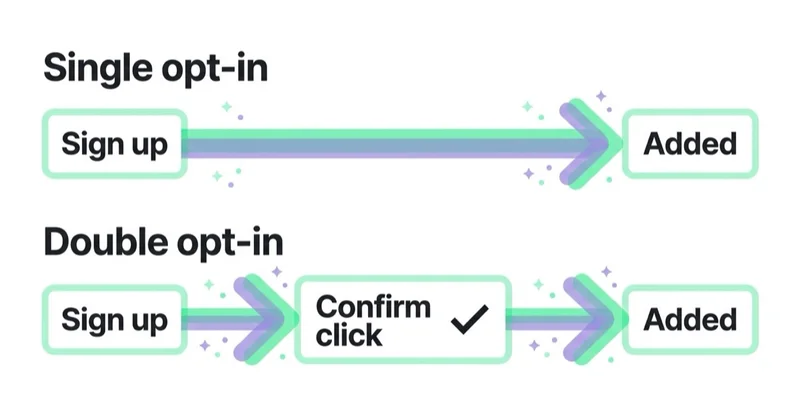
| Area | Single opt-in | Double opt-in |
|---|---|---|
| Steps | One | Form submission plus email confirmation |
| Growth speed | Faster | Some valid subscribers will not complete confirmation |
| Address verification | No proof that the person controls the inbox | Confirms access to the inbox at that time |
| Risk of typos and abuse | Higher | Lower, though bot protection is still needed |
| Consent evidence | Depends entirely on form and event records | Adds a separate confirmation event |
| Deliverability | Can work with strong controls | Usually creates a cleaner starting audience |
Double opt-in is a strong default for newsletters and promotional programmes, particularly when sign-up forms are public, the brand serves multiple countries or the cost of a false subscription is high. Google also advises senders to confirm each address before subscribing it and now describes address confirmation as part of its email subscription guidelines.
That does not mean double opt-in is a universal legal requirement. Marketing rules differ by jurisdiction and may include specific consent rules, existing-customer exceptions or requirements for business contacts. Double opt-in is a process for verification and evidence; legal compliance still depends on what the person was told, what they actively agreed to and how the organisation records and uses that choice.
What a robust double opt-in flow looks like
A good implementation has more than a confirmation email.
1. Make the form specific
State who will send the messages, what the recipient will receive and, where practical, how often. Use an unticked choice rather than a preselected marketing box. Link to the relevant privacy information without hiding the core promise in legal copy.
If one form covers several distinct subscriptions, allow granular choices. Consent to a weekly editorial newsletter is not automatically consent to every promotion from every brand in a group.
2. Create a pending record
After submission, store the address as pending, not marketable. Record the form or source, timestamp, wording or version shown and any other evidence appropriate to the applicable rules. Do not send promotional content while confirmation is outstanding.
3. Send a focused confirmation message
The message should identify the brand and the requested subscription, then offer one clear confirmation action. Avoid turning it into a promotional campaign. If the recipient did not request it, provide a safe way to ignore or report the request.
4. Use a secure, expiring link
The token should be unique, difficult to guess, limited to the intended action and valid for a reasonable period. Confirmation should activate only the subscription that was described. Avoid putting unnecessary personal data in the URL.
5. Record confirmation and set expectations
When the recipient confirms, save the confirmation timestamp and connect it to the original request. The welcome message should remind them what they joined, set frequency expectations and show how to change preferences or unsubscribe.
6. Expire unconfirmed records
Do not keep retrying indefinitely. Define how long pending records remain valid, limit reminders and remove or minimise stale pending data according to your retention policy.
Protect the sign-up process from abuse
Double opt-in filters many bad entries, but automated tools can also submit forms and sometimes click links. Public forms need additional controls:
- rate-limit requests by IP, device or address where appropriate;
- use a honeypot or risk-based challenge without making the form inaccessible;
- prevent rapid repeated confirmation emails to the same address;
- monitor sudden bursts from one source, domain or form;
- sign and expire confirmation tokens;
- keep confirmation messages strictly recognisable and expected.
These controls also reduce confirmation bombing, where an attacker submits one person's address to many forms, flooding the victim with confirmation emails. Double opt-in prevents the victim from becoming an active subscriber, but it does not prevent the initial nuisance unless the form is protected.
One-click unsubscribe: what it actually means
One-click unsubscribe is a technical mechanism defined by RFC 8058. The sending system adds two headers to a marketing message:
List-Unsubscribe: <https://example.com/unsubscribe/opaque-token>
List-Unsubscribe-Post: List-Unsubscribe=One-Click
The message must carry a valid DKIM signature covering the relevant headers. When the mailbox provider presents its unsubscribe control and the user selects it, the provider sends an HTTPS POST request to the URL. The endpoint must process the request without asking the person to sign in, confirm on another page or take an additional action.
A mailto: option by itself does not satisfy Gmail's RFC 8058 one-click requirement. Nor does a button in the email body that opens a preference centre. Those options can still be useful, but they do not replace the required HTTPS header flow.
Who must implement one-click unsubscribe?
Gmail requires one-click unsubscribe for marketing and subscribed messages from senders that send more than 5,000 messages per day to personal Gmail accounts. The volume is counted across messages from the same primary domain. Gmail's subscription guidelines say to process requests within 48 hours.
Yahoo requires bulk senders to provide one-click unsubscribe for marketing and subscribed messages and to honour requests within two days. Both providers also expect a clearly visible unsubscribe link in the message body. Transactional messages such as password resets and purchase receipts are generally outside this specific mailbox-provider requirement, although the classification must reflect the actual content.
Even below the threshold, implementing the standard is sensible. A recipient who cannot leave easily may report the message as spam, which creates a stronger negative reputation signal. Easy unsubscribe is not lost revenue; it is a way to stop sending to someone who no longer wants the programme.
One-click unsubscribe, body link and preference centre
These serve different jobs:
| Mechanism | Purpose |
|---|---|
| RFC 8058 headers | Enables immediate unsubscribe through the mailbox interface |
| Visible body link | Gives every reader an obvious way to leave or manage preferences |
| Preference centre | Lets the recipient change topics, brands or frequency |
The one-click endpoint should remove the recipient from the list associated with that message. It does not necessarily have to suppress every type of communication from the organisation. The body link can offer a granular preference centre, but it must also include a clear route to full marketing opt-out where required.
Do not require login, demand a password, charge a fee or make the unsubscribe control difficult to find. Confirm the outcome plainly, and ensure all connected systems receive the suppression quickly.
What email list hygiene includes
List hygiene is the ongoing process of keeping audience status accurate across the customer data platform, CRM, ecommerce system and email service provider. It is not a one-off deletion project.
Suppress immediately
- Unsubscribes — stop the relevant marketing messages promptly and within applicable provider and legal deadlines.
- Spam complaints — suppress the address from the affected stream as soon as feedback is available.
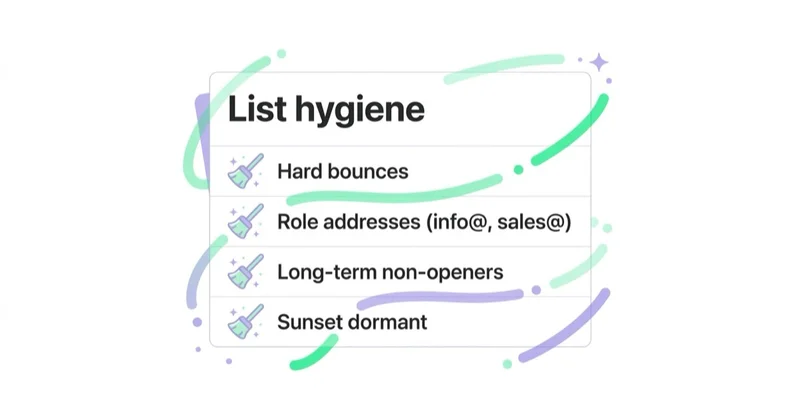
- Permanent or hard bounces — suppress addresses that the receiving server identifies as invalid or non-existent.
- Known abuse and trap records — isolate and investigate the acquisition source, not only the individual address.
Review with context
- Soft bounces and deferrals — use the SMTP code and repeated history; a full mailbox is different from a policy block.
- Long-term inactivity — apply a defined sunsetting policy based on the purchase cycle and message frequency.
- Role addresses such as
info@orsales@— do not remove automatically. A role inbox can be a legitimate, expected B2B subscriber, but public or unverified role addresses deserve careful provenance and monitoring. - Duplicates and changed addresses — reconcile identities without accidentally restoring an old suppressed address.
An email verification service may help identify syntax or domain problems, but it does not create permission. A technically deliverable address can still be unwanted, unlawfully acquired or harmful to reputation.
Suppression is different from deletion
When a contact unsubscribes or hard-bounces, simply deleting the row can be dangerous. The same address may be imported again from a CRM export and resume receiving mail. A suppression record preserves the minimum information needed to prevent future sending and to demonstrate that the choice was honoured.
Design the data flow so that suppression wins over campaign membership. Define which systems own subscription status, how quickly changes propagate and how conflicts are resolved. Access to suppression data should be limited, and retention should follow applicable privacy and legal requirements.
How to define an inactivity and sunsetting policy
There is no universal “remove after 90 days” rule. A daily-deals newsletter, a quarterly B2B publication and a travel company with an annual booking cycle need different windows.
Define inactivity using several signals:
- time since the last click;
- purchase, login or product activity;
- replies or preference updates;
- number of delivered campaigns since the last meaningful action;
- subscription age and original source;
- opens as a supporting, not decisive, signal.
Open tracking is imperfect because privacy features, image proxying and security scanners can create opens that did not reflect human attention—or hide real reading. A person who never records an open but purchases after receiving email should not be treated like a dormant contact.
A practical sequence is:
- reduce frequency or pause the least engaged segment;
- send a short re-engagement series only while permission and expectations remain valid;
- offer a clear “keep me subscribed” action and preference options;
- suppress contacts who do not respond by the stated deadline;
- measure the effect on complaints, clicks, conversions and inbox placement.
Do not use a re-engagement campaign to revive a list with unknown origin or expired permission. If you cannot establish why the recipient should expect the message, sending another message is not the cure.
Metrics for list health
Raw list size is a poor management metric. Track a compact set of measures by acquisition source and message stream:
| Metric | What it reveals |
|---|---|
| Form-to-confirmation rate | Friction, address quality and possible form abuse |
| Hard-bounce rate | Data quality at capture or import |
| Spam complaint rate | Whether recipients recognise and want the mail |
| Unsubscribe rate | Expectation, frequency and content fit |
| Meaningfully engaged share | The reachable audience under your inactivity definition |
| Reactivation rate | Whether sunsetting messages recover genuine interest |
| Clicks and conversion per delivered email | Business value of the addressable list |
| Suppression propagation time | Whether opt-outs reach every sending system quickly |
Compare sources, not only totals. If one lead form produces many unconfirmed records, bounces or complaints, investigate its promise, placement and bot protection before buying more traffic to it.
How we approach list health at Space Ads
We treat list growth and list quality as one system. Acquisition is reviewed together with confirmation, consent evidence, first engagement, complaints and downstream revenue. That makes it possible to distinguish a form that generates many addresses from a form that creates valuable, durable subscribers.
Our operating model defines the subscription taxonomy, owner of consent data, suppression rules and sunsetting windows before campaign automation is scaled. We also test the real unsubscribe path from header to endpoint to every connected platform. A green status in an email tool is not enough if the CRM can re-add the address the next morning.
List health supports the wider email deliverability framework and email authentication. Authentication proves who sent the message; permission and hygiene help prove that the recipient wanted it.
Implementation checklist
- Use clear, unticked subscription choices and record the wording shown.
- Keep new contacts pending until a secure confirmation link is used.
- Rate-limit forms and confirmation messages to reduce abuse.
- Implement RFC 8058 headers with a working HTTPS POST endpoint and valid DKIM coverage.
- Include a clear unsubscribe link in the message body.
- Process opt-outs across every sending platform within the strictest applicable deadline.
- Suppress hard bounces and complaints; review soft bounces by response code.
- Keep subscription messages separate from transactional messages.
- Define inactivity using business-cycle and engagement signals, not opens alone.
- Test imports to ensure suppressed addresses cannot become marketable again.
Common mistakes
- Treating double opt-in as a substitute for specific consent language.
- Activating the address before the confirmation click.
- Sending a promotional confirmation email to a person who has not yet confirmed.
- Calling a body link “one-click unsubscribe” without RFC 8058 headers.
- Sending one-click users to a login or confirmation page.
- Deleting unsubscribes and losing the suppression evidence.
- Automatically rejecting every role address or every non-opener.
- Running re-engagement against a database with unknown provenance.
- Measuring success by database size rather than permissioned, reachable value.
Frequently asked questions
What is double opt-in?
Double opt-in is a subscription process in which an address stays pending until the recipient clicks a unique link in a confirmation email. It verifies access to the inbox and records an additional expression of intent. The form still needs clear language, and the organisation must retain appropriate evidence of what was requested and confirmed.
Is double opt-in legally required?
Not everywhere. Legal requirements vary by country, recipient type and relationship. Double opt-in is widely recommended because it verifies the address and strengthens evidence, but it does not by itself make every campaign lawful. Obtain jurisdiction-specific advice where necessary and keep records of who agreed, when, how and to what.
Is an unsubscribe link in the footer enough for Gmail and Yahoo?
Not for senders covered by their one-click requirements. RFC 8058 one-click unsubscribe uses List-Unsubscribe and List-Unsubscribe-Post headers with an HTTPS endpoint. Gmail and Yahoo also expect a visible link in the message body, so compliant programmes normally provide both.
Should hard-bounced and unsubscribed contacts be deleted?
They should stop receiving the relevant mail immediately, but complete deletion may remove the evidence needed to prevent re-import. Keep an appropriately protected suppression record containing the minimum data required to honour the status, subject to applicable retention and privacy rules.
Should inactive subscribers be removed?
Persistently inactive contacts should usually be reduced in frequency, re-engaged or suppressed under a documented policy. The window should reflect the buying cycle and send frequency. Do not decide from opens alone; use clicks, transactions, account activity, replies and delivered-message history.
Are role-based addresses bad for deliverability?
Not automatically. A role address can be a legitimate B2B subscription monitored by a team. Risk is higher when it was scraped, purchased or added without knowing who requested the mail. Judge provenance, expectation and response rather than applying a blanket ban.
Key takeaways
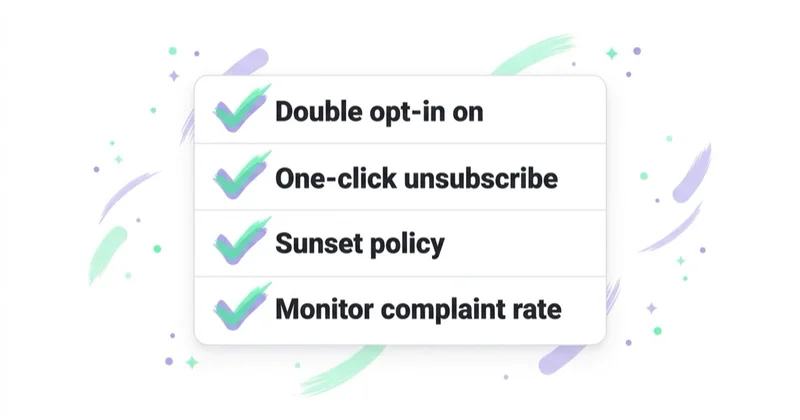
- Double opt-in verifies inbox access and creates stronger evidence, but clear consent and record-keeping still matter.
- RFC 8058 one-click unsubscribe is a header-based HTTPS POST flow, separate from the body link and preference centre.
- Suppression prevents unsubscribes, complaints and invalid addresses from returning through another system.
- List hygiene requires context: role inboxes, soft bounces and inactive contacts should not all be handled identically.
- Sunsetting should reflect the business cycle and multiple engagement signals, not open rate alone.
- Optimise for a permissioned, reachable and valuable audience—not the largest possible database.
Sources and further reading
- Gmail Help — email sender guidelines
- Gmail Help — email subscription guidelines
- Gmail Help — sender guidelines FAQ and one-click implementation
- Yahoo Sender Hub — sender requirements and best practices
- IETF — RFC 8058: one-click functionality for list email
- UK Information Commissioner's Office — consent records for electronic mail marketing
Continue learning
Continue reading
Email Deliverability: Why Emails Land in Spam and How to Fix It
A message marked delivered may still be in spam. Learn how to distinguish acceptance, deferral, rejection and inbox placement; diagnose problems by mailbox provider and stream; and fix authentication, reputation, list, volume or content issues in the right order.
Email Authentication Explained: SPF, DKIM and DMARC for Marketers
SPF authorises sending infrastructure, DKIM signs selected message content, and DMARC connects those results to the domain recipients see in From. Learn how alignment works, what Gmail, Yahoo and Outlook require, and how to move from inventory to monitored enforcement safely.
Dedicated vs Shared IP in Email Marketing (and IP Warm-Up)
A shared IP is usually the practical choice for lower or irregular email volume. A dedicated IP offers isolation and control when sending is large, predictable and operationally mature—but it needs careful warm-up. Learn how to choose without relying on an arbitrary volume threshold.


































