
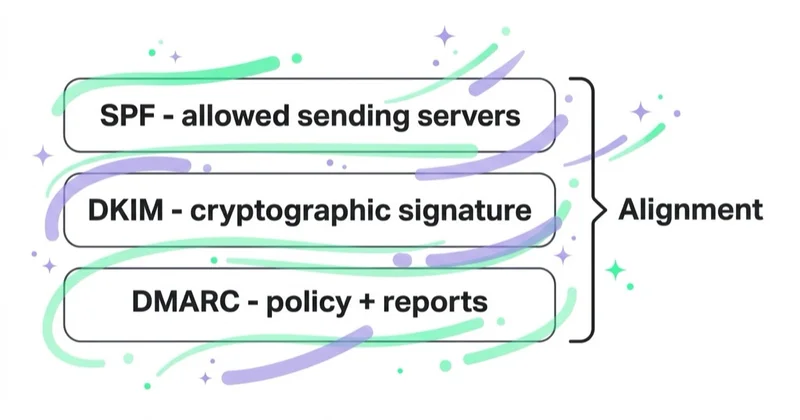
SPF, DKIM and DMARC help receiving mail systems verify whether a message is authorised to use a domain. SPF checks the sending infrastructure against the envelope sender domain. DKIM verifies a cryptographic signature attached to the message. DMARC then asks whether at least one passing result aligns with the domain recipients see in the From address and publishes a policy for failures.
They are complementary, not interchangeable. A message can pass SPF and DKIM for an email platform's domains but still fail DMARC for your brand. It can also pass DMARC and land in spam because authentication does not prove that recipients wanted the message. The practical goal is correct, aligned authentication across every legitimate sending system—followed by monitoring and an appropriate DMARC policy.
The short answer
- SPF authorises IPs and services to send using the envelope sender, also called MAIL FROM or Return-Path, domain.
- DKIM signs selected headers and the message body; the public key is published under a selector in DNS.
- DMARC checks whether the visible From domain aligns with a passing SPF or DKIM domain.
- DMARC passes when aligned SPF or aligned DKIM passes. Bulk-sender rules can still require both SPF and DKIM to be configured and passing.
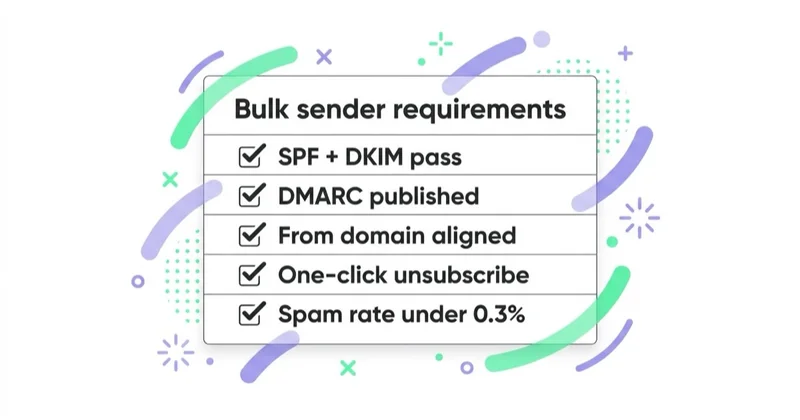
- Gmail, Yahoo and Outlook.com apply enhanced authentication requirements to high-volume senders; the exact scope and thresholds differ.
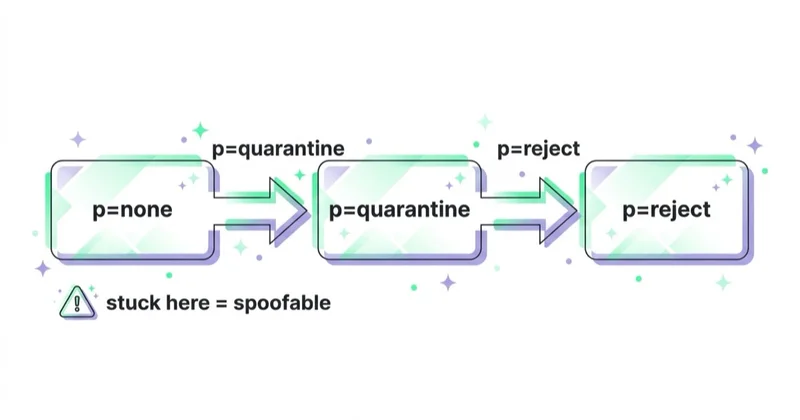
p=nonemonitors,p=quarantinerequests suspicious treatment, andp=rejectrequests rejection. The right end state depends on the domain's use.- Do not publish
p=rejectbefore identifying every legitimate sender and reviewing aggregate reports. - SPF has a limit of 10 DNS-querying terms during evaluation, and publishing multiple SPF records for one domain causes a permanent error.
- DMARC does not stop lookalike domains, display-name impersonation or unwanted mail sent from a correctly authenticated system.
The three identities behind one email
To a recipient, a message may appear to have one sender. Underneath, authentication can involve three domains:
| Identity | Where it appears | Used by |
|---|---|---|
| Visible From domain | From: offers@example.com |
DMARC's reference domain; what the recipient sees |
| Envelope sender domain | Return-Path: bounce@mail.example.com |
SPF and bounce handling |
| DKIM signing domain | d=mail.example.com in DKIM-Signature |
DKIM and DMARC alignment |
An email service provider may use its own Return-Path and DKIM domain by default. SPF and DKIM can technically pass for that provider while neither identity aligns with example.com. The message then fails DMARC.
This is why a dashboard that shows two green “pass” labels is not enough. Verify the actual domains in the headers and the final dmarc=pass result.
What SPF does
SPF—Sender Policy Framework—is a DNS policy for the domain used in the SMTP envelope sender. The receiving server takes the connecting IP, looks up the SPF record for that domain and checks whether the address is authorised.
An illustrative record might look like this:
example.com TXT "v=spf1 include:_spf.example-provider.com -all"
Do not copy this value into production. Each authorised provider supplies its own mechanism, and the record must represent the systems that really send for that envelope domain.
SPF limitations marketers should know
- SPF does not authenticate the visible From address by itself. DMARC alignment connects the SPF domain to the From domain.
- Forwarding often breaks SPF. The forwarder's IP may not be authorised by the original envelope domain.
- There must be one SPF record per domain. Adding a second
v=spf1TXT record does not extend the first; it producespermerror. - The lookup budget is limited. RFC 7208 allows at most 10 terms that trigger DNS queries during SPF evaluation, including
include,a,mx,existsandredirect. Nested includes count. - A huge record is not good governance. Remove old vendors and avoid authorising infrastructure more broadly than necessary.
Use separate custom return-path subdomains where platforms support them. This can simplify ownership and make relaxed DMARC alignment possible without forcing unrelated services into one overloaded SPF record.
What DKIM does
DKIM—DomainKeys Identified Mail—adds a DKIM-Signature header. The sending system uses a private key to sign selected headers and the body. The receiver uses the signing domain (d=) and selector (s=) to retrieve the matching public key from DNS and verify the signature.
If the selector is s2026 and the signing domain is mail.example.com, the key is normally published at:
s2026._domainkey.mail.example.com
DKIM proves that the signed parts have not changed in a way that invalidates the signature and that the system controlling the private key signed on behalf of the d= domain. It does not prove that the content is truthful, solicited or safe.
DKIM implementation checklist
- use a custom signing domain aligned with the visible From domain;
- follow the sending provider's generated DNS values exactly;
- use at least 1024-bit keys for Gmail and 2048-bit keys where supported, as Google recommends;
- use selectors so a new key can be published before the old one is retired;
- store private keys only in the signing system and rotate them under a documented policy;
- verify each mail stream, not merely one test from the corporate mailbox.
DKIM often survives forwarding because the signature travels with the message. It can fail when a gateway or mailing list modifies signed content, rewrites the subject or otherwise changes protected parts.
What DMARC does
DMARC—Domain-based Message Authentication, Reporting, and Conformance—uses the visible From domain as its anchor. A message passes DMARC when at least one of these paths succeeds:
SPF passes + SPF domain aligns with From
OR
DKIM passes + DKIM signing domain aligns with From
The DMARC record is published at _dmarc.example.com. A monitoring example is:
_dmarc.example.com TXT "v=DMARC1; p=none; rua=mailto:dmarc-reports@example.com"
The rua address receives aggregate reports from participating receivers. These machine-readable reports summarise sending IPs, message counts, authentication results and policy handling. They do not arrive from every receiver, and the mailbox or reporting service must be prepared to process the volume and XML format.
In May 2026, RFC 9989, RFC 9990 and RFC 9991 replaced RFC 7489 as the current DMARC standards: the core protocol, aggregate reporting and failure reporting respectively. Existing v=DMARC1 records remain recognisable, but the legacy pct tag was removed from the new core specification. Do not design a rollout that depends on percentage enforcement being interpreted consistently.
DMARC alignment in plain English
Alignment compares the visible From domain with the authenticated SPF or DKIM domain.
Relaxed alignment
The domains share the same organisational domain. For example:
- visible From:
news.example.com; - DKIM
d=:mailer.example.com.
Both sit under example.com, so they align in relaxed mode. Relaxed alignment is the default and is sufficient for most organisations.
Strict alignment
The domains must match exactly. news.example.com and mailer.example.com would not align. Strict alignment can suit a tightly controlled architecture, but it should be a deliberate choice because it reduces tolerance for subdomain differences.
Example outcomes
| Visible From | SPF domain/result | DKIM domain/result | DMARC |
|---|---|---|---|
example.com |
bounce.example.com / pass |
provider.net / pass |
Pass via relaxed SPF alignment |
news.example.com |
provider.net / pass |
news.example.com / pass |
Pass via strict DKIM alignment |
example.com |
provider.net / pass |
provider.net / pass |
Fail: neither passing identity aligns |
example.com |
bounce.example.com / fail |
example.com / pass |
Pass via DKIM |
Bulk-sender requirements can demand both SPF and DKIM authentication even though only one aligned path is needed for the DMARC result. Configure both rather than treating the OR logic as permission to omit one.
p=none, p=quarantine and p=reject
The p tag expresses the domain owner's requested treatment for mail that fails DMARC:
p=none— monitor without requesting DMARC-specific blocking or quarantine;p=quarantine— ask the receiver to treat failures as suspicious, often through spam placement or additional scrutiny;p=reject— ask the receiver to reject failures.
The receiver retains discretion and may apply local security rules. Passing DMARC does not force inbox placement, and failing does not guarantee identical treatment at every mailbox provider.
p=reject is not automatically the right destination for every domain. It is often appropriate for dedicated marketing, transactional and non-sending domains once all legitimate use is controlled. A general-purpose domain used by people, mailing lists and complex forwarding paths may need a more nuanced design. New RFC 9989 explicitly cautions against treating reject as a universal policy for general-purpose email.
For BIMI, mailbox providers generally expect DMARC enforcement at p=quarantine or p=reject, not monitoring-only p=none. Our BIMI, VMC and CMC guide covers that separate requirement.
Current Gmail, Yahoo and Outlook requirements
Mailbox-provider rules are not identical.
Gmail
For mail to personal Gmail accounts, all senders need SPF or DKIM. A sender that reaches roughly 5,000 messages or more in 24 hours from the same primary domain is treated as a bulk sender; Gmail says that status does not expire. Bulk senders must use SPF, DKIM and DMARC, with the visible From domain aligned to at least the SPF or DKIM organisational domain. The minimum DMARC policy can be p=none.
Yahoo
Yahoo requires all senders to authenticate with SPF or DKIM. Bulk senders must implement both SPF and DKIM, publish DMARC with at least p=none, and align the visible From domain with either SPF or DKIM. Yahoo does not publish the same numeric bulk threshold as Gmail in its main sender requirements.
Outlook.com consumer services
Microsoft announced SPF, DKIM and DMARC requirements for domains sending more than 5,000 messages per day to Outlook.com, Hotmail and Live consumer addresses, with enforcement introduced in 2025. High-volume senders should verify alignment and current Microsoft guidance rather than assuming Gmail compliance covers every receiving network.
Authentication is only one part of each programme. DNS identity, TLS, complaint rates, consent, unsubscribe and message formatting also affect compliance and delivery.
A safe implementation sequence
1. Inventory every sending source
Include more than the marketing platform:
- employee and executive mail;
- ecommerce orders, password resets and account alerts;
- CRM and sales outreach;
- support desk and ticketing;
- invoicing, HR and recruitment;
- website forms, monitoring systems and internal applications;
- agencies, affiliates or platforms sending on the brand's behalf.
Record owner, visible From domain, Return-Path domain, DKIM d= domain, volume, purpose and criticality. An unknown source cannot be migrated safely.
2. Design domain and stream ownership
Decide which domains or subdomains will carry employee, transactional and promotional mail. Separation can reduce blast radius and make reputation and policy easier to interpret. It does not excuse weak controls on any stream.
3. Configure SPF and aligned DKIM per system
Use provider-specific setup instructions, then inspect a real delivered message. Confirm that SPF and DKIM pass and that at least one domain aligns with the visible From. Do not rely solely on a DNS checker that never sees the final message.
4. Publish DMARC in monitoring mode
Start with p=none and an aggregate-report destination that is actually monitored. Allow enough time to observe daily, weekly and monthly streams, regional tools and low-frequency business systems.
5. Classify the report data
For each source, decide whether it is:
- authorised and aligned;
- authorised but misconfigured;
- an indirect or forwarded flow requiring investigation;
- obsolete infrastructure that should be removed;
- unauthorised spoofing.
Reports show IPs and authentication outcomes, not a perfect vendor inventory. Map evidence carefully and involve the system owner before blocking.
6. Move to an appropriate enforcement policy
Once legitimate sources are accounted for, move controlled domains from monitoring to quarantine or reject based on risk and use. Because RFC 9989 removed pct, do not assume percentage sampling offers a portable safety valve. Stage by controlled domains or streams, maintain rollback criteria and watch delivery immediately after each change.
7. Maintain change control
Every new sender must have an owner, aligned domain plan and authentication test before launch. Review aggregate reports, SPF lookup count, DKIM key age and obsolete DNS authorisations regularly. Authentication is infrastructure with ongoing ownership, not a one-time marketing ticket.
How to verify a real message
Send production-format tests to accounts at Gmail, Yahoo and Outlook. Inspect the original headers or authentication details and look for:
spf=pass
dkim=pass
dmarc=pass
Then verify the associated domains:
- Which domain did SPF evaluate?
- What is the DKIM
d=value and selector? - Which path produced DMARC alignment?
- Is the From domain the one the campaign is meant to use?
Also test forwarding, help-desk replies and transactional templates if they are part of the real customer journey. A clean newsletter test does not validate an invoice system.
What authentication does not solve
SPF, DKIM and DMARC do not:
- guarantee inbox placement;
- prove the recipient consented;
- prevent a compromised authorised platform from sending abuse;
- stop a lookalike domain such as
examp1e.com; - stop display-name impersonation that uses another domain;
- encrypt message content;
- replace list hygiene, one-click unsubscribe or reputation management.
They make domain use more accountable and give receivers a stronger basis for handling unauthorised mail. They remain essential, but they are the foundation—not the complete deliverability programme.
How we approach authentication at Space Ads
We start with an evidence-based sending inventory and message headers, not with blindly adding DNS records. Each stream needs a business owner, an aligned identity and a documented reason to use the domain. Aggregate reports then validate what is actually reaching participating receivers.
Enforcement follows coverage. We choose policy by domain purpose, protect critical transactional flows, and define onboarding rules so a new CRM or help desk cannot bypass the architecture. This work supports email deliverability, while list quality and recipient feedback determine whether correctly authenticated mail remains wanted.
Common mistakes
- Publishing two SPF records instead of merging authorised sources.
- Exceeding the SPF DNS-query limit through nested vendor includes.
- Seeing
spf=passanddkim=passwithout checking the domains ordmarc=pass. - Letting the provider sign only with its own DKIM domain.
- Moving to
p=rejectbefore observing infrequent legitimate systems. - Leaving
p=noneindefinitely without an owner or enforcement decision. - Relying on the removed
pcttag for a modern staged rollout. - Assuming DMARC reports identify every vendor automatically.
- Rotating or removing a DKIM key before old signed mail has cleared.
- Treating authentication as a guarantee of consent or inbox placement.
Frequently asked questions
What is the difference between SPF, DKIM and DMARC?
SPF checks whether the connecting server is authorised for the envelope sender domain. DKIM verifies a cryptographic signature associated with its d= signing domain. DMARC compares the passing SPF and DKIM domains with the visible From domain and applies the published policy when neither aligned path passes.
Can SPF and DKIM pass while DMARC fails?
Yes. Both can pass for domains owned by the email platform while the visible From uses your brand domain. If neither authenticated domain aligns with the From domain, DMARC fails. Configure a custom Return-Path and/or DKIM signing domain through the provider.
Does DMARC require both SPF and DKIM to pass?
The DMARC result needs at least one aligned passing path: SPF or DKIM. However, Gmail, Yahoo and Outlook high-volume sender rules require both technologies to be implemented for covered senders. In practice, use both; DKIM also provides resilience when forwarding breaks SPF.
Should every domain move from p=none to p=reject?
No. Monitoring without a decision provides weak protection, but reject is not universally appropriate for every general-purpose mail domain. Assess the domain's use, forwarded and mailing-list traffic, legitimate-source coverage and business risk. Dedicated sending and non-sending domains are often easier to enforce strictly.
How long should a domain stay at p=none?
Long enough to observe every legitimate sending cycle and fix alignment, but not as an indefinite default. A high-frequency, simple environment may be understood quickly; a global organisation with monthly systems will need longer. Exit based on source coverage and stable report data, not an arbitrary number of days.
Do I need a DMARC reporting service?
Not strictly, but aggregate reports are machine-readable and can arrive in large volumes. A suitable internal parser or specialist reporting service makes source mapping and trend review easier. Treat the report destination and vendor access as part of the organisation's security and privacy governance.
Key takeaways
- SPF authenticates the envelope sender infrastructure; DKIM authenticates a signature; DMARC aligns those results with the visible From domain.
- DMARC passes through aligned SPF or aligned DKIM, but covered bulk senders should implement both.
- Check real headers and domains, not just green status icons in an email platform.
- Inventory every sender before enforcement and process aggregate reports under clear ownership.
- Choose
none,quarantineorrejectaccording to domain use; do not assume reject is universal. - Use the current DMARC standards—RFC 9989, 9990 and 9991—and do not depend on the removed
pcttag. - Authentication is necessary for trusted sending but does not replace permission, reputation or content quality.
Sources and further reading
- Gmail Help — email sender guidelines
- Yahoo Sender Hub — sender requirements and best practices
- Microsoft Security Blog — Outlook requirements for high-volume senders
- IETF — RFC 7208: Sender Policy Framework
- IETF — RFC 6376: DKIM Signatures
- IETF — RFC 9989: DMARC core protocol
- IETF — RFC 9990: DMARC aggregate reporting
Continue learning
Continue reading

Double Opt-In, Unsubscribe and List Hygiene: Keep Your List Healthy
A healthy email list starts with verifiable permission, makes leaving effortless and stops mailing addresses that are no longer valid or engaged. Learn how to implement double opt-in, RFC 8058 one-click unsubscribe, suppression and a defensible sunsetting policy.
Dedicated vs Shared IP in Email Marketing (and IP Warm-Up)
A shared IP is usually the practical choice for lower or irregular email volume. A dedicated IP offers isolation and control when sending is large, predictable and operationally mature—but it needs careful warm-up. Learn how to choose without relying on an arbitrary volume threshold.

BIMI, VMC and a Verified Logo in the Inbox: What They Are
BIMI lets supporting mailbox providers display a sender logo after strong domain authentication. This guide explains VMC and CMC requirements, Gmail support and why only a VMC receives the blue verification checkmark.


































