
Email delivery means the receiving server accepted a message. Email deliverability concerns what happened next: did wanted mail reach the inbox, go to spam, get throttled or fail before acceptance? An email platform can report 99% “delivered” while a material share of those messages sits in junk. That is why delivery rate alone cannot diagnose inbox performance.

When messages go to spam, do not begin by rewriting subject lines or changing providers. First establish which mailbox providers, domains, IPs, audiences and message streams are affected. Then use SMTP responses, message headers, provider dashboards and recent change history to identify whether the cause is infrastructure, authentication, reputation, permission, sending pattern or message content.
The short answer
- “Delivered” normally means accepted by the receiving server, not placed in the inbox.
- A temporary 4xx deferral, permanent 5xx rejection and accepted message placed in spam are different incidents.
- Gmail's Promotions tab is part of the inbox; it is not the spam folder.
- Diagnose by mailbox provider and message stream before changing the entire programme.
- Check SMTP codes and authentication first, then provider reputation and complaints, audience quality, volume changes, content and link domains.
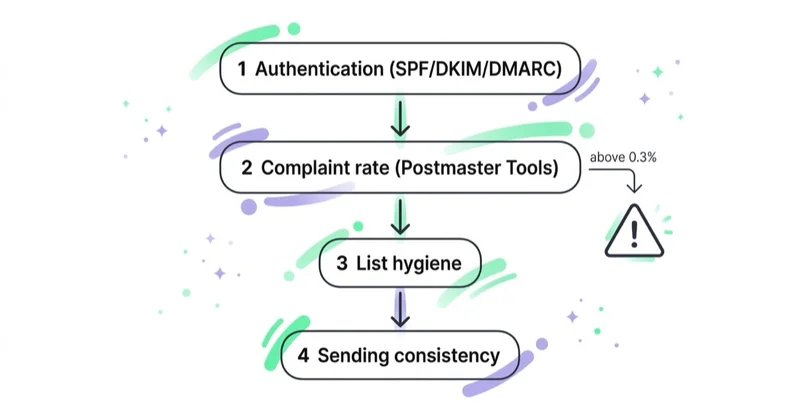
- Gmail recommends keeping user-reported spam below 0.1% and avoiding 0.3% or higher; Yahoo requires bulk senders to remain below 0.3%. Treat these as ceilings, not targets.
- Do not manage deliverability from open rate alone. Opens are distorted by privacy features, image proxying and automated scanners.
- During recovery, protect transactional traffic, suppress known bad recipients and send only wanted mail to the strongest current audience.
- Reputation has no universal reset time. Recovery depends on the cause and each receiving network's response.
Delivery, deferral, rejection and inbox placement
The vocabulary matters because each status leads to a different investigation.
| Outcome | What happened | First evidence to inspect |
|---|---|---|
| Sent | Your platform attempted delivery | Sending logs and queue |
| Deferred | Receiver temporarily refused or throttled the message, usually with a 4xx code | Exact SMTP response, provider and retry pattern |
| Rejected/bounced | Receiver permanently refused the message, usually with a 5xx code | Enhanced status code and bounce classification |
| Delivered | Receiver accepted the SMTP transaction | Delivery log; this does not reveal folder placement |
| Spam/junk placement | Accepted message was filtered away from the inbox | Provider dashboards, controlled inbox tests, recipient evidence |
| Inbox tab/category | Message reached an inbox category such as Gmail Promotions | This is classification inside the inbox, not a delivery failure |
A marketing team may describe lower Gmail opens as “deliverability”, while the operational data shows normal acceptance and no reputation decline. The cause could instead be category placement, measurement changes, seasonality or weaker content. Define the observed outcome before naming the incident.
What determines email deliverability?
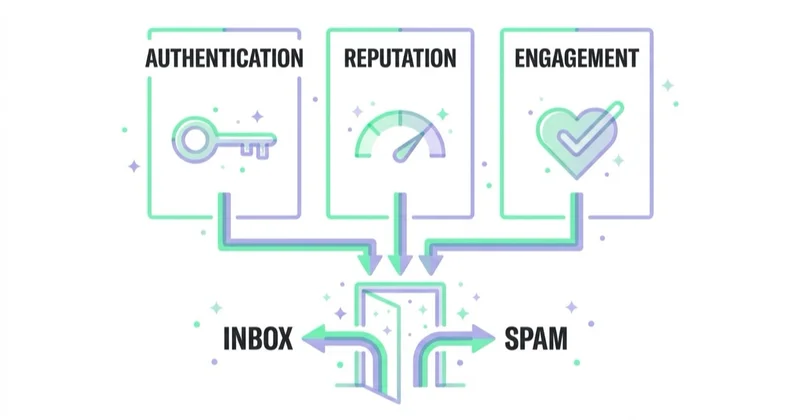
No single score controls every provider. Receiving networks make their own decisions using overlapping groups of signals.
1. Infrastructure and protocol compliance
Sending IPs need valid forward and reverse DNS, stable identity, TLS and correctly formatted RFC 5321/5322 messages. Queues must respect throttling and retry temporary failures rather than turning them into uncontrolled bursts. A missing PTR record or malformed header can cause direct rejection before campaign quality is considered.
2. Authentication and alignment
SPF, DKIM and DMARC help the receiver verify use of the sending domain. High-volume sender programmes at Gmail, Yahoo and Outlook require all three in their covered scope. The visible From domain must align with a passing SPF or DKIM identity for DMARC. The SPF, DKIM and DMARC guide explains the implementation in detail.
3. Domain, IP and stream reputation
Providers evaluate the history of sending domains and IP addresses, including complaints, invalid recipients, volume patterns and policy violations. They may also assess DKIM domains, From addresses, message types and linked domains. A dedicated IP isolates one layer of reputation; it does not erase domain or audience history.
4. Permission and audience quality
Mail sent to people who did not request it generates complaints, low interest and invalid-address signals. Purchased, rented, scraped or poorly documented lists are high risk even when a verification tool labels the addresses “deliverable”. Clear subscription expectations, confirmation, fast suppression and sensible inactivity rules are core infrastructure for list health.
5. Volume and sending pattern
New domains and IPs have little history. Sudden spikes, long periods of silence, traffic moved between providers or a new message format can trigger throttling or scrutiny. Volume should be introduced and maintained consistently by receiving network. A dedicated-IP warm-up is a controlled reputation process, not a fixed daily multiplication table.
6. Message, sender and link quality
Content still matters, but there is no reliable list of “spam words” that solves deliverability. Receiving systems examine whether the sender and subject are truthful, links are safe and consistent, HTML is valid, attachments are acceptable and the message resembles what recipients subscribed to. A compromised tracking domain or misleading From name can affect mail even when the copy sounds professional.
Why emails go to spam
Common causes include:
- SPF, DKIM or DMARC failure or misalignment;
- missing reverse DNS, TLS or valid message formatting;
- high complaint rates or mail sent without clear permission;
- hard bounces, stale acquisition sources or spam-trap exposure;
- a sudden rise in volume, a new domain/IP or an unplanned provider migration;
- mixing risky promotional traffic with critical transactional mail;
- code leakage or automation that reactivates suppressed recipients;
- deceptive subject lines, From names, urgency or message purpose;
- unsafe, shortened, repeatedly redirected or low-reputation link domains;
- a shared IP pool affected by another sender;
- compromised credentials or an authorised platform sending unexpected traffic.
The same symptom can have different causes. Gmail-only spam placement may indicate Gmail reputation or audience response, while a simultaneous collapse at Gmail, Yahoo and Outlook more often points to authentication, DNS, content infrastructure or a major list change.
Current mailbox-provider requirements
Requirements change, so the providers' own postmaster pages remain the source of truth.
Gmail
For messages to personal Gmail accounts, all senders must use SPF or DKIM, valid forward and reverse DNS, TLS and valid message formatting, and keep spam below the published ceiling. Senders reaching approximately 5,000 messages or more within 24 hours from the same primary domain become bulk senders; Gmail states that this classification is permanent.
Bulk senders must use SPF and DKIM, publish DMARC with at least p=none, align the visible From domain with SPF or DKIM, and provide RFC 8058 one-click unsubscribe plus a visible body link for marketing and subscribed mail. Gmail recommends user-reported spam below 0.1% and says to avoid 0.3% or higher.
Yahoo
Yahoo requires all senders to use SPF or DKIM, valid forward and reverse DNS, RFC-compliant messages and a spam complaint rate below 0.3%. Bulk senders must implement SPF, DKIM, DMARC with at least p=none, alignment and easy unsubscribe. Yahoo says its complaint rate is calculated from mail delivered to the inbox, so it may not match a platform's denominator.
Outlook.com, Hotmail and Live
Microsoft introduced SPF, DKIM and DMARC requirements for domains sending more than 5,000 messages per day to its consumer services, with enforcement beginning in 2025. Its guidance also calls for a valid visible sender, working unsubscribe, list hygiene and bounce management. Delivery decisions and dashboards for consumer Outlook traffic should not be confused with a company's internal Microsoft 365 tenant policies.
iCloud Mail
Apple requires bulk senders to use permission-based lists, immediate unsubscribe, SPF, DKIM, DMARC, reverse DNS, consistent IP/domain identity, bounce handling and separation of marketing and transactional streams. iCloud Mail does not offer a sender allowlist or public feedback loop; its postmaster guidance directs senders to SMTP errors and mail logs.
Meeting these requirements is the entry condition, not an inbox guarantee. Each provider still applies abuse filtering and recipient-specific decisions.
How to diagnose a deliverability problem
Step 1: preserve evidence and build a timeline
Before making changes, record:
- when the problem began;
- mailbox providers and recipient domains affected;
- sending domain, DKIM domain, Return-Path and IP/pool;
- promotional, transactional or person-to-person stream;
- campaign, template and audience source;
- changes to ESP, DNS, links, consent flow, volume or segmentation;
- examples of full headers and exact SMTP errors.
Changing several variables at once can hide the cause and make recovery harder to attribute.
Step 2: segment the symptoms
Compare by provider and stream, not only the account total.
| Pattern | Likely investigation path |
|---|---|
| Hard bounces rise across all providers | Address capture, imports, suppression and bounce classification |
| 4xx deferrals rise at one provider | Rate, provider-specific reputation, connection pattern and SMTP guidance |
| Authentication-related 5xx errors | SPF/DKIM/DMARC, PTR, TLS and message format |
| Transactional mail is healthy; promotions go to spam | Permission, complaints, audience fatigue, stream/domain reputation |
| All streams decline after migration | DNS, alignment, IP/domain warm-up, link tracking and routing |
| Opens decline with stable technical/provider signals | Measurement, content, frequency, category placement and demand |
Step 3: read the SMTP response—not only “soft bounce”
Capture the full code and text returned by the receiver. A 4xx rate limit calls for slower throughput and controlled retry. A 5xx invalid-recipient response calls for suppression. A DMARC failure calls for alignment repair. Converting every response into one platform label discards the most useful diagnostic evidence.
Step 4: inspect authentication on a real message
Check full headers for spf=pass, dkim=pass and dmarc=pass, then verify which domains produced those results. Test production-format messages from each stream. A successful newsletter test does not validate receipts, help-desk replies or an invoicing tool.
Step 5: use provider-owned diagnostics
- Google Postmaster Tools: compliance, spam rate, domain/IP reputation, authentication, encryption, feedback loop and delivery errors for personal Gmail traffic.
- Yahoo Sender Hub and CFL: complaint and delivery insight for verified domains where eligibility and data are available.
- Microsoft sender services: consumer-network IP and complaint diagnostics such as SNDS/JMRP where available, plus exact Outlook SMTP errors.
- Apple iCloud postmaster guidance: SMTP logs and documented escalation data; Apple does not provide a feedback loop.
Absence of dashboard data is not evidence of good reputation. Provider tools may hide low-volume days for privacy or require specific eligibility.
Step 6: audit recipients and acquisition sources
Review permission, confirmation, age and recent activity by source. Suppress unsubscribes, complaints and confirmed hard bounces immediately. Interpret repeated soft bounces by SMTP code. Do not automatically remove every role address or every person without a tracked open.
Open data alone is unreliable. Combine clicks, purchases, account activity, replies, send frequency and delivered-message history. Re-engagement is appropriate only while recipients can still reasonably expect the programme; it is not a remedy for an unknown or unpermissioned list.
Step 7: compare volume and infrastructure changes
Plot daily volume by mailbox provider, sending domain and IP. Look for bursts, long gaps, pool changes, new DKIM or From domains, new tracking links and traffic moved without warm-up. Review whether marketing and transactional streams still use their intended routing.
Step 8: inspect content and links last—but seriously
Confirm the message accurately identifies the sender and purpose, uses a truthful subject, contains functioning one-click and body unsubscribe, and links only to domains controlled or vetted by the business. Check redirects, compromised landing pages, attachment types, HTML validity and accidental inclusion of promotional content in transactional mail.
A controlled recovery plan
1. Stop the source of new negative signals
Pause or reduce non-essential mail to the weakest and least certain audience. Do not continue the same blast schedule while investigating rising complaints or deferrals. Keep legally or operationally required transactional mail protected on its appropriate stream.
2. Fix binary infrastructure failures
Correct authentication, DNS, TLS, routing and malformed-message problems. Confirm the repair using real headers and provider responses before increasing volume.
3. Enforce suppression everywhere
Synchronise unsubscribes, complaints and hard bounces across ESP, CRM, ecommerce and automation systems. Prevent imports or fallback workflows from restoring suppressed contacts.
4. Restart with the strongest legitimate audience
Use recent clicks, purchases, account activity and clearly expected transactional interaction. Opens may supplement this selection but should not define it alone. Do not “test” recovery on dormant contacts.
5. Increase volume only when provider signals are stable
Pace traffic consistently and watch each receiving network separately. If temporary failures rise, hold or reduce throughput and follow the returned SMTP instructions. Do not jump from a successful small test directly to the historical peak.
6. Validate business quality, not only acceptance
Track complaints, clicks, conversion, unsubscribes and revenue per delivered message. A low complaint rate can look artificially reassuring after much of the mail is already being sent to spam, because fewer inbox recipients can report it. Read complaint rate together with reputation and placement evidence.
Deliverability metrics that belong on the dashboard
| Metric | Required breakdown |
|---|---|
| Accepted/delivered rate | Provider, domain, IP/pool and stream |
| Temporary deferral rate | SMTP code and receiving provider |
| Permanent bounce rate | Invalid recipient, policy, authentication and other causes |
| SPF/DKIM/DMARC pass rate | Sending and visible From domains |
| Complaint rate | Provider-specific denominator and campaign/Feedback-ID |
| Domain and IP reputation | Provider dashboard where available |
| Unsubscribe and suppression latency | System and message stream |
| Clicks/contribution per delivered message | Audience source and campaign |
| Inbox-placement tests | Provider and seed panel, treated as directional evidence |
Seed tests can help compare providers or detect a sudden change, but a small set of test accounts does not represent every real recipient. Use them with provider data and live cohort performance.
Does email content affect spam placement?
Yes, but not through a simple checklist of forbidden words. Content influences recipient response and can trigger security or abuse systems when it is deceptive, malformed or linked to risky infrastructure. Focus on:
- a recognisable From name and valid reply path;
- a subject that matches the message;
- consistent brand, domain and link destinations;
- accessible HTML and a sensible text alternative;
- no hidden content, fake reply prefixes or misleading urgency;
- a visible unsubscribe path for subscription mail;
- landing pages and tracking domains that are secure and operational.
Changing “FREE” to “COMPLIMENTARY” will not repair a damaged domain reputation. Likewise, strong reputation does not make a deceptive or compromised message safe.
How we approach deliverability at Space Ads
We treat deliverability as a cross-functional operating system connecting marketing, CRM, security, engineering and customer service. The investigation starts with provider and stream-level evidence, then maps changes across DNS, sending infrastructure, acquisition and campaign operations. That prevents a technical incident from being mistaken for weak creative—or a consent problem from being hidden behind a platform migration.
The recovery plan has an owner, stop/go criteria and protected transactional paths. Once delivery stabilises, the same dashboards remain in routine use. Deliverability is easier to preserve through change control and early warning than to rebuild after a large uncontrolled send.
Common mistakes
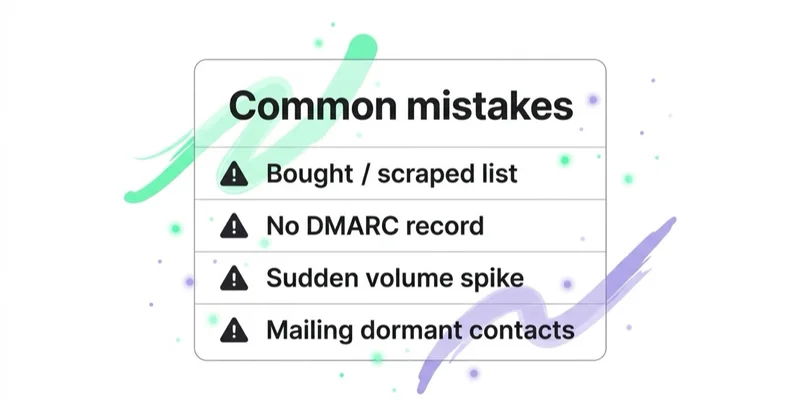
- Treating “delivered” in the ESP as proof of inbox placement.
- Calling Gmail Promotions a spam-folder problem.
- Making multiple DNS, provider, audience and creative changes simultaneously.
- Looking at blended totals instead of provider and stream-level data.
- Ignoring the full SMTP response behind a bounce category.
- Deleting all role addresses or non-openers without context.
- Sending a re-engagement blast during a reputation incident.
- Assuming a new IP or ESP resets domain and list reputation.
- Treating 0.3% complaints as an acceptable operating target.
- Trusting an inbox seed test as a complete measurement system.
Frequently asked questions
What is email deliverability?
Email deliverability is the ability to get legitimate, wanted messages accepted and placed where recipients can see them, normally the inbox. It is broader than delivery rate, which usually records only whether the receiving server accepted the message. Accepted mail can still be filtered to spam.
Why are my emails suddenly going to spam?
Look for a recent change: sending platform, IP or domain, authentication, tracking links, volume, audience source, suppression flow or message type. Determine whether the issue affects one provider or all of them and whether transactional mail behaves differently from promotions. That scope usually reveals the fastest diagnostic path.
Is the Gmail Promotions tab bad for deliverability?
No. Promotions is an inbox category designed for commercial mail. It is not the spam folder. Optimise for wanted, useful messages and business outcomes rather than trying to disguise promotions as personal correspondence.
What spam complaint rate is acceptable?
Lower is better. Gmail recommends staying below 0.1% and avoiding 0.3% or higher; Yahoo requires bulk senders to remain below 0.3%. Denominators and visibility differ by provider, so compare each provider's own reporting rather than relying on one blended ESP percentage.
How long does deliverability recovery take?
There is no guaranteed timeline. A DNS or authentication error can be corrected quickly, although reputation effects may persist. Recovery from complaints, poor acquisition or a large volume spike usually requires sustained wanted sending and may vary by mailbox provider. Judge progress from SMTP, reputation, complaint and engagement signals rather than a calendar promise.
Should I change email providers if messages go to spam?
Only after identifying the cause. A provider change can help when the current infrastructure or shared pool is demonstrably responsible, but it also introduces new IPs, routing and authentication. Consent, domain reputation and weak audience quality move with you. Migrating without diagnosis can make the incident worse.
Do open rates measure deliverability?
Not reliably on their own. A decline can indicate spam placement, but it can also reflect privacy protection, image loading, bot activity, category placement, content or seasonality. Use opens as one directional signal alongside provider reputation, SMTP errors, complaints, clicks and controlled placement tests.
Key takeaways
- Delivery acceptance and inbox placement are different; diagnose the exact outcome first.
- Scope incidents by provider, domain, IP, audience and message stream before changing the programme.
- Infrastructure, authentication, reputation, permission, sending pattern and content all matter.
- Provider-owned dashboards and SMTP responses are stronger evidence than blended ESP totals.
- Stop new negative signals, fix binary failures, enforce suppression and recover with a current, engaged audience.
- Keep complaint rates far below enforcement ceilings and do not use open rate as the sole health metric.
Sources and further reading
- Gmail Help — email sender guidelines
- Gmail Help — Postmaster Tools dashboards and diagnostics
- Gmail Help — top sender issues and remediation
- Yahoo Sender Hub — sender requirements and best practices
- Microsoft Security Blog — Outlook requirements for high-volume senders
- Apple Support — postmaster information for iCloud Mail
Continue learning
Continue reading

Double Opt-In, Unsubscribe and List Hygiene: Keep Your List Healthy
A healthy email list starts with verifiable permission, makes leaving effortless and stops mailing addresses that are no longer valid or engaged. Learn how to implement double opt-in, RFC 8058 one-click unsubscribe, suppression and a defensible sunsetting policy.
Dedicated vs Shared IP in Email Marketing (and IP Warm-Up)
A shared IP is usually the practical choice for lower or irregular email volume. A dedicated IP offers isolation and control when sending is large, predictable and operationally mature—but it needs careful warm-up. Learn how to choose without relying on an arbitrary volume threshold.
Email Authentication Explained: SPF, DKIM and DMARC for Marketers
SPF authorises sending infrastructure, DKIM signs selected message content, and DMARC connects those results to the domain recipients see in From. Learn how alignment works, what Gmail, Yahoo and Outlook require, and how to move from inventory to monitored enforcement safely.


































