
Instagram Stories are short, vertical posts that appear in a sequence and disappear after 24 hours unless saved as Highlights. They are best used for close, frequent communication with existing followers: behind-the-scenes updates, quick product or service explanations, polls, questions, link stickers, launches, reminders, testimonials and direct messages.
Stories are not the same as Reels. Reels are usually stronger for discovery and reaching new people. Stories are usually stronger for relationship, trust, interaction and lower-funnel activation among people who already follow or regularly view the account.
TL;DR
- Instagram Stories are a relationship and activation channel, not only a reach format.
- Stories disappear after 24 hours unless saved to Highlights.
- Interactive stickers such as polls, questions, quizzes and sliders can turn passive viewing into feedback.
- Link stickers can move users to a product page, article, booking page, form or campaign landing page.
- Highlights should organise evergreen information such as offer, FAQ, reviews, delivery, process, portfolio and contact details.
- Stories and Reels should work together. Reels attract attention; Stories deepen the relationship and move people to the next step.
- Measure exits, replies, link clicks, sticker taps, profile actions, DMs and downstream conversions, not only views.
What Instagram Stories are
Instagram Stories are temporary vertical content pieces shown in a tap-through sequence. A Story can include photo, video, text, stickers, music, polls, questions, quizzes, links and other interactive elements.
Stories are useful because they sit close to daily audience behaviour. They feel more immediate than feed posts, less polished than ads and more conversational than many static posts.
Common uses:
- show behind the scenes;
- answer frequently asked questions;
- collect opinions;
- share limited-time updates;
- show product availability;
- promote a new article or video;
- announce an event;
- send traffic through a link sticker;
- start conversations in DMs;
- save key information in Highlights.
The format works best when it feels purposeful. A random sequence of slides is easy to skip. A short story with context, interaction and next step is easier to follow.
Stories vs Reels
| Area | Instagram Stories | Instagram Reels |
|---|---|---|
| Main role | Relationship, interaction, reminders, lower-funnel action | Discovery, entertainment, reach, new audience |
| Typical audience | Existing followers and warm viewers | Followers plus non-followers through recommendations |
| Lifespan | 24 hours unless saved as Highlights | Longer-lived content surface |
| Interaction | Stickers, replies, link taps, DMs | Likes, comments, shares, saves, follows |
| Best use | Updates, Q&A, polls, launches, links, trust | Hooks, education, trends, demonstrations, reach |
The best Instagram strategy usually uses both. Reels can create attention. Stories can turn that attention into familiarity, feedback, clicks and conversations.
For Reels strategy, read What You Need to Know About Instagram Reels.
Why Stories matter for brands
Stories can support:
- trust;
- frequency;
- customer education;
- product discovery;
- event reminders;
- offer activation;
- feedback collection;
- content testing;
- customer support;
- community building;
- direct response.
They are especially useful for reducing distance between the brand and the audience. A polished feed can explain what a brand wants to show. Stories can show how the brand works, thinks and responds.
The best structure for an Instagram Story sequence
A strong Story sequence has a beginning, middle and next step.
1. Hook
The first frame should make the reason to watch clear.
Examples:
- "3 mistakes that make this product harder to choose."
- "A quick update before tomorrow's launch."
- "Here is what changed in this campaign."
- "Which version would you choose?"
- "Before booking this service, check this."
Avoid opening with a generic graphic that explains nothing.
2. Context
The next frame should explain the situation. What is happening? Why does it matter? Who is it for?
Context can be a short video, annotated screenshot, product demo, text overlay or voice explanation.
3. Interaction
Use interaction when it helps the user participate:
- poll;
- question sticker;
- quiz;
- emoji slider;
- countdown;
- link sticker;
- DM prompt.
Do not use stickers only for decoration. A poll should produce useful insight. A question sticker should lead to real answers. A link sticker should match the user's expectation.
4. Next step
End with a clear action:
- tap the link;
- reply with a question;
- save the Highlight;
- check the product;
- book a call;
- read the guide;
- vote in the poll;
- watch the Reel;
- send a DM.
The CTA should fit the content. Not every Story needs to sell.
How to use interactive stickers
Interactive stickers help move Stories from broadcast to conversation.
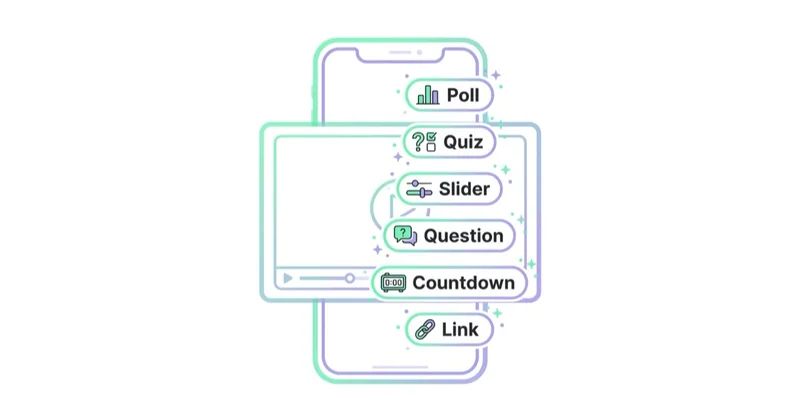
| Sticker | Best use |
|---|---|
| Poll | Quick preference, segmentation, product choice, topic validation |
| Question | Collect objections, FAQs, topic ideas, customer language |
| Quiz | Educate, test knowledge, reveal surprising facts |
| Emoji slider | Lightweight sentiment or interest check |
| Countdown | Launch, event, deadline, live session |
| Link | Product page, booking, blog post, landing page, form |
The strongest sticker use connects to a decision. A poll about product preference can inform content, merchandising or ad angles. A question sticker can reveal objections that should be answered on landing pages or in FAQ content.
Link stickers
Link stickers are useful, but they should not be dropped into a Story without context.
A better link sequence:
- Explain the problem.
- Show why the linked page helps.
- Use a clear link sticker label.
- Add a reason to tap now.
- Follow up with answers or proof.
Weak link sequence:
- one graphic;
- no context;
- tiny sticker;
- vague "check this";
- no explanation of what happens after tapping.
Link clicks should be measured with UTMs when possible, especially for campaigns, launches and paid support.
Highlights
Highlights turn temporary Stories into evergreen profile navigation. Instagram Help explains that Stories can be added to Highlights and remain visible on the profile until removed.
Useful Highlight sections:
- Start here;
- Offer;
- Services;
- Products;
- Reviews;
- FAQ;
- Results;
- Delivery;
- Process;
- Tutorials;
- Events;
- Team;
- Contact.
Highlights should not be an archive of everything. They should help a new visitor understand the brand quickly.
Highlights architecture
Treat Highlights like profile navigation. A new visitor should be able to understand the offer, proof and next step without scrolling through the whole account.
Useful structure:
- Start here: who the brand helps and what to do first;
- Offer: products, services, packages or categories;
- Proof: reviews, case studies, UGC, results;
- FAQ: delivery, pricing, sizing, process, eligibility;
- Process: how ordering, booking or cooperation works;
- Resources: guides, tutorials, checklists, webinars;
- Contact: DM, booking page, email, location or opening hours.
Each Highlight should be short enough to be useful. If a Highlight contains dozens of unrelated frames, it becomes an archive rather than a decision tool. Review Highlights monthly and remove outdated offers, expired launches and old information.
Instagram Stories for ecommerce
For ecommerce, Stories can support consideration and conversion.
Useful formats:
- product launch countdown;
- product demo;
- size or variant explanation;
- back-in-stock update;
- customer review;
- unboxing;
- packing process;
- user-generated content;
- limited offer;
- link to product page;
- poll about colour or variant;
- delivery and returns FAQ;
- "how to choose" mini-guide.
Stories should connect product interest with the next step. A link sticker, product context, DM prompt or saved Highlight can reduce friction.
For profile commerce setup, read How to Set Up and Manage an Instagram Shop.
Stories for product launches
A simple launch sequence can look like this:
- Teaser: show the problem, material, detail or use case.
- Context: explain who the product is for.
- Proof: show review, demo, founder note or customer need.
- Interaction: poll, question or countdown sticker.
- Launch: link sticker with clear label.
- Objection: delivery, returns, sizing or availability answer.
- Reminder: final update before deadline or stock change.
The sequence should build readiness before the link appears. If the first frame is only "new product available," many viewers will not know why it matters.
Instagram Stories for services and B2B
Stories are not only for shops.
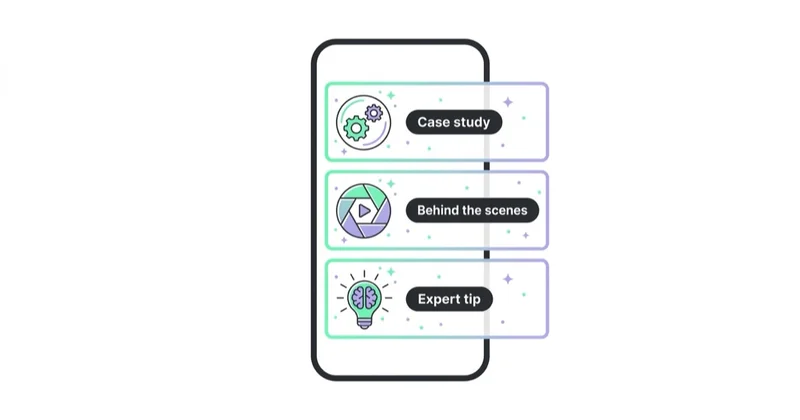
For services and B2B, use them to:
- answer objections;
- introduce team expertise;
- show process;
- summarise a case study;
- share event notes;
- ask the audience about priorities;
- explain a service step;
- invite questions before a webinar;
- link to a guide;
- collect problems for future content;
- show proof of work.
B2B Stories do not need to chase mass reach. A small number of qualified viewers can be valuable if the content builds trust and starts conversations.
Stories as a research tool
Stories can generate customer insight quickly.
Use them to learn:
- which product variant people prefer;
- which pain point is strongest;
- which objection blocks purchase;
- which topic deserves a Reel or article;
- which FAQ should be added to the website;
- which offer language feels clear;
- whether people want a live session or guide.
Save good answers. Customer language from Stories can improve ads, landing pages, FAQs and product descriptions.
Stories and storytelling
Stories are not called Stories by accident. They work best when the sequence has a small narrative.
Simple formats:
- problem -> example -> solution -> link;
- question -> poll -> answer -> DM prompt;
- behind the scenes -> challenge -> result -> lesson;
- customer problem -> process -> outcome -> proof;
- launch teaser -> benefit -> countdown -> link.
The sequence does not need to be long. Three to six frames can be enough.
For broader narrative strategy, read What Is Storytelling in Marketing and How to Use It?.
Visual and copy principles
Good Stories are easy to consume.
Use:
- vertical 9:16 framing;
- readable text;
- strong contrast;
- captions when speaking;
- one idea per frame;
- simple visual hierarchy;
- native phone-shot content when appropriate;
- consistent brand cues;
- clear sticker placement;
- safe space away from interface elements.
Avoid:
- tiny text;
- too many elements;
- long paragraphs;
- unclear CTA;
- overdesigned graphics;
- repeated sales slides;
- unreadable screenshots;
- too many frames without payoff.
Stories are mobile-first. Design for the thumb, not for a presentation deck.
How to measure Stories
Instagram Insights can show performance for content, including Stories, for business and creator accounts.
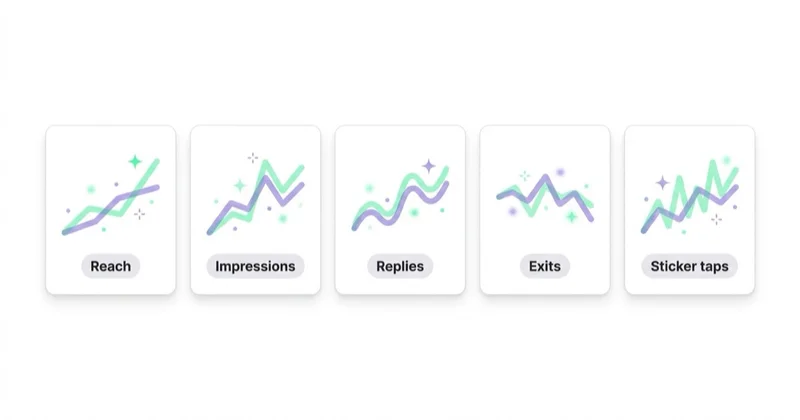
Useful metrics:
- reach;
- impressions;
- exits;
- replies;
- forward taps;
- back taps;
- link clicks;
- sticker taps;
- profile visits;
- follows;
- DMs;
- product clicks;
- sales or leads after click.
Interpret metrics by intent:
- high exits on frame one may mean weak hook;
- many forward taps may mean the frame is too slow or too obvious;
- many back taps may mean people wanted to rewatch;
- replies may indicate strong relationship;
- link clicks show activation;
- DMs can be the most valuable signal for services.
Publishing rhythm
Stories can be frequent, but they still need purpose.
A workable rhythm:
- use Stories on active business days;
- post around launches, events and new content;
- avoid publishing long sequences without a point;
- mix planned and spontaneous content;
- review completion and exits weekly;
- save evergreen sequences to Highlights.
Some brands can post daily because their operations create useful material. Others should post less often and make each sequence clearer.
7-day Stories content plan
A simple weekly structure can reduce random posting.
| Day theme | Story idea | Goal |
|---|---|---|
| Monday | quick tip, industry note or plan for the week | education and relevance |
| Tuesday | product or service detail | consideration |
| Wednesday | poll, question sticker or audience problem | research and interaction |
| Thursday | proof, review, case detail or behind the scenes | trust |
| Friday | offer, booking reminder or content link | activation |
| Weekend | lighter behind-the-scenes or community content | relationship |
This is only a template. The point is to mix education, proof, interaction and action rather than posting only sales slides or only casual updates.
Organic Stories vs Stories ads
Organic Stories usually speak to warmer audiences. Stories ads can reach broader or more precisely targeted audiences and should be treated like paid creative.
| Area | Organic Stories | Stories ads |
|---|---|---|
| Audience | followers and warm viewers | targeted paid audience |
| Tone | conversational and immediate | clearer offer and faster context |
| Tracking | Insights, UTMs, DMs | Ads Manager, UTMs, conversions |
| Creative | native, frequent, flexible | polished enough for cold viewers |
| CTA | reply, link, vote, DM | click, shop, lead, message, install |
Do not simply boost any Story. A paid Story needs enough context for someone who may not know the brand. It should also have a landing page or message path that matches the promise.
How we approach this at Space Ads
Stories are a low-pressure, high-frequency channel for us, and a cheap creative testbed besides. Whatever organically pulls replies, sticker reactions and few skips tells us which hooks and offers land, and that feeds the Stories ads. We build them for the format: full-screen vertical, fast, with interactive stickers. Polls and questions do double duty — a prompt for the audience and free mini-research at once, since the answers state plainly what people care about and the words they use for it. Stories that perform organically graduate to paid creative. The one thing to avoid is dumping tired square graphics from the feed: vertical format and a light tone aren't cosmetic here, they're the price of being watched at all.
Common mistakes
| Mistake | Why it hurts | Better approach |
|---|---|---|
| Too many frames | Viewers exit before the point | Build shorter sequences |
| No hook | Users skip immediately | Open with a clear reason to watch |
| Stickers without purpose | Interaction feels random | Use stickers to learn or guide action |
| No CTA | Attention does not move anywhere | Add a natural next step |
| No Highlights | Evergreen answers disappear | Save key Stories by topic |
| Overdesigned graphics | Stories feel like ads | Mix native, human and branded formats |
| No measurement | Weak formats repeat | Review exits, replies and link clicks |
| Only selling | Relationship weakens | Mix education, proof, people and offers |
FAQ
What are Instagram Stories best for?
Instagram Stories are best for relationship-building, quick updates, behind-the-scenes content, questions, polls, reminders, product context, links, DMs and lower-funnel activation.
How are Stories different from Reels?
Stories usually reach warmer audiences and disappear after 24 hours unless saved. Reels are stronger for discovery and can reach more non-followers through recommendations.
Should Stories be posted every day?
Not always. Regularity helps, but only when there is enough value. A few useful sequences can be better than daily empty posts.
What should be saved in Highlights?
Save evergreen content: offer, FAQ, reviews, delivery, process, product guides, services, tutorials, case studies, team and contact information.
Do link stickers work for sales?
They can, but only when the Story gives context and a reason to tap. For better tracking, use UTM parameters and compare link clicks with landing page behaviour.
What metrics matter most for Stories?
Important metrics include exits, replies, link clicks, sticker taps, forward taps, back taps, DMs and downstream conversions. Views alone are not enough.
Can B2B brands use Instagram Stories?
Yes. B2B brands can use Stories for expertise, process, case studies, events, team visibility, FAQs, webinar reminders and conversation starters.
Should organic Stories be used as ads?
Sometimes, but only after checking whether the Story gives enough context for cold viewers, has a clear CTA and leads to a relevant landing page or message path.
How often should Highlights be reviewed?
Review them at least monthly or after every campaign, launch or offer change. Outdated Highlights can mislead users and weaken trust.
Conclusion
Instagram Stories are strongest when they feel close, useful and timely. They are not only a place for random daily updates. They can support trust, product education, audience research, community and conversion.
Use Stories with structure: hook, context, interaction and next step. Save evergreen sequences to Highlights. Connect Stories with Reels, feed posts, landing pages, DMs and email where appropriate.
The best Stories strategy is not about posting constantly. It is about showing up with content that helps the audience act, respond or understand the brand better.
Sources and further reading
- Instagram Help Center: Add a story to your Story Highlights
- Instagram Help Center: About Instagram Insights
- Meta for Business: Stories ads
- Instagram Blog: Introducing Instagram Stories
- TechCrunch: Instagram rolls out link stickers for all users
Continue learning
Continue reading
What You Need to Know About Instagram Reels
Instagram Reels can support discovery, trust, product education and lead generation when each video has one idea, a strong hook, retention logic and a clear next step.
How to Use Instagram Hashtags?
Instagram hashtags support discovery, classification and campaigns, but they are not a magic reach lever. Learn how to use precise tags with social SEO, captions and measurement.
How Much Do LinkedIn Ads Cost?
LinkedIn Ads have no fixed CPC or CPM. Cost is set by the audience auction, objective, bidding and relevance. Use this framework to model an affordable CPL, opportunity cost and test budget.


































