
An Instagram Shop lets eligible businesses display products from a Meta catalog on Instagram and connect product discovery with content, product tags and commerce flows. It is not just an Instagram profile feature. It depends on Commerce Manager, a product catalog, a professional Instagram account, product approval, Meta Commerce Policies and the current availability of shopping features in the target market.
The most important part of Instagram Shopping is the catalog. If product names, images, prices, availability, URLs and variants are inaccurate, the shop, product tags and catalog-based ads will all suffer. Instagram can help turn inspiration into product interest, but the main ecommerce website usually remains the center for checkout, analytics, fulfillment, returns and customer experience.
TL;DR
- Instagram Shop is built on Meta commerce infrastructure. Commerce Manager and the product catalog are the foundation.
- Availability varies by account, market and current Meta rules. Do not assume the same checkout or shop features are available everywhere.
- Product tagging works only after the shop and catalog are approved. Products are reviewed against Meta Commerce Policies.
- The catalog must stay accurate. Prices, availability, product URLs, images and variants should match the ecommerce website.
- Instagram Shopping is strongest when content is visual and contextual. Reels, posts and product-led storytelling should show how products are used, not only list SKUs.
- The catalog can support paid media. It can feed catalog ads, remarketing and broader Meta sales campaigns.
- Instagram should support the ecommerce system, not replace it. The website still owns checkout logic, legal pages, analytics, customer accounts and fulfillment in most setups.
What an Instagram Shop is
An Instagram Shop is the Instagram-facing part of Meta's commerce ecosystem. It allows a business to present products from a catalog and, where available, tag products in content so users can move from inspiration to product details more easily.
It usually involves:
- an Instagram business or creator account;
- a Meta Business Portfolio;
- Commerce Manager;
- a product catalog;
- a Facebook Page or connected business assets where required;
- product approvals;
- Commerce Policies compliance;
- product content such as photos, Reels, Stories or posts;
- Meta Pixel and Conversions API if paid campaigns and website tracking matter.
Instagram Shop should be seen as a product discovery layer. Users discover products through visual content, creator posts, Reels, product tags, profile surfaces and ads. The purchase path then depends on what Meta supports for the business, product category and market.
Instagram Shop vs Facebook Shop
Instagram Shop and Facebook Shop can use the same commerce foundation, but user behavior is different.
| Area | Instagram Shop | Facebook Shop |
|---|---|---|
| Main user behavior | Visual discovery, creators, Reels, inspiration | Browsing, product showcase, Page and catalog discovery |
| Content style | Lifestyle, short-form video, product use, creator content | Product collections, Page content, catalog browsing |
| Catalog role | Product tagging and shopping surfaces | Product browsing and Meta commerce surfaces |
| Paid media role | Social commerce, remarketing, creator-led demand | Catalog ads, remarketing, Page and feed discovery |
| Best fit | Visual products and inspirational buying | Product catalog presence across Facebook ecosystem |
The same catalog can often support both. The creative strategy should not be identical. Instagram usually needs stronger visual context, short-form product demonstrations and content that fits how people browse the platform.
For the Facebook side, read What Is Facebook Shop and How to Set It Up?.
What is needed before setup?
Before creating or optimizing an Instagram Shop, prepare the operational basics.
You usually need:
- an Instagram professional account;
- business access under the right Meta Business Portfolio;
- Commerce Manager access;
- a product catalog;
- a connected website or ecommerce platform;
- product images;
- product titles and descriptions;
- prices and availability;
- destination URLs;
- return and customer service information;
- compliance with Meta Commerce Policies;
- Meta Pixel and preferably Conversions API for advertising measurement.
Meta's Instagram Help Center states that shops are created in Commerce Manager and that businesses need a Commerce Manager account. It also notes that if a shop is meant to be visible on Instagram, an Instagram business account in the business portfolio is needed.
Step-by-step Instagram Shop setup
1. Organize account ownership and access
Start with permissions. The Instagram account, Facebook Page where relevant, ad account, Pixel, catalog and domain should be controlled by the business, not by an old employee, freelancer or personal account.
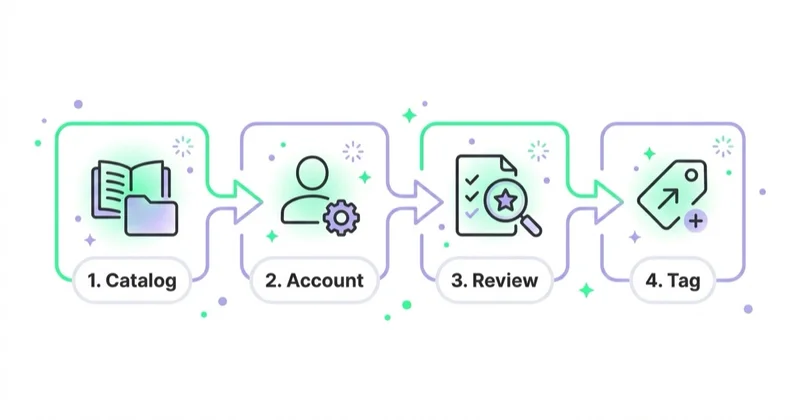
Check:
- Instagram professional account status;
- Business Portfolio ownership;
- Page connection if used;
- ad account access;
- catalog ownership;
- domain access;
- Pixel and Conversions API ownership;
- admin roles for the people managing commerce.
Many setup problems are access problems. The catalog may be correct, but the Instagram account may be connected to the wrong business. Or the ad account may not have permission to use the catalog.
2. Create or connect the product catalog
The catalog is the foundation of Instagram Shopping.
A good catalog includes:
- stable product ID;
- clear product title;
- accurate description;
- price;
- availability;
- product URL;
- image;
- category;
- brand;
- variant data;
- condition;
- sale price where relevant.
For small catalogs, manual setup can work. For active ecommerce stores, automatic synchronization from Shopify, WooCommerce, Magento, BigCommerce or another ecommerce platform is usually better. Manual catalogs become risky when prices, stock or variants change often.
3. Check product eligibility and policies
Products must comply with Meta Commerce Policies. Some categories are restricted or prohibited. Product claims, images, descriptions and landing pages can all affect approval.
Before submitting a catalog, check:
- product category eligibility;
- landing page consistency;
- price consistency;
- availability;
- product claims;
- health, financial, adult, regulated or sensitive categories;
- image quality;
- return and customer service information.
Do not repeatedly submit the same rejected catalog without fixing the reason. Use Commerce Manager diagnostics and policy feedback to identify the issue.
4. Configure the shop in Commerce Manager
Meta's setup flow is managed through Commerce Manager. The shop configuration may include business details, catalog selection, visible products, shop settings and publishing steps.
Important decisions:
- which catalog to use;
- which products should appear;
- how collections should be organized;
- whether products route to website checkout or another available flow;
- which markets and accounts are eligible;
- what business information is displayed.
The interface can change, so the current account panel should be treated as the source of truth.
5. Connect Instagram and publish
Once the shop is configured and approved, connect the Instagram business account and publish the shop where available. Meta documentation notes that businesses in some regions can continue to set up shops in Commerce Manager or partner platforms, but certain setup or management options through the Instagram app are no longer supported in those regions.
This is why the safest practical advice is: always check the current account status in Commerce Manager.
6. Enable and test product tagging
After approval, product tagging can make product discovery easier in Instagram content. Meta's Help Center states that businesses and creators can tag products in Reels if they have an approved shop on Instagram set up, and that products are reviewed under Meta Commerce Policies.
Test product tags before relying on them:
- tag a product in a controlled post or Reel;
- check whether the product appears correctly;
- confirm price and image;
- click through as a user;
- verify the destination URL;
- check mobile behavior;
- confirm tracking parameters if used.
How to run an Instagram Shop after launch
The work does not end after approval.
Ongoing tasks include:
- keeping the catalog synchronized;
- fixing rejected products;
- checking price and availability;
- refreshing product images;
- creating collections;
- tagging products in relevant content;
- reviewing product performance;
- responding to messages and comments;
- monitoring website checkout issues;
- coordinating paid campaigns;
- updating seasonal offers.
Instagram Shopping should have an owner. If no one owns the catalog, product tags and shop experience, the setup gradually becomes outdated.
Content strategy for Instagram Shopping
Instagram Shopping works best when products are shown in context.
Useful content formats:
- Reels showing product use;
- styling ideas;
- before-and-after where compliant;
- tutorials;
- gift guides;
- collection launches;
- customer content;
- creator collaborations;
- product comparison carousels;
- behind-the-scenes production;
- frequently asked questions;
- seasonal bundles.
Do not tag products mechanically in every post. Product tags should help the user when purchase intent naturally appears. If the content is purely brand storytelling, forced product tags may feel irrelevant.
For video context, read Are Product Videos Worth Using? and What You Need to Know About Instagram Reels.
Product feed quality checklist
Instagram Shop depends on catalog quality.
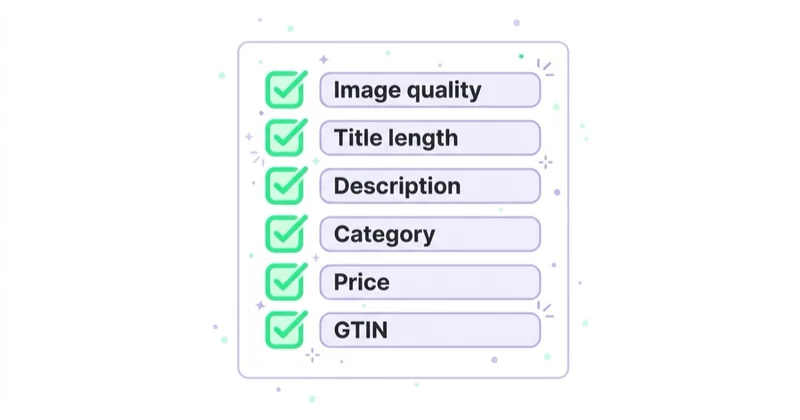
| Area | What to check | Why it matters |
|---|---|---|
| Product ID | Stable and consistent | Supports catalog ads and tracking |
| Title | Clear and user-friendly | Helps users understand product quickly |
| Description | Accurate and useful | Reduces uncertainty |
| Image | Sharp and representative | Drives trust and clicks |
| Price | Same as website | Prevents frustration and rejection |
| Availability | Updated quickly | Avoids promoting unavailable products |
| URL | Correct product page | Protects conversion path |
| Variants | Sizes, colors and versions mapped cleanly | Avoids confusion |
| Policy | Products comply with Meta rules | Reduces rejected items |
| Tracking | Events match product IDs where possible | Improves remarketing and reporting |
For product visuals, read Product Photography: How to Take Product Photos and Packshots.
Instagram Shop and Meta ads
The catalog used for Instagram Shopping can also support Meta advertising.
Use cases:
- product remarketing;
- abandoned cart campaigns;
- product viewer remarketing;
- cross-selling;
- collection launches;
- seasonal product campaigns;
- Advantage+ sales campaigns;
- creator or content amplification;
- catalog-based creative.
Paid campaigns need proper measurement. Meta Pixel and Conversions API help send website events back to Meta for optimization and reporting. For ecommerce, product IDs in website events should align with catalog IDs wherever possible.
For measurement, read Meta Conversions API: Integration and Benefits and Facebook Remarketing: How Meta Retargeting Works and Why Use It.
Instagram Shop for ecommerce
For ecommerce brands, Instagram Shop should support the main store.
It can help:
- expose products inside social content;
- shorten the path from inspiration to product detail;
- support remarketing;
- create product-led creator content;
- improve product discovery;
- connect catalog data with paid social.
It should not replace:
- complete product information;
- checkout ownership;
- legal policies;
- customer accounts;
- shipping and returns logic;
- analytics;
- merchandising strategy;
- customer service.
If the website is slow, product pages are weak or checkout is confusing, Instagram Shopping will not solve the business problem. It will simply send users into a weak purchase path.
For store diagnosis, read How to Audit an Ecommerce Store.
Instagram Shop vs TikTok Shop
Instagram Shop and TikTok Shop both sit in social commerce, but they behave differently.
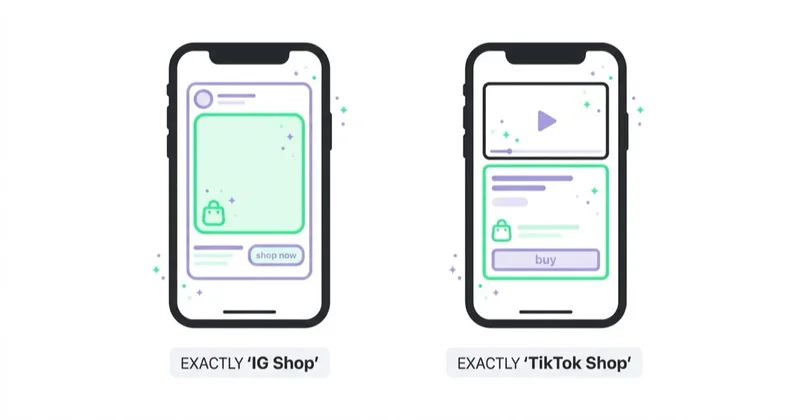
Instagram Shopping is usually more tied to product tagging, catalog-based discovery and Meta commerce surfaces. TikTok Shop, in supported markets, can operate as a more integrated in-app commerce system with shoppable videos, LIVE shopping, Seller Center and creator affiliate workflows.
The choice depends on market availability, audience, content capability, logistics and margin. A visually strong brand may use both, but the operating model is not identical.
For TikTok commerce context, read TikTok Shop: What It Is and How It Works.
Measurement: what to track
Track both organic and paid impact.
Useful metrics:
- tagged content reach;
- product tag taps;
- product page views;
- website clicks;
- add-to-cart events;
- purchases;
- assisted conversions;
- catalog item approval rate;
- rejected product count;
- product-level ad performance;
- message volume;
- response time;
- revenue by product set;
- return rate if available.
Do not evaluate Instagram Shop only by direct attributed revenue. It may also support discovery, trust, remarketing and creator-led demand. At the same time, avoid over-crediting soft metrics if the setup does not create measurable commercial movement.
Common mistakes
| Mistake | Why it hurts | Better approach |
|---|---|---|
| Manual catalog updates for a changing store | Prices and stock drift | Use platform sync or scheduled feed updates |
| Weak product images | Users do not trust the offer | Use clear packshots and contextual images |
| Tagging every product everywhere | Content feels forced | Tag when it helps the user |
| Ignoring rejected products | Catalog coverage shrinks | Review Commerce Manager diagnostics |
| No measurement | Impact is unclear | Use Pixel, CAPI, GA4 and UTMs where appropriate |
| Product IDs do not match events | Remarketing gets weaker | Align catalog and event IDs |
| No customer service process | Comments and questions go unanswered | Assign message ownership |
| Treating Instagram as the whole store | Website problems remain | Improve product pages and checkout |
30-day launch plan
Days 1-5: prepare accounts and access
Confirm Instagram professional account, Business Portfolio, Page connection if needed, catalog ownership, ad account, Pixel and user permissions.
Days 6-10: clean the catalog
Fix product names, prices, availability, URLs, variants, images and policy-sensitive items.
Days 11-15: configure Commerce Manager
Set up or connect the shop, choose the catalog, organize products and check market eligibility.
Days 16-20: test product tags and user journey
Publish controlled content, test product tags, click through to product pages and verify tracking.
Days 21-25: create shopping content
Prepare Reels, carousels, Stories, product explainers and collection content around the most commercially relevant products.
Days 26-30: connect paid activity
Launch controlled catalog or remarketing campaigns, monitor approval issues and measure product-level outcomes.
How we approach this at Space Ads
At Space Ads, we treat Instagram Shop as an ecommerce discovery layer built on catalog quality, not as a standalone store. Before activating product tags or catalog ads, we verify business ownership, catalog source, item IDs, price and availability sync, product images, policy diagnostics, Pixel and CAPI events and the handoff to product pages. For paid activity, we connect Shop work with product sets, remarketing, Advantage+ sales campaigns and GA4 or backend revenue so performance is not judged only by tag taps or engagement. The strongest setups use Instagram content to create context around products while the website, feed and fulfilment carry the commercial promise.
FAQ
Is Instagram Shop available in every country?
No. Shopping features depend on market, account eligibility, product category and Meta's current rules. Commerce Manager should be checked for the specific business account.
Is a product catalog required?
Yes. The catalog is the foundation for product tagging, shop surfaces and many catalog-based advertising use cases.
Can Instagram Shop replace an ecommerce website?
Usually no. Instagram can support discovery and product browsing, but the ecommerce website normally remains responsible for full product information, checkout, legal pages, analytics, fulfillment and customer service.
Can products be tagged in Reels?
Meta Help Center says approved businesses with an Instagram shop set up can tag products in Reels, and products are reviewed under Meta Commerce Policies. Availability and interface options can vary.
Why are products rejected?
Common reasons include policy restrictions, inaccurate product data, inconsistent landing pages, unsupported categories, weak images or missing business information.
Does Instagram Shop help ads?
Yes, indirectly and directly. A clean catalog can support catalog ads, product remarketing, Advantage+ sales campaigns and product-level creative.
What should be optimized first?
Start with catalog accuracy, product images, policy approval, product page quality, tracking and content context. Without these, product tags and ads will be weaker.
Conclusion
Instagram Shop is useful when it connects strong visual content with an accurate product catalog and a reliable ecommerce journey. The shop itself is only one part of the system. The real foundation is Commerce Manager, catalog quality, policy compliance, product content and measurement.
Brands should treat Instagram as a discovery and social commerce channel, not as a replacement for their website. The best results come when product tags appear naturally inside useful content, catalog data stays current and paid campaigns use the same clean product foundation.
Sources and further reading
- Instagram Help Center - Set up a shop on Facebook and Instagram
- Instagram Help Center - Tag products in Reels
- Meta - Commerce Policies
- Meta Business Help Center
- Shopify Help Center - Instagram Shopping
Continue learning
- What Is Facebook Shop and How to Set It Up?
- Meta Conversions API: Integration and Benefits
- Facebook Remarketing: How Meta Retargeting Works and Why Use It
- Meta Advantage+: What It Is and How It Works After the Changes
- Product Photography: How to Take Product Photos and Packshots
- TikTok Shop: What It Is and How It Works
Continue reading
Static vs Video Ads: Which Converts, and When to Use Each
Static and video ads can both sell. The useful question is which format communicates a specific idea in a specific placement at an acceptable total cost. This guide shows how to choose and test them fairly.

UGC Ads: How to Brief, Source and Run Creator Content That Performs
Creator-led ads can make a product easier to understand, but paid content must not masquerade as an independent customer opinion. Learn how to source, brief, contract, disclose and test creator content responsibly.

How Many Ad Creatives Do You Need Per Campaign?
The right creative count depends on the platform format, objective, audience, budget and question being tested. Use this framework to plan coverage, testing and refreshes without manufacturing a magic number.


































