A chatbot is a system that can hold an automated conversation with a user on a website, in an app or inside a messaging platform. It can answer questions, qualify leads, help people choose products, collect support details, route requests and hand complex cases to a human team.
The business value of a chatbot depends less on the chat widget itself and more on the quality of the knowledge, conversation design, integrations, escalation rules and governance behind it. A chatbot without reliable information becomes a faster way to give bad answers. A well-designed chatbot can reduce repetitive work and improve the user journey.
In 2026, the term chatbot covers a broad range of systems: simple rule-based flows, intent-based assistants, generative AI assistants, retrieval-augmented bots connected to a knowledge base, and hybrid models that combine automation with human support.
TL;DR
- A chatbot automates part of a conversation between a user and a business.
- It can support customer service, lead generation, ecommerce, onboarding, booking and internal operations.
- Rule-based bots are predictable but limited.
- LLM-based chatbots are more flexible but need stronger controls, knowledge grounding and escalation.
- RAG, or Retrieval-Augmented Generation, connects a language model to approved knowledge sources.
- The best business chatbot is often hybrid: automation for repeatable tasks and humans for complex or sensitive cases.
- A chatbot should be honest when it does not know the answer.
- Privacy, retention, security and data minimisation should be planned before launch.
- A chatbot should be measured by resolution quality, lead quality, escalation rate, user satisfaction and conversion impact, not only conversation volume.
- The user should always have a clear path to a human where the topic requires it.
What is a chatbot?
A chatbot is a conversational interface that responds to user input through text, buttons, structured flows, natural language or voice. It can be embedded on a website, inside a mobile app, in Messenger, WhatsApp, Instagram, Slack, a customer portal or an internal tool.
Common chatbot tasks include:
- answering frequently asked questions;
- collecting lead details;
- qualifying enquiries;
- booking meetings;
- recommending products;
- checking order status;
- explaining delivery and return policies;
- routing support tickets;
- collecting complaint details;
- helping users complete forms;
- guiding users to the right page or resource.
A chatbot is not a complete replacement for customer service, sales or product expertise. It is usually best used as a first line of support and an assistant for repeatable tasks.
How does a chatbot work?
The simplest chatbot follows predefined rules. The user clicks a button or chooses an option, and the bot shows the next message in the flow.
More advanced chatbots use natural language understanding to detect intent. The system tries to understand whether the user wants delivery information, pricing, product advice, a refund, a demo or something else.
Modern AI chatbots often use large language models. These systems generate natural-language responses based on instructions, user input and available context. They are flexible, but they can also produce inaccurate answers when they do not have reliable information or when the question is outside scope.
A practical chatbot usually includes:
- chat interface;
- conversation logic;
- knowledge base;
- user intent recognition;
- integrations with CRM, ecommerce, ticketing or calendar tools;
- escalation rules;
- analytics;
- privacy and retention settings;
- quality review process.
The visible widget is only the front end. The real work is in the information architecture and operating model behind it.
Types of chatbots
| Type | How it works | Best use case | Main limitation |
|---|---|---|---|
| Rule-based chatbot | Predefined paths, buttons and conditions | Simple FAQ, lead routing, small scope | Limited flexibility |
| Intent-based chatbot | Detects user intent and maps it to responses | Repetitive support topics | Needs training and maintenance |
| LLM chatbot | Generates responses in natural language | Broader support and sales assistance | Needs grounding, guardrails and review |
| RAG chatbot | Retrieves approved knowledge and generates grounded answers | Support, documentation, product advice | Quality depends on source content |
| Hybrid chatbot | Combines flows, AI and human escalation | Ecommerce, SaaS, B2B, customer service | Requires process ownership |
For most businesses, the safest direction is hybrid. Use rules for critical flows, AI for flexible answers, approved knowledge sources for factual grounding and humans for high-risk or unusual cases.
Rule-based chatbot vs AI chatbot
Rule-based bots are useful when the question set is narrow and the business needs predictable behaviour. For example:
- opening hours;
- branch selection;
- booking category;
- simple lead qualification;
- FAQ menu;
- return policy choice;
- order status route.
AI chatbots are useful when users ask many versions of similar questions or need a more natural conversation. For example:
- product comparison;
- documentation support;
- troubleshooting;
- service qualification;
- onboarding assistance;
- recommendation based on multiple constraints.
The trade-off is control. A rule-based bot may feel rigid, but it is easier to test. An AI chatbot may feel helpful, but it needs knowledge limits, refusal rules, monitoring and escalation.
What is RAG in chatbot implementation?
RAG stands for Retrieval-Augmented Generation. In a chatbot context, it means the system first retrieves relevant information from approved sources, then uses a language model to draft an answer based on that information.
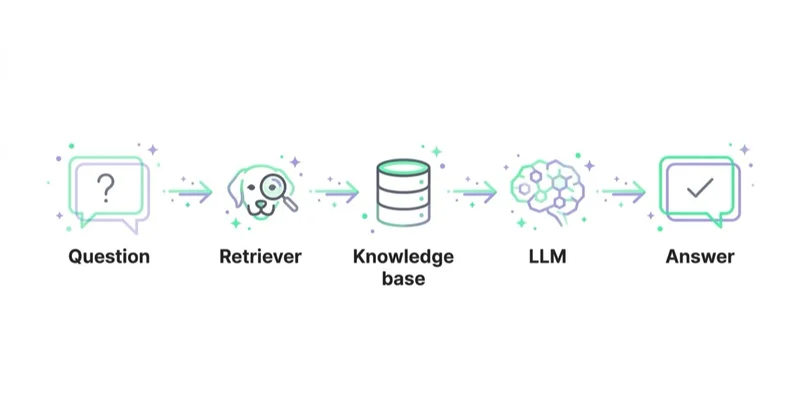
Sources can include:
- FAQ pages;
- help centre articles;
- product documentation;
- return and warranty policies;
- pricing rules;
- service descriptions;
- technical manuals;
- CRM knowledge articles;
- internal procedures.
RAG does not magically guarantee correctness. It improves the chance that answers are based on approved material, but quality still depends on:
- clean source documents;
- up-to-date content;
- good chunking and indexing;
- retrieval accuracy;
- prompt design;
- clear fallback behaviour;
- human review.
A good chatbot should say that it cannot answer when the source material is insufficient.
Where chatbots create the most value
Chatbots usually work best when they remove a common barrier or reduce repetitive work.
Strong use cases:
- delivery and returns questions;
- order status;
- appointment booking;
- demo scheduling;
- lead qualification;
- product recommendation;
- troubleshooting;
- account setup;
- support ticket creation;
- onboarding guidance;
- internal knowledge search;
- after-hours first response.
Weak use cases:
- replacing all support;
- legal, medical or financial advice without expert review;
- handling angry complaints without escalation;
- processing sensitive data without controls;
- making high-impact decisions automatically;
- answering from outdated or unverified documents.
The best scope is narrow enough to be controlled and valuable enough to justify maintenance.
Chatbots for ecommerce
Ecommerce chatbots are useful when they help shoppers make a purchase decision or solve a post-purchase issue.
Practical ecommerce use cases:
- product availability;
- size and fit guidance;
- delivery options;
- return policy;
- warranty details;
- order status;
- product comparison;
- accessory suggestions;
- back-in-stock alerts;
- cart recovery support;
- collecting details before a human follow-up.
They should not cover important product information or interrupt checkout. A chatbot that opens aggressively on every product page can become another pop-up problem rather than a conversion tool.
For related ecommerce optimisation, see abandoned carts, product recommendations and how to increase online sales.
Chatbots for B2B and services
For B2B and service businesses, the chatbot often has a different role. It should qualify demand and help users reach the right next step.
Good B2B use cases:
- service fit questions;
- pricing or package guidance;
- booking a consultation;
- webinar registration;
- lead qualification;
- industry-specific routing;
- document or case study recommendation;
- support for existing customers;
- onboarding assistance.
The bot should avoid pretending that every visitor is ready to talk to sales. Some users are still researching. A useful chatbot may recommend a guide or explain a process instead of pushing a meeting.
For journey planning, see sales funnel strategy.
Human escalation
Escalation is not a failure. It is part of a good chatbot design.
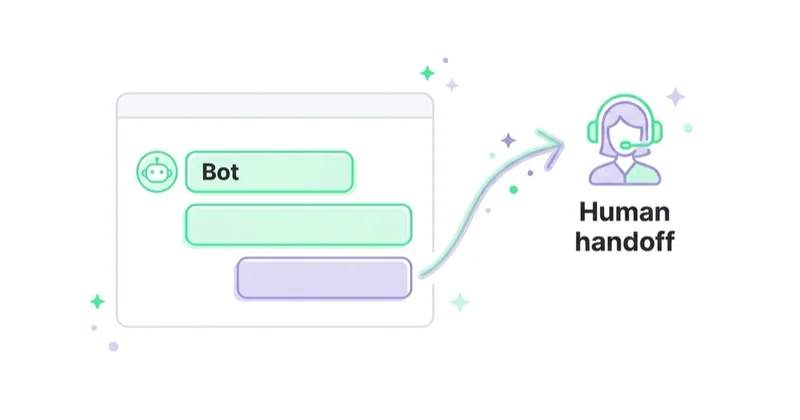
A chatbot should hand over to a human when:
- the user asks for a person;
- the bot is uncertain;
- the conversation includes a complaint;
- payment, refund or cancellation issues appear;
- sensitive data is involved;
- the user is angry or stuck;
- the request is outside the approved scope;
- the answer may have legal, health, financial or contractual consequences.
Escalation should preserve context. A user should not have to repeat the whole story after being transferred. If the business cannot provide live support, the bot should create a clear ticket and set expectations for response time.
Privacy and data protection
Chatbots often process personal data. That can include names, emails, order numbers, addresses, messages, support history and sometimes sensitive details typed by users unexpectedly.
Before launch, define:
- what data the chatbot collects;
- why that data is needed;
- legal basis or consent requirements where relevant;
- retention period for chat transcripts;
- who can access conversations;
- whether data is used to train models;
- whether third-party vendors process the data;
- how users can request deletion or access;
- how sensitive data is detected or masked;
- what happens when a user types payment, health or identity information.
Data minimisation matters. If an answer only requires an order number, the bot should not ask for unrelated personal details.
For UK and EU-facing businesses, data protection obligations need to be reviewed before deployment, especially when AI systems process personal data. For US, AU and other international markets, local privacy obligations and sector rules may also apply.
Security and AI risk
LLM-based chatbots introduce risks that traditional rule-based bots do not.
Important risks include:
- prompt injection;
- sensitive information disclosure;
- excessive agency;
- insecure tool use;
- hallucinated answers;
- overreliance on generated output;
- outdated knowledge sources;
- weak authentication around account data;
- unsafe handoff to external systems.
Risk increases when the chatbot can take actions, such as changing an order, issuing a refund, updating a CRM record or sending an email. In those cases, permissions, logging, approval rules and transaction limits become essential.
A practical governance setup includes:
- approved knowledge sources;
- prohibited topics;
- response quality checks;
- escalation criteria;
- transcript review;
- security testing;
- vendor review;
- access controls;
- incident process;
- regular content updates.
How to prepare the knowledge base
The knowledge base is the foundation of chatbot quality.
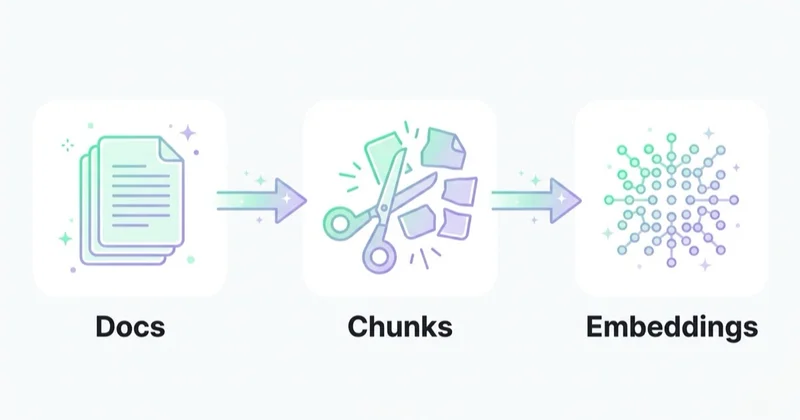
Useful source materials:
- FAQ;
- delivery policy;
- return and complaint policy;
- pricing rules;
- product descriptions;
- size guides;
- service descriptions;
- onboarding documentation;
- troubleshooting guides;
- sales qualification criteria;
- escalation playbooks;
- list of topics the bot must not answer independently.
Before connecting content to a chatbot, remove contradictions. If the return policy says 14 days on one page and 30 days on another, the chatbot may reproduce the inconsistency. Knowledge cleanup is often the most important implementation step.
Conversation design principles
A good chatbot should feel efficient, not theatrical.
Recommended principles:
- keep answers concise;
- ask one question at a time;
- confirm important details;
- avoid pretending to be human;
- show when the bot is automated;
- offer buttons for common actions;
- allow free text when needed;
- make escalation visible;
- avoid unnecessary personal questions;
- state limitations clearly;
- use the brand tone without sacrificing clarity.
The best chatbot conversations are often short. If a user needs a long explanation, the bot can summarise and link to a detailed resource.
How to measure chatbot performance
Conversation volume alone is not a success metric. It may simply mean the website is unclear.
Track:
- total conversations;
- resolved conversations;
- escalation rate;
- first response time;
- time to resolution;
- user satisfaction;
- failed answer rate;
- repeated questions;
- lead qualification rate;
- booked meetings;
- support ticket quality;
- conversion impact;
- reduction in repetitive support load;
- privacy or security incidents.
Qualitative review is essential. Read real conversations regularly. Analytics may show that the bot answered, but transcripts reveal whether the answer was accurate, useful and appropriate.
How we approach this at Space Ads
A chatbot is worth two things that are easy to overlook. The first is speed: it replies in a second, right when interest is hottest, and can pre-qualify the enquirer before a human steps in — and in acquisition, response time often decides the outcome. The second, more often missed, is data. The conversations are a goldmine of the actual questions and words customers use, the very ones they later type into a search engine. We pull that language into ad copy, into the site's FAQ, into keyword choices and negatives. A bot that merely forwards enquiries to support wastes half its value; it earns its keep when it also feeds us a steady read on what customers are really after.
Common chatbot mistakes
Launching without a knowledge base
Generic AI answers are not enough. The bot needs approved, current and structured information.
Hiding human support
Users become frustrated when a bot blocks access to a person. Escalation should be easy.
Automating too much too early
Start with high-volume, low-risk topics. Expand after reviewing transcripts and outcomes.
Collecting too much data
Unnecessary data collection increases privacy risk and can reduce trust.
Ignoring edge cases
Complaints, refunds, payment issues and sensitive topics need clear rules.
No quality review
AI chatbot quality changes when content, policies, integrations or user behaviour changes. Ongoing review is required.
FAQ
Can a chatbot increase conversion rate?
Yes, if it removes specific barriers such as unclear delivery terms, product uncertainty, form friction or slow response time. It should be measured against business outcomes, not only conversation starts.
Can an AI chatbot make things up?
Yes. Generative chatbots can produce inaccurate or unsupported answers, especially when they lack reliable context. RAG, fallback rules, source control and human escalation reduce the risk but do not remove it completely.
Is a rule-based chatbot still useful?
Yes. Rule-based bots are often best for predictable, high-risk or transactional flows where the business needs strict control over the conversation.
What is the best chatbot for a small business?
The best option depends on the scope. For simple FAQ and lead capture, a structured tool may be enough. For larger support needs, choose a system with knowledge base integration, CRM or ticketing integration, analytics and clear escalation.
Does a chatbot need GDPR consent?
It depends on the data collected, purpose and legal basis. Even when consent is not the only possible basis, the business still needs transparency, data minimisation, retention rules and vendor governance.
Should a chatbot say it is AI?
Yes, transparency is good practice. Users should understand that they are interacting with an automated system, especially when answers are generated or when the conversation may be reviewed or stored.
Conclusion
A chatbot can improve support, lead generation and conversion when it is built around real user needs. The strongest implementations are not just chat widgets. They combine useful knowledge, sensible automation, human escalation, privacy controls and regular quality review.
For many businesses, the right model is hybrid: automate repetitive questions, use AI where flexibility matters, ground answers in approved knowledge and move sensitive or complex cases to people. A chatbot should make the user journey clearer and faster. If it adds friction, hides support or gives unreliable answers, it needs a smaller scope and better governance.
Sources and further reading
- Google Cloud: Dialogflow documentation
- ICO: Guidance on AI and data protection
- NIST: AI Risk Management Framework
- OWASP: Top 10 for Large Language Model Applications
Continue learning
Continue reading

How Much Does a Landing Page Cost?
A landing page can cost a few hundred dollars or more than $10,000 because the scope may cover only implementation—or research, copy, design, tracking, integrations and optimisation. Compare deliverables, not just quotes.

Website Audit: What to Check Before You Spend More on Ads
More ad spend magnifies both a website's strengths and its leaks. Use this evidence-led audit to find measurement, speed, accessibility, message and conversion constraints before scaling.

WCAG 2.2 and Conversion: Where Accessibility Pays for Itself
Many WCAG 2.2 criteria address the same barriers a sound usability review finds in forms, checkout and login: invisible focus, missing labels, unclear errors and controls that are hard to operate. Learn how to test them, prioritise remediation and understand the EAA context.