
Facebook Ads Manager, now usually called Meta Ads Manager, is the tool for creating, managing, optimising and reporting ads across Meta placements such as Facebook, Instagram, Messenger and Audience Network. It is where advertisers choose campaign objectives, budgets, audiences, placements, creatives, optimisation events, attribution settings, breakdowns and reports.
Knowing where to click is not enough. Good Meta Ads Manager work depends on the business goal, event tracking, campaign structure, creative quality, landing page, catalogue data, budget discipline and interpretation of reporting outside Meta as well as inside Meta.
TL;DR
- Meta Ads Manager is the main interface for running ads on Facebook, Instagram and other Meta placements.
- Campaigns are organised into campaign, ad set and ad levels.
- The campaign objective matters because it tells Meta what outcome to optimise for.
- The ad set controls delivery settings such as budget, schedule, audience, placements and optimisation event.
- The ad level contains creative, copy, CTA, destination and tracking parameters.
- Events Manager, Meta Pixel, Conversions API and catalogues are essential for performance campaigns.
- Ads Manager reports should be compared with GA4, CRM, ecommerce backend and margin data.
What Meta Ads Manager is
Meta Ads Manager is the operational centre for paid campaigns in Meta's advertising ecosystem.
It is used to:
- create campaigns;
- choose objectives;
- set budgets;
- define audiences;
- select placements;
- upload or build ads;
- connect catalogues;
- choose optimisation events;
- review delivery;
- compare creatives;
- analyse breakdowns;
- create reports;
- duplicate, edit, pause and test campaigns.
It is different from Meta Business Suite. Business Suite is broader: posts, messages, Page management, content planning, basic insights and business asset management. Ads Manager is the more specialised campaign management interface.
Meta Ads Manager vs Business Suite vs Business Manager
| Tool | Main role |
|---|---|
| Meta Ads Manager | Creating, managing and analysing paid campaigns |
| Meta Business Suite | Managing business presence, content, inbox, basic ads and assets |
| Business settings / Business Manager workflows | Managing access, assets, Pages, ad accounts, pixels, domains and partners |
| Events Manager | Managing Pixel, datasets, Conversions API and event diagnostics |
| Commerce Manager | Managing catalogues and shop-related assets |
Small businesses often start inside Business Suite because it is simpler. More serious advertising work usually belongs in Ads Manager because it offers better control over objectives, events, reporting, creative testing and structure.
The three-level campaign structure
Meta Ads Manager uses a three-level structure.
| Level | Main decisions |
|---|---|
| Campaign | Objective, campaign budget settings, buying type and high-level goal |
| Ad set | Audience, placements, schedule, budget, optimisation event and delivery settings |
| Ad | Creative, copy, headline, CTA, destination, tracking and identity |
This structure matters because mistakes at one level affect everything below it.
Example: if the campaign objective is Traffic but the business needs purchases, Meta will optimise toward link clicks or landing page views, not necessarily buyers. If the ad set uses a weak event, delivery will learn from weak signals. If the ad creative is unclear, the campaign may reach the right people but fail to persuade them.
Campaign objectives
The campaign objective tells Meta what kind of result the system should optimise for.
Common objective groups include:
- awareness;
- traffic;
- engagement;
- leads;
- app promotion;
- sales.
The best objective is the one closest to the real business outcome while still giving the system enough signal to learn.
Examples:
- use Sales when the goal is purchases and purchase tracking is reliable;
- use Leads when the goal is qualified form submissions, calls or CRM leads;
- use Engagement when the goal is post engagement, messages or video interaction;
- use Awareness when the goal is reach or brand exposure;
- use Traffic carefully because traffic is not the same as valuable traffic.
Choosing the wrong objective is one of the fastest ways to get misleading results. Meta can optimise very well for the wrong thing.
Ad set decisions
The ad set level controls delivery.
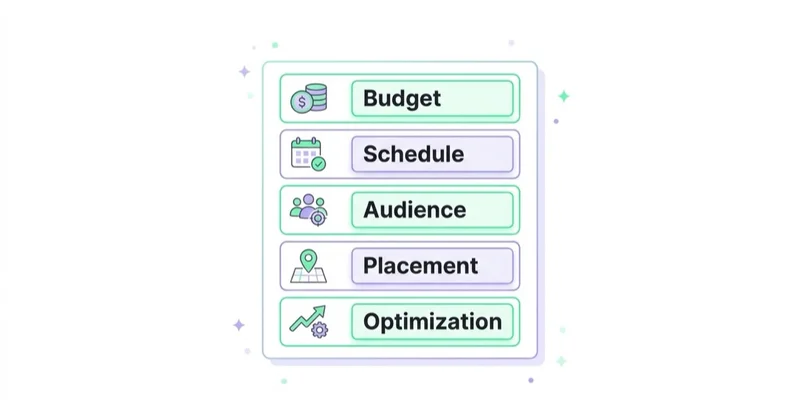
Important settings:
- budget or schedule;
- audience;
- location;
- age and language where relevant;
- placements;
- optimisation event;
- attribution setting;
- bid strategy where available;
- promoted catalogue or product set where relevant.
Modern Meta delivery often works better with broader audiences and stronger creative signals than with over-segmented micro-targeting. But "broad" does not mean "strategy-free." The offer, creative, landing page, event quality and customer data still guide the system.
For audience strategy, read Meta Ads Audiences: How to Build Facebook Audiences.
Ad level decisions
The ad level is where the user-facing message is built.
It includes:
- image or video;
- primary text;
- headline;
- description;
- call to action;
- destination URL;
- display link;
- catalogue creative;
- Advantage+ creative options where available;
- UTM parameters;
- ad identity;
- comments and social proof.
Creative is now one of the biggest levers in Meta Ads. Strong targeting cannot save unclear creative. A good ad should make the offer understandable quickly, show proof or relevance, and match the landing page promise.
What to configure before launching campaigns
Before spending budget, check the foundation.
Business and access
- Business portfolio or business account structure;
- Page and Instagram account access;
- ad account access;
- payment method;
- two-factor authentication where required;
- partner access;
- roles and permissions.
Tracking
- Meta Pixel or dataset;
- Conversions API where relevant;
- deduplication between browser and server events;
- event names and parameters;
- purchase value and currency;
- lead events;
- domain and landing page consistency;
- UTM naming.
Assets
- creative library;
- landing pages;
- product catalogue;
- privacy policy;
- lead forms;
- CRM integration;
- exclusions;
- remarketing audiences;
- customer lists where compliant.
Launching without measurement is often worse than waiting. The campaign may spend, but the learning and reporting will be weak.
For measurement setup, read Meta Conversions API: Integration and Benefits.
Events Manager, Pixel and Conversions API
Events Manager is where Meta event data is configured and diagnosed.
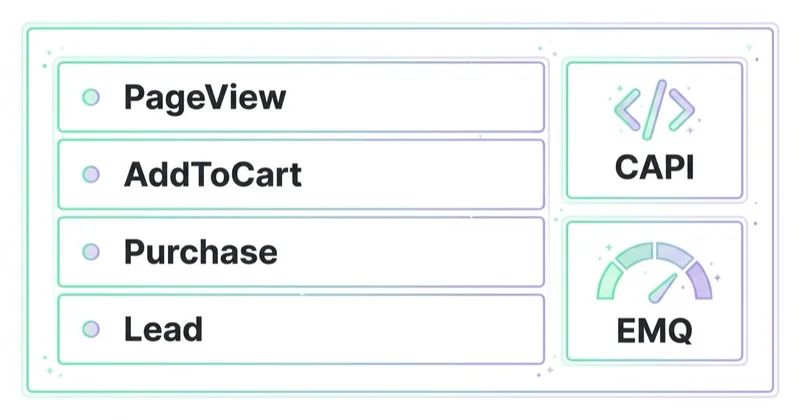
For web campaigns, important events may include:
- PageView;
- ViewContent;
- AddToCart;
- InitiateCheckout;
- Purchase;
- Lead;
- CompleteRegistration;
- Subscribe;
- Contact;
- custom events where justified.
Meta Pixel sends browser-side events. Conversions API sends server-side or direct integration events. Meta recommends using Conversions API with Pixel for website events where appropriate because it can create a more reliable connection between marketing data and Meta systems.
Event quality matters because Meta Ads Manager uses events for optimisation, reporting and audience creation. If events are duplicated, missing value, misfiring or not matched to the correct product IDs, performance analysis becomes unreliable.
Product catalogues and ecommerce
For ecommerce, Ads Manager often depends on catalogue quality.
A strong setup includes:
- accurate product feed;
- stable product IDs;
- product events matching catalogue IDs;
- correct prices and availability;
- product sets;
- margin or category labels where possible;
- strong product creative;
- purchase value tracking;
- return and margin analysis outside Meta.
Advantage+ shopping campaigns and catalogue ads can be powerful, but they depend on product data, event data and creative inputs. Automation needs good inputs.
For feed setup, read What Is a Product Feed and How to Use It?. For automated shopping context, read Meta Advantage+: What It Is and How It Works After the Changes.
Advantage+ and automation
Meta has moved heavily toward automation and AI-supported delivery. Advantage and Advantage+ features can affect audience expansion, placements, creative enhancements and shopping campaign setup.
Automation can help when:
- tracking is reliable;
- creative variety is strong;
- budget is sufficient;
- product data is clean;
- the objective matches the real outcome;
- the landing page can convert;
- reporting uses blended business data.
Automation can hurt or mislead when:
- the event is wrong;
- creative is weak;
- the campaign is over-fragmented;
- the business judges only platform ROAS;
- new customer quality is not measured;
- the catalogue includes poor products;
- the advertiser changes settings too often.
For current Meta automation context, read Meta Andromeda: What It Is and How to Adapt Your Meta Ads in 2026.
Reporting in Ads Manager
Important Ads Manager metrics include:
- amount spent;
- reach;
- impressions;
- CPM;
- frequency;
- CTR;
- CPC;
- landing page views;
- result rate;
- cost per result;
- purchases or leads;
- conversion value;
- ROAS;
- video hold or view metrics;
- creative-level performance;
- placement-level performance;
- attribution-window reporting.
But platform metrics are not the whole truth. Meta and GA4 can report different numbers because attribution models, click definitions, view-through windows, consent, browser behaviour and event timing differ.
Good reporting compares:
- Ads Manager;
- GA4;
- ecommerce backend;
- CRM;
- call tracking;
- payment data;
- margin;
- new vs returning customers;
- refunds and cancellations.
For analytics context, read Google Analytics 4: Why Implement It and What Are the Benefits?.
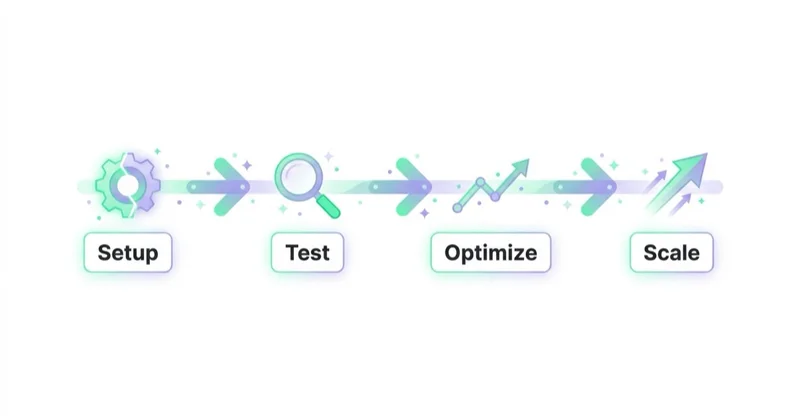
How to launch a new account in 30 days
Days 1-7: foundation
- confirm business access;
- set up payment and permissions;
- connect Facebook Page and Instagram account;
- configure Pixel and Conversions API;
- check event diagnostics;
- prepare UTMs;
- review landing pages;
- define campaign objectives;
- collect creative assets.
Days 8-14: structure and creative
- choose the first campaign objective;
- keep structure simple;
- prepare 3-5 creative angles;
- build landing page alignment;
- create exclusions if needed;
- set reporting columns;
- check policy-sensitive claims;
- QA mobile destination pages.
Days 15-21: launch and observe
- launch with controlled budget;
- avoid major edits too early;
- monitor delivery and event flow;
- check comments and landing page behaviour;
- identify obvious creative or tracking problems;
- compare Ads Manager with GA4 or backend data.
Days 22-30: optimise
- pause clear failures;
- keep promising ads stable;
- add new creative angles;
- review frequency and fatigue;
- inspect audience quality;
- check lead or purchase quality;
- document learning for the next cycle.
The first month should create learning, not force premature scaling.
Meta Ads Manager for lead generation
For lead generation, Ads Manager can use website forms, Instant Forms, calls, messages or CRM-connected workflows.
Key questions:
- Is the objective Leads or another objective?
- Is the lead event reliable?
- Is the form asking enough to qualify without killing volume?
- Are leads routed quickly?
- Is CRM status imported or reviewed?
- Are low-quality leads excluded from "success" reporting?
- Are sales teams giving feedback on lead quality?
Lead volume without quality is not success. Ads Manager should be connected with CRM reality.
For lead forms, read Facebook Lead Ads: What They Are and How to Launch Instant Forms.
Meta Ads Manager for ecommerce
For ecommerce, focus on:
- purchase event reliability;
- product feed quality;
- catalogue diagnostics;
- creative volume;
- offer clarity;
- mobile product page speed;
- checkout friction;
- new customer acquisition;
- margin;
- return rate;
- repeat purchase.
Ads Manager can show ROAS, but it does not automatically know whether the order was profitable after discounts, shipping, refunds and cost of goods. Ecommerce teams need blended reporting.
How we approach this at Space Ads
Ads Manager is a cockpit for reading, not a workbench to fiddle with hourly. The most common self-inflicted wound we see is over-editing: every significant change resets the learning phase, so constant tweaking keeps campaigns in permanent re-learning and never lets them settle. We change things deliberately, with intent, then leave them long enough to judge on data rather than on nerves after two days. The real lever is structure, consolidated and broad enough for the system to learn from, not the click-count in the panel. A good operator looks far more often than they change. The dashboard is there to show whether a decision worked, not to tempt the next change before the last one has had time to land.
Common mistakes
| Mistake | Why it hurts | Better approach |
|---|---|---|
| Choosing Traffic for sales goals | Meta optimises for traffic, not buyers | Use objective aligned with business outcome |
| Launching without Pixel or CAPI QA | Learning and reporting are weak | Validate events before scale |
| Too many campaigns and ad sets | Data fragments and learning slows | Keep structure simple |
| Judging only CTR | Clicks can be low quality | Measure outcomes and quality |
| No UTM convention | GA4 reporting becomes messy | Use consistent UTMs |
| Ignoring comments | Social proof and objections are missed | Review and moderate ads |
| Over-editing during learning | Delivery resets or becomes noisy | Make controlled changes |
| Trusting platform ROAS blindly | Attribution can over-credit | Compare with backend and margin |
FAQ
Is Facebook Ads Manager the same as Meta Ads Manager?
In practice, yes. The tool historically known as Facebook Ads Manager is now part of the Meta advertising ecosystem and is commonly referred to as Meta Ads Manager.
What is the difference between Ads Manager and Business Suite?
Business Suite manages broader business activity such as posts, inbox, assets and basic insights. Ads Manager is focused on paid campaign setup, optimisation and reporting.
What are the three levels in Meta Ads Manager?
The three levels are campaign, ad set and ad. Campaign defines the objective, ad set controls delivery settings and ad contains the creative and destination.
Can ads run without Meta Pixel?
Some campaigns can run without Pixel, but sales, remarketing and website conversion optimisation are limited without reliable event tracking. For performance campaigns, Pixel and Conversions API should be considered.
Which campaign objective should be used?
Choose the objective closest to the real business outcome. Use Sales for purchases, Leads for lead generation, Engagement for interactions or messages, Awareness for reach and Traffic only when traffic itself is a valid goal.
Why do Meta results differ from GA4?
They use different attribution rules, event collection methods, timing, consent handling and click/view logic. Differences are normal; they should be understood and reconciled, not ignored.
Is Advantage+ better than manual setup?
It depends on account maturity, creative quality, tracking, budget and business model. Advantage+ can work well with strong inputs, but it is not a substitute for strategy or measurement.
Conclusion
Meta Ads Manager is a powerful tool, but it is still only a tool. The quality of results depends on the decisions behind the campaign: objective, structure, tracking, creative, audience strategy, landing page and reporting.
Start with the business outcome. Configure tracking before launch. Keep campaign structure simple. Feed the system strong creative and reliable events. Then interpret Ads Manager results with GA4, CRM, ecommerce backend and margin data.
The best advertisers do not just know where settings are. They understand what each setting tells Meta to optimise for and what business trade-off it creates.
If you would rather have a team run the account than do it yourself, we handle it within Facebook and Instagram ads.
Sources and further reading
- Meta for Business: Meta Ads Manager
- Meta Business Help Center: About Conversions API
- Meta for Business: Advantage+ shopping campaigns
- Meta for Business: Meta Advantage+
- Meta for Developers: Marketing API campaign structure
- Meta for Developers: Marketing API insights
Continue learning
- What Is a Facebook Ads Audit and Why Is It Important?
- Meta Conversions API: Integration and Benefits
- Meta Ads Audiences: How to Build Facebook Audiences
- Meta Advantage+: What It Is and How It Works After the Changes
- Meta Andromeda: What It Is and How to Adapt Your Meta Ads in 2026
- Facebook Lead Ads: What They Are and How to Launch Instant Forms
- What Is a Product Feed and How to Use It?
Continue reading
Meta Advantage+ vs Manual Campaigns: When to Trust the Automation
Meta Advantage+ can automate audience expansion, placements and budget allocation, while manual settings preserve selected controls. This guide explains what each label actually means and how to test the right configuration for a business goal.
Why Your Meta Ads Stopped Working (and How to Diagnose It)
When Meta performance changes, diagnose the affected layer before editing campaigns. This guide covers delivery status, billing, event quality, funnel metrics, activity history, creative, offer, website and controlled recovery.
Scaling Meta Ads Without Killing ROAS
Scaling Meta ads is a commercial decision, not a promise to preserve the same ROAS at a higher spend. Learn how to set a profitable ceiling, diagnose constraints and increase budget through controlled tests.


































