If you run Google Ads for clients — as an agency or a freelancer managing paid accounts on someone else's behalf — the hard part stops being campaign strategy and becomes operations. Managing one account well is a craft; managing ten to one standard, every week, while onboarding the eleventh, is a workflow problem. This guide covers how agencies structure multiple Google Ads accounts under a manager account (MCC), the weekly cadence that scales, where the manual approach breaks (usually around 5–10 accounts), and how to keep quality consistent across a growing roster without headcount rising in lockstep.
TL;DR
- Multi-account Google Ads is an operations problem. The bottleneck isn't strategy per account — it's applying the same standard across all of them, reliably.
- The MCC (manager account) is the backbone. It's how agencies link, access and report on many client accounts under one login, with permissions and consolidated billing.
- The manual workflow breaks around 5–10 accounts. Below that, you hold it in your head. Above it, things drift unless something enforces the routine.
- Cadence beats heroics. A fixed weekly rhythm — Monday health check, mid-week optimization, end-of-week reporting — scales; ad-hoc firefighting doesn't.
- Consistency is the product. Clients aren't paying for occasional brilliance; they're paying for a standard applied every week, on time.
- Reporting overhead is where margin leaks. Rebuilding decks by hand across the roster is a part-time job that produces no strategy.
- Automation and AI handle the repetition, not the judgement. The routine checks and reports scale through tooling; the decisions stay with the team.
For where the tooling around this sits, see the pillar on ad management software and the deep dive on PPC management software for agencies.
A quick glossary
- MCC (My Client Center / manager account) — Google's structure for managing multiple Google Ads accounts under one login, with tiered access and consolidated reporting.
- Manager account hierarchy — managers can contain other managers and client accounts, mirroring how an agency organizes teams and clients.
- Account access levels — admin, standard, read-only and email-only; the basis of safe delegation across a team.
- Cadence — the fixed rhythm of recurring work (daily/weekly/monthly) that keeps every account to standard.
- Audit log / change history — Google Ads' record of who changed what and when; the agency's accountability trail. See change history.
- Brand-keyword protection — rules that prevent spend mistakes on a client's brand terms across accounts.
The MCC: the backbone of agency Google Ads
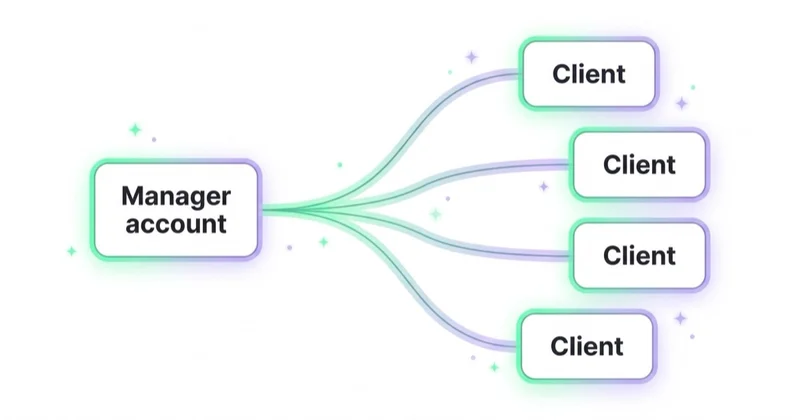
Everything about managing many client accounts starts with the manager account. An MCC lets an agency link client accounts under one login, set access levels per person, switch between accounts without juggling credentials, and pull consolidated reporting across the roster. For more than a couple of clients, it isn't optional — it's the structure that makes delegation and oversight possible at all.
Two things matter most when setting it up for scale. First, access hygiene: give each team member the right level (admin, standard, read-only) per account, and keep client ownership of the account itself — the agency manages, the client owns. Second, a consistent naming and structure convention across accounts, so anyone on the team can open an unfamiliar account and immediately understand it. The agencies that scale smoothly are the ones where every account looks recognizably the same under the hood.
Where the manual workflow breaks
There's a predictable inflection point. With one to five accounts, an experienced specialist holds the whole picture in their head — they know which account needs attention without a system telling them. Somewhere between five and ten, that stops working. Not because the specialist got worse, but because human attention doesn't scale linearly and the surface area grew faster than the hours.
The symptoms are consistent: a client's account quietly underperforms for a week before anyone notices; reporting slips because Friday ran out; negative-keyword hygiene becomes inconsistent because the routine depends on someone remembering. None of these is a strategy failure. They're all coverage failures — the standard exists, but nothing guarantees it's applied to every account, every cycle.
This is the moment agencies either add headcount or add a system. Headcount scales cost linearly; a system scales coverage. The agencies that keep margins healthy as they grow tend to choose the system first.
A weekly cadence that scales
The antidote to drift is rhythm. A fixed weekly cadence turns "manage twenty accounts" into a repeatable routine rather than a daily judgement call about where to look.
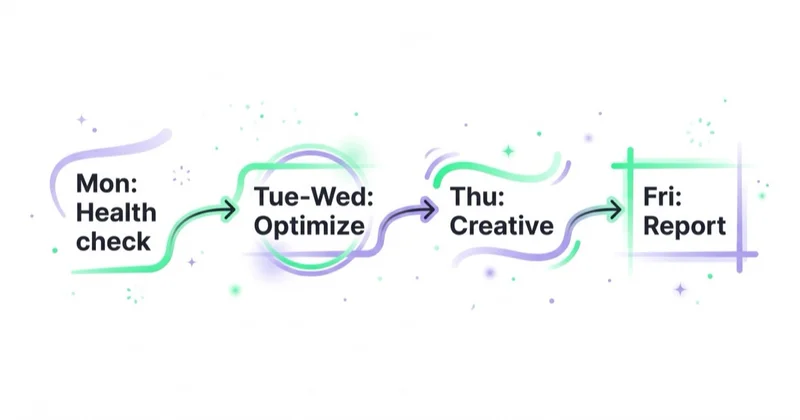
| When | What | Why |
|---|---|---|
| Monday | Cross-account health check — pacing, anomalies, broken tracking | Catch what broke over the weekend before clients do |
| Tuesday–Wednesday | Optimization pass on accounts flagged Monday | Act on exceptions, not on every account equally |
| Thursday | Creative and structure review where due | Keep angles fresh, structure clean |
| Friday | Reporting — reconciled, client-ready | Close the week with the client informed |
| Monthly | Deeper review per client — strategy, budget, budget planning | Step back from the weekly grind |
The key discipline is triage by exception. You don't give twenty accounts equal attention every day — you let a Monday health check tell you which three need work this week, and you spend the hours there. That only works if something reliably surfaces the exceptions across all accounts; otherwise "triage by exception" quietly becomes "look at whichever account complained loudest."
Keeping one standard across the roster
Consistency is what clients are actually paying for. A few practices keep it intact as the roster grows:
- A documented standard. What a healthy account looks like — structure, tracking, naming, negatives — written down, not held in one person's head.
- Brand-keyword protection everywhere. Rules that prevent spend mistakes on brand terms, applied to every account, not the ones someone remembered.
- Per-account targets and limits. Each client's ROAS/CPA bands and budget caps defined once, enforced continuously.
- An audit trail. Every change logged with a reason, so any account decision can be explained to the client or reconstructed by a teammate.
- Onboarding as a repeatable process. A new account joins the standard the same way every time, not ad hoc.
What we see across a growing roster
Across the 25+ client accounts we manage daily, the difference between agencies that scale cleanly and those that strain isn't talent — it's whether the routine survives a busy week. When things get hectic, the manual workflow is the first thing to slip, and it slips silently: nobody decides to skip the Tuesday check on a quieter account, it just doesn't happen, and three weeks later that account has drifted. The agencies that hold their standard are the ones where the routine runs whether or not anyone remembers it — daily checks across every account, exceptions surfaced automatically, reporting assembled rather than rebuilt. The strategy was never the bottleneck. The coverage was.
That's also why we treat platform automation as an ally rather than something to manage around: with the bidding handled by the platforms, the agency's scarce attention goes to the things that actually need a human — which accounts to prioritize, what to change, and why.
A 30-day plan to systematize multi-account management
- Week 1 — get the MCC in order. Audit access levels, confirm client ownership, standardize naming across accounts. Fix the structural debt first.
- Week 2 — document the standard. Write down what a healthy account looks like and define per-account targets, budgets and brand-keyword rules.
- Week 3 — install the cadence. Put the weekly rhythm on the calendar and run one full cycle manually, noting where time actually goes.
- Week 4 — automate the repetition. Move the daily health check and reporting to tooling so the routine survives busy weeks. Keep the optimization decisions with the team.
Stop doing / do instead
| Stop doing | Do instead |
|---|---|
| Giving every account equal daily attention | Triage by exception from a cross-account health check |
| Holding the standard in one person's head | Document it; enforce per-account targets and limits |
| Rebuilding client reports by hand each week | Reconciled, templated reporting assembled automatically |
| Adding headcount to add coverage | Add a system that scales coverage, then headcount for judgement |
| Onboarding each account ad hoc | A repeatable onboarding that joins the standard every time |
| Letting the routine slip on busy weeks | Automate the routine so it runs regardless |
Where Space Ads OS fits
Space Ads OS exists because we hit this exact wall running our own roster. It's built around the multi-account reality: instead of opening each client's panel on Monday, you ask for a health check across every account at once and get the exceptions back — pacing issues, tracking breaks, the account that drifted. The Friday report comes out reconciled and client-ready from chat rather than a manual rebuild. And every change runs through per-account limits, a preview and a logged reason, so the standard holds and any decision can be explained to the client later.
What it really does is let one specialist hold the reach of several — not by automating the judgement, but by making the coverage tireless across the whole roster. If you're past the point where the manual workflow keeps up, that's the gap it closes; you can see how it works here.
FAQ
How do agencies manage multiple Google Ads accounts?
Agencies use a manager account (MCC) to link client accounts under one login, with tiered access per team member and consolidated reporting. On top of that structure they run a fixed cadence — typically a weekly cycle of health checks, optimization and reporting — and enforce a documented standard (structure, tracking, targets, brand-keyword rules) across every account, increasingly with tooling that automates the recurring checks.
What is an MCC in Google Ads?
An MCC, or manager account (also called My Client Center), is Google's structure for managing multiple Google Ads accounts from a single login. It lets agencies link client accounts, set access levels, switch between accounts without separate credentials, and report across the whole portfolio. It's the standard backbone for any agency or freelancer running more than a couple of client accounts.
How many Google Ads accounts can one person manage?
It depends on account complexity and tooling, but the manual workflow typically starts to strain between five and ten accounts. Below that, an experienced specialist can hold the picture by hand. Above it, coverage gaps appear unless a system surfaces which accounts need attention — at which point one person, supported by automation for the routine checks, can manage many more.
What's the best way to report to multiple clients?
Use a reconciled, templated approach: the same report structure for every client, with numbers tied to business outcomes via GA4 rather than re-displayed platform figures, on a cadence clients actually read. Automating the data assembly leaves only the commentary as manual work — which is where the agency's value shows. See the reporting guide for the full approach.
How do agencies keep quality consistent across accounts?
Through a documented standard (what a healthy account looks like), per-account targets and limits enforced continuously, brand-keyword protection applied everywhere, a complete change log, and a repeatable onboarding process. The goal is that any account, opened by any team member, looks recognizably the same and meets the same bar — consistency, not occasional brilliance, is what clients pay for.
In short
- Running Google Ads for many clients is an operations problem; the MCC is its backbone.
- The manual workflow reliably breaks around 5–10 accounts — coverage, not strategy, is what fails.
- A fixed weekly cadence with triage-by-exception scales where ad-hoc firefighting doesn't.
- Consistency across the roster is the product clients are paying for.
- Reporting overhead is where margin leaks; automate the assembly, keep the commentary.
- Systematize coverage first, add headcount for judgement — that's how margins survive growth.
Sources and further reading
- Google Ads Help — About manager accounts (MCC)
- Google Ads Help — Account access levels
- Google Ads Help — Change history
- Space Ads — PPC management software for agencies
- Space Ads — Marketing reporting in 2026
Continue learning
Continue reading
Google Local Services Ads: The Pay-Per-Lead Channel for Local Businesses
A current guide to Google Local Services Ads and pay-per-lead Performance Max: eligibility, Google Verified, screening, billing, ranking, lead credits, migration and measurement beyond raw leads.
Google Ads Benchmarks by Industry (CTR, CPC, Conversion Rate)
Google Ads benchmarks can provide context, but only when the campaign type, market, conversion action, attribution and time period match. Learn how to make a valid comparison and turn it into a useful decision.

Google Ads Change History: How to See What Your Agency Actually Changed
Google Ads Change history shows many account edits, their timing and the user or tool responsible. Learn what the log can verify, what it cannot, and how to review agency decisions without rewarding busywork.