
Google Local Services Ads connect eligible local businesses with people searching for a relevant service. Instead of charging for every ad click, Google charges for valid lead interactions such as eligible calls, messages or bookings, subject to the market and category.
The format can appear prominently on Google Search and, during Google's current platform transition, on Google Maps. It is not available to every business, and a platform-valid lead is not automatically a sales-qualified prospect or booked job. Commercial performance still depends on eligibility, screening, profile quality, bidding, service settings and what happens after the enquiry arrives.
Google is moving existing Local Services Ads into a specialised Performance Max campaign type with pay-per-lead goals. This guide explains both the operating model and the practical implications of that migration, including the new Google Verified badge and regional limits on lead credits.
TL;DR
- Local Services uses a pay-per-lead model: you pay for lead interactions Google classifies as valid, not ordinary ad clicks.
- Eligibility, lead types, verification and features vary by country, category and advertiser. Check the onboarding flow rather than relying on a generic industry list.
- Google has replaced Google Guaranteed and Google Screened with a unified Google Verified badge for eligible advertisers; the former money-back guarantee has been discontinued.
- Ranking considers the bid and the estimated likelihood of producing a lead, including relevance, responsiveness, profile quality and search context. Budget alone does not determine placement.
- Automatic credits and disputes are not universal. Google says automated lead credits are unavailable in EMEA and certain verticals, while dispute eligibility is limited by market and lead reason.
- Existing accounts are being migrated to Performance Max campaigns with pay-per-lead goals. Export historical campaign reports before migration because those reports will not carry over.
- Evaluate cost per accepted lead, booked job and acquired customer in your own system, not platform cost per lead alone.
What are Google Local Services Ads?
Local Services Ads are a Google format for supported businesses that serve defined local areas. A profile can show business details, reviews, contact options and, for eligible businesses that complete the required checks, the Google Verified badge. The user can contact the provider through the ad without the advertiser paying for an ordinary website visit.
Available lead types can include calls, messages and bookings. Their availability differs by market and vertical; for example, Google's help centre limits some messaging, booking, call-recording and lead-credit features to specified countries or excludes healthcare and tax categories.
The business remains responsible for deciding which enquiries to accept, communicating accurately with customers and delivering the service. Google is the advertising platform, not a party that sets the provider's prices or resolves ordinary service disputes.
The migration to Performance Max pay-per-lead campaigns
Google is automatically moving existing Local Services Ads campaigns into Google Ads as a specialised Performance Max campaign type optimised for pay-per-lead goals. This is not the standard Performance Max model:
- billing remains based on valid leads rather than clicks;
- ads remain focused on local placements on Google Search and Google Maps;
- campaigns are keywordless and use information associated with the business profile and service settings;
- common standard Performance Max assets and optimisation options do not all apply;
- eligible advertisers can retain the Google Verified badge after meeting the required checks.
Google says advertisers will receive advance notice before their scheduled migration. At the time described in its transition guidance, new pay-per-lead campaigns cannot yet be created directly inside Google Ads; advertisers continue to begin through the Local Services signup route until that changes.
After migration, Lead Manager in Google Ads replaces the former Local Services lead inbox. Core Google Business Profile information such as business name, physical address and standard hours syncs into Google Ads, while service areas and ad schedules can be managed independently in the migrated campaign.
One detail deserves immediate attention: historical campaign performance reports do not migrate. Google says past customer lead history will transfer, but previous campaign-level metrics will not. Before the transition:
- export campaign performance and lead reports from the existing dashboard;
- record the reporting period, market, settings and definitions;
- preserve current budgets, bid modes, service areas, job types and schedules;
- document which numbers reconcile with finance and the CRM;
- check account access for everyone who will use Google Ads and Lead Manager.
This creates a usable baseline when the interface and campaign identifier change.
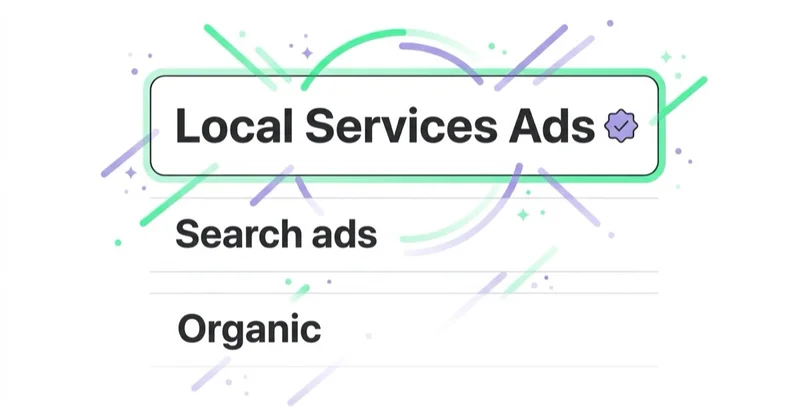
Local Services Ads vs Search Ads vs SEO
These routes can reach some of the same searches, but they solve different problems. A business does not automatically need all three, and they should not be compared using the same conversion definition.
| Route | Direct media charge | Main control | Important limitation |
|---|---|---|---|
| Local Services / pay-per-lead campaigns | Valid lead interaction | Service categories, areas, schedule, bid/budget and profile | Restricted eligibility and less control over queries and landing experience |
| Google Search Ads | Usually clicks | Keywords or query themes, ad copy, landing pages, bidding and conversion goals | A paid click can occur without an enquiry |
| SEO and Google Business Profile | No charge per organic click | Site content, technical foundations and profile information | Requires ongoing work and offers no guaranteed position or volume |
Local Services may suit a verified provider in a supported category with reliable phone or message handling. Search Ads can cover offers, locations and queries outside that format and provide more control over the journey. Organic visibility and a complete Business Profile support discovery and trust, but they are not free to produce simply because there is no click fee.
Choose the mix from incremental reach, lead quality, capacity and acquisition economics. Running every available channel is not automatically efficient.
Google Verified replaces Google Guaranteed and Google Screened
Older guides often describe two badges: Google Guaranteed for many home-service categories and Google Screened for selected professional services. That distinction is now outdated. Google has introduced one Google Verified badge for eligible advertisers that complete the relevant screening and verification.
Google also discontinued the money-back guarantee associated with the previous Google Guarantee badge. The last eligible services under that programme had to be booked before Google's stated December 2025 cutoff, with reimbursement requests subject to the former deadline. Current advertisers should not describe Google Verified as a consumer money-back guarantee.
The Verified badge signals completion of the checks Google required for that advertiser; it is not a promise that every service outcome will be satisfactory. Relevant verifications may also be shown on the provider's profile.
Some advertisers may run pre-badge ads after preliminary requirements are complete while finishing the remaining checks. Google says these listings can appear below providers that have completed onboarding, and pre-badge availability has category restrictions.
Which businesses can use Local Services Ads?
Eligibility is specific to the combination of country, location and service category. Google's lists change and some features are limited to particular regions or even individual states. The reliable process is:
- run the official eligibility check for the business location and category;
- confirm that the legal entity and service area meet Google's rules;
- review the precise screening documents requested in the account;
- confirm which lead types, badge, credit and booking features are available;
- assess whether expected lead economics justify the operational work.
Do not select a neighbouring category merely to enter the programme. Incorrect categories and unreasonably broad service areas can create irrelevant leads and policy risk.
Screening and verification requirements
All participating businesses must pass Google's screening and verification process. Requirements vary by location and category and may include:
- business registration or entity checks;
- professional or trade licences;
- insurance documentation;
- a verified and affiliated Google Business Profile;
- owner, business or field-worker background checks in relevant North American categories;
- minimum review requirements;
- additional or advanced verification for selected high-risk categories.
Treat onboarding as a compliance workstream, not a one-time form. Names, addresses, licences and insurance details should be consistent and current. Google can request repeat checks, and incomplete follow-up may result in badge loss, paused ads or suspension.
The checks do not transfer the provider's legal duties to Google. The business remains responsible for licensing, insurance, privacy, pricing, worker conduct and other requirements in every jurisdiction it serves.
How you're billed: pay per lead, not per click
Google charges for lead interactions it recognises as valid under the rules for the advertiser's market and lead type. This platform label should not be confused with your own qualified-lead definition. A valid call about a listed service may still be commercially unsuitable, fail sales qualification or never become a job.
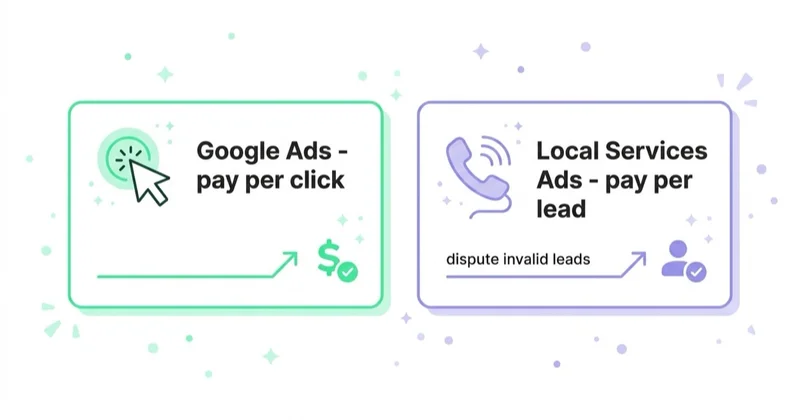
Examples of potentially valid events in Google's current documentation include:
- speaking with a customer on an inbound call;
- receiving a voicemail or meaningful interaction with an automated system;
- a missed call followed by a return contact that reaches the person or leaves a voicemail;
- a message or booking request where that lead type is supported.
Prices can differ by lead type, service, market and Google's estimate of booking likelihood. The account interface shows lead charges and average cost per lead, but those figures do not include the internal cost of handling enquiries.
Depending on migration state, advertisers may see legacy weekly budget language or daily budgets in Google Ads. Use the budget and charging-limit information displayed in the active account, rather than copying an amount or interface instruction from an older guide.
Bidding, budget and ranking
Local Services placement is auction-based. Google's ranking documentation identifies:
- the bid, including automated Maximise Leads and other available bidding modes;
- estimated likelihood of producing a lead;
- responsiveness, where missed calls may negatively affect the signal;
- the search context, including service, time and estimated location;
- relevance of services and business information;
- profile quality, including rating, review count, average response time, photos and completed verification checks;
- ecosystem considerations, including diversity and opportunity for providers.
These are inputs, not a formula an advertiser can reverse-engineer. Google does not say that review count alone is the strongest lever, nor that a higher budget guarantees visibility. Budget limits how much demand the campaign can buy; the bid and quality-related signals affect participation and order in each auction.
Optimisation should begin with accurate settings and customer service, not attempts to manipulate one signal.
Lead credits and disputes: check the regional rules
The instruction to "dispute every bad lead weekly" is no longer a universal best practice.
Google's current automated-credit system assesses leads when contact occurs and may reassess charged leads later. Google states that automated credits are unavailable in EMEA, healthcare, and tax-specialist verticals. It also says credits are no longer supported merely because the requested job type or geography is not serviced. Those settings are the advertiser's responsibility.
Separate dispute guidance indicates that successful disputed-lead credits are available in the US and Canada, with additional exclusions. The options visible in the active account determine what can be submitted. Do not forecast refunds as if every commercially poor enquiry will qualify.
Operationally:
- review charged, uncharged, in-review and credited leads;
- give accurate lead feedback where the feature is available;
- submit disputes only for eligible reasons and preserve supporting information;
- reconcile credits with invoices because the original charge may remain visible;
- fix service areas, job types, categories and schedules when unwanted demand reflects the campaign setup;
- track your own invalid, accepted and booked classifications separately from Google's status.
How to set up Local Services Ads
- Check eligibility. Use Google's onboarding flow for the exact country, location and service category.
- Resolve Business Profile ownership. The business needs the required access to a public, verified and matching Google Business Profile.
- Complete every requested check. Provide accurate registration, licence, insurance, owner and worker information as applicable.
- Choose service areas and job types. Select only locations the business can reasonably and legally serve and services it actually performs.
- Review the customer-facing profile. Check name, hours, biography, services, photos, reviews and contact routes for accuracy.
- Configure bidding and budget. Start from capacity and allowable acquisition cost, then use the options available in the account.
- Design lead handling. Define ownership, call or message coverage, missed-lead escalation and CRM recording before activation.
- Test reporting and reconciliation. Confirm how platform leads, charges, credits, bookings and internal sales stages will be joined.
How to get more — and better — leads from LSA
- Keep eligibility data current. Renew licences and insurance and complete repeat checks before they interrupt serving.
- Align schedule with capacity. Do not buy calls or messages that the business cannot handle reliably. Use pausing and schedules when needed.
- Improve responsiveness without sacrificing quality. Define acknowledgement, callback and message-handling responsibilities. A missed call should create a visible follow-up task, not disappear.
- Use accurate categories, services and areas. Review unwanted leads for a settings pattern before treating them as random poor quality.
- Maintain an authentic profile. Use accurate descriptions and useful, representative photos. Ask eligible customers for genuine reviews without misleading incentives or review gating.
- Record outcomes consistently. Classify valid, accepted, booked, completed, cancelled and lost leads with clear reasons.
- Change one constraint at a time where possible. A simultaneous budget, bid, service-area and staffing change makes the outcome hard to interpret.
Space Ads supports lead generation and Google Ads. Local Services eligibility, verification, account operations, lead handling and technical integrations should be confirmed in the agreed scope rather than assumed to be included in every engagement.
Measure booked work, not only platform leads
Google Ads can report charged leads, total cost and average cost per lead. Your commercial scorecard should continue further:
| Stage | Example measure | Question it answers |
|---|---|---|
| Platform | Charged leads and platform CPL | What did Google bill as a lead? |
| Validity | Internally valid lead rate | Did the contact match the agreed basic rules? |
| Sales acceptance | Cost per accepted lead | Was it appropriate for active follow-up? |
| Booking | Booking rate and cost per booked job | Did the enquiry create scheduled work? |
| Completion | Completed-job rate and acquisition cost | Did the booked work actually occur? |
| Economics | Revenue, contribution and payback | Did the acquired work create sufficient value? |
Document how duplicates, repeat customers, cancellations, no-shows, spam and multi-service jobs are treated. Platform lead status and internal status can legitimately differ because they answer different questions.
Use call recordings only where the feature is available and their use is lawful, disclosed and appropriately secured. Access should be limited, retention defined and sensitive information handled carefully.
When comparing LSA with Search Ads or organic acquisition, use the same downstream stage and cost scope. Comparing LSA cost per platform lead with Search cost per qualified opportunity would be misleading.
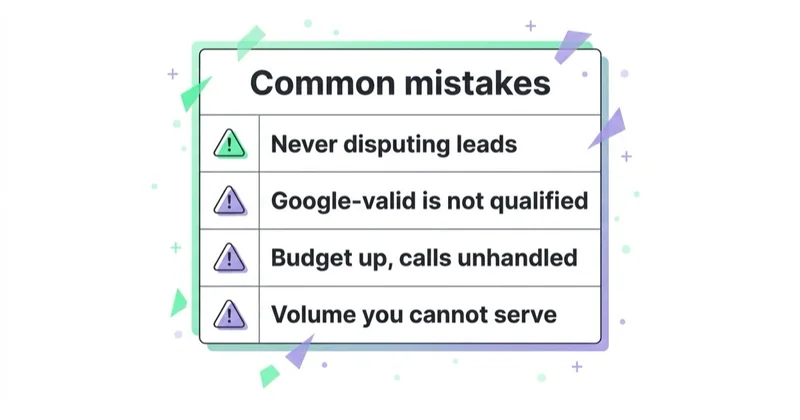
Common mistakes
- Referring to the discontinued Google Guarantee as a current money-back promise.
- Assuming a Google-valid lead meets the company's sales qualification criteria.
- Expecting credits for unsupported job types or service areas instead of correcting settings.
- Using a broad category or geography to chase volume the business cannot serve.
- Increasing budget while calls, messages or bookings remain unhandled.
- Optimising around reviews without following Google's review and content policies.
- Failing to export historical performance before account migration.
- Comparing channels at different funnel stages or with different cost definitions.
- Treating verification as permanent and ignoring requests to repeat checks.
Common questions
Are Local Services Ads part of Google Ads?
They are being integrated into Google Ads. Existing LSA campaigns are migrating to a specialised Performance Max campaign type with pay-per-lead goals and Lead Manager. It differs from standard Performance Max and retains lead-based billing. Follow the migration notice shown for the specific account.
What replaced Google Guaranteed and Google Screened?
Google introduced the Google Verified badge for eligible advertisers that complete the required screening and verification. The former money-back guarantee linked to Google Guarantee has been discontinued, so the new badge should not be described as reimbursement protection.
How much do Local Services Ads cost?
Lead prices vary by market, service and lead type. The bid, budget, auction and expected likelihood of a lead all affect delivery and cost. Set an affordable ceiling from accepted-lead, booking and customer economics rather than a generic industry benchmark.
Can a business get credit for a bad lead?
Sometimes, but availability and reasons vary. Google's automated credits are not available in EMEA, healthcare or tax-specialist verticals, and manual dispute eligibility is limited by market. An enquiry that does not become a sale is not automatically creditable. Check the active account and current Google policy.
Does Google Verified guarantee service quality?
No. It indicates that the advertiser completed the checks Google required for that business and category. The business remains responsible for the service and its legal duties.
Do Local Services Ads replace Search Ads or SEO?
No universal replacement rule applies. Local Services can capture eligible local demand with lead-based billing; Search Ads offer broader query and landing-page control; SEO and the Business Profile support organic discovery. Use downstream performance and incremental reach to decide the mix.
Sources
- Google Local Services Ads Help — Get started with Local Services Ads
- Google Ads Help — Local Services Ads transition to Performance Max campaigns with pay-per-lead goals
- Google Local Services Ads Help — About the Google Verified badge
- Google Local Services Ads Help — Screening and verification process
- Google Local Services Ads Help — How leads work
- Google Local Services Ads Help — About ad rankings
- Google Local Services Ads Help — Automated lead credits
- Google Business Profile Help — Tips and policies for customer reviews
Continue learning
Continue reading
Performance-Based Marketing and Pay-Per-Lead: How It Works
Pay-per-lead can align payment with a defined outcome, but it does not remove business risk. Learn how to define a billable lead, calculate a sustainable CPL, connect CRM outcomes and protect quality, data and compliance.

Google Local Services Ads (LSA): Google Verified, Leads and When to Use Them
Local Services Ads are Google's pay-per-lead format for eligible local service businesses. The current trust badge is Google Verified, and performance depends on screening, profile quality, responsiveness and booked-job economics.
How to Choose a Lead Generation Agency (Questions to Ask, Red Flags)
A practical framework for comparing lead generation agencies: scope, measurement, pricing, account ownership, security, contracts and the questions worth asking before you sign.


































