
Google Ads Change history is a useful audit trail, but it is not a timesheet. It shows many edits made to campaigns, conversion actions and account settings during the previous two years, along with the user or tool responsible. It can help you connect a budget, bidding or targeting change with what happened next.
It cannot show the quality of analysis, strategy, creative production, landing-page work or CRM follow-up performed outside Google Ads. Google also notes that some account-level settings and changes made by its representatives may not appear. Use the log to verify specific decisions and improve the conversation with your agency—not to count changes as proof of value.
TL;DR
- The log covers the previous two years, not the account's complete lifetime.
- Find it under Campaigns → Change history. Filter by date, campaign, change type, user, tool or experiment.
- The user label needs interpretation. Edits may come from a person, Google Ads Editor, an automated rule, the API or the Google Ads system.
- Connect changes to a hypothesis. Ask what problem the edit addressed, which metric should move and when the result will be reviewed.
- Do not reward activity volume. A stable automated campaign may need fewer edits; frequent material changes can make evaluation harder.
- Maintain direct access. The advertiser should have an administrator who is not dependent on the agency and understand manager-account ownership and billing arrangements.
- Use more than one record. Pair Change history with reports, experiment results, CRM or sales data and an agency decision log.
What the change history is (and why it matters)
Change history records many changes to ads, assets, audiences, budgets, bidding, conversion actions, feeds, keywords, networks, status and targeting. It also records changes made through automated rules, Google Ads Editor and the API. The “User” field may therefore display an email address, a tool name, “Google Ads API” or a system label.
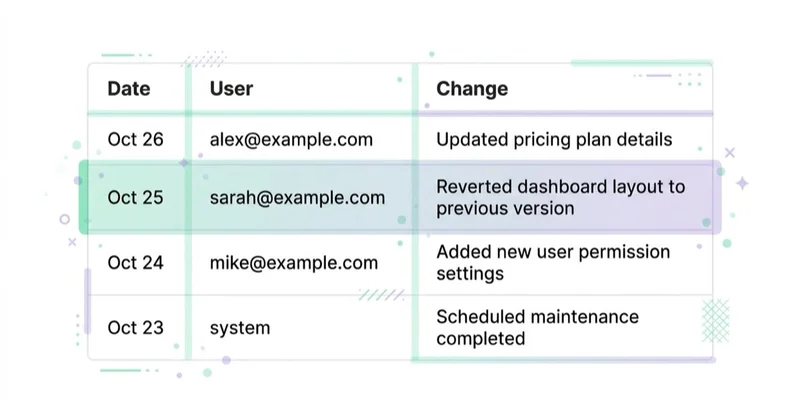
The log becomes useful when a report says that the team changed a target, added exclusions or launched a test. You can verify the date and affected entity, then compare it with the performance timeline. That supports accountability, but it does not establish causation: seasonality, competitors, consent, stock, pricing and other simultaneous changes may also explain the result.
The record has limits. Data older than two years is unavailable. Google says the detail shown for each entry is limited and recommends smaller changes when full detail is important; bulk edits affecting many entities can be harder to inspect. Password changes are not tracked, and some account-level or Google-representative changes may be absent.
First, secure durable access
At least one responsible person at the advertiser should have direct administrative access to the individual Google Ads account, protected with appropriate authentication. Do not rely solely on an agency email or a former employee. Confirm who can administer users, managers, billing, conversion links and the payments profile.
Google distinguishes direct user access from manager-account ownership. An agency manager can be linked to a client account and, in some cases, designated its administrative owner. Google states that this does not take data ownership or administrative rights away from the client account, which can unlink the manager. The practical requirement is continuity: the advertiser can access its data, remove or replace partners, and retain the account if the relationship ends. See who owns your accounts and data when you leave an agency.
How to read it: decision, scope and outcome
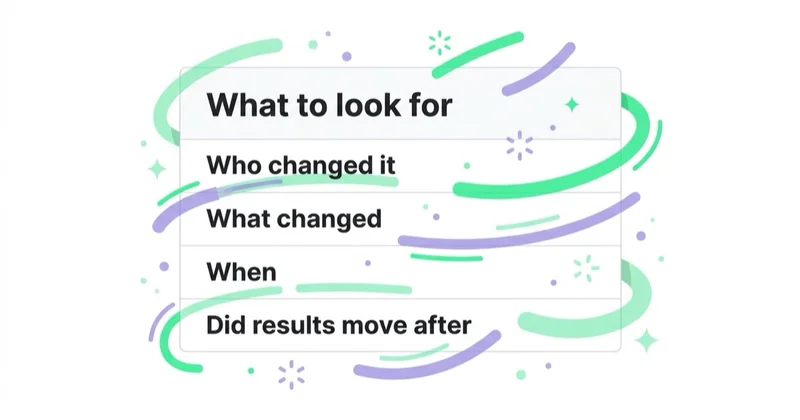
Start from a reporting claim or a performance change, then narrow the log to the relevant date and campaigns. Reading the entire account as one stream creates noise, especially when automated tools make frequent edits.
- Decision: what problem or opportunity was the team addressing?
- Scope: which campaigns, settings and conversion goals changed? Was the edit manual, automated or API-driven?
- Expected outcome: which primary metric and guardrail should move, and over what conversion cycle?
- Evidence: did the team use an experiment, or is it only a before-and-after observation?
- Follow-up: was the decision reviewed and retained, adjusted or reversed for a documented reason?
This method does not require the client to judge every keyword. It requires the agency to connect material actions with business logic and evidence.
Glossary
- Change history — Google's two-year record of many edits to an Ads account, campaign or ad group.
- User — the person, system or integration associated with a logged change.
- Tool — the interface or mechanism used, such as Google Ads Editor, an automated rule or API.
- Administrative access — permission to manage the account and access configuration, subject to Google's access model.
- Manager-account ownership — enhanced administrative rights granted to one linked manager; it does not remove the client account's data ownership.
- Decision log — a separate record of hypotheses, expected outcomes, review dates and conclusions.
Patterns worth investigating
The following patterns are prompts for a question, not verdicts on their own:
An unexplained mismatch with the report. The report claims a major restructure or bidding change, but the relevant filters show no corresponding entry. First check the date range, campaign scope, user and tool filters and the known limits of the log. Then ask for the exact entities and date.
Repeated reversals without a documented hypothesis. Budgets, targets or structures move back and forth while the conversion cycle has not elapsed. Material strategy, setting or composition changes can put automated bidding into calibration; Google says the duration depends on conversion volume, cycle length and strategy. Repetition may indicate reaction to immature data, but there may also be a valid commercial reason.
Unrecognised users, tools or system activity. An unfamiliar API integration or email address requires an access review. A Google system label is not automatically suspicious, but the team should know which integrations and automated rules are authorised.
Conversion-setting changes near a performance jump. Adding an easier primary conversion, changing values or altering count settings can improve reported CPA or ROAS without improving the business. Reconcile such changes with CRM, order and finance data.
A quiet log is not automatically a warning. Analysis, reporting, creative development, feed work in Merchant Center and changes to a website or CRM may not appear here. Stable campaigns can also be managed responsibly without constant edits. Ask what was monitored, learned and decided during the period.
Change history is a transparency test
The client should be able to inspect the account and understand how access is structured. An agency should also be able to explain material changes without turning the log into theatre. Neither side benefits from equating more entries with more expertise: that incentive encourages unnecessary edits.
Change history is one control among several: agreed objectives, transparent fees, direct account access, trustworthy measurement, experiment records and results reconciled with business data. The fuller checklist is in how to tell if your marketing agency is doing a good job.
How Space Ads approaches account transparency
Our transparency standard is durable client access, clear partner permissions and material decisions that can be explained against their commercial purpose. Change history helps verify execution, while a decision log supplies the context the platform cannot store: hypothesis, owner, success metric, guardrail and review date.
We assess account activity together with campaign results, CRM or order data, conversion delay and changes outside Google Ads. This prevents a routine automation entry from being presented as strategy and prevents valuable analysis from being dismissed because it did not create a platform event. If reported work and the evidence do not reconcile, an independent marketing audit can establish the facts.
How to read your change history (step by step)
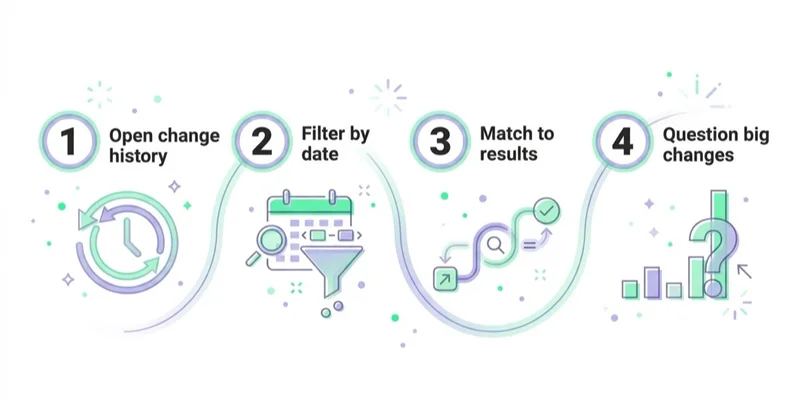
- Confirm direct access. Ensure the advertiser has an active administrator and knows which manager accounts, users and tools are authorised.
- Open Campaigns → Change history. Select a date range within the available two-year window.
- Filter to the question. Use campaign, change type, user, tool and experiment filters instead of scanning everything.
- Inspect material edits. Note the exact setting, previous value, new value, user or tool and timestamp where shown.
- Compare with the performance timeline. Allow for conversion delay and other simultaneous business changes.
- Ask for decision context. What was the hypothesis, success metric, guardrail and review date?
- Reconcile with external work. Check the CRM, Merchant Center, website releases, creative approvals and experiment records.
- Document the conclusion. Confirm whether the change was retained, reversed or remained inconclusive—and why.
Stop doing / Do instead
| Stop doing | Do instead |
|---|---|
| Trusting a reporting claim without support | Filter Change history to the stated edit and date |
| Depending solely on agency credentials | Keep a current advertiser-side administrator |
| Counting changes as work quality | Review decisions, outcomes and business value |
| Treating every quiet period as neglect | Ask what was monitored or delivered outside the log |
| Attributing a result to one edit automatically | Consider delay, seasonality and concurrent changes |
| Ignoring API and automated-rule labels | Maintain an authorised integrations and access register |
Common mistakes
Common errors include using the wrong date or campaign scope, assuming an API label identifies a person, treating correlation as causation and overlooking conversion-setting changes. The most damaging mistake is making change volume a contractual KPI: it rewards activity rather than judgment and can encourage edits before data has matured.
FAQ
What is Google Ads change history?
Google Ads Change history is a built-in record of many account, campaign and ad-group edits made during the previous two years. It can show the time, affected item and the user or tool associated with a change. It is not complete for every possible action: Google notes limits for some account-level and representative-made changes, and work outside Google Ads is not recorded.
How do I see what my agency changed in Google Ads?
Open Campaigns → Change history and set the relevant date range. Filter by campaign, change type, user, tool or experiment. Start from a specific reporting claim or performance movement, identify the material edits, and ask the agency for the hypothesis, expected outcome and review date. Remember that a tool or system label may appear instead of a person's email.
What does healthy Google Ads account activity look like?
Healthy management produces documented decisions, not a prescribed number of edits. The team should monitor agreed metrics, protect measurement, run appropriate tests, explain material changes and connect platform results to sales or margin. A stable campaign may require few edits; another may need substantial work because the offer, market or inventory changed.
What are the warning signs in a change history?
Investigate unrecognised users or integrations, repeated reversals before data matures, conversion-definition changes near a reported improvement, and material report claims that cannot be reconciled with the log. None is proof of misconduct by itself. Verify filters and limitations first, then request the decision record and supporting business data.
Should my agency give me access to my Google Ads account?
The advertiser should have durable direct access, normally including an administrator who is not dependent on the agency. An agency can legitimately work through a linked manager account. Google also supports manager-account ownership, which grants administrative privileges but does not remove the client account's data ownership or ability to unlink that manager. Document access, billing and offboarding before work begins.
The change history looks quiet — is that bad?
No. Change history does not capture analysis, creative development, reporting, CRM work or every change outside Google Ads. Automated bidding can also operate without frequent manual edits. Ask what the team monitored, learned and delivered, then compare that explanation with reports, decision logs, website or feed releases and business results.
Key takeaways
- Change history covers many Google Ads edits from the previous two years and identifies the associated user or tool.
- It is evidence of execution, not a complete record of agency work or proof that one edit caused a result.
- Review a specific decision by date, scope, hypothesis, outcome and follow-up.
- Keep durable advertiser-side access and understand linked-manager permissions and ownership.
- Combine the log with decision records, experiments, CRM or order data and work completed outside Google Ads.
Sources and further reading
- Google Ads Help — About change history
- Google Ads Help — Review your account history
- Google Ads Help — Access levels in a Google Ads account
- Google Ads Help — Manager-account ownership of client accounts
- Google Ads Help — Duration of the learning period
Continue learning
Continue reading

How to Tell If Your Marketing Agency Is Doing a Good Job
Evaluate an existing marketing agency with an agreed scorecard covering business impact, measurement quality, decisions, delivery, access, communication and commercial governance—not dashboard aesthetics.
Google Local Services Ads: The Pay-Per-Lead Channel for Local Businesses
A current guide to Google Local Services Ads and pay-per-lead Performance Max: eligibility, Google Verified, screening, billing, ranking, lead credits, migration and measurement beyond raw leads.
Google Ads Benchmarks by Industry (CTR, CPC, Conversion Rate)
Google Ads benchmarks can provide context, but only when the campaign type, market, conversion action, attribution and time period match. Learn how to make a valid comparison and turn it into a useful decision.


































