
Banner ads are visual online ads that use images, text, branding and a call to action to promote a product, service, content offer or campaign. They can be static images, animated GIFs, HTML5 creatives, uploaded display ads or responsive display ads assembled from assets.
Banner advertising is not just graphic design. A banner ad only works when the creative has a clear role in the funnel, the message is readable in small placements, the audience is relevant, frequency is controlled, the landing page matches the promise and measurement reflects the campaign goal.
TL;DR
- Banner ads are visual ads used across websites, apps, display networks, remarketing campaigns and programmatic inventory.
- They can be static, animated, HTML5, uploaded display ads or responsive display ads.
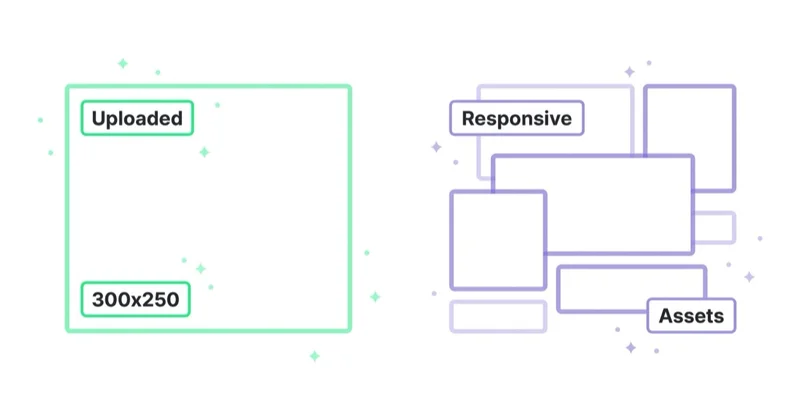
- In Google Ads, the main practical split is uploaded display ads vs responsive display ads.
- Uploaded banners give more design control, but they require correct dimensions, file types and production work.
- Responsive display ads give more reach and flexibility, but they give less pixel-level layout control.
- Banner ads are strongest for awareness, remarketing, launches, seasonal campaigns, product reminders and funnel support.
- Creative quality matters: one message, readable text, strong contrast, product or outcome clarity and a landing page that matches the ad.
- Banner performance should be judged by the campaign role, not only last-click ROAS or CTR.
What is a banner ad?
A banner ad is a visual advertising unit shown in digital environments such as websites, apps, display networks, publisher placements and remarketing campaigns. It usually includes:
- a visual;
- short copy;
- brand cue;
- offer or message;
- call to action;
- click-through destination.
The classic banner is a fixed image in a standard size. Modern banner advertising is broader. A banner may be generated dynamically from assets, animated in HTML5, built as a responsive display ad, or connected to a product feed.
The important point is not the file format. The important point is the role. A banner can introduce a brand, remind a visitor, promote a sale, launch a product, support an event, explain a feature or bring people back to a cart.
Banner ads vs display ads
People often use "banner ads" and "display ads" interchangeably, but they are not exactly the same.
| Term | Meaning |
|---|---|
| Banner ad | A visual ad unit, often image-based or layout-based |
| Display ad | A broader category of visual ads served across display inventory |
| Google Display Network | A Google network where Display campaign ads can appear |
| Responsive display ad | An asset-based ad format assembled by Google AI |
| Uploaded display ad | A designed creative uploaded in supported formats and sizes |
| Programmatic display | Automated buying of display inventory across ad exchanges and platforms |
In short: a banner is a creative format. Display is the broader media environment. The Google Display Network is one place where display ads can run.
For the network-specific topic, read What Is the Google Display Network and How to Use It?.
Main banner ad formats
Static image banners
Static banners are image files, usually JPG or PNG. They are simple, controllable and easy to review.
Best use cases:
- simple offers;
- remarketing reminders;
- product launches;
- event announcements;
- local campaigns;
- publisher direct buys;
- brand-safe placements that need exact creative control.
Limitations:
- each size needs to be designed;
- message space is limited;
- scaling across many placements takes production work;
- performance may fatigue quickly if creative is not refreshed.
Animated GIF banners
Animated GIFs can add movement, sequence and emphasis. Google Ads specifications include limits for animated GIF ads, such as animation duration and speed requirements.
Best use cases:
- showing two or three message frames;
- simple product transitions;
- before-and-after;
- countdown-style sale reminders;
- brand awareness loops.
Limitations:
- file size restrictions;
- limited animation quality;
- accessibility risk if motion is excessive;
- easy to overload with too much text.
HTML5 banners
HTML5 banners can include richer animation and interaction. They are often built in tools such as Google Web Designer and uploaded as ZIP files when the account is eligible.
Best use cases:
- premium creative;
- interactive banners;
- animated product stories;
- dynamic creative;
- campaigns requiring polished motion.
Limitations:
- stricter technical requirements;
- more QA;
- account eligibility and policy history may matter;
- production cost is higher.
Responsive display ads
Responsive display ads are built from assets: images, logos, headlines, descriptions and sometimes videos. Google AI assembles combinations to fit available placements.
Best use cases:
- broad reach;
- fast launch;
- testing messages;
- remarketing;
- campaigns with limited design resources;
- supplementing uploaded banners where fixed sizes do not fit.
Limitations:
- less control over final layout;
- cropping can be awkward if assets are weak;
- brand design can become inconsistent;
- generic assets produce generic ads.
Read more in How Responsive Display Ads Work in Google Ads.
Uploaded display ads
Uploaded display ads are custom creatives designed outside Google Ads and uploaded in supported formats and sizes. Google documentation covers image, animated image, AMPHTML and HTML5 specifications.
Best use cases:
- strict brand control;
- campaign-specific artwork;
- legal or compliance-heavy layouts;
- publisher-style creative;
- premium launches;
- exact desktop and mobile layouts.
Limitations:
- requires multiple sizes;
- creative specs must be followed;
- less flexible than responsive assets;
- production and QA take longer.
Uploaded banners vs responsive display ads
| Decision area | Uploaded banners | Responsive display ads |
|---|---|---|
| Design control | High | Medium to low |
| Reach flexibility | Lower | Higher |
| Setup speed | Slower | Faster |
| Brand consistency | Stronger when designed well | Depends on assets and automation |
| Testing | Requires more versions | Easier asset-level testing |
| Best for | Premium control, exact layouts | Scale, coverage, learning |
| Main risk | Too few sizes, slow refresh | Poor cropping, generic combinations |
Many accounts should use both. Responsive display ads can provide coverage and learning. Uploaded banners can protect high-value campaigns where exact design matters.
What makes a good banner ad?
One message
A banner ad should usually communicate one idea:
- a sale;
- a product benefit;
- a launch;
- a problem;
- an event;
- a category;
- a proof point;
- a reminder.
Trying to include five benefits, a paragraph, a logo, legal text and three CTAs usually makes the ad unreadable.
Strong hierarchy
The viewer should understand the ad in this order:
- What is this about?
- Who is it from?
- Why should it matter?
- What is the next step?
If the logo is clear but the offer is not, the banner may build familiarity but fail to create action. If the offer is clear but the brand is hidden, recall may suffer.
Readable text
Small placements punish long copy. Use short lines, strong contrast and clear type. Avoid thin fonts, tiny disclaimers and text placed over busy images.
Real product or context
Banners work better when the visual shows something meaningful:
- product in use;
- before-and-after;
- interface screenshot;
- customer situation;
- result;
- category context;
- event visual;
- service outcome.
Abstract backgrounds can work for brand campaigns, but they need stronger copy to carry meaning.
Matching landing page
The click destination should continue the same promise. If the banner says "Summer sale", the page should show the sale. If the banner promotes a webinar, the page should show the webinar. If the banner shows a product category, the page should not send users to a generic homepage.
Where banner ads can run
Banner ads can run through:
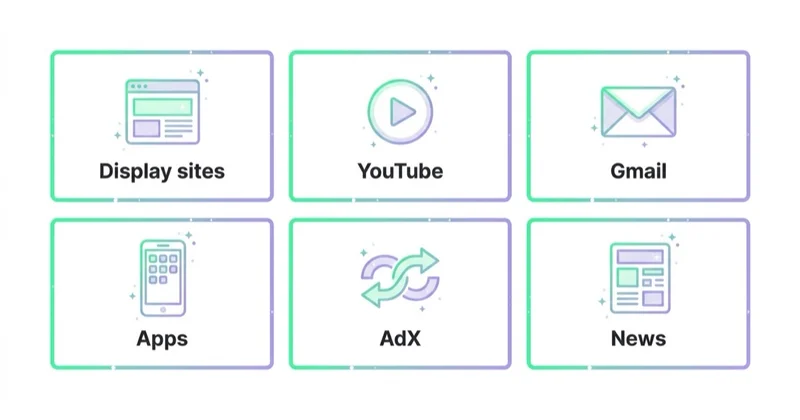
- Google Display campaigns;
- remarketing campaigns;
- Demand Gen campaigns where visual assets are used;
- Performance Max asset groups;
- programmatic platforms;
- direct publisher buys;
- affiliate placements;
- media partnerships;
- app inventory;
- ecommerce retail media networks.
Each environment has different targeting, reporting, creative requirements and brand safety controls. The same banner concept may need different versions for Google Ads, programmatic display and a direct publisher campaign.
For automated buying context, read What Are Programmatic Campaigns and Are They Worth Using? and What Are RTB Campaigns (Real-Time Bidding)?.
How to launch banner ads
1. Define the role in the funnel
Choose the job before choosing the design:
- awareness;
- remarketing;
- product launch;
- lead magnet promotion;
- event registration;
- abandoned cart reminder;
- seasonal sale;
- category push;
- customer reactivation.
A cold awareness banner and a cart remarketing banner should not have the same message.
2. Choose the buying environment
Decide whether the campaign belongs in:
- Google Display;
- Demand Gen;
- Performance Max;
- DV360 or another programmatic platform;
- direct publisher media;
- retail media;
- a remarketing-only setup.
The platform determines available formats, bidding, controls and reporting.
3. Prepare creative variants
At minimum, prepare variants by:
- funnel stage;
- audience temperature;
- offer;
- product or category;
- desktop and mobile context;
- static vs responsive approach;
- remarketing vs prospecting.
Do not test only colour changes. Test meaningful message angles.
4. Build landing pages
The landing page should match the ad's promise and user stage.
For cold traffic, a content or category page may work better than a hard sales form. For warm remarketing, a direct product, pricing or consultation page may be appropriate.
5. Set frequency and exclusions
Banner fatigue is real. Review frequency, placement quality, exclusions and audience overlap. Showing the same banner too often can reduce efficiency and damage perception.
6. Launch with clear measurement
Define the success metric before launch:
- reach;
- frequency;
- engaged sessions;
- assisted conversions;
- direct conversions;
- CPA;
- ROAS;
- lead quality;
- product revenue;
- brand search lift;
- remarketing audience growth.
The metric should match the role. A top-of-funnel banner should not be judged only by last-click sales.
Banner ads for ecommerce
Ecommerce banner ads can support:
- product launches;
- category promotions;
- seasonal collections;
- abandoned carts;
- recently viewed products;
- complementary products;
- free shipping thresholds;
- sale periods;
- customer win-back;
- loyalty campaigns.
Dynamic remarketing can be especially useful when product feed data is clean. The banner can remind users of products or categories they viewed, but the feed and landing page need to be accurate.
Important checks:
- product is in stock;
- price matches the page;
- discount is valid;
- image is clear;
- delivery promise is accurate;
- landing page loads quickly;
- product variants are easy to select.
For feed quality, read What Is a Product Feed and How to Use It?.
Banner ads for B2B and services
B2B banner ads can work when they support a longer decision journey.
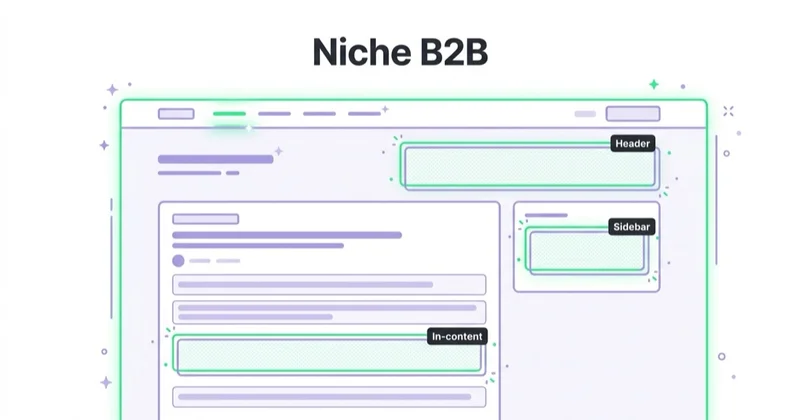
Good uses:
- promoting reports;
- webinar registration;
- retargeting pricing-page visitors;
- reminding demo viewers;
- case study promotion;
- event attendance;
- category education;
- account-based awareness;
- employer branding.
Weak B2B banners ask cold audiences to book a call before trust exists. A softer next step may work better: guide, benchmark, checklist, case study, webinar or product tour.
Measurement and reporting
Important banner metrics include:
- impressions;
- reach;
- frequency;
- CTR;
- CPC;
- CPM;
- conversions;
- conversion value;
- view-through or engaged-view context where available;
- assisted conversions;
- placement performance;
- audience performance;
- creative performance;
- landing page engagement;
- post-click conversion rate.
CTR can be useful, but it is not enough. A banner with a high CTR can bring poor traffic. A banner with a low CTR can still support remarketing or brand recall. Always connect the metric to the campaign role.
Use UTM discipline when traffic goes to owned pages. Read What Are UTM Parameters and How to Create UTM URLs for Google Analytics?.
Common mistakes
| Mistake | Why it hurts | Better approach |
|---|---|---|
| Too much text | Small placements become unreadable | Use one idea and short copy |
| No clear CTA | Users do not know the next step | Match CTA to funnel stage |
| Same banner for all audiences | Cold and warm users need different context | Segment creative by stage |
| No mobile check | Cropping and readability suffer | Preview mobile formats |
| Landing page mismatch | Clicks do not convert | Continue the same promise |
| No frequency review | Fatigue increases | Monitor exposure and refresh creative |
| Judging only last click | Display often assists | Review assisted impact and paths |
| Ignoring specs | Ads are rejected or limited | Follow platform requirements |
How we approach this at Space Ads
At Space Ads, we start banner campaigns by defining the job: reach, remarketing, product reminder, launch support, lead nurturing or customer reactivation. That decision controls the creative, audience, placement, frequency cap, landing page and KPI. We do not judge every banner by last-click sales; a prospecting banner, a cart reminder and a webinar retargeting ad should have different success criteria. For ecommerce, we check feed accuracy, product availability, offer validity and landing-page match before dynamic or remarketing banners run. For B2B and services, we often use banners to support proof, education and return visits rather than pushing cold users straight into a sales form. The banner is useful only when it advances the next step in the journey.
FAQ
What is a banner ad?
A banner ad is a visual online ad that uses image, text, branding and a CTA to promote a product, service, offer or content asset.
Are banner ads the same as display ads?
Not exactly. Banner ads are a creative format. Display ads are the broader category of visual ads that can include banners, responsive display ads, video-like assets and other visual formats.
Do banner ads still work?
Yes, when they have the right role. They are useful for awareness, remarketing, launches, seasonal campaigns and funnel support. They are weaker when used as generic cheap traffic.
Should uploaded banners or responsive display ads be used?
Use uploaded banners when design control matters. Use responsive display ads when reach, flexibility and fast testing matter. Many campaigns benefit from both.
What sizes are needed for Google banner ads?
Google publishes supported sizes for uploaded display ads, including common rectangle, leaderboard, skyscraper and mobile banner formats. Responsive display ads use assets that Google adapts to placements.
Are HTML5 banners worth using?
They can be worth using for premium animation, interactivity or brand control, but they require more technical QA and must meet platform requirements.
How often should banner creative be refreshed?
Refresh depends on spend, audience size and frequency. If performance drops, frequency rises or the campaign feels stale, new creative angles should be tested.
Conclusion
Banner ads are useful when they are treated as campaign assets, not decoration. A strong banner has one message, clear hierarchy, readable text, relevant visual context, a matching landing page and measurement that fits the funnel role.
For Google Ads, the practical choice is often responsive display ads for reach and uploaded display ads for control. For larger media plans, programmatic and direct publisher buying may add scale and precision. In every case, the quality of the creative and the clarity of the campaign role decide whether banners support growth or just generate impressions.
Sources and further reading
- Google Ads Help: Uploaded display ads specifications
- Google Ads Help: About responsive display ads
- Google Ads Help: Create a responsive display ad
- Google Ads Help: Google Ads specs, ad formats, sizes and best practices
- Google Ads API: Uploaded Display Ads
- Google Ads Help: About ads for Display campaigns
Continue learning
Continue reading
What Is the Google Display Network and How to Use It?
The Google Display Network shows visual ads across websites, apps, videos and Google surfaces, but its value depends on campaign role, creative quality, placement control, frequency and measurement. This guide explains GDN targeting, responsive display ads, uploaded banners, remarketing and how to judge Display beyond CTR or last-click conversions.
What Are RLSA Campaigns? Remarketing Lists for Search Ads
RLSA uses audience lists in Google Search campaigns so previous visitors can be treated differently when they search again. Learn Observation vs Targeting, use cases and setup.
How Responsive Display Ads Work in Google Ads
Responsive display ads combine images, logos, headlines, descriptions and videos into flexible Google Display creatives. Learn how they work and how Demand Gen changes the context.


































