
RLSA means Remarketing Lists for Search Ads: using audience lists of people who previously interacted with a website, app or brand when they later search on Google. In the current Google Ads interface, the language has shifted toward "audience segments" and "your data", but the strategic idea is the same: combine previous engagement with current search intent.
RLSA is powerful because it joins two signals. A person already knows the brand or has shown interest, and that same person is now actively searching again. That can justify different bids, different keywords, different ad copy or a separate search campaign for warmer users.
TL;DR
- RLSA stands for Remarketing Lists for Search Ads.
- It is not display remarketing. Ads show on Google Search when someone from an eligible audience segment searches.
- Google's current terminology often uses "audience segments" and "your data" instead of old remarketing wording.
- Observation mode is usually the safe starting point for Search. It lets campaigns keep their reach while reporting audience performance.
- Targeting mode narrows reach to selected audience segments. Use it carefully for dedicated RLSA strategies.
- RLSA works best with segmented lists: cart abandoners, product viewers, pricing visitors, previous customers, high-value users and inactive customers.
- List size, consent, tag quality and GA4 or Google Ads linking determine whether lists are usable.
What RLSA is
RLSA is a search remarketing strategy. It allows advertisers to use audience lists in Search campaigns.
The basic sequence:
- A user visits the website, app or other tracked property.
- The user qualifies for an audience list based on rules.
- Later, that user searches on Google.
- A Search campaign can use that audience signal for reporting, bidding, targeting or ad strategy.
This is different from showing banner ads to past visitors. The ad appears when the person actively searches again.
Why RLSA matters
Search intent is already valuable. A previous brand interaction makes it more useful.
For example:
- a user viewed hiking boots but did not buy;
- later they search "waterproof hiking boots";
- the advertiser can treat that search differently from a completely cold user.
That may mean:
- a higher bid;
- broader keywords;
- more specific ad copy;
- a different landing page;
- an offer for returning users;
- exclusion of existing customers;
- a win-back campaign after a certain time.
RLSA is not only about bidding higher. It is about using context.
Modern terminology: RLSA, audience segments and your data
Google Ads has updated audience terminology over time. What advertisers used to call remarketing lists may now appear under audience segments and "your data" language in parts of the interface and documentation.
The legacy term RLSA remains useful because marketers still search for it, agencies still use it, and Google Analytics documentation still references Remarketing Lists for Search Ads. But when working in Google Ads, expect to see:
- audience segments;
- your data segments;
- data segments for Search ads;
- observation and targeting settings;
- Audience Manager;
- GA4 audiences linked to Google Ads.
The strategy has not disappeared. The labels have evolved.
RLSA vs display remarketing
| Area | RLSA | Display remarketing |
|---|---|---|
| Where ads appear | Google Search results | Display inventory, websites, apps, YouTube or visual placements |
| Main trigger | User searches again | User browses eligible inventory |
| Main intent signal | Current search query | Previous visit or audience membership |
| Creative | Search ad text and assets | Images, responsive display, video or visual ads |
| Best role | High-intent return search | Reminder, reach and re-engagement |
| Risk | Narrow lists or overbroad keywords | Frequency fatigue and weak placements |
RLSA usually has stronger immediate intent because the user is searching. Display remarketing is better for reminding and re-engaging users outside active search moments.
For broader remarketing context, read Google Remarketing: What It Is and Why Use It.
Observation vs Targeting
This is the most important operational distinction.
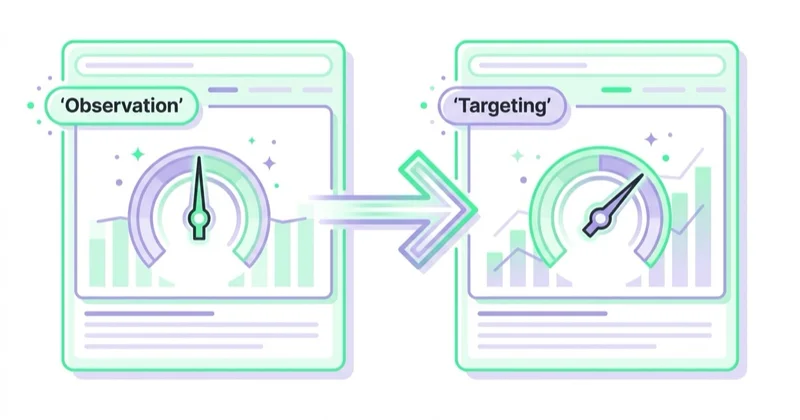
Observation
Observation does not restrict who can see the ad. The campaign still targets its normal keywords, locations and settings. Google Ads simply reports how selected audience segments perform and, in some cases, uses first-party audience signals with Smart Bidding.
Use Observation when:
- starting with RLSA;
- monitoring audience performance;
- using Smart Bidding;
- keeping full Search reach;
- comparing warm vs cold users;
- deciding whether a dedicated audience-only structure is justified.
Google's own guidance recommends Observation for Search campaigns.
Targeting
Targeting restricts reach to the selected audience segments. In Search, this means ads can show only when users in the chosen audience also match the campaign's keywords and other settings.
Use Targeting when:
- creating a dedicated RLSA campaign;
- testing broader keywords for previous visitors;
- bidding on competitor or generic terms only for warm users;
- targeting cart abandoners with specific messages;
- re-engaging previous customers;
- limiting budget to known audiences.
Targeting can be useful, but it can also make the campaign too narrow.
How RLSA works with Smart Bidding
Smart Bidding uses signals to set bids dynamically. First-party audience segments added in Observation can be used as signals for Smart Bidding, according to Google's targeting and observation guidance.
This changes how classic RLSA bid adjustments should be understood.
In manual bidding, the advertiser may increase bids for a remarketing list. In Smart Bidding, the algorithm can use the audience signal along with many other signals such as device, query, location, time, conversion likelihood and historical data.
Practical rule:
- use Observation to give reporting and signals;
- use Targeting only when the business strategy intentionally restricts reach;
- avoid stacking manual logic on top of Smart Bidding without a clear reason.
Audience lists for RLSA
Good RLSA depends on useful segments.
Start with:
- all site visitors;
- product viewers;
- category viewers;
- cart abandoners;
- checkout starters;
- pricing page visitors;
- form starters;
- past purchasers;
- high-value customers;
- repeat customers;
- inactive customers;
- blog or guide readers;
- specific service page visitors;
- users from selected campaigns.
Then refine by time:
- last 7 days;
- last 14 days;
- last 30 days;
- last 90 days;
- older than 180 days where relevant.
Fresh visitors and old visitors often behave differently. A person who abandoned cart yesterday is not the same as someone who read a blog post nine months ago.
List size and eligibility
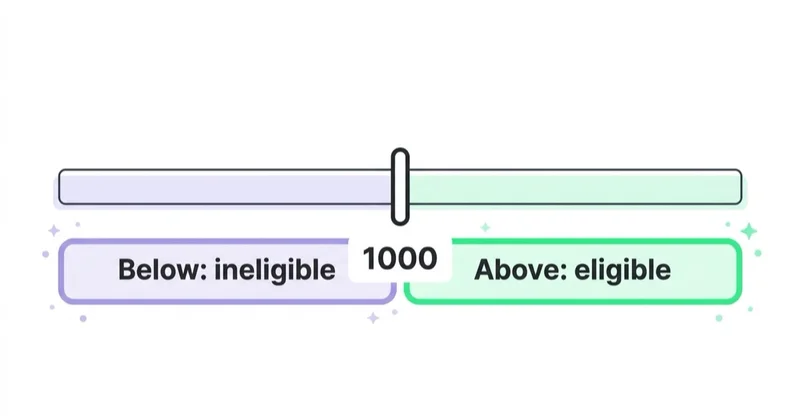
RLSA lists need enough eligible users before they can be used. Google Analytics documentation states that a remarketing list for Google Search ads must have at least 1,000 cookies before it can be used to tailor search ads, and that maximum list duration for Google Search ads is 540 days.
In practice, list size can be affected by:
- website traffic;
- consent settings;
- tag implementation;
- GA4 and Google Ads linking;
- audience rules;
- time window;
- user eligibility;
- privacy thresholds;
- browser behavior;
- account settings.
If a list looks too small, do not assume the strategy is broken. Audit tracking, consent, audience rules and eligibility first.
RLSA use cases
Bid up for cart abandoners
Cart abandoners are often high-intent users.
Use:
- Observation in standard Search campaigns;
- dedicated campaign for cart audience where scale allows;
- ad copy that answers delivery, returns or offer concerns;
- landing pages that return users to cart or product category.
Broader keywords for warm users
Broad or generic keywords may be too expensive for cold users. For known visitors, they can be more reasonable.
Example:
- cold Search: exact and phrase around high-intent terms;
- RLSA Search: broader category keywords only for previous product viewers or cart abandoners.
This works only when list volume is large enough.
Competitor search for previous visitors
Competitor keywords are often expensive and low quality for cold traffic. They can make more sense for people who already visited the brand's site and then search for alternatives.
Use carefully:
- avoid misleading ad copy;
- keep landing page comparison useful;
- monitor CPA and quality;
- consider legal and trademark rules in the relevant market.
Brand defence
People who previously visited the site may later search the brand name again. RLSA can help analyse whether returning visitors behave differently and whether brand campaigns assist conversion.
This is especially useful when competitors bid on the brand.
Customer win-back
Previous customers can be targeted when they search again after a certain time.
Use cases:
- replenishment;
- accessories;
- upgrades;
- renewal;
- seasonal repeat purchase;
- subscription restart.
For customer-list strategy, read Customer Match in Google Ads: What It Is and How to Use It.
RLSA for ecommerce
Ecommerce RLSA works well when lists reflect product intent.
Useful segments:
- viewed category but did not buy;
- viewed product but did not add to cart;
- added to cart but did not purchase;
- began checkout but did not purchase;
- bought product A, likely needs accessory B;
- high-AOV customers;
- discount users;
- customers inactive for 180 days;
- product page viewers from paid social.
Example:
A user views running shoes, adds a pair to cart and leaves. Later they search "best cushioned running shoes". A Search campaign can use that previous interaction to bid differently or show a more relevant message.
Pair RLSA with What Is Ecommerce Analytics and Why Is It So Important? so decisions are based on margin and customer value, not only clicks.
RLSA for services and B2B
RLSA can work for services, SaaS and B2B when the buying journey is longer.
Useful segments:
- pricing visitors;
- demo page visitors;
- case study readers;
- webinar attendees;
- whitepaper downloaders;
- form starters;
- high-intent service page visitors;
- returning visitors from specific industries.
Measure:
- qualified leads;
- pipeline value;
- sales accepted leads;
- demo show-up rate;
- close rate;
- revenue;
- time to close.
Do not judge B2B RLSA only by form volume. Warm users may generate fewer but better opportunities.
RLSA and keyword strategy
RLSA can change how keywords are used.
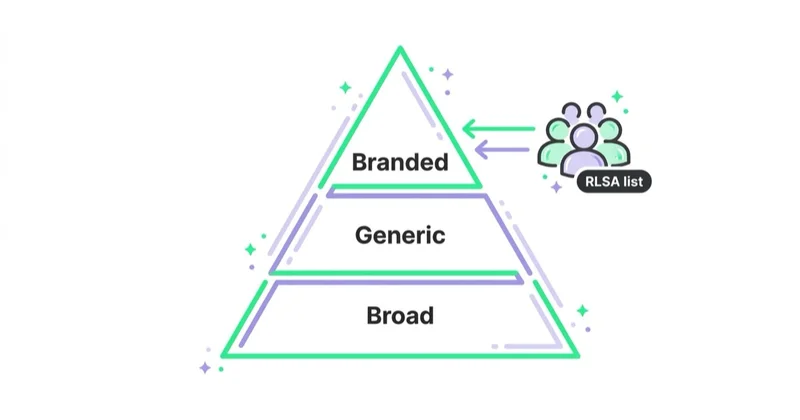
Possible strategies:
- keep high-intent exact and phrase keywords for all users;
- layer audience Observation across normal Search campaigns;
- create Targeting-only campaigns for broader keywords;
- test competitor terms only for warm users;
- use different landing pages for returning users;
- exclude customers from acquisition campaigns;
- create separate campaigns for win-back and upsell.
For keyword fundamentals, read What Are Keyword Match Types in Google Ads and How to Choose Them?.
Measurement
Track:
- conversion rate by audience segment;
- CPA;
- ROAS;
- conversion value;
- search terms;
- new vs returning customers;
- audience list size;
- lead quality;
- assisted conversions;
- time lag;
- cart recovery;
- customer lifetime value;
- overlap with brand campaigns.
Do not assume every warm audience should receive a higher bid. Some lists may contain low-intent users, support visitors or customers who already bought.
Setup checklist
Before using RLSA:
- Google tag or GA4 tracking is implemented.
- Google Ads and GA4 are linked where needed.
- Ads personalisation settings are configured appropriately.
- Consent behavior is tested.
- Audience rules match business intent.
- List size is eligible for Search.
- Membership duration fits the decision cycle.
- Search campaigns have relevant keywords.
- Observation vs Targeting is chosen intentionally.
- Conversions and values are reliable.
- Customers are excluded where acquisition is the goal.
- Reporting separates audience performance.
For tracking and consent foundations, read Consent Mode v2: What It Is and How to Implement It and Enhanced Conversions in Google Ads: What They Are and How to Set Them Up.
How we approach this at Space Ads
We mostly use RLSA to act differently toward people who already know us, on the very same queries. On broad, expensive terms we'd never show to cold traffic, we'll bid up or loosen the match for past visitors, because to someone who's already been on the site that query means something else. The lists are layered: a cart abandoner isn't handled like a blog reader from a month ago. One thing gets close attention — the list has to be large enough to actually fire, and it has to be fresh. RLSA doesn't create demand; it recaptures demand that already surfaced once, so we run it as a Search amplifier rather than a machine of its own.
Common mistakes
| Mistake | Why it hurts | Better approach |
|---|---|---|
| Using only "all visitors" | Too broad to guide decisions | Segment by intent and recency |
| Choosing Targeting accidentally | Campaign reach collapses | Use Observation unless restriction is intentional |
| Lists too small | Ads cannot serve or data is thin | Build broader or longer-duration lists |
| Same ad copy for warm and cold users | Context is wasted | Test returning-user messaging |
| No customer exclusions | Acquisition campaigns waste budget | Exclude purchasers where needed |
| Treating RLSA as display remarketing | Wrong expectations | Remember ads show on Search |
| Ignoring consent and tag quality | Lists underpopulate | Audit tracking and consent states |
| Overreacting to small data | False decisions | Wait for volume |
| No lead quality tracking | B2B looks better or worse than reality | Connect to CRM outcomes |
FAQ
What does RLSA mean?
RLSA means Remarketing Lists for Search Ads. It is a way to use audience lists of previous visitors or users in Google Search campaigns.
Does RLSA still exist?
The strategy still exists, although the Google Ads interface increasingly uses terms such as audience segments and your data. Many advertisers still use RLSA as the common name.
Is RLSA the same as remarketing?
No. RLSA is remarketing applied to Search campaigns. Display remarketing shows visual ads across display inventory. RLSA works when a person from a list searches on Google.
What is the difference between Observation and Targeting?
Observation keeps normal campaign reach and reports audience performance. Targeting restricts reach to selected audience segments. Observation is usually the safer starting point for Search.
How large does an RLSA list need to be?
Google Analytics documentation states that a remarketing list for Google Search ads must have at least 1,000 cookies before it can be used to tailor Search ads.
Can RLSA use GA4 audiences?
Yes, GA4 audiences can be shared to Google Ads when the property and account are configured correctly and requirements are met.
Is RLSA useful for ecommerce?
Yes. Cart abandoners, product viewers, category viewers and previous customers can be valuable Search audience segments, especially when paired with strong product data and conversion tracking.
Is RLSA useful for B2B?
Yes, especially for pricing visitors, demo page visitors, case study readers and returning users. Measure lead quality and pipeline, not only form volume.
Conclusion
RLSA is still a useful search strategy, even if the interface language has changed. It helps advertisers use previous user behavior inside Google Search campaigns, where current intent is already strong.
The best RLSA setups are segmented, measured and intentional. Start with Observation, learn how warm users perform, then decide whether dedicated Targeting campaigns, broader keywords, different ad copy or customer exclusions make sense.
RLSA is not about chasing users around the web. It is about recognising when someone who already interacted with the brand is searching again and making that Search moment more relevant.
We set up RLSA lists and bid adjustments by decision stage within Google Ads campaigns.
Sources and further reading
- Google Analytics Help: Remarketing lists for search ads
- Google Ads Help: About targeting and observation settings
- Google Ads Help: About audience segments
- Google Ads Help: How your data segments work
- Google Ads API: Targeting settings
- Google Ads API: Get started with audience segments
Continue learning
- Google Remarketing: What It Is and Why Use It
- Customer Match in Google Ads: What It Is and How to Use It
- What Are Keyword Match Types in Google Ads and How to Choose Them?
- What Are Responsive Search Ads in Google Ads?
- What Is a Google Ads Audit and How to Do It?
- Consent Mode v2: What It Is and How to Implement It
Continue reading

What Are Banner Ads and How to Launch Them?
Banner ads are visual online ads for awareness, remarketing and campaign support, but they only work when creative, audience, placement quality, frequency and landing page fit match the funnel role. This guide explains formats, Google Ads options, ecommerce and B2B use cases, measurement and launch steps.

What Is the Google Display Network and How to Use It?
The Google Display Network shows visual ads across websites, apps, videos and Google surfaces, but its value depends on campaign role, creative quality, placement control, frequency and measurement. This guide explains GDN targeting, responsive display ads, uploaded banners, remarketing and how to judge Display beyond CTR or last-click conversions.
What Are Google Ads Extensions (Assets) and How to Use Them?
Google Ads extensions are now called assets. Learn how sitelinks, callouts, snippets, calls, locations, prices, promotions, images and lead forms improve ads.


































