
ChatGPT Ads conversion tracking runs on two sources: a browser pixel and a server-to-server Conversions API. OpenAI's documentation answers which one to trust directly — the Conversions API is a more reliable tracking source than the pixel alone.
In this channel measurement is not a reporting layer to add later. A conversion-optimized campaign requires a configured conversion source and one selected standard event. Without trustworthy data, the system cannot optimize toward business actions and the advertiser cannot tell whether clicks generated value.
This guide covers the full setup: 12 standard events and the custom-event mechanism, browser-server deduplication, attribution identifiers, normalization before hashing, monetary values, consent and Content Security Policy.
TL;DR
- Two sources: a browser pixel and a server-side Conversions API. The documentation names the API as the more reliable one; the sensible build is both, joined by deduplication.
- There are 12 standard conversion events plus the
customtype, andapp_installed/app_openedrun through the Conversions API only. A custom event cannot be an oCPC goal. - Deduplication keys on three things: Pixel ID, event name and event ID. OpenAI keeps the first event it receives for a matching key and ignores later duplicates.
- User identifiers are sent as SHA-256 hashes after normalization, as lowercase 64-character hex strings. Geographic values go as raw text, unhashed.
- Phone numbers are hashed without the leading
+and without leading zeros — country code kept, 8 to 15 digits. - Monetary values are integers in the currency's minor unit.
12999withcurrency: "USD"means $129.99, and an amount requires a currency. - Pixel consent defaults to granted. It initializes as
trueunless set tofalseor a stored denial is found, and blocked events are never replayed. - A strict Content Security Policy can block part or all of measurement. OpenAI documents four required sources across three directives; they should be merged into the site's existing policy without weakening it with
unsafe-inline. - View-through conversions are reported separately and are not included in the
Conversionsmetric, which stays the click-through total. - The pixel captures
opprefautomatically, but the Conversions API does not. A hybrid setup can also pass the unmodifiedobrefvalue when consent requirements are met.
Two Measurement Sources
The Measurement Pixel is a browser SDK. The snippet goes in the <head> of every page where conversions should be captured, and near the top of it — otherwise early conversions are lost while the rest of the page loads. The pixel initializes with a Pixel ID, and a conversion is reported by calling oaiq("measure", ...).
The Conversions API accepts events from your server only. Pixel ID and API key are provisioned in the conversions tab of Ads Manager. The API accepts batches of up to 1,000 events, and if one event in a batch fails the whole batch fails — worth building error handling around rather than sending maximum batches and assuming they land.
App lifecycle events, app_installed and app_opened, go through the Conversions API only, with action_source set to mobile_app. The pixel does not support them, and native mobile SDK setup is not currently supported.
One technical limit is easy to trip over: an event timestamp must fall within the last 7 days and no more than 10 minutes in the future. Backfilling a week-old batch will not be accepted.
Twelve Standard Events and One Custom Type
| Event | Data shape | Use for |
|---|---|---|
page_viewed |
contents |
landing on or viewing an important page |
contents_viewed |
contents |
viewing a product, listing, article or content unit |
items_added |
contents |
adding items to a cart, bundle or selection |
checkout_started |
contents |
starting checkout |
order_created |
contents |
a completed purchase |
lead_created |
customer_action |
a lead form submitted or contact requested |
appointment_scheduled |
customer_action |
booking a meeting, demo or consultation |
registration_completed |
customer_action |
finishing an account or event registration |
app_installed |
customer_action |
app install (Conversions API only) |
app_opened |
customer_action |
app open (Conversions API only) |
trial_started |
plan_enrollment |
a free trial begins |
subscription_created |
plan_enrollment |
a paid subscription begins |
custom |
custom |
an event outside the standard taxonomy |
Two distinctions are worth holding. page_viewed is for page loads; contents_viewed is for viewing a specific product or content item, including interactions after the page has loaded. Custom event names run 1 to 64 characters.
Custom events carry one significant campaign-side limitation: they cannot be an oCPC optimization goal. That target accepts standard events only.
Deduplicating Browser and Server
Without deduplication the same conversion counts twice — once from the pixel, once from the server.
The mechanism is simple and needs one discipline: the same event identifier on both sides. It goes in the API's id field and the pixel's event_id, and both events must use the same Pixel ID. For custom events, the same custom_event_name must appear on both sides too.
The dedup key has three parts:
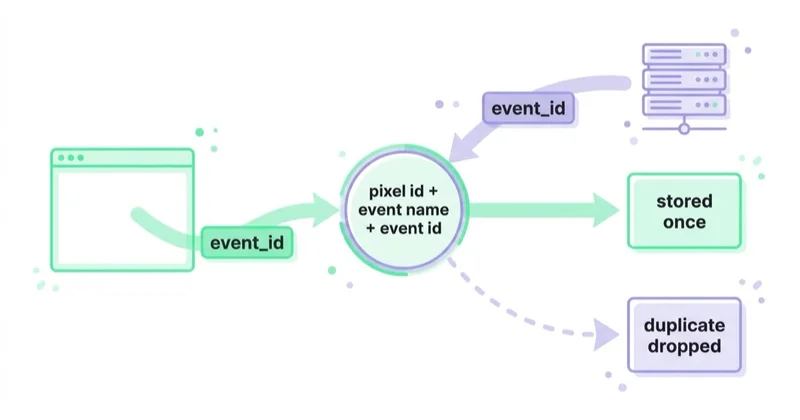
- Pixel ID,
- event name,
- event ID.
OpenAI keeps the first event it receives for a matching key and ignores later duplicates. That has a practical consequence: order does not affect correctness, but it does affect completeness. If the server event carries richer matching data than the browser event, and the browser arrives first, the thinner version is the one that persists.
Generate the identifier yourself and pass it into both paths. The documentation permits reusing one only when retrying, or when sending the same conversion through another channel.
oppref and obref: Attribution Identifiers
Deduplication asks whether the same event arrived twice. Attribution asks whether that event can be connected to an interaction with an ad. OpenAI documents two opaque identifiers used for this purpose:
opprefarrives in the URL after an ad click. The pixel captures it automatically and stores it in the__opprefcookie for subsequent pages. The Conversions API does not capture it for you; the server integration must retain the value and send it unchanged on the event.obrefcomes from the pixel's first-party__obrefcookie. In a hybrid browser-server implementation, it can be passed unhashed inevents[].user.obrefwhen the site's consent requirements have been met. Do not continue sending it after the relevant consent has been withdrawn.
A server-side web event also requires a valid source_url with action_source: "web". The Conversions API must be called from the server, never directly from browser code where the API key would be exposed.
Normalization and Hashing
Identifying data is sent as SHA-256 hashes only. Raw email addresses, phone numbers, external IDs, first names and last names must not be sent.
Normalize before hashing:
| Field | Normalization | Example |
|---|---|---|
| trim surrounding whitespace, lowercase | Jane@Company.COM → jane@company.com |
|
| phone | keep the country code; strip whitespace, parentheses, periods, hyphens, then the leading + and any leading zeros; hash 8–15 digits |
+1 (415) 555-2671 → 14155552671 |
| first / last name | lowercase, remove whitespace and ASCII punctuation, preserve non-ASCII characters | O'Connor → oconnor, José → josé |
| external ID | trim whitespace, preserve case | AB-1024 → AB-1024 |
Encode the normalized value as UTF-8, compute SHA-256, and send it as a lowercase 64-character hex string.
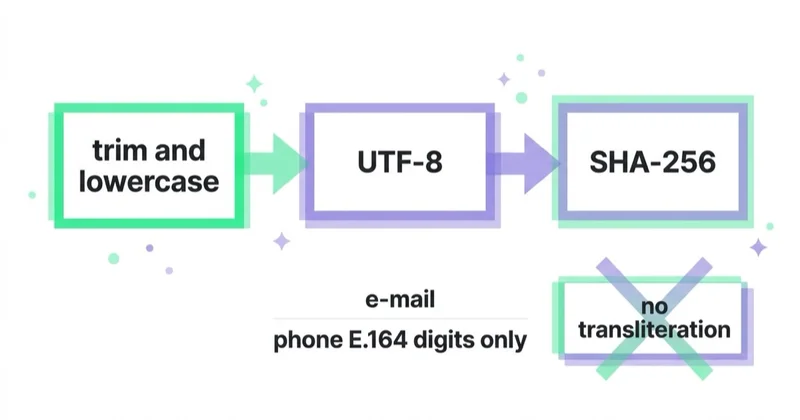
Two things usually go wrong here. First, stripping accents or transliterating names — the documentation requires preserving non-ASCII characters, so turning josé into jose produces a different hash and the match is lost. Second, leaving the + on a phone number.
Geographic values — city, region, postal code — are sent as raw text, unhashed. City and region up to 128 characters, postal code up to 32.
Amounts and Currencies
Monetary values are integers in the currency's standard ISO 4217 minor unit. For USD the minor unit is cents, so 12999 means $129.99. When an event carries an amount, it must carry a currency.
This is the easiest error to make in the whole implementation and the hardest to notice. Sending 129.99 instead of 12999 understates conversion value by two orders of magnitude, and the report looks entirely plausible — revenue is simply a hundred times lower than reality.
Consent
Here is the trap that matters for any site operating under GDPR.
The pixel defaults to consent granted. The documentation says so plainly: consent initializes as true unless it is set to false or the pixel finds a stored denial. The default behavior is measurement on.
Where consent is required, the order is: oaiq("consent", false) first, then pixel initialization, then oaiq("consent", true) once the user grants it. Setting consent before initialization is the load-bearing part — otherwise the pixel starts in a measuring state.
Two operational consequences:
- Events blocked by absent consent are not replayed later. Granting consent allows future events; it does not recover past ones.
- The pixel has to be wired into the existing consent mechanism, not placed alongside it. A bare snippet in
<head>measures from the first page load.
Automatic Advanced Matching
When enabled, the pixel can detect supported customer data on the page, normalize it and hash it with SHA-256 in the browser. OpenAI states that raw data detected this way is not sent to OpenAI. The feature can improve matching when a click identifier is unavailable, but it does not remove the need for appropriate notice, legal basis and consent. Whether to enable it should be assessed for the particular site and legal context rather than treated as a universal default.
Content Security Policy
A restrictive CSP can block the SDK, its configuration or event delivery. OpenAI documents these required sources:
| Directive | Source | Purpose |
|---|---|---|
script-src |
https://bzrcdn.openai.com |
load the Measurement Pixel SDK |
connect-src |
https://bzr.openai.com |
send events via fetch or sendBeacon |
connect-src |
https://bzrcdn.openai.com |
fetch per-pixel configuration |
img-src |
https://bzr.openai.com |
send events via the image-request fallback |
A missing img-src entry can block the image-request fallback. Do not add unsafe-inline solely for the pixel. If the site uses nonces, generate a fresh nonce per response and apply it to the installation script; if script-src-elem is present, include the CDN and the applicable nonce or hash there as well.
Attribution and What Counts
Web events support click-through attribution and, on eligible accounts, view-through attribution. The view-through window is fixed at one day after a qualifying impression. Whether view-through reporting is available does not depend on the configured click window. When a conversion qualifies for both, the click takes precedence.
The reporting distinction that matters most:
View-through conversions are reported separately at campaign level and are not included in the Conversions metric. That stays the click-through total. CPA, post-click conversion rate, bidding, billing and conversion optimization all remain click-through-based, as do app lifecycle events.
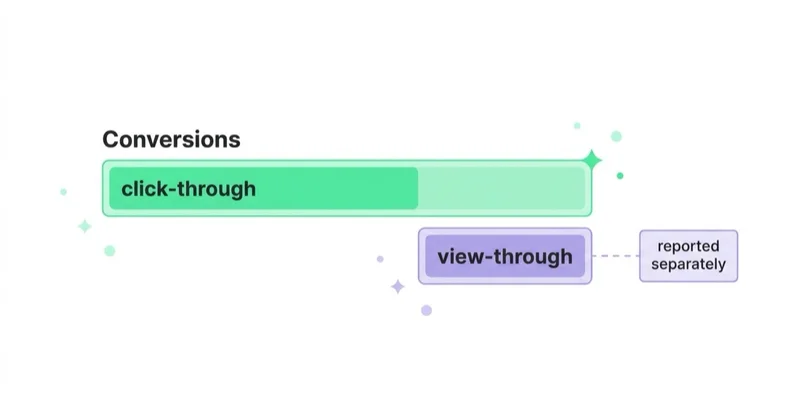
Adding the two together inflates the channel — and inflates it asymmetrically, because only some accounts have view-through reporting available. Comparing two accounts then means comparing two different definitions.
View-through attribution requires no change to the pixel integration or the event payload.
What oCPC Requires
A conversion-optimized campaign will not run until all of the following hold:
- The ad account supports conversion bidding — otherwise campaign creation returns
403withConversion bidding is not enabled. - Tracking is live via the pixel, the Conversions API, or both.
- Exactly one active standard conversion event serves as the goal; custom events cannot.
- The event setting belongs to the current ad account and connects to one active conversion source.
- Goal and event are chosen before creation, because neither can change afterward.
Three of the five are measurement work. That list is why measurement here is pre-campaign work rather than post-campaign reporting.
Image Tag and Multiple Pixels
Image Tag sends an event from HTML without JavaScript — useful in email templates and systems where a script cannot run. It takes its own event_id, so it joins the same deduplication: use the image tag's event_id as the Conversions API event's id.
Multiple Pixel IDs apply when one page must measure conversions for several pixels — a shared site serving two brands, for instance. An event can go to every pixel or be targeted at one.
How we approach this at Space Ads
Our measurement design starts with the business action, not the list of available tags. First we decide what represents a purchase, qualified lead, registration or booked appointment and map it to the appropriate OpenAI standard event. Then we define one identifier shared by browser and server, retain oppref and — where consent permits — obref, and validate amounts, currency and normalized hashes before sending. We start Conversions API testing with validate_only: true and run the pixel in debug mode. A controlled conversion is then compared across both payloads. An oCPC campaign is created only after the event has the right meaning, deduplication works and the report receives the conversion once.
Common Mistakes
- Shipping the pixel alone and skipping the Conversions API, which the documentation names as the more reliable source.
- No shared event identifier across browser and server, so conversions double-count.
- Sending
129.99instead of12999and understating revenue a hundredfold. - Omitting the currency on an event that carries an amount.
- Stripping accents or transliterating names before hashing.
- Leaving the
+or leading zeros on a phone number before hashing. - Sending raw identifiers instead of SHA-256 hashes.
- Relying on the default consent state, which is on, and measuring without a basis.
- Missing required CSP sources and blocked pixel requests.
- Omitting
oppreffrom the server event or an available, lawfully obtainedobreffrom the hybrid implementation. - Calling the Conversions API from the browser and exposing the API key.
- Adding view-through conversions to click-through conversions in one figure.
- Choosing a custom event as the goal of a conversion-optimized campaign.
- Backfilling events older than 7 days.
FAQ
Pixel or Conversions API — which should you use?
OpenAI's documentation names the Conversions API as more reliable than the pixel alone. In practice both belong in the build, joined by deduplication: the pixel captures browser events, the server supplies the complete matching data.
How does event deduplication work?
The dedup key is Pixel ID, event name and event ID. The same identifier goes in the Conversions API id field and the pixel's event_id. OpenAI keeps the first event it receives for a matching key and ignores later duplicates.
How do you send an order value?
As an integer in the currency's minor unit, together with the currency code. $129.99 is 12999 with currency: "USD". An amount without a currency will not be accepted.
Does the ChatGPT Ads pixel require consent?
The pixel initializes with consent set to granted. Where consent is required, set it to false before initialization and switch it to true once the user grants it. Events blocked by absent consent are not replayed afterward.
Why are conversions missing from the panel when the pixel is installed?
Temporarily enable debug: true for the pixel and inspect browser console and network requests. For the Conversions API, first submit the payload with validate_only: true. Also check consent, CSP, Pixel ID, source_url, timestamp and the response for the entire batch — one invalid event rejects every event in that request.
Are view-through conversions included in the conversions metric?
No. They are reported separately at campaign level and are not part of the Conversions metric, which stays the click-through total. CPA, bidding and optimization are also click-through-based.
Key Takeaways
In ChatGPT Ads, measurement is a prerequisite for a responsible test and a technical requirement for oCPC. Even when some targeting features do not fit a specific setup, results still depend on objective, bid, context, creative and landing page. Measurement shows whether those decisions lead to valuable post-click actions.
From day one, get the shared event identifier, amounts and currency, attribution identifiers, and lawful handling of data and consent right. Only then can the pixel and Conversions API work together without double-counting, and oCPC can optimize toward an event that actually represents business value.
The channel's full mechanics are covered in ChatGPT Ads.
Sources and further reading
- OpenAI Developers — Measurement Pixel
- OpenAI Developers — Conversions API
- OpenAI Developers — Supported Events
- OpenAI Developers — Conversion-Optimized Campaigns
- OpenAI Developers — Image Tag
- OpenAI Developers — Multiple Pixel IDs
- OpenAI Developers — Conversion Setup
Continue Learning
Continue reading
ChatGPT Ads: What They Are, How to Buy Them and What They Cost
ChatGPT Ads are paid placements below a ChatGPT response, matched to conversation context rather than keywords. This guide explains CPM, CPC and oCPC, creative limits, measurement requirements, product feeds, landing-page checks and when the channel makes business sense.
ChatGPT Ad Formats and Character Limits: What Actually Fits
A ChatGPT ad appears below the response and carries six elements, with specific limits: title 3–50 characters, body up to 100. The "24 / 48 character" figures in trade coverage do not match the documentation, so this guide gives the full limits table, shows how to fit a useful message, and covers the image, product ads and end-to-end consistency with the landing page.
OpenAI Ads Manager: How to Set Up Your First ChatGPT Ads Campaign
OpenAI Ads Manager has three campaign levels, but launch also requires advertiser verification, billing, landing-page checks, measurement and deliberate choices for settings that cannot be changed later. This guide covers the setup sequence, budgets, context hints, oCPC, targeting, review and Ads API workflows.


































