
Google Marketing Platform is Google's enterprise suite for planning, buying, measuring and optimizing digital media and customer experiences across advertising and analytics products. It includes tools such as Campaign Manager 360, Display & Video 360, Search Ads 360, Analytics 360 and Tag Manager 360. It is not a simple replacement for Google Ads. It is a more advanced environment for organisations that need cross-channel media buying, unified measurement, enterprise governance, data integrations and multi-team workflows.
For many small and mid-sized businesses, Google Ads, GA4, Google Tag Manager and Looker Studio are enough. Google Marketing Platform becomes relevant when media scale, organisational complexity, programmatic buying, advanced reporting, Floodlight measurement or multi-market management justify the cost and operational overhead.
TL;DR
- Google Marketing Platform (GMP) combines enterprise advertising and analytics tools.
- The main advertising products are Campaign Manager 360, Display & Video 360 and Search Ads 360.
- The analytics and tagging side includes Analytics 360 and Tag Manager 360.
- GMP is not required for every advertiser. Google Ads, GA4 and GTM are enough for many businesses.
- GMP makes the most sense for large advertisers, agencies and multi-market teams.
- The value is governance, integration, media control and unified measurement, not automatic performance improvement.
- Enterprise tools increase capability and complexity at the same time.
What Google Marketing Platform is
Google Marketing Platform is a collection of enterprise products designed to help teams manage advertising, analytics and media measurement in a more integrated way.
Google's own Help documentation describes the products as working together so teams can plan, buy, measure and optimise digital media and customer experiences in one place.
In practical terms, GMP supports:
- media planning;
- display and video buying;
- programmatic buying;
- campaign trafficking;
- search management across engines;
- ad serving;
- Floodlight conversion tracking;
- enterprise analytics;
- tag governance;
- cross-product integrations;
- user access control;
- reporting for large teams.
It is most useful when a company has enough scale and complexity that individual ad platforms and free analytics tools become hard to manage.
What products are in Google Marketing Platform?
| Product | Main role |
|---|---|
| Campaign Manager 360 | Ad serving, trafficking, Floodlight tracking and cross-channel campaign measurement |
| Display & Video 360 | Programmatic display, video, connected TV, audio and media buying |
| Search Ads 360 | Search campaign management across multiple engines and accounts |
| Analytics 360 | Enterprise version of Google Analytics with advanced features and higher service level |
| Tag Manager 360 | Enterprise tag management and governance |
| Platform Home and Admin | Product access, administration and integrations |
The exact setup depends on the organisation. Some companies use only DV360. Others use CM360 and Floodlight as a central measurement layer. Large advertisers may combine multiple 360 products with Google Cloud, Ads Data Hub and internal BI.
Google Ads vs Google Marketing Platform
Google Ads is the advertising platform many businesses use to run Search, Shopping, Performance Max, YouTube, Demand Gen, app and other Google Ads campaigns.
Google Marketing Platform is broader and more enterprise-oriented.
| Area | Google Ads | Google Marketing Platform |
|---|---|---|
| Typical user | Small, mid-market and enterprise advertisers | Larger advertisers, agencies and enterprise teams |
| Search ads | Google Search campaigns | Search Ads 360 can manage multiple search engines |
| Display and video | Google Ads campaigns, YouTube, Demand Gen, PMax | DV360 for programmatic buying and broader media control |
| Measurement | Google Ads conversions, GA4 | CM360, Floodlight, Analytics 360 and integrations |
| Complexity | Lower | Higher |
| Cost | Self-serve, accessible to most advertisers | Enterprise pricing, sales and partner workflows |
| Best for | Direct campaign activation | Integrated media, governance, measurement and scale |
Google Ads is often the right answer. GMP is justified only when the business problem is bigger than campaign management inside one ad account.
Campaign Manager 360
Campaign Manager 360 is used for ad serving, trafficking and measuring digital campaigns. It is often the measurement backbone for large advertisers and agencies.
Common use cases:
- serving creative across placements;
- managing campaign structure;
- applying tracking tags;
- using Floodlight activities;
- reporting conversions across media;
- deduplicating campaign interactions;
- connecting with DV360 and SA360;
- measuring campaigns outside a single ad platform.
CM360 is not the same as GA4. GA4 measures site and app behavior. CM360 is more focused on campaign trafficking, ad serving and advertising measurement.
Display & Video 360
Display & Video 360 is Google's demand-side platform for programmatic media buying.
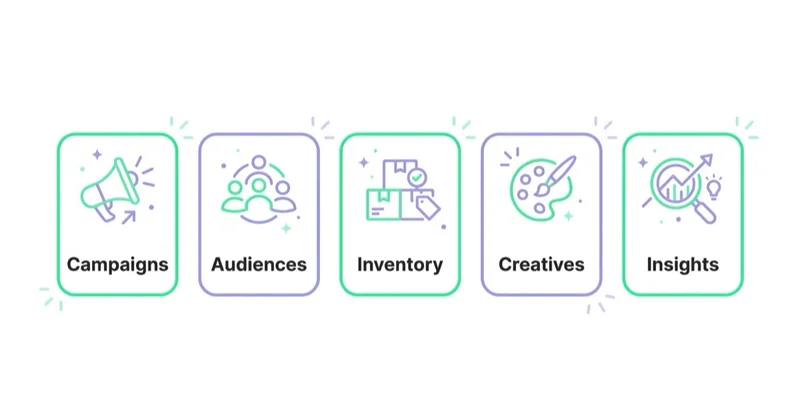
It is used for:
- display campaigns;
- video campaigns;
- YouTube and partner inventory workflows;
- connected TV;
- audio;
- programmatic guaranteed;
- private marketplace deals;
- audience and inventory controls;
- frequency management;
- brand safety controls;
- creative and deal workflows.
DV360 makes sense when the advertiser needs more control over buying, inventory, audiences, frequency and programmatic strategy than standard Google Ads display/video tools provide.
For more context, read Google Marketing Platform's DV360: Everything You Need to Know.
Search Ads 360
Search Ads 360 is built for managing paid search campaigns across multiple engines and accounts.
It is useful when a team manages:
- many Google Ads accounts;
- Microsoft Advertising campaigns;
- multiple markets;
- large keyword structures;
- shared reporting;
- cross-engine portfolio bidding;
- enterprise governance;
- centralised search workflows.
SA360 is not required for a simple Google Ads account. Its value grows with search scale, account complexity and multi-engine management.
Analytics 360
Analytics 360 is the enterprise version of Google Analytics. It is designed for organisations that need more advanced service levels, governance, integrations and scale than standard GA4.
Potential reasons to consider Analytics 360:
- high-volume websites or apps;
- multiple teams and properties;
- roll-up or subproperty needs;
- enterprise support;
- advanced integrations;
- more formal governance;
- wider organisational reporting;
- connection with GMP workflows.
In May 2026, Google announced that Meridian, its open-source marketing mix model, is being brought into Google Analytics 360. That illustrates the direction of enterprise measurement: combining platform data, modelling and business decision support.
For many companies, standard GA4 is still enough. The upgrade should be justified by real reporting, scale or governance requirements.
Read Google Analytics 4 (GA4): Why Implement It and What Are the Benefits? for GA4 foundations.
Tag Manager 360
Tag Manager 360 is the enterprise version of Google Tag Manager. It is relevant for organisations that need stronger governance, workflows and service levels around tagging.
It may be useful when:
- many teams publish tags;
- multiple sites and markets are managed;
- approval workflows are required;
- legal and compliance teams need process control;
- tag governance is a business risk;
- enterprise support is needed.
For many businesses, standard GTM is enough. The upgrade should be based on governance need, not because the name sounds more advanced.
Read What Is Google Tag Manager and How to Use It?.
Floodlight and unified measurement
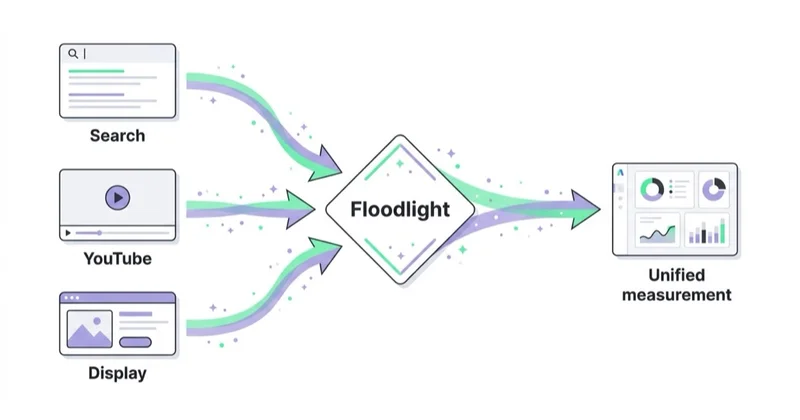
Floodlight is the conversion tracking system used with Campaign Manager 360 and other GMP products. It can help centralise conversion measurement across media activity.
Why it matters:
- one conversion framework across channels;
- campaign-level reporting;
- deduplication logic;
- connection with DV360 and SA360;
- better campaign measurement for agencies and enterprise teams;
- a shared language for media activation and reporting.
Floodlight does not remove the need for GA4, backend revenue checks or clean business data. It is one part of a broader measurement architecture.
When GMP makes sense
Google Marketing Platform may be justified when:
- media budgets are large;
- campaigns run across many markets;
- several agencies or teams work on media;
- programmatic buying is important;
- DV360 access is required;
- search is managed across many accounts or engines;
- campaign measurement must be centralised;
- Floodlight is needed as a shared conversion framework;
- governance and user access are complex;
- leadership needs cross-channel reporting;
- the business has analytics and ad ops resources.
The question is not "is GMP better?" The question is "does the organisation have problems GMP is designed to solve?"
When standard tools are enough
Google Ads, GA4 and GTM are often enough when:
- campaigns mainly run in Google Ads;
- the business is not buying programmatic media at scale;
- reporting is manageable in GA4, Google Ads and Looker Studio;
- there are not many markets or agencies;
- search is limited to Google Ads and perhaps one Microsoft Ads account;
- the team does not need Floodlight;
- the main problem is campaign optimisation, not tool architecture.
For many ecommerce and lead-generation businesses, the bigger gains come from better tracking, feed quality, creative, landing pages and conversion rate, not from moving to enterprise tools.
GMP for ecommerce
Large ecommerce organisations may use GMP for:
- multi-market media buying;
- programmatic display and video;
- CTV and premium media;
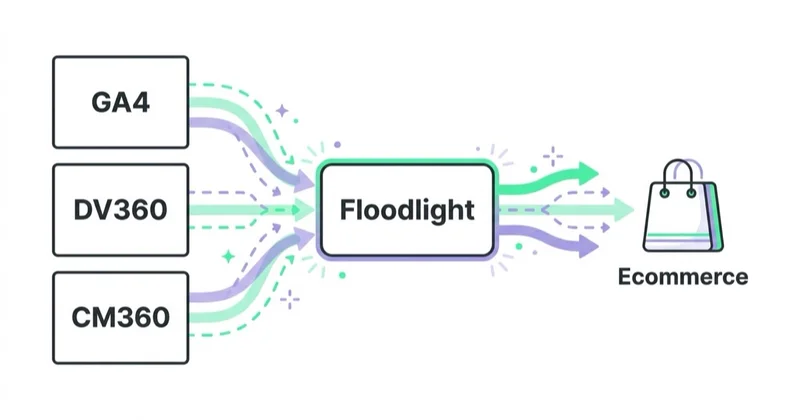
- Floodlight measurement;
- Analytics 360 reporting;
- customer data integration;
- product feed and campaign analysis;
- cross-channel attribution and modelling;
- enterprise governance.
Smaller stores usually need a simpler foundation first:
- Merchant Center;
- clean product feed;
- Google Ads and Performance Max;
- GA4 ecommerce events;
- GTM and consent setup;
- product profitability reporting;
- Looker Studio dashboards.
For that foundation, read What Is Google Merchant Center and How to Manage It?, What Is Ecommerce Analytics and Why Is It So Important? and How to Use Google Data Studio (Looker Studio).
GMP for agencies
Agencies may use GMP when they manage:
- enterprise media accounts;
- programmatic buying;
- multi-market reporting;
- ad serving and trafficking;
- advanced campaign measurement;
- cross-channel deduplication;
- search management across engines;
- complex client permission structures.
The operational requirement is important. GMP requires specialist skills in ad operations, analytics, trafficking, reporting and platform governance.
Implementation considerations
Before adopting GMP, define:
- which products are needed;
- who owns each product;
- who handles ad operations;
- how Floodlight will be structured;
- how GA4 and Analytics 360 fit the model;
- how conversion definitions are governed;
- how access is managed;
- how agencies collaborate;
- how data is exported or reported;
- what success looks like;
- what the total operating cost is.
The tool cost is only part of the cost. The bigger cost is the people and process needed to use the platform properly.
How we approach this at Space Ads
The enterprise stack — DV360, SA360, Analytics 360, Campaign Manager — is powerful, but it isn't a default. It earns its place only at real scale and multi-channel complexity: large data volume, several media-buying sources, de-duplicated measurement across channels. Most mid-market clients get the bulk of that value from Google Ads, a well-configured GA4 and clean tracking, at a fraction of the cost and without the overhead GMP carries. We recommend it when the numbers genuinely justify it, not because it sounds serious. Roll out a heavy stack at a company that won't use half of it and you've bought cost and complication with no return. The question we ask first is what problem it should solve; the tool follows from the scale, never the reverse.
Common mistakes
| Mistake | Why it hurts | Better approach |
|---|---|---|
| Buying enterprise tools without enterprise needs | Cost and complexity rise | Start from business requirements |
| Confusing GMP with Google Ads | Wrong expectations | Separate activation from enterprise management |
| No measurement owner | Floodlight and reporting become messy | Assign governance responsibility |
| Implementing every product at once | Complexity overwhelms the team | Phase implementation |
| Underestimating ad ops | Campaign setup slows down | Resource trafficking and QA properly |
| No naming conventions | Reporting becomes unusable | Standardise campaigns, placements and tags |
| No data strategy | Tools do not connect to decisions | Define reporting, exports and BI use cases |
| Expecting performance to improve automatically | Tools do not replace strategy | Improve creative, media, data and measurement |
GMP decision checklist
Consider GMP if most of these are true:
- Media budget is large enough to justify enterprise tooling.
- Multiple teams or agencies need controlled access.
- Programmatic buying is a core channel.
- DV360 is required for inventory or deal strategy.
- Search campaigns span multiple engines or many accounts.
- Floodlight measurement is needed.
- Leadership needs cross-channel reporting.
- Current free tools hit real limits.
- Analytics and ad ops teams can support the stack.
- Data governance is a business requirement.
If only one or two points apply, standard tools may still be better.
FAQ
What is Google Marketing Platform?
Google Marketing Platform is Google's enterprise suite for advertising and analytics, combining tools such as Campaign Manager 360, Display & Video 360, Search Ads 360, Analytics 360 and Tag Manager 360.
Is Google Marketing Platform the same as Google Ads?
No. Google Ads is a campaign activation platform. Google Marketing Platform is a broader enterprise environment for media buying, ad serving, search management, analytics, tag governance and cross-channel measurement.
Is DV360 part of Google Marketing Platform?
Yes. Display & Video 360 is one of the main advertising products within Google Marketing Platform.
Is Search Ads 360 a replacement for Google Ads?
Not directly. Search Ads 360 manages search campaigns across accounts and engines, while Google Ads remains the system that serves ads within Google's search ecosystem.
Does every business need GMP?
No. Many businesses are better served by Google Ads, GA4, GTM and Looker Studio. GMP is most useful for large, complex advertisers and agencies.
Will GMP improve performance automatically?
No. GMP can improve control, measurement and workflow, but results still depend on strategy, data quality, creative, media buying and optimisation.
What should be implemented first?
Start with the product that solves the clearest business problem, such as DV360 for programmatic buying, CM360 for central campaign measurement or Analytics 360 for enterprise analytics requirements.
What is the biggest risk of GMP?
The biggest risk is adding enterprise complexity without the team, process and business need to support it.
Conclusion
Google Marketing Platform is powerful when the business genuinely needs enterprise media and measurement infrastructure. It helps large teams manage programmatic buying, campaign trafficking, search at scale, analytics, tag governance and cross-channel measurement.
It is not a shortcut to better results. For many companies, a clean setup in Google Ads, GA4, GTM and Looker Studio creates more value than moving too early into enterprise tools.
The right question is simple: is the current stack limiting business decisions or media execution? If yes, GMP may be worth evaluating. If not, improve the fundamentals first.
Sources and further reading
- Google Marketing Platform: Enterprise advertising and analytics solutions
- Google Marketing Platform Help: About Google Marketing Platform
- Google Marketing Platform: Unified advertising and analytics
- Google Blog: The Gemini advantage in Google Marketing Platform
- Google Blog: Meridian in Google Analytics 360
- Google Analytics Help: Link Display & Video 360 to Analytics
Continue learning
- Google Marketing Platform's DV360: Everything You Need to Know
- Google Analytics 4 (GA4): Why Implement It and What Are the Benefits?
- What Is Google Tag Manager and How to Use It?
- How to Use Google Data Studio (Looker Studio)
- What Is Ecommerce Analytics and Why Is It So Important?
- What Is a Google Ads Audit and How to Do It?
Continue reading

What Is Search Ads 360?
Search Ads 360 is Google's enterprise paid search management layer for teams that need multi-engine governance, Floodlight measurement, reporting and bidding workflows, not a shortcut to better campaigns. This guide explains how SA360 differs from Google Ads, when the operational case is strong and what to clean up before implementation.

Margin-Based Conversion Value in Google Ads: When Ecommerce Should Use It
If Google Ads receives gross revenue as conversion value, value-based bidding optimises toward gross revenue. For ecommerce stores with different product margins, a value closer to gross margin or contribution margin can give Shopping and Performance Max a better signal.

Returns and Conversion Adjustments in Google Ads for Ecommerce
Returns, cancellations and partial refunds change the real value of ecommerce orders after the purchase. If Google Ads only sees gross revenue from the conversion day, campaigns can optimise toward products that look efficient before returns but weak after them.


































