
Dynamic remarketing is retargeting where the ad content changes based on what a user previously viewed, added to cart, started to buy or interacted with on a website or app. Instead of showing the same banner to every visitor, the platform can show relevant products, listings, destinations, service categories or content items from a feed or catalog.

In ecommerce, dynamic remarketing usually means showing products from a Google Merchant Center feed, Meta catalog or another product data source. In lead generation, travel, education, real estate, automotive or SaaS, the same concept can apply to structured offers, listings, plans or funnel stages. The campaign is only as strong as the data behind it: feed quality, event tracking, item IDs, consent, exclusions, creative templates and measurement all need to work together.
TL;DR
- Dynamic remarketing personalizes ad content using previous user behavior and a feed or catalog.
- In ecommerce, it depends on product feed quality, event tracking and matching item IDs.
- Google Ads supports dynamic remarketing with Display, Performance Max and App campaign setups.
- Retail dynamic remarketing needs product identifiers in events that match the Merchant Center feed.
- Meta uses similar logic through catalog ads, Pixel or Conversions API events and product sets.
- The most common implementation failure is ID mismatch: the product ID in the event does not match the product ID in the feed.
- Dynamic remarketing should use exclusions, recency logic, frequency management and privacy-aware consent handling.
- Reported ROAS can look strong because audiences are warm, so incrementality and margin should be checked.
What is dynamic remarketing?
Dynamic remarketing is a form of retargeting where ad content is assembled from a structured feed or catalog based on a person's previous activity.
Regular remarketing may show one generic ad to every website visitor. Dynamic remarketing can show:
- the exact product viewed;
- products added to cart;
- related products;
- similar products;
- products from the same category;
- a hotel, flight, destination or rental listing;
- a vehicle or property listing;
- a SaaS plan or product tier;
- a course, resource or content category;
- a product set matched to previous behavior.
The ad is not manually designed for every item. The platform uses feed data and a template to create relevant ads at scale. This is why dynamic remarketing is especially useful for businesses with many SKUs, listings, destinations, plans or content items.
How dynamic remarketing works
The process usually looks like this:
- A user visits a website or app.
- Tracking records an event, such as a product view, add to cart, checkout start or content interaction.
- The event includes an item ID, product ID, content ID or category signal.
- The ad platform matches that identifier to a feed or catalog.
- The platform serves an ad with relevant items or offers.
- The user returns, converts, delays the decision or exits the journey.
The matching step is the heart of dynamic remarketing. If the website sends product ID SKU-123 but the feed uses 123-blue-size-m, the system may not be able to connect the user behavior to the right product. The result is weak personalization, wrong products or no useful dynamic ad at all.
For feed fundamentals, read What Is a Product Feed and How to Use It?.
Dynamic remarketing vs standard remarketing
| Area | Standard remarketing | Dynamic remarketing |
|---|---|---|
| Ad content | Usually static or manually built | Personalized from a feed or catalog |
| Best use | General re-engagement and brand recall | Item-specific recovery and product/listing reminders |
| Data needed | Audience list or segment | Audience plus feed/catalog plus events |
| Ecommerce value | Useful but broad | Strong when product data and events match |
| Main risk | Generic message fatigue | Wrong product, wrong price, ID mismatch or over-personalization |
Standard remarketing is still useful for service pages, content journeys, brand recall and simple funnels. Dynamic remarketing is stronger when the previous item-level behavior should influence the ad.
For the broader concept, read What Is Remarketing and How to Launch Retargeting Ads?.
What is required for dynamic remarketing?
Dynamic remarketing needs five foundations.

1. Feed or catalog
The feed is the source of item data. In ecommerce, it is usually a product feed. In travel, education, real estate or automotive, it may be a structured database of destinations, courses, properties or vehicles.
Common feed fields include:
- item ID;
- title;
- description;
- landing page URL;
- image URL;
- price;
- sale price;
- availability;
- category;
- brand;
- condition;
- GTIN or MPN where relevant;
- custom labels or business attributes.
2. Event tracking
Events tell the platform what the user did.
Useful ecommerce events include:
- view item;
- add to cart;
- view cart;
- begin checkout;
- purchase;
- product category view;
- onsite search;
- wishlist or save event.
For non-retail businesses, events may include plan view, pricing page view, lead form start, listing view, course view, booking start or app item interaction.
3. Identifier matching
The event must include an identifier that matches the feed. Google's dynamic remarketing event documentation explains that retail event data works with Merchant Center product feeds and that values should match feed attributes such as id, item_group_id or display_ads_id depending on the setup.
This is why a technical audit should check the actual data layer, not only whether a tag fires. A tag can fire perfectly and still send the wrong item identifier.
4. Audience logic
Dynamic remarketing still needs segmentation. A product viewer from 2 days ago is not the same as a checkout abandoner from 30 minutes ago.
Useful audience groups include:
- product viewers;
- category viewers;
- cart abandoners;
- checkout starters;
- recent buyers;
- lapsed buyers;
- high-value users;
- app users;
- users who viewed high-margin products;
- users who engaged with specific service categories.
5. Consent and privacy setup
Dynamic remarketing depends on behavioral data, so consent and privacy configuration matter. Cookie banners, Consent Mode, Google tag setup, GA4 audiences, Meta Pixel, Conversions API and data policies should be reviewed before launch.
Dynamic remarketing is not a way to bypass privacy choices. It should operate only within the consent, legal and platform rules that apply to the market and business model.
Dynamic remarketing in Google Ads
Google Ads dynamic remarketing can be used with Display, Performance Max and App campaigns. The setup differs by business type, campaign type and data source, but the logic is consistent: website or app behavior is connected with a product or business data feed.
For retail, Google Merchant Center is usually the feed source. For non-retail businesses, Google can use business data feeds depending on the campaign and setup.
Important components include:
- Google tag, GA4 or Google Ads event setup;
- dynamic remarketing parameters;
- product or business data feed;
- audiences or audience signals;
- campaign eligibility and policy compliance;
- correct item identifiers;
- conversion tracking;
- value data where relevant.
Performance Max can use Merchant Center feeds and remarketing signals, but it should not be treated as a fix for bad data. Product titles, item IDs, prices, availability, images, landing pages and conversion values still matter.
For Shopping context, read Google PLA / Shopping Campaigns in Google Ads: What to Know and How to Use Google Shopping Campaigns Effectively?.
Dynamic remarketing in Meta Ads
Meta uses similar logic through catalog ads and product events. The system can show products from a catalog based on previous behavior or predicted interest.
Important elements include:
- Meta catalog;
- Meta Pixel events;
- Conversions API events where appropriate;
- content IDs matching the catalog;
- product sets;
- availability and price updates;
- Custom Audiences;
- purchaser exclusions;
- creative templates and primary text.
Meta catalog ads are especially useful when a store has many products and users browse several items before deciding. They can also support verticals such as travel, property and vehicles where structured inventory matters.
For this cluster, read What Are Meta Catalog Ads and How to Launch Them? and Facebook Remarketing: How Meta Retargeting Works and Why Use It.
Dynamic remarketing for ecommerce
Ecommerce is the most common use case because product behavior is easy to structure.
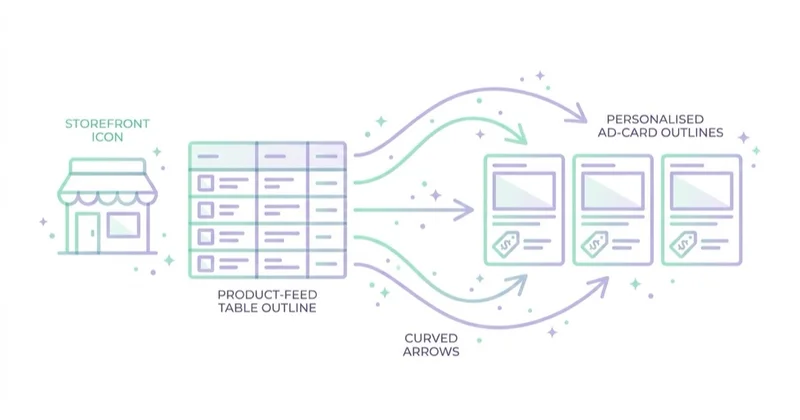
Useful scenarios include:
- viewed product but no cart;
- added to cart but no purchase;
- checkout started but abandoned;
- product category viewed;
- similar products;
- complementary products;
- replenishment reminders;
- cross-sell after purchase;
- seasonal reactivation;
- product drop or back-in-stock reminders where allowed.
The message should match the segment:
| Segment | Likely intent | Better message |
|---|---|---|
| Product viewer | Early comparison | Benefits, reviews, product proof |
| Category viewer | Broad interest | Bestsellers, category guide, filters |
| Cart abandoner | High intent with friction | Delivery, returns, payment trust, saved cart |
| Checkout starter | Very high intent | Reassurance, support, clear next step |
| Recent buyer | Completed action | Accessories, replenishment, onboarding |
| Lapsed buyer | Dormant relationship | New collection, useful reason to return |
For cart recovery, read Abandoned Carts: What They Are and How to Recover Them.
Dynamic remarketing beyond ecommerce
Dynamic remarketing is not only for online stores.
It can support:
- hotels and travel destinations;
- flights and routes;
- real estate listings;
- automotive inventory;
- education courses;
- SaaS pricing plans;
- job listings;
- local service categories;
- event tickets;
- B2B content offers;
- financial products where policies allow.
In these cases, the feed is not a retail product catalog. It is a structured list of items, offers, pages or categories that can be matched to behavior. The same rules still apply: identifiers, landing pages, images, policy compliance and event quality must be reliable.
Feed quality checklist
Before launch, check:
- IDs are stable and unique.
- IDs in events match IDs in the feed.
- Product or item URLs work.
- Images are high quality and approved.
- Prices match landing pages and checkout.
- Sale prices and availability update quickly.
- Out-of-stock items are handled.
- Product titles are clear.
- Variants are structured correctly.
- Restricted products are excluded.
- Low-margin products are separated where needed.
- Custom labels reflect business logic.
Most dynamic remarketing problems are feed and tracking problems before they are bidding problems.
Tracking and QA checklist
Use this checklist before scaling:
- Confirm the tag fires only when the consent state allows it.
- Confirm the correct event fires on product view, cart, checkout and purchase steps.
- Inspect the item ID sent in each event.
- Compare the item ID with the feed ID.
- Test variants, bundles and configurable products.
- Check prices, currency and availability.
- Confirm purchaser exclusions.
- Check audiences by recency and funnel depth.
- Run a test order and compare platform data with analytics and backend data.
- Review diagnostics after launch, not only before launch.
For implementation context, read What Is Google Tag Manager and How to Use It?.
Exclusions, recency and frequency
Dynamic remarketing can feel useful or intrusive depending on targeting discipline.
Useful exclusions include:
- recent purchasers;
- users who completed the target lead action;
- unavailable products;
- products with policy restrictions;
- products with low margin or stock risk;
- users who already converted through another path;
- internal users and test traffic where possible.
Recency windows should reflect purchase cycles. A low-cost impulse product may need a short window. A high-consideration purchase may need a longer nurture path. A B2B service may need a sequence of proof, education and consultation rather than repeated product cards.
Frequency should also be watched. Repeatedly showing the same product after a purchase or after a user has clearly moved on can damage trust.
Measurement and attribution
Dynamic remarketing often appears highly profitable because it reaches warm users. Interpret results carefully.
Track:
- revenue;
- margin;
- ROAS;
- CPA;
- cart recovery rate;
- frequency;
- product-level performance;
- new vs returning customer mix;
- assisted conversions;
- audience overlap;
- incrementality tests where possible;
- return and cancellation rates;
- profit after discounts and shipping subsidies.
Platform-reported ROAS may overstate incremental impact if users would have returned anyway. This does not mean dynamic remarketing is bad. It means measurement should be realistic.
For ecommerce measurement, read What Is Ecommerce Analytics and Why Is It So Important?.
How we approach this at Space Ads
Dynamic remarketing only delivers with two things behind it: a clean product catalogue and sensibly split audiences. The catalogue comes first — without correct IDs and availability, the ad shows the wrong product instead of the one someone actually viewed. Then audiences split by intent: a cart-abandoner hears something different from a browser, and recent buyers are usually excluded so we're not paying to remind people of what they already own. Frequency stays under watch too, because the same ad on a loop wears people out instead of selling. And we run remarketing to close the journey, not as a machine for handing out discounts — a permanent discount only teaches customers to wait for a code instead of buying.
Common mistakes
| Mistake | Why it hurts | Better approach |
|---|---|---|
| Product IDs in events do not match the feed | Dynamic ads cannot show the right items | Audit the data layer and feed IDs |
| Feed prices differ from landing page prices | Disapprovals and poor user trust | Sync feed, landing page and checkout |
| Out-of-stock products stay active | Wasted spend and bad UX | Update availability and exclude unavailable items |
| No purchaser exclusions | Users see ads for items already bought | Exclude or cross-sell after purchase |
| Too broad recency windows | Ads follow users long after intent fades | Segment by funnel depth and buying cycle |
| No frequency review | Users become annoyed | Monitor frequency and creative fatigue |
| Weak product images | Dynamic cards do not persuade | Improve feed images and product page assets |
| ROAS-only reporting | Incrementality and margin are ignored | Add profit, new customer and return data |
| Consent is treated as optional | Legal and platform risk | Connect tags and audiences to consent rules |
FAQ
Is dynamic remarketing the same as retargeting?
Dynamic remarketing is a type of retargeting. Retargeting is the broader practice of re-engaging users after a previous interaction. Dynamic remarketing specifically changes ad content based on previous behavior and feed or catalog data.
Does dynamic remarketing work only in Google Ads?
No. Google Ads supports dynamic remarketing, but similar logic exists in Meta catalog ads, TikTok catalog setups, marketplaces and other ad systems. The names and technical requirements differ.
Is a product feed required?
For ecommerce dynamic remarketing, yes. The feed or catalog is the source of product data shown in ads. For non-retail use cases, a structured business data feed or catalog may be used instead.
Why are dynamic ads showing the wrong products?
Common causes include mismatched item IDs, stale feed data, wrong product variants, broad audience logic, unavailable products, incorrect product sets or poor event configuration.
Should recent buyers be excluded?
Usually yes for recovery campaigns. Recent buyers should either be excluded or moved into a different strategy such as accessories, replenishment, onboarding or loyalty messaging.
Is dynamic remarketing privacy-sensitive?
Yes. It uses behavioral data, so consent, disclosure, tag governance and platform policies matter. The setup should respect local law and user choices.
Why does dynamic remarketing ROAS look so high?
It often targets warm users who were already close to purchase. Reported ROAS can be useful, but incrementality, margin, frequency and overlap with other campaigns should be checked.
Key takeaways
Dynamic remarketing is strongest when it is treated as a data system, not just a campaign type. The feed must be accurate. Events must send the right identifiers. Audiences must reflect intent and recency. Exclusions must prevent wasted impressions. Measurement must separate real incremental value from warm-audience attribution.
For ecommerce, dynamic remarketing can be one of the most useful recovery and cross-sell mechanisms. For services and non-retail categories, it can still work when offers, listings or funnel stages are structured clearly enough to personalize ads responsibly.
We implement feed-based dynamic remarketing within Google Ads campaigns for online stores.
Sources and further reading
- Google Ads Help - About dynamic remarketing
- Google Ads Help - Set up dynamic remarketing with Display, Performance Max, and App campaigns
- Google Ads Help - Dynamic remarketing events and parameters
- Google Merchant Center Help - Product data specification
- Google Ads Help - About Performance Max campaigns
Continue learning
Continue reading

Google PLA / Shopping Campaigns in Google Ads: What to Know
Google PLA, now usually called Shopping ads, use Merchant Center product data to show product images, titles, prices and store details. Learn how feed quality, PMax, Standard Shopping and profitability measurement work.

Performance Max Campaigns: What to Know and How to Create Them
Performance Max is a goal-based Google Ads campaign type powered by Google AI, but its results depend on inputs: conversion quality, values, assets, feeds, landing pages and business rules. This guide explains when to use PMax, how to structure ecommerce and lead generation campaigns, and how to measure performance beyond one blended ROAS number.

Google Remarketing: What It Is and Why Use It
Google remarketing re-engages people who already interacted with a website, app, YouTube channel, product or customer list, but warm-audience ROAS can be misleading. This guide explains how your data segments, GA4 audiences, Customer Match, exclusions, consent and incrementality checks should work together.


































