
Local inventory ads connect a high-intent search with a product available in a nearby physical store. Depending on the setup, a shopper can see that an item is in stock, check the store, reserve or buy it online, and collect it within a stated timeframe.
That makes the format useful for retailers whose stores are part of the buying journey. It also makes the underlying data unusually important. A strong campaign cannot compensate for a closed location, a mismatched store code or an item that the website marks as available even though the last unit has already been reserved.
Local inventory ads are therefore not simply a media feature. They are an omnichannel operating system made visible in Google: product data, store data, stock, landing pages, fulfilment and measurement must agree. This guide explains how to build that system without overpromising to shoppers.
TL;DR
- Local inventory ads can show nearby shoppers which products are available in a physical store. Free local listings can provide similar visibility without a media charge.
- The setup usually joins Google Business Profile locations, Merchant Center product data, store-level inventory and an eligible landing-page experience.
- Google supports two pickup-later implementations: one based on in-store inventory data and another based on product data without a local inventory source. Pickup Today requires a credible same- or next-day promise.
- Product IDs and store codes must match exactly across systems. Price, availability and pickup timing must also match what the shopper sees on the website.
- Submit inventory updates at least daily, as Google requires, and more often when sales velocity or reservation volume can make a daily snapshot misleading.
- Measure the behaviour the format is meant to influence: collection orders, local actions and, where the account is eligible, Store Visits or Store Sales.
- Check the current country and feature eligibility in Merchant Center rather than relying on an old market count.
What are local inventory ads?
Local inventory ads are Shopping ads designed for retailers with physical locations. When an eligible nearby shopper searches for a product, Google can surface store availability and lead the shopper to a local storefront or product page.
They differ from standard Shopping ads in one important respect: the promise is tied to a location. The shopper is not only asking, “Do you sell this product?” but also, “Can I get it from this store, on these terms, at this time?”
Free local listings use much of the same infrastructure but can surface products organically. Availability differs by country and feature, so confirm eligibility for the target market in Merchant Center before scoping the integration.
The data architecture behind the ad
A reliable setup has four connected layers.
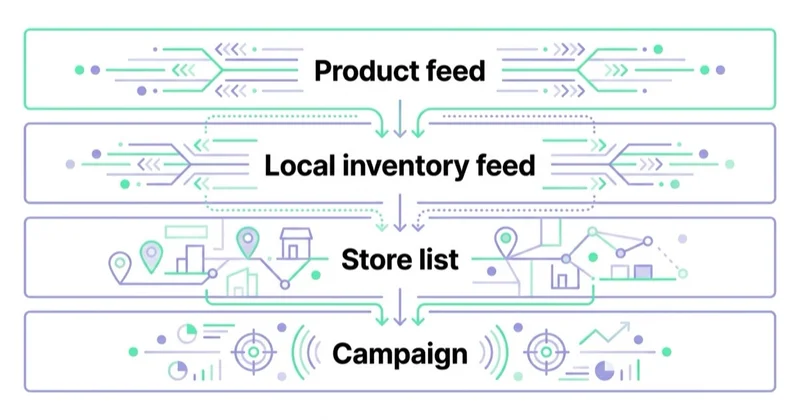
1. Store locations and store codes
Each participating location needs a published Google Business Profile connected to Merchant Center. The store code in the local inventory data is case-sensitive and must match the code associated with that location.
Treat store codes as durable identifiers, not labels for people to edit casually. A location rename, relocation, closure or migration between retail systems can otherwise leave inventory attached to the wrong shop. Opening hours and other location details should also be maintained because they shape the customer’s next step after the click.
2. Primary product data
The main Merchant Center data source describes the product: ID, title, description, image, price, brand, GTIN or other identifiers, and the attributes required for its category and market. One primary product source can support both online Shopping and local destinations when it is configured correctly.
The product ID is the join key. It must match the ID used in local inventory data exactly, including capitalisation. If the catalogue says SKU-1042 and the store system sends sku-1042, Google cannot reliably connect the two records.
If the wider catalogue needs work, start with our guides to Google Merchant Center and product feeds.
3. Local product inventory data
The local inventory source connects products to stores. Depending on the implementation, it includes fields such as:
- product ID;
- store code;
- availability;
- quantity;
- and, where applicable, a store-specific price.
Google requires inventory data to be resubmitted when it changes and recommends updating it as frequently as possible, with at least one update per day. For fast-moving products, a nightly export may satisfy the minimum while still being operationally inadequate. Update cadence should reflect sales velocity, reservations, cancellations and replenishment frequency.
4. The local landing-page experience
The page must make the local promise clear and actionable. Depending on the approved setup, this may be a retailer-hosted store-specific product page, a product page that shows in-store availability after the shopper selects a location, or another experience supported by Google’s local inventory programme.
For store-specific product pages, the URL template uses a {store_code} parameter. Google can crawl the resulting page to verify that the submitted store price and availability match what the customer sees.
A local page should answer, without ambiguity:
- Which store is selected?
- Is the item available there now, or will it be delivered there later?
- What is the store-specific price?
- When will collection be ready?
- Does the customer reserve the product or pay for it online?
- Are there collection fees, restrictions or identity requirements?
The same availability should appear in the data source, visible page content, structured data and checkout journey. Contradictions increase both disapproval risk and customer frustration.
Pickup Today and Pickup Later: the correct distinction
“Pickup” is not one generic promise. The correct implementation depends on where the item is and when the retailer can make it available.
| Option | Appropriate use | Core operational requirement |
|---|---|---|
| Pickup Today | The item can be bought or reserved online and collected the same or next day | Current availability, a clear pickup SLA and a notification when the order is ready |
| Pickup Later with in-store inventory data | A local offer is currently out of stock but can be sent to the selected store within a stated period | Store-level inventory data plus a reliable fulfilment promise for the selected location |
| Pickup Later with product data | The retailer can fulfil products to a chosen store but does not provide a local inventory data source for this implementation | Eligible product and landing-page data, online purchase or reservation, store selection and a dependable pickup SLA |
Since September 2024, Google requires the pickup_sla attribute for pickup implementations while pickup_method is optional. The customer-facing obligations remain important: the site must show when collection will be ready, allow an eligible online purchase or reservation flow, and send confirmation when the order is ready.
Do not choose Pickup Today merely because it sounds more persuasive. Choose it only when the retailer can keep that promise consistently. Pickup Later with product data can be a practical route for retailers without a store-level inventory source, but it still requires a real fulfilment process and accurate timing. It is not permission to advertise uncertain availability.
What “available” should mean operationally
An ERP stock count is not automatically a customer-buyable quantity. The implementation should define how each of the following affects availability:
- units reserved for collection or online orders;
- damaged, returned or quarantined goods;
- display units that cannot be sold immediately;
- stock in transit between warehouse and store;
- shrinkage and delayed goods-received updates;
- safety stock retained for operational reasons;
- the last unit, where the risk of a concurrent sale is high.
The right rule is neither “always report every unit” nor “always hide low stock”. It is to expose the quantity the customer can genuinely buy under the advertised terms. A conservative buffer can be sensible for high-velocity or low-confidence inventory, but excessive buffering also suppresses valid demand. Set the rule by category, stock reliability and the cost of a failed visit.
A practical refresh policy
Segment the catalogue rather than applying one refresh schedule to everything:
- High velocity or scarce stock: near-real-time or frequent incremental updates where the systems permit it.
- Stable inventory: scheduled updates may be sufficient, provided they still meet Google’s daily minimum.
- Known data-quality problems: exclude affected products or stores until the discrepancy is fixed.
Monitor both kinds of error. A false positive sends a shopper to unavailable stock; a false negative hides a product that could have generated revenue.
Can Google create the inventory data automatically?
For some eligible accounts, Google can use Google Storebot to extract availability displayed on the retailer’s website and create local inventory data for a subset of product-and-store combinations. The website must expose store availability and allow the relevant crawlers.
This can reduce integration work, but it is not equivalent to a complete inventory connection. Google describes the extraction as covering a selection of top product-and-store pairs. Retailers that need full coverage should provide their own local inventory source or discuss other supported data-collection options with Google.
Inventory verification and launch approval
Google may require inventory verification before local inventory ads or free local listings go live. The process checks whether the products and availability submitted for selected stores reflect reality.
Some approved landing-page configurations do not require a separate inventory-verification step because Google can verify store-specific price and availability by crawling the retailer’s pages. That does not remove the retailer’s responsibility for accurate data.
Before requesting approval, test a sample across:
- different stores, including recently opened or migrated locations;
- in-stock, low-stock and out-of-stock states;
- promotional and store-specific prices;
- product variants whose IDs are easy to confuse;
- Pickup Today and Pickup Later promises;
- mobile and desktop landing-page behaviour.
Campaign strategy: start where local intent matters
Once the infrastructure is sound, campaign decisions still affect performance. Bids, budgets, product segmentation, search intent and the quality of product data all matter. Inventory is a constraint, not the only optimisation lever.
Strong initial categories often include:
- products needed urgently, such as replacement parts or essential accessories;
- considered purchases customers want to inspect before buying;
- bulky products for which collection can be faster or cheaper than delivery;
- ranges with meaningful local availability and dependable margins;
- products whose store presence gives the retailer an advantage over online-only sellers.
Start with a controlled group of products and stores. This makes it easier to compare submitted availability with reality, train store teams, isolate fulfilment failures and establish credible measurement. Expand only after the pilot keeps its customer promise.
Measuring the full omnichannel effect
A local inventory click can end in several ways: an online purchase for collection, a call, a request for directions, a store visit, an in-store transaction or no purchase at all. Online revenue alone captures only part of that journey.
Build a measurement ladder from the signals the business can genuinely support:
- Online collection orders. Track purchase or reservation completion, value, cancellations and no-shows.
- Local actions. Google Ads can report actions such as directions, calls and website visits associated with location-based interactions.
- Store Visits. Eligible accounts may receive modelled Store Visits reporting. Availability depends on factors including account activity, location setup and privacy thresholds.
- Store Sales. Eligible or allowlisted advertisers can use Store Sales measurement based on supported data and privacy-safe matching or modelling.
- First-party operational analysis. Compare till revenue, product-level sales, collection behaviour and store or regional lift while accounting for seasonality and other campaigns.
Where appropriate, pass qualified offline outcomes and values back to Google Ads. Our guide to value-based bidding and offline conversion import explains the wider principle. Do not upload personal information in Merchant Center inventory data, and use an approved, privacy-compliant workflow for advertising measurement.
A simple commercial model
Assess incremental contribution, not raw tracked revenue:
Incremental contribution = incremental online collection margin + incremental in-store margin − media cost − fulfilment and operating cost
Suppose a pilot generates £30,000 in measured collection revenue and an estimated £12,000 in incremental store revenue. At a blended contribution margin of 35%, that is £14,700 before media and incremental operating cost. If media costs £6,000 and extra collection handling costs £1,500, the pilot contributes £7,200.
This is only an illustrative model. The hard part is establishing incrementality. Use matched stores, geographic holdouts, campaign experiments or time-based comparisons where feasible, and document the limitations of each method.
Common failure modes
| Failure | What the shopper experiences | Corrective action |
|---|---|---|
| Product IDs do not match | The local item is missing or cannot be joined to the catalogue | Use one canonical ID and test case-sensitive matching |
| Store codes have changed | Availability appears against the wrong or missing location | Reconcile Merchant Center, Business Profile and retail-system codes |
| Inventory updates too slowly | The ad promises stock already sold or reserved | Increase update frequency and introduce category-level buffers where justified |
| Website and feed disagree | Conflicting price, availability or pickup information | Align feed generation, page content, structured data and checkout logic |
| Pickup SLA is aspirational | The order is not ready when promised | Base the SLA on real fulfilment percentiles and store capacity |
| The whole catalogue launches at once | Errors are difficult to isolate and stores are overwhelmed | Pilot selected stores and products, then expand against quality gates |
| Campaigns optimise only to online sales | Store-influenced value is ignored | Add eligible local and offline goals, then validate incrementality |
How Space Ads approaches local inventory projects
We treat local inventory advertising as a joint commerce, data and media project. The work begins with the promise made to the customer and traces it backwards through the website, Merchant Center, store identifiers, inventory source and fulfilment process.
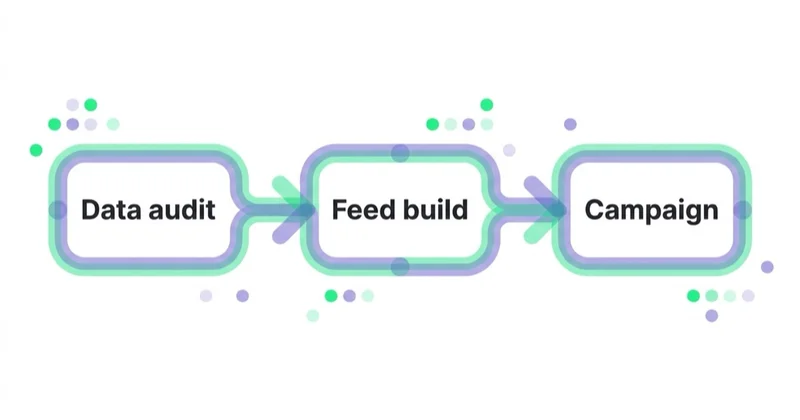
A practical engagement typically follows this sequence:
- Eligibility and journey audit: confirm markets, store coverage, landing-page options and pickup journeys.
- Data mapping: document the canonical product ID, store code, availability logic, price source and update cadence.
- Quality baseline: compare submitted stock with the website and a physical sample from stores.
- Measurement design: define primary conversions, diagnostic signals, offline outcomes and an incrementality method.
- Controlled pilot: launch a limited set of products and locations with named owners for feed, site and store issues.
- Scale gates: expand only when data accuracy, fulfilment SLA, disapproval rate and commercial contribution meet agreed thresholds.
This order prevents media optimisation from masking an operational problem. It also gives each team a clear responsibility: marketing manages demand, commerce manages the journey, data teams maintain the joins, and retail operations keep the availability promise.
Implementation checklist
- Confirm that every target country and feature is currently supported.
- Link the correct Google Business Profile locations to Merchant Center.
- Reconcile case-sensitive store codes across all source systems.
- Confirm exact product-ID matching between primary and local data.
- Define customer-buyable availability, including reservations, damage and safety stock.
- Set an update cadence by product velocity, with at least daily submission.
- Choose the correct landing-page and pickup implementation.
- Make price, availability, store and pickup timing consistent across the journey.
- Prepare for inventory verification where required.
- Test collection confirmation, cancellations, refunds and no-shows.
- Configure online, local and eligible offline measurement before launch.
- Pilot a controlled range and document thresholds for expansion.
FAQ
What are local inventory ads? Local inventory ads are Shopping ads that can show nearby customers products associated with physical store locations. They combine product information with location, inventory or pickup data and lead to an approved local shopping experience.
What data do local inventory ads require? The standard setup uses primary product data, linked Business Profile locations, matching store codes and local product inventory data. Some pickup-later and automatic-extraction options work differently, so the precise requirement depends on the approved implementation.
What is the difference between Pickup Today and Pickup Later? Pickup Today is for products that can be reserved or purchased online and collected the same or next day. Pickup Later promises collection after a longer stated SLA. Google supports pickup later with in-store inventory data and a separate implementation based on product data without a local inventory source.
How often should local inventory data be updated? Google says to update local inventory as frequently as possible and at least once daily. High-velocity products may need much more frequent updates so that ads and landing pages do not promise units already sold or reserved.
How are local inventory ads measured? Track collection purchases or reservations first, then add local actions and eligible Store Visits or Store Sales measurement. Where the business has appropriate first-party data and consent, offline outcomes can provide a fuller view. Use incrementality testing to distinguish campaign impact from sales that would have happened anyway.
Which retailers benefit most? The strongest candidates have meaningful physical-store coverage and products for which immediacy, inspection or convenient collection affects the purchase. Suitability still depends on accurate data, dependable store operations, margin and the ability to measure outcomes.
Can a retailer use local inventory ads without a full store inventory feed? Potentially. Pickup Later with product data does not require a local inventory data source, and Google may automatically extract a subset of local availability from eligible websites. Both options have specific requirements and neither replaces a reliable customer-facing fulfilment promise.
Key takeaways
- Local inventory ads work when product, location, availability, landing-page and fulfilment data describe the same customer promise.
- Exact product IDs and store codes are foundational; one mismatch can break the connection between catalogue and location.
- Pickup Today and the two Pickup Later implementations solve different operational situations.
- Daily inventory updates are the minimum, not necessarily the right cadence for fast-moving stock.
- Measurement should include collection and local behaviour, with Store Visits or Store Sales where eligible.
- Pilot selected stores and products, validate incrementality and expand only when data and operations meet defined quality gates.
For support connecting media, product data and the retail journey, see our e-commerce development services.
Sources and further reading
- Local inventory ads and free local listings policies — Google Merchant Center Help
- About pickup later — Google Merchant Center Help
- Set up pickup today — Google Merchant Center Help
- Local product data specification — Google Merchant Center Help
- Inventory verification — Google Merchant Center Help
- Automatically extracted local inventory — Google Merchant Center Help
- About offline conversion goals — Google Ads Help
- What is a product feed and how to use it
- What is Google Merchant Center and how to manage it
- Value-based bidding and offline conversion import
Continue reading
Auto Parts Ecommerce: Marketing Around the Fitment Problem
Auto parts marketing starts with fitment data. Learn how to connect the catalogue, vehicle selector, product feed, SEO and returns data so customers find parts that genuinely fit.
The Shopify Marketing Stack: What to Install and What to Remove
A Shopify marketing stack should connect customer data, storefront experience, merchandising, lifecycle and acquisition without duplicating events or adding unmanaged risk. Use this framework to choose, govern and remove apps safely.

How to Market a Private Label Brand Nobody Has Heard Of
Market an unknown private label by turning a real product advantage into verifiable proof, making the first purchase feel safe and building acquisition around contribution, repeat demand and compliant reviews.


































