
A Shopify marketing stack is the combination of platform features, apps, pixels, data connections and operating processes used to acquire, convert and retain customers. It includes more than the icons listed under Apps: theme extensions, Shopify Functions, sales channels, tag-manager containers, custom code, webhooks, external subscriptions and warehouse or CRM integrations can all affect the customer journey.
A strong stack is not necessarily the one with the fewest apps. It is the smallest system that can meet the business, customer, privacy, reliability and measurement requirements at an acceptable total cost. One high-value app can justify meaningful complexity; five “free” tools can create duplicate events, slow interactions and unclear ownership.
The decision standard is therefore not “does this app have useful features?” It is: which capability does it own, what measurable value does it create, what data and storefront surfaces can it access, what can fail, and how will we remove it?
TL;DR
- Audit apps, sales channels, custom code, pixels, functions, extensions, external billing and data exports as one system.
- Not every app injects a storefront script, and modern theme app extensions do not edit theme code directly. Measure actual impact rather than assigning every app the same performance penalty.
- Build around capabilities and data flow: governance, customer privacy and measurement, storefront and merchandising, lifecycle, acquisition, experimentation and operations.
- Use Shopify-native or Shopify-made capabilities where they meet the requirement, but evaluate limits, usage cost, data portability and performance in the same way as third-party tools.
- Give every capability one accountable owner and one source of truth. Supporting tools may overlap by design, but their responsibilities must not.
- App cost includes subscription and usage charges, implementation, support, performance, privacy, data integration, failure recovery and switching cost.
- Before uninstalling, export required data, map dependencies, cancel external charges, handle app-managed inventory and check whether manual theme code must be removed.
- Validate changes with Shopify’s real-user Web Performance reports, business KPIs and functional QA — not a single synthetic speed score.
What is part of the Shopify marketing stack?
| Layer | Typical capabilities | Important dependencies |
|---|---|---|
| Governance | App register, permissions, billing, change control, data ownership | Named owners and approval process |
| Privacy and measurement | Consent, Customer Events, app/custom pixels, analytics, server events | Event dictionary, legal basis, deduplication, QA |
| Storefront and conversion | Theme, product content, reviews, search, recommendations, bundles, checkout extensions | Performance, accessibility, inventory and price accuracy |
| Merchandising and feed | Collections, product taxonomy, search rules, catalogue and marketplace feeds | Canonical product data and stable IDs |
| Lifecycle | Forms, segmentation, email, SMS, loyalty, subscriptions, customer service | Consent, identity, suppression and order data |
| Acquisition | Ad sales channels, affiliate or creator tools, landing pages, audiences | Measurement, feed quality and margin rules |
| Experimentation and reporting | A/B testing, cohort reporting, attribution and finance reconciliation | Decision rules and trusted business outcomes |
| Operations affecting marketing | Returns, fulfilment, warranty, referrals and review requests | Accurate status and customer communication |
The same capability can sit in different products depending on store size, market and team. The architecture matters more than the vendor list.
Build by dependency, not by a rigid universal order
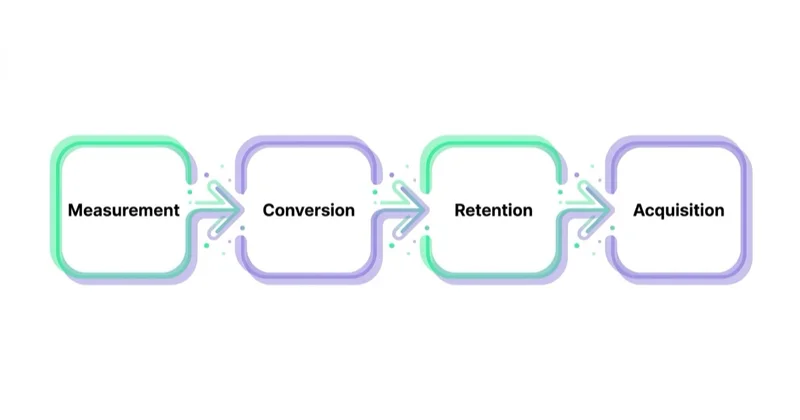
Some dependencies are real: value-based bidding cannot work without accurate value events, and dynamic product ads cannot work without a usable catalogue. But the original “measurement, conversion, retention, acquisition” sequence is too rigid.
A new store should establish lifecycle basics before acquiring traffic: marketing consent, a welcome journey, transactional boundaries, abandonment logic and suppression rules. A mature store may need to fix merchandising before measurement changes are safe. A regulated store may need privacy and legal approval before any new pixel.
Use dependency gates instead:
- Business gate: define customer, offer, market, margin and the metric the capability should change.
- Governance gate: name owner, data controller/processor roles, budget and exit plan.
- Data gate: define required inputs, IDs, consent, events and source of truth.
- Experience gate: validate storefront, checkout, customer-account and message behaviour.
- Performance gate: measure real and lab impact on relevant templates.
- Measurement gate: define baseline, success threshold and review date.
- Scale gate: expand only after functionality and economics pass.
This allows teams to build several necessary layers in parallel without installing tools that have no usable inputs.
Start with Shopify’s current native and Shopify-made capability
Before selecting a third-party app, check the current platform and Shopify-made apps. At the time of writing, relevant capabilities include customer segments, Customer Events and pixel management, web-performance reports, marketing automations, Forms, Messaging, Flow, Search & Discovery and sales-channel integrations. Availability, pricing and limits can depend on plan, market and feature.
“Native” is not automatically free, sufficient or scriptless. Shopify Flow, for example, is installed as an app; some messaging has usage charges; a storefront feature can still add code or UI; and advanced requirements may justify a specialist product.
Compare options against the requirement:
| Criterion | Questions |
|---|---|
| Functional fit | Does it handle the real workflow, edge cases and markets? |
| Data model | Which system owns customer, product, consent and event state? |
| Integration method | App pixel, theme extension, Function, API, webhook, custom code or sales channel? |
| Privacy and security | What permissions and customer data are accessed? Where are data stored? |
| Storefront impact | Which pages, templates and interactions change? |
| Reliability | What happens if the app API or external service is unavailable? |
| Commercial model | Subscription, message, order, revenue-share and implementation cost? |
| Portability | Can data, templates, rules and history be exported? |
| Support and roadmap | Is support adequate for peak trading and critical incidents? |
| Exit | How is the app removed, billing cancelled and functionality replaced? |
The full cost of a Shopify app
Direct commercial cost
Count monthly subscription, usage tiers, messages, orders, API volume, revenue share, overages, add-ons, currency conversion, implementation and support. Shopify notes that some external app charges do not appear on the Shopify bill and are not cancelled by uninstalling the app.
Storefront performance cost
Not every app slows every page. Apps can operate entirely in the admin or backend. Shopify’s app pixels run in a strict sandbox, and theme app extensions avoid direct theme-code edits. Other apps, embeds, manually added tags and third-party libraries can affect loading, interaction or layout.
Measure actual effects with:
- Shopify Web Performance reports for real-user LCP, INP and CLS;
- before-and-after lab tests on representative templates;
- browser network and performance traces;
- storefront error and uptime monitoring;
- conversion and revenue guardrails;
- mobile devices and slower connections, not only a developer laptop.
Shopify’s reports can show performance over time and by page type or URL, with data delayed up to 36 hours and retained for 90 days. Low-traffic stores may not have enough field data, so combine sources.
Data, privacy and security cost
Review API scopes, PII access, pixel permissions, privacy settings, subprocessors, retention and deletion. In markets configured to require consent, Shopify says web pixels run only after the permissions required by their configuration are granted. The merchant remains responsible for applicable privacy compliance.
More tracking is not automatically better. Duplicate pixels can count one order several times, and a manually injected script can bypass the governance provided by Customer Events. Shopify recommends app pixels using the Web Pixels API as the supported, sandboxed integration route where available.
Operational and failure cost
Map what happens if the tool stops:
- Does checkout, discounting or payment fail?
- Are orders still routed to fulfilment?
- Do transactional and marketing messages stop?
- Is inventory frozen in an app-managed location?
- Can the team operate manually?
- Who has support access and escalation rights?
An app touching discounts, shipping, payments or fulfilment has a different risk class from a reporting dashboard.
Switching and diagnostic cost
Count data migration, template rebuilding, workflow replacement, retraining and historic-report loss. When several tools can modify the same order, customer or storefront surface, incident diagnosis becomes slower because ownership is unclear.
One accountable owner per capability
“One capability, one app” is a helpful anti-sprawl heuristic but not a universal architecture rule. A store can reasonably use one platform for transactional email and another for marketing, or a warehouse system for operational product data and Shopify for storefront merchandising.
The stronger rule is:
One accountable owner and one source of truth per decision, with explicit boundaries for every supporting system.
For example:
| Capability | System of record | Delivery tool | Boundary |
|---|---|---|---|
| Marketing consent | Shopify customer record | Lifecycle platform | Delivery tool must respect Shopify suppression and regional consent |
| Product price | Shopify or ERP under documented integration | Storefront and feed channels | Apps may display but not create conflicting price state |
| Reviews | Review platform | Theme widget and syndication | Only one Product structured-data owner |
| Purchase event | Commerce backend/order | Analytics and ad pixels | All destinations use one order ID for deduplication |
Overlap becomes dangerous when two tools both write the same state, send the same message or publish conflicting markup.
Customer Events and pixel architecture
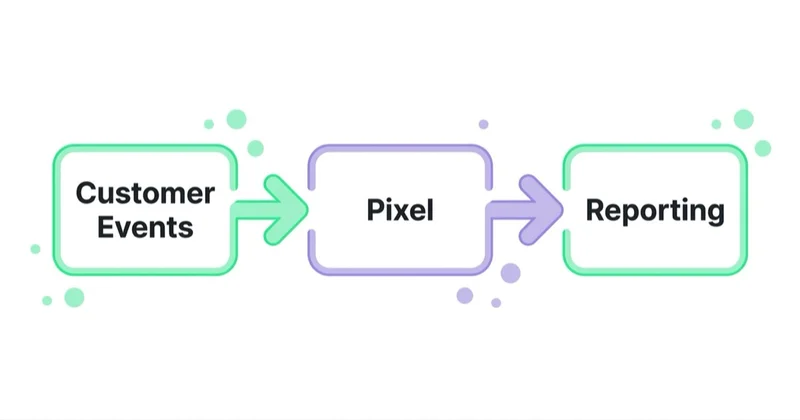
Shopify’s Customer Events area centralises app and custom pixels. Pixels run in a sandbox and receive standard customer events through Shopify-controlled APIs. This can improve isolation, governance and checkout-event access, but sandbox limitations mean old DOM-scraping implementations may not translate directly.
For every pixel, document:
- owner and purpose;
- app pixel or custom pixel;
- permissions and privacy configuration;
- events received and sent;
- order, product and customer identifiers;
- consent categories and data-sale settings;
- browser/server deduplication;
- downstream destination and retention;
- Pixel Helper test evidence;
- fallback or removal plan.
Do not install both an official channel app pixel and a legacy manually injected version without a documented deduplication design. Shopify notes that older pixels migrated to custom pixels may lose measurement features, so verify rather than assuming continuity.
The Shopify stack audit
The duration depends on store complexity; it is not reliably a half-day job. A multi-market Plus store with custom Functions, headless storefronts, ERP and several agencies requires more than an app-list review.
1. Create the inventory
Include:
- installed and recently uninstalled apps;
- sales channels;
- custom and legacy custom apps;
- app extensions, embeds and Functions;
- app and custom pixels;
- theme customisations and old snippets;
- tag-manager containers and tags;
- API credentials, webhooks and middleware;
- externally billed SaaS tools;
- app-managed locations and inventory;
- data exports and warehouse/reporting connections.
2. Build the app register
For each item record:
| Field | What to capture |
|---|---|
| Business purpose | Specific customer or operating outcome |
| Owner | Named business and technical owner |
| Cost | Fixed, usage, revenue share and external charges |
| Permissions | Store and customer data accessed or modified |
| Touchpoints | Theme, checkout, accounts, POS, admin, pixels, functions |
| Dependencies | Apps, workflows, locations, feeds and teams that rely on it |
| KPI and baseline | Metric it should change and current level |
| Reliability | Failure mode, monitoring and support route |
| Data portability | Export method and retention after uninstall |
| Renewal/review | Contract date and next value review |
| Removal plan | Replacement, rollback and clean-up steps |
3. Test overlap and data ownership
Trace purchase, refund, consent, subscriber, product and inventory state from source to every consumer. Look for:
- duplicate welcome, abandonment or review-request automations;
- competing discounts or Shopify Functions;
- multiple product-schema generators;
- duplicate ad pixels and purchase events;
- inconsistent product IDs across feeds;
- conflicting customer tags or segments;
- two systems updating stock, price or consent.
4. Measure storefront and business value
Use an appropriate test design. Before-and-after performance changes can be affected by traffic mix, theme releases and promotions. For critical tools, use feature flags, market or template scope, controlled rollout or a suitable experiment.
Evaluate value as:
Incremental contribution or avoided operating cost − total ownership cost − expected risk cost
An app can be worth keeping even if it does not directly lift revenue: fraud prevention, tax, consent, accessibility or fulfilment controls may protect the business.
5. Decide: keep, reconfigure, replace or remove
- Keep: clear owner, necessary capability, acceptable cost and risk.
- Reconfigure: valuable but overscoped, duplicated or loading where unnecessary.
- Replace: requirement is valid but another option has materially better fit or risk.
- Remove: no active purpose, value below cost, unacceptable permissions or superseded capability.
“Nobody remembers what it does” is a reason to investigate, not to uninstall blindly. The app may be maintaining a critical webhook, discount Function or fulfilment location.
Glossary
- App sprawl: tools and integrations accumulated without current ownership or value review.
- App pixel: an app-provided pixel using Shopify’s Web Pixels API and strict sandbox.
- Theme app extension: an app integration exposed through the theme editor without directly editing theme code.
- Shopify Function: app-provided logic that can extend areas such as discounts, delivery or payments.
- Field data: performance observations collected from real visitor sessions.
- Orphaned code: manual or legacy code left behind after its original integration is removed.
- Source of truth: the authoritative system for a specific data state or decision.
How to remove an app safely
Shopify’s current uninstall guidance highlights several dependencies that a simple click does not resolve.
Before uninstalling:
- identify workflows, Functions, extensions, pixels and other apps that depend on it;
- export required customer, loyalty, subscription, review or reporting data;
- record configuration and templates needed for migration;
- transfer or delete inventory held at an app location as appropriate;
- check current-cycle and usage charges;
- cancel subscriptions billed outside Shopify separately;
- ask the developer whether additional uninstall steps or theme cleanup are required;
- create a tested replacement or manual fallback;
- back up or version the theme before manual code changes.
After uninstalling:
- test purchase, discounts, checkout, account, messages, fulfilment and refunds;
- inspect affected theme templates and network requests for legacy code;
- review Customer Events, Functions, extensions and webhooks;
- confirm external billing stopped;
- verify data deletion or retention commitments with the provider;
- compare Web Performance and business guardrails after enough data matures;
- monitor support tickets and errors through at least one normal operating cycle.
Modern theme app extensions reduce the risk of ghost code because they do not directly edit theme files. Some apps still require manual theme code, and legacy integrations can leave snippets, so use the app-specific uninstall instructions.
How Space Ads approaches the Shopify marketing stack
We start from the growth model and map the capabilities required to measure, acquire, convert and retain profitable customers. We do not prescribe a standard list of apps for every store.
Our operating sequence is:
- inventory the full stack and data flows;
- establish sources of truth for product, customer, consent and purchase data;
- verify Customer Events, ad-channel integrations and deduplication;
- measure storefront performance and conversion by relevant template;
- identify capability gaps, overlap and unsupported custom code;
- rank changes by commercial impact, privacy, reliability and effort;
- make controlled changes with functional and measurement acceptance tests;
- assign ongoing owners, budgets, renewal dates and incident procedures.
Feed and acquisition layers are covered in our guides to product feeds and Shopify with Google Shopping and Performance Max. Where Space Ads owns the wider programme, stack governance sits within our Shopify marketing work.
Common mistakes
| Mistake | Better practice |
|---|---|
| Auditing only the Installed apps screen | Include channels, pixels, Functions, extensions, custom code and external SaaS |
| Assuming every app slows every page | Inspect the integration and measure actual template-level impact |
| Choosing “native” without checking limits | Compare function, cost, data and exit requirements consistently |
| Installing both official and legacy pixels | Define one architecture and deduplicate events with stable IDs |
| Letting two tools write the same customer or product state | Assign a source of truth and explicit write boundaries |
| Removing an unknown app immediately | Investigate dependencies, data, inventory and billing first |
| Measuring app value in attributed revenue alone | Use incremental contribution, avoided cost and risk reduction |
| Changing several apps and the theme at once | Use controlled releases and a change log |
FAQ
How many apps should a Shopify store have? There is no target number. Every app should have an owner, defined capability, acceptable permissions and risk, measurable value and removal plan. Complexity depends on the store’s markets, operations and customisation.
Do Shopify apps slow down a store? Some do; others work only in the admin or backend. Theme scripts, app embeds, pixels and third-party libraries can affect performance differently. Use Shopify’s real-user Web Performance reports plus template-level technical tests to measure the actual effect.
What should I install first on a new store? Start with the minimum capabilities required for legal operation, accurate orders, privacy, measurement, customer communication and fulfilment. Establish lifecycle capture and event architecture before paid acquisition, then add tools only when a validated requirement appears.
Is it better to use native Shopify features or apps? Use the option that meets the requirement with the best total cost and risk. Native and Shopify-made tools can reduce integration complexity, but may have plan, feature or usage limits. Third-party apps can provide specialist depth. Evaluate both.
How do I know if an app is worth keeping? Document the customer or operating outcome, estimate incremental contribution or avoided cost, subtract full ownership cost and assess privacy, reliability and switching risk. Regulatory or operational controls can be valuable even without direct revenue.
What happens when I uninstall an app? Its workflows and features stop, but current-cycle charges, externally billed subscriptions, app-managed inventory, retained data and manually added theme code may need separate action. Export data and review the app’s uninstall instructions first.
Should reviews, email and loyalty come from one vendor or several? Either can work. Define a source of truth and responsibility for consent, messages, customer state and Product structured data. Several vendors are manageable when boundaries and data flow are explicit.
How often should the Shopify stack be audited? Review continuously through ownership and renewal controls, with a deeper audit after major theme, checkout, market, agency or tracking changes and before peak trading. An annual review is a useful minimum for a stable store, not a universal schedule.
Sources and further reading
- Managing apps — Shopify Help Center
- Uninstalling apps — Shopify Help Center
- App pixels — Shopify Help Center
- Web Performance reports — Shopify Help Center
- Storefront app performance — Shopify.dev
- Theme performance best practices — Shopify.dev
Key takeaways
- The stack includes apps, channels, pixels, Functions, extensions, custom code and external systems.
- Evaluate tools on total ownership cost, data access, reliability, storefront impact and exit — not subscription alone.
- Use dependency and acceptance gates instead of one rigid installation order.
- Assign one accountable owner and source of truth per decision, even when several tools support it.
- Customer Events and modern extensions improve governance, but still require consent, deduplication and QA.
- Remove apps through a controlled migration that covers data, billing, inventory, workflows and legacy code.
- Measure real-user performance and commercial value before and after material stack changes.
Continue reading
Auto Parts Ecommerce: Marketing Around the Fitment Problem
Auto parts marketing starts with fitment data. Learn how to connect the catalogue, vehicle selector, product feed, SEO and returns data so customers find parts that genuinely fit.
Local Inventory Ads: The Format Decided by Your Stockroom
Local inventory ads connect nearby demand with products available in physical stores. Learn how to prepare store data, pickup options, landing pages and offline measurement without promising stock the customer cannot buy.

How to Market a Private Label Brand Nobody Has Heard Of
Market an unknown private label by turning a real product advantage into verifiable proof, making the first purchase feel safe and building acquisition around contribution, repeat demand and compliant reviews.


































