Shopify Google Shopping is not won by choosing the right campaign type first. It is won by sending Google a clean product feed, keeping Merchant Center healthy and giving Smart Bidding a conversion value that reflects the economics of the order.
For a DTC store, that means the work starts before Performance Max or Standard Shopping launches. Product titles need to describe what people search for. Product identifiers need to be correct. Variants, availability, price, shipping and returns need to match the site. Custom labels should separate margin, stock, season and priority. Conversion value should account for gross margin and returns, not only revenue.
TL;DR
- The feed is the first campaign setting. Google uses product data to match products to queries and render Shopping ads and free listings.
- Shopify's Google & YouTube channel syncs products to Merchant Center. Shopify says initial product syncing can take up to 24 hours; after that, product changes typically sync within a few hours.
- Merchant Center approval controls eligibility. A product can exist in Shopify and still be invisible in ads because of missing identifiers, price mismatch, unavailable landing pages, policy issues or feed errors.
- Custom labels are the control layer. Use
custom_label_0-4for margin, season, lifecycle, bestseller status, stock risk or return risk so campaigns can follow business priorities. - Standard Shopping and Performance Max do different jobs. Standard Shopping gives product and query control. Performance Max gives broader reach across Google inventory and more automation.
- Performance Max has useful controls, but it still needs clean inputs. Brand exclusions, negative keywords, asset groups, listing groups, channel performance reporting and asset reporting matter only when the feed and values are reliable.
- DTC stores should optimise to margin after returns. Google can restate or retract conversions, but return windows and adjustment deadlines mean the value model should be conservative from the start.
How Shopify connects to Google Shopping
The standard Shopify route is the Google & YouTube sales channel. Shopify's help documentation says the channel automatically syncs products and relevant store information with Google Merchant Center. From there, eligible products can be used for free product listings and paid advertising.
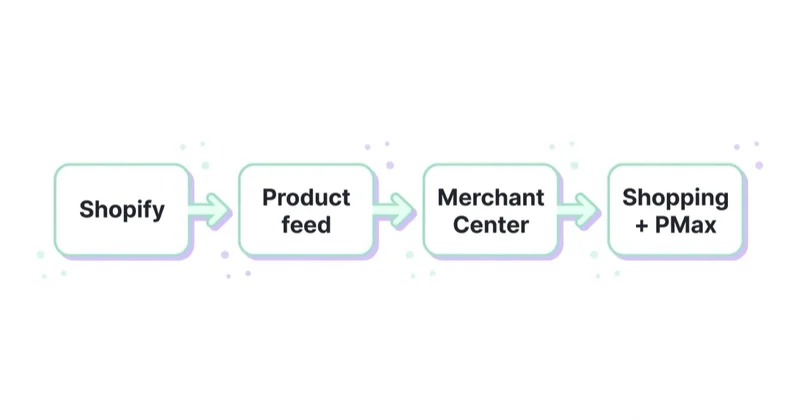
The setup has four separate connections:
- Connect the Google account.
- Connect or create the Merchant Center account that will receive the product data.
- Connect Google Ads if paid Shopping or Performance Max campaigns will run.
- Connect GA4 or another analytics setup if ecommerce measurement needs to be read outside Google Ads.
Shopify also makes two details explicit. First, the Google & YouTube channel is managed by Google, and Merchant Center or Google Ads issues are handled in Google's systems. Second, product sync is not instant: initial syncing can take up to 24 hours, later product changes typically sync within a few hours, and Google applies a 30-day expiry policy to synced product data.
That matters operationally. If a store launches campaigns the same day a large product update goes live, the ads may be optimising against stale product states. If pricing, availability or shipping changes frequently, Merchant Center diagnostics should be part of the daily check, not a monthly clean-up.
Merchant Center is the approval layer
Shopify holds the catalogue. Merchant Center decides whether Google can use it. The most common DTC issues are not advanced bidding problems. They are basic eligibility problems:
- Landing page unavailable or not matching the product URL.
- Price or availability mismatch between Shopify and the feed.
- Missing product image or image with promotional overlays.
- Missing GTIN, MPN or brand where Google expects product identifiers.
- Incorrect
identifier_existsuse for private-label products. - Shipping or tax settings that do not match the target country.
- Products synced to a market where currency, language or shipping is not ready.
- Misrepresentation or policy issues in the Merchant Center account.
Google's product data specification is direct: accurate and correctly formatted product data is essential for ads and free listings, while incorrect or missing information can cause disapprovals, limited eligibility or incorrect display. For a Shopify store, the immediate priority is not adding another campaign. It is clearing the Merchant Center issue list until the products that matter commercially are eligible.
For the account fundamentals behind this layer, see what Google Merchant Center is and how to manage it and what a product feed is and how to use it.
Feed attributes that decide reach
Google does not ask for keywords in Shopping. It reads the product feed. These attributes decide what a product can match, how it appears and how easily the account can be managed.
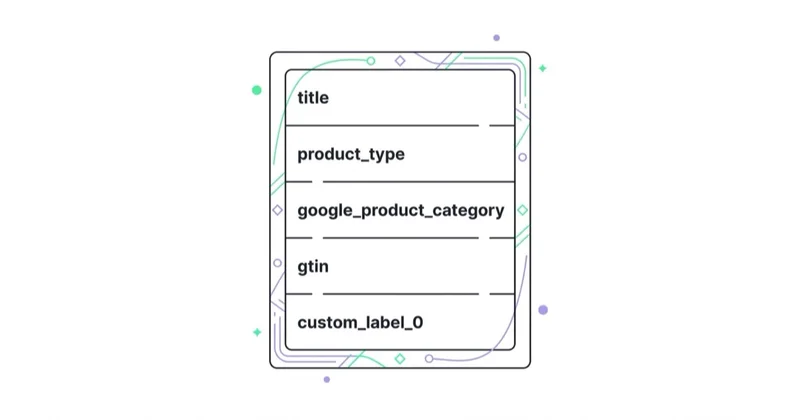
| Attribute | Why it matters | Shopify risk |
|---|---|---|
title |
Required product name and a major relevance signal | Bare internal names that do not describe the product |
structured_title |
Used when titles are generated with AI | AI-generated titles sent as normal title without the structured field |
description |
Required context and product detail | Thin manufacturer text or lifestyle copy with little product information |
google_product_category |
Google's taxonomy for the product | Left unset or mapped too broadly |
product_type |
The merchant's own category path | Blank product type, which weakens reporting and grouping |
gtin, mpn, brand |
Product identifiers used to understand the item | Private-label products handled as if they had missing manufacturer identifiers |
identifier_exists |
Tells Google whether unique identifiers exist | Set to no when identifiers do exist, which can lead to disapproval |
item_group_id, color, size |
Variant clarity | Variants merged or separated incorrectly |
image_link |
First visual impression in the listing | Lifestyle image when a clean product view is needed |
custom_label_0-4 |
Organises bidding and reporting in Shopping campaigns | Unused labels, so margin and business priority disappear from campaign structure |
For DTC brands, titles and custom labels usually deserve the most attention. A title should identify the product clearly and match the landing page. Google specifically warns against promotional text, all caps and gimmicky characters in titles. A useful DTC title pattern is:
Brand + product type + key material/use + colour/variant + gender/size range where relevant
Examples:
| Weak title | Stronger feed title |
|---|---|
| Cloud Hoodie | Brand Cloud Hoodie - Heavyweight Cotton Fleece - Black |
| Runner | Brand Women's Running Shoe - Lightweight Mesh - White |
| Set 02 | Brand Ceramic Dinnerware Set - 4 Piece - Ivory |
The goal is not keyword stuffing. The goal is to make the product easy for Google and the buyer to understand.
Custom labels: the Shopify control layer
Google defines custom_label_0-4 as labels a merchant assigns to organise bidding and reporting in Shopping campaigns. They are optional, not shown to shoppers, and each product can carry up to five custom labels.
For Shopify DTC, use them deliberately:
| Label | Example values | Why it helps |
|---|---|---|
custom_label_0 |
margin_high, margin_mid, margin_low | Keeps target ROAS aligned with economics |
custom_label_1 |
bestseller, core, test, outlet | Separates proven products from catalogue noise |
custom_label_2 |
spring, summer, holiday, evergreen | Supports seasonality without rebuilding the feed |
custom_label_3 |
stock_high, stock_low, preorder | Prevents spend from chasing products that cannot fulfil demand |
custom_label_4 |
return_low, return_high, size_risk | Keeps high-return items from distorting bidding |
This is where Shopify stores often leave money on the table. Without labels, Performance Max and Shopping have to average products with very different margins, stock positions and return profiles. With labels, campaigns can separate a high-margin evergreen bestseller from a low-margin clearance item, even if both sit in the same Shopify collection.
Standard Shopping vs Performance Max
Standard Shopping and Performance Max are not interchangeable. They can both advertise products from Merchant Center, but they solve different problems.
| Dimension | Standard Shopping | Performance Max |
|---|---|---|
| Main strength | Control and product-level visibility | Reach and automation across Google inventory |
| Inventory | Shopping-focused placements and related search surfaces | Search, Shopping, YouTube, Display, Discover, Gmail and Maps |
| Query control | Search-term visibility and negatives | Search insights, search themes, negatives and brand controls |
| Product control | Product groups, priorities and bids | Asset groups, listing groups and product filters |
| Best use | Hero SKUs, margin-sensitive products, query analysis, brand defence | Scaling a clean catalogue with strong conversion value |
| Main risk | Too manual for broad catalogues | Scaling weak feed data or low-margin revenue |
Standard Shopping is still valuable when query visibility matters, when a few products carry most profit, or when a store needs tight control over brand and non-brand demand. Performance Max is valuable when the catalogue is clean, conversion value is trustworthy and the account can benefit from broader Google inventory.
The practical structure for many DTC stores is not "one or the other." It is:
- Standard Shopping for controlled product sets, high-margin SKUs, query learning and brand-sensitive coverage.
- Performance Max for broader scaling once the feed, values and exclusions are ready.
- Search campaigns for exact brand, category and competitor work where text ads and landing-page control matter.
- Separate targets by margin, lifecycle and country instead of one blended ROAS for the entire catalogue.
For more campaign detail, see how to use Google Shopping campaigns effectively, Google PLA Shopping campaigns and Performance Max campaigns.
Performance Max controls that matter for Shopify
Performance Max is broader than old Shopping structures, but it is not a reason to give up control. Google lists several campaign-level controls and reporting options that matter in ecommerce accounts: brand exclusions, negative keywords, search themes, asset reporting, asset group reporting, channel performance, placement reports and conversion tracking.
For Shopify, prioritise these:
- Merchant Center feed quality: PMax can only scale the product data it receives.
- Asset groups and listing groups: group products by label, category, margin or use case instead of putting the whole catalogue in one pool.
- Product filters: restrict products shown in an asset group so creative and landing pages match what the user clicks.
- Brand exclusions and negative keywords: reduce overlap with Search and prevent brand harvesting where it distorts acquisition reporting.
- Final URL expansion settings: decide whether Google can send traffic to alternative URLs or should stay closer to selected product/category pages.
- Channel performance reporting: understand how results are distributed across Google surfaces instead of reading one total.
- Asset reporting: remove weak creative and brief new assets from observed performance rather than opinion.
For Merchant Center feed campaigns, Google also notes that advertisers do not need creative assets to launch a Performance Max campaign, but creative assets can help ads serve across more surfaces. In practice, feed-only can be useful for narrow Shopping-style tests; richer assets are usually needed when the campaign is meant to reach beyond Shopping inventory.
Optimise to margin after returns
Revenue is not profit. For Shopify DTC, this is the most important measurement point in the account.
If a campaign sends gross order revenue as conversion value, Smart Bidding will optimise toward gross order revenue. It will not know that one product has 70% gross margin and another has 35%. It will not know that one SKU has a high return rate unless the value is adjusted or the SKU is isolated. It will not know that a discount-heavy order produces weak contribution margin.
There are three ways to handle this:
- Pass margin-adjusted value at purchase. Use a value closer to gross profit or contribution margin rather than gross revenue.
- Use conversion adjustments for returns and cancellations. Google supports restating a conversion value or retracting a conversion, provided the original conversion can be identified, commonly with an order ID.
- Use custom labels to manage risk. High-return or low-margin products should not live in the same target as high-margin evergreen products.
The timing matters. Google's conversion adjustment documentation says conversion values can be restated or retracted, but adjustments have limits for automated bidding readability and overall processing. It states that for best results, adjustments should be uploaded at least 24 hours after the original conversion; when retracting or restating values, there are up to 7 days after first recording for autobidding readability and 54 days overall for conversion adjustments.
Many DTC return windows are close to or longer than that. So do not rely only on late conversion adjustments. Build a conservative margin model into the original value, then use adjustments where they arrive in time and labels where product economics are structurally different.
Shopify Markets, currency and country structure
Shopify Markets can make international expansion look simple inside Shopify and messy inside Merchant Center. Google requires product data, prices, currency, availability, language and shipping to line up with the target country.
The Google & YouTube app lets stores choose target countries and languages, and Google notes that adding countries can affect Google Ads campaign location settings. Shopify also points out that products synced to Merchant Center can appear on Google surfaces for eligible stores, but eligibility depends on the destination and product data.
For paid media, do not treat markets as a language toggle. Treat each important market as its own commercial system:
- Feed context for country and language.
- Currency and price match between Shopify and Merchant Center.
- Local shipping and returns policy visible on the site.
- Campaign location settings aligned with the feed.
- Separate ROAS or margin targets where duties, returns and fulfilment cost differ.
One global campaign may look cleaner in the interface. It often hides the economics that make one market profitable and another weak.
A practical setup order
| Step | Work | Outcome |
|---|---|---|
| 1 | Install Google & YouTube and connect Merchant Center | Product sync starts |
| 2 | Verify domain, shipping, tax and contact requirements | Merchant Center account can be approved |
| 3 | Map target countries and languages | Products sync to the right destinations |
| 4 | Clean product titles, descriptions, categories and identifiers | Better eligibility and query matching |
| 5 | Add custom_label_0-4 |
Campaigns can follow margin and priority |
| 6 | Fix Merchant Center disapprovals | Priority products become eligible |
| 7 | Set margin-aware conversion values | Bidding learns value closer to profit |
| 8 | Launch controlled Shopping or narrow PMax tests | Early performance is readable |
| 9 | Expand PMax with asset groups and product filters | Scale without mixing weak and strong SKUs |
| 10 | Upload conversion adjustments and review product economics | Returns and cancellations feed back into decisions |
The order is deliberate. Campaign type comes after eligibility, feed quality and value quality. Otherwise the campaign tests the wrong thing.
How Space Ads approaches Shopify Shopping
Across daily audits on 25+ client accounts, the recurring pattern in Shopify Shopping accounts is that the visible campaign settings get too much attention and the underlying inputs get too little. Bids and ROAS targets cannot correct a catalogue where titles are thin, products are disapproved, margin is invisible and high-return SKUs are mixed with profitable core products.
Our first pass is usually:
- Merchant Center diagnostics and product eligibility.
- Product title, category, identifier and variant audit.
custom_label_0-4structure for margin, season, lifecycle, stock and return risk.- Conversion value audit against gross margin and returns.
- Standard Shopping and PMax split based on control needs and scale potential.
- Reporting by product, label, market and network, not only campaign.
That is how Shopping becomes a profit channel rather than a spend channel. It is also the discipline behind our ecommerce work, including Zaxy, and the reason performance marketing for e-commerce has to include feed and measurement work, not only campaign management. For brands where product, margin and seasonality drive outcomes, the same principles apply to fashion and footwear paid media.
Stop doing / Do instead
| Stop doing | Do instead |
|---|---|
| Launching PMax on the default Shopify feed | Clean titles, categories, identifiers and labels first |
| Judging Shopping only on revenue ROAS | Use margin-aware value and account for returns |
Leaving custom_label_0-4 empty |
Label margin, season, lifecycle, stock and return risk |
| Treating Merchant Center warnings as admin work | Treat diagnostics as revenue eligibility |
| One campaign for all countries | Align feed, currency, shipping and targets by market |
| Letting PMax and Search fight over brand | Use brand controls and separate acquisition reporting |
| Reading one campaign total | Review performance by product, label, market and channel |
FAQ
How do I connect Shopify to Google Shopping?
Install the Google & YouTube sales channel from the Shopify App Store, connect a Google account, then connect or create a Google Merchant Center account. Products available to the online store can sync to Merchant Center, where they become eligible for free listings and paid Shopping or Performance Max campaigns if they meet requirements.
How long does Shopify take to sync products to Google?
Shopify says initial product syncing can take up to 24 hours. After the initial sync, product changes typically sync within a few hours. Google also has a 30-day expiry policy on synced product data, so the channel updates products within that period.
Is Google Shopping free for Shopify stores?
The Google & YouTube channel is free to install, and eligible products can appear in free Google Shopping tab listings or other relevant Google surfaces. Paid Shopping ads and Performance Max campaigns are separate and spend through Google Ads.
Should a Shopify store use Standard Shopping or Performance Max?
Use the campaign type that fits the job. Standard Shopping is useful for control, query visibility and high-margin product sets. Performance Max is useful for broader reach and automation when feed quality and conversion value are reliable. Many DTC stores use both.
Why are Shopify products not showing in Google Shopping?
The cause is usually in Merchant Center: product disapproval, missing identifiers, price or availability mismatch, unavailable landing page, shipping issue, target country mismatch or policy problem. Shopify can sync a product successfully while Merchant Center still prevents it from serving.
Which feed attributes matter most for Shopify Google Shopping?
Start with title, description, google_product_category, product_type, gtin, brand, identifier_exists, variant attributes such as color and size, image_link and custom_label_0-4. Titles affect relevance; custom labels affect management and reporting.
How should DTC brands handle returns in Google Ads?
Use margin-aware conversion values at purchase, upload conversion adjustments where return or cancellation data arrives in time, and separate high-return products with custom labels. Do not let raw revenue teach Smart Bidding that a high-return SKU is more valuable than it is.
Do I need a paid feed tool for Shopify?
Not always. The Google & YouTube channel plus careful product data can be enough for many stores. A paid feed tool becomes useful when the catalogue is large, variants are complex, titles need rule-based rewriting, or supplemental feeds save enough operational time to justify the cost.
In short
- Shopify Google Shopping starts with Merchant Center and feed quality, not campaign type.
- The Google & YouTube channel syncs Shopify products to Merchant Center, but eligibility depends on product data, destination settings and account health.
custom_label_0-4is the practical control layer for margin, season, lifecycle, stock and return risk.- Standard Shopping gives control; Performance Max gives broader reach; mature accounts often use both for different jobs.
- DTC stores should optimise to margin after returns, not gross revenue, or campaigns will scale products that look better than they are.
Sources
- Shopify Help Center - Set up the Google & YouTube channel
- Shopify Help Center - Google & YouTube
- Google Merchant Center Help - Syncing your products
- Google Merchant Center Help - Product data specification
- Google Ads Help - About Performance Max campaigns
- Google Ads Help - Create a Shopping campaign
- Google Ads Help - How to adjust your conversions
Continue learning
Continue reading
Performance Max vs Standard Shopping: What Should an Ecommerce Store Use?
Performance Max and Standard Shopping can both advertise Merchant Center products, but they give very different levels of automation, control and reporting. This guide explains when to use PMax, when to use Standard Shopping and when both can work together.
Custom Labels in Google Shopping and Performance Max: How to Segment Products
Custom labels let ecommerce teams segment Merchant Center products by margin, season, stock, bestseller status, lifecycle and return risk. Used well, custom_label_0-4 make Shopping, Performance Max and Demand Gen easier to report, filter and optimise by business priority.

Merchant Center Disapproved Products: How to Find and Fix the Cause
Merchant Center disapprovals usually come from a mismatch between the feed, product page, price, availability, identifiers, images, shipping or Google policy requirements. This guide shows how to diagnose the issue, prioritise fixes by business impact and restore Shopping or Performance Max eligibility.