
Sponsored links are paid search results or paid ad links that appear when a user searches for something online. In Google, they are part of Google Ads and are clearly labelled as ads or sponsored results. They are most often used to drive traffic, leads, phone calls, ecommerce sales and brand visibility from high-intent search queries.
The term "sponsored links" is older than today's Google Ads interface, but the concept is still useful. It describes a paid result that looks similar to a search result, appears near organic results and is paid for by an advertiser. Modern sponsored links are not simple text placements. They use auctions, keywords, match types, responsive search ads, ad assets, landing pages, conversion tracking and automated bidding.
TL;DR
- Sponsored links are paid links shown in search or search-related ad placements.
- In Google Search, ads are labelled separately from organic results, such as with Ads or Sponsored-style labels depending on the surface and current interface.
- The advertiser usually pays when someone clicks, although the campaign strategy and billing context can vary by format.
- Sponsored links are useful when people already search for the product, service, brand or problem.
- They do not directly improve organic SEO rankings, but they can provide useful keyword and conversion data.
- The best sponsored links match query, ad copy and landing page.
- For ecommerce, sponsored links complement Shopping and Performance Max when message control is needed.
- For services and B2B, lead quality matters more than click volume.
What are sponsored links?
Sponsored links are paid ad links displayed in response to user intent. In search engines, they appear near organic results and are marked as advertising. In Google Ads, they are usually part of Search campaigns, Shopping ads, local ads or other paid search-related formats.
The phrase can refer to:
- Google Search text ads;
- paid product listings;
- ads on search partner sites;
- paid links in comparison engines;
- sponsored results in marketplaces;
- paid search placements in other search engines.
This article focuses mainly on Google Ads because that is where the term is most commonly used in performance marketing.
Sponsored links vs organic results
Google's help documentation explains that people can see two types of results: search results and ads. Search results are not part of Google's advertising programs. Ads are labelled and may appear in several places around free search results.
| Area | Sponsored link | Organic result |
|---|---|---|
| Visibility model | Paid advertising | SEO and organic ranking |
| Control over copy | High in the ad platform | Limited by page title, meta and Google's display choices |
| Speed | Can start after setup and approval | Usually slower |
| Cost per click | Paid | No direct click fee, but SEO has costs |
| Testing | Fast message and keyword testing | Slower feedback |
| Longevity | Stops when budget or campaign stops | Can continue if rankings remain |
| Best use | Capture demand and test intent | Build durable visibility and authority |
The strongest strategy often uses both. Sponsored links provide fast data and traffic. SEO builds long-term visibility and reduces dependence on paid clicks.
How sponsored links work in Google Ads
The simplified process:
- The advertiser creates a Google Ads campaign.
- Keywords, targeting, ads, assets and landing pages are configured.
- A user searches for something.
- Google checks which ads are eligible.
- Eligible ads enter an auction.
- Ad position and cost are influenced by bid, relevance, quality, assets and auction context.
- The user clicks or does not click.
- Conversion tracking records valuable actions when configured correctly.
The highest bid does not automatically win everything. Relevance and expected user experience matter. A useful ad with a strong landing page can compete more efficiently than a vague ad with a higher bid.
That is why sponsored links should be planned as a system: query, keyword, ad, asset, landing page, conversion action and follow-up all need to point in the same direction.
What a sponsored link contains
Modern Google Search ads can include several parts.
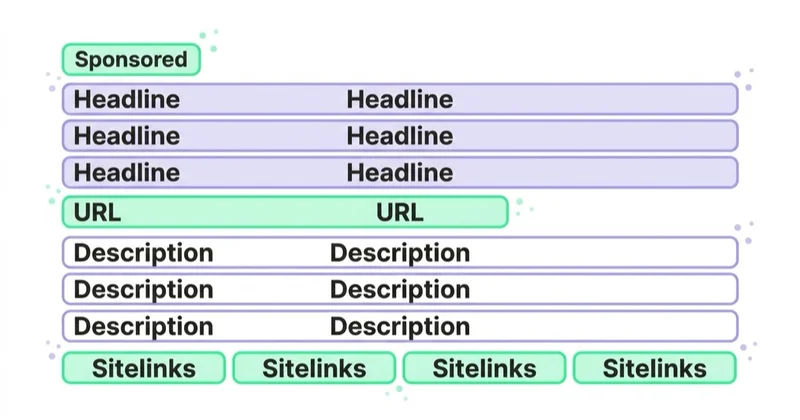
Headlines
Headlines carry the main message. They should reflect the search intent, product, service or offer.
Descriptions
Descriptions add context, proof, conditions or next steps. They should not promise something the landing page does not deliver.
Display URL and paths
The visible URL helps users understand where they will go. Path fields can reinforce topic relevance.
Ad assets
Assets can add sitelinks, callouts, snippets, calls, locations, prices, promotions and other useful information.
Label
Search ads are labelled as ads or sponsored results depending on interface and placement. This separates paid results from organic results.
For the technical Search Ads setup, read Search Advertising in Google Ads: What to Know.
When sponsored links make sense
Sponsored links are useful when:
- search demand already exists;
- users express clear intent;
- a product or service can be explained on a landing page;
- the business needs traffic quickly;
- SEO visibility is not yet strong;
- seasonal offers need fast promotion;
- brand terms need protection;
- campaigns need conversion data;
- competitors are visible in paid results;
- the business can measure leads or sales.
They are weaker when the market does not yet know the category. In that case, demand creation through content, PR, social, YouTube, Demand Gen or partnerships may be needed before search volume exists.
Search intent behind sponsored links
Sponsored links work best when the intent behind the query is understood.
| Intent type | Example query | Better landing page |
|---|---|---|
| Informational | how does Google Ads work | educational article or guide |
| Commercial | best Google Ads agency for ecommerce | service page with proof and fit |
| Comparison | Google Ads vs Meta Ads | comparison page or consultation page |
| Transactional | book Google Ads audit | audit landing page with clear CTA |
| Local | Google Ads agency Warsaw | local service page, reviews and contact |
| Brand | Space Ads Google Ads | brand-controlled page or service page |
Not every query deserves the same bid or same CTA. Informational queries may support future demand, but high-intent commercial and transactional queries usually need the most precise landing pages.
Types of sponsored links and search ads
Brand sponsored links
Brand ads appear for searches containing the company or product name. They can protect traffic, control sitelinks and defend against competitors.
They should be reported separately because brand users already know the business.
Generic sponsored links
Generic ads appear for non-brand searches such as "google ads agency" or "running shoes for winter". They are usually more expensive and more important for growth.
Local sponsored links
Local search ads can support businesses that need calls, directions, bookings or store visits. Location quality, opening hours, phone handling and landing pages matter.
Product sponsored links
Product search can be served by Search text ads, Shopping ads or Performance Max depending on setup. Product feed quality becomes important when Shopping is involved.
Competitor sponsored links
Competitor campaigns target searches related to competing brands. They can work, but they require caution, legal review, careful copy and realistic expectations.
Sponsored links and SEO
Sponsored links do not directly buy organic rankings. Paying for Google Ads does not make a page rank higher in organic search.
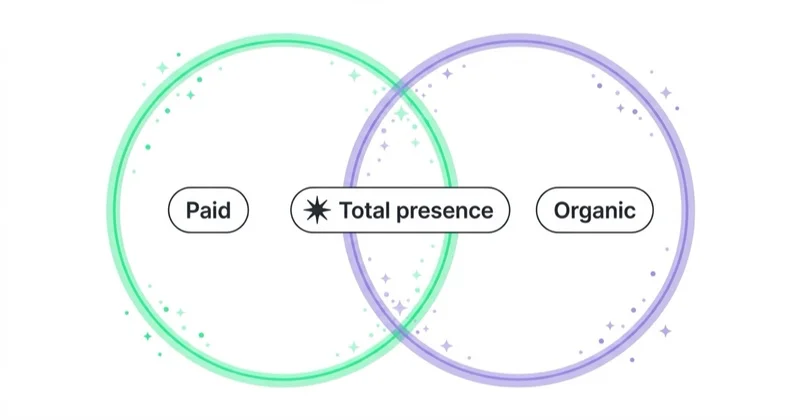
However, paid search data can help SEO:
- identify high-converting queries;
- test title and messaging ideas;
- reveal landing page gaps;
- compare brand vs non-brand demand;
- find questions and objections;
- prioritise content topics;
- understand which offers convert.
SEO and sponsored links should share learning, but performance should be reported separately.
For organic content planning, read What to Write Blog Posts About?.
How to use sponsored links well
1. Choose intent, not only volume
A keyword with lower volume but clear buying intent can be more valuable than a broad, popular keyword.
2. Match the landing page
The landing page should answer the same promise as the ad. A user searching for "google ads audit" should not land on a generic homepage.
3. Use negative keywords
Negative keywords stop ads from showing on irrelevant searches. They protect budget and improve query quality.
4. Separate campaign types
Brand, generic, competitor, local and informational campaigns should not be judged as one average. Each has different intent and economics.
5. Use assets
Assets make the sponsored link more useful and give users better paths to important pages.
6. Measure real outcomes
Track sales, qualified leads, calls, bookings, demo requests, conversion value and offline outcomes where possible. Clicks are not enough.
7. Review search terms
Search terms show what people actually typed or what queries matched the campaign. They help identify irrelevant traffic, new keyword ideas, negative keywords and landing-page gaps.
8. Separate learning from scaling
The first weeks should usually focus on tracking, query quality, landing-page fit and lead or sale quality. Scaling budget before those basics are stable can make the account spend faster without becoming more profitable.
Sponsored links for ecommerce
In ecommerce, sponsored links can drive traffic to:
- product pages;
- category pages;
- brand pages;
- sale pages;
- comparison pages;
- seasonal collections;
- high-margin categories;
- local inventory pages.
They should complement Shopping and Performance Max. Shopping shows product cards from feed data. Sponsored Search links give more control over message, sitelinks and landing page choice for strategic searches.
Read How to Use Google Shopping Campaigns Effectively? for the product-feed side.
Ecommerce sponsored links are often strongest when they support searches that need text explanation. For example, a product category with many variants may need Search ads that explain delivery, fit, material, warranty or use case. Shopping ads show products from the feed, while sponsored Search links can control the argument around the category.
Sponsored links for B2B and services
For services, sponsored links should focus on quality:
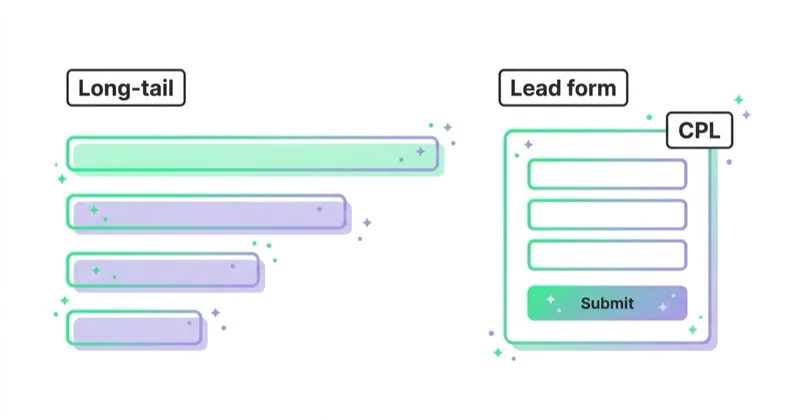
- service-specific landing pages;
- strong lead qualification;
- location targeting;
- call tracking;
- form tracking;
- offline conversion imports where possible;
- negative keywords for jobs, courses, free, templates and unrelated intent;
- separate reporting for brand and non-brand.
The goal is not to generate the most leads. The goal is to generate leads that sales can actually use.
For B2B, it is often useful to import qualified lead stages or offline conversion data. A campaign that optimizes only for every form submission can learn to generate cheap but weak leads.
Launch checklist
Before launching sponsored links, check:
- primary conversion action is configured;
- call tracking is set up if calls matter;
- landing page matches the query intent;
- brand and generic campaigns are separated where useful;
- negative keyword list covers obvious waste;
- locations and languages match the business;
- ad assets are added where relevant;
- responsive search ads have varied headlines and descriptions;
- final URLs and tracking templates work;
- budget is realistic for the auction;
- reporting separates leads, qualified leads, revenue and margin where possible.
This checklist is especially important for small budgets. A small campaign has less room for irrelevant clicks, weak keywords or a homepage that does not answer the search.
How to measure sponsored links
Useful metrics include:
- impressions;
- clicks;
- CTR;
- CPC;
- search terms;
- conversions;
- conversion rate;
- CPA;
- conversion value;
- ROAS;
- impression share;
- lost impression share due to budget or rank;
- Quality Score diagnostics;
- landing-page conversion rate;
- lead quality;
- offline revenue or sales feedback.
Do not judge all sponsored links together. Brand campaigns, generic campaigns, competitor campaigns and local campaigns have different economics. Reporting them as one average can hide weak acquisition behind strong brand demand.
Common mistakes
| Mistake | Why it hurts | Better approach |
|---|---|---|
| Treating sponsored links like SEO | Paid and organic work differently | Report and optimise separately |
| Sending all traffic to the homepage | Intent is not answered | Use specific landing pages |
| No negative keywords | Budget leaks into irrelevant searches | Review search terms |
| Reporting brand and generic together | Results look artificially strong | Segment intent |
| Optimising for clicks | Click volume hides poor quality | Optimise for conversions and value |
| Weak ad copy | Users do not see relevance | Match query and offer |
| No assets | Ads are less useful | Add sitelinks, callouts and relevant assets |
| No conversion tracking | Bidding learns from weak data | Fix measurement first |
How we approach this at Space Ads
At Space Ads, we plan sponsored links from search intent and landing-page fit, not from keyword volume alone. Brand, generic, competitor, local and product searches have different economics, so they should not be mixed into one average CPA or ROAS. Before scaling, we check conversion tracking, search terms, negative keywords, ad assets, Quality Score diagnostics, landing-page promise and post-click lead or order quality. For ecommerce, sponsored links are useful when text ads can explain category value, delivery, warranty, fit or use cases better than a product card alone. For B2B and services, we optimise toward qualified enquiries and offline outcomes, not raw form volume.
FAQ
Are sponsored links the same as Google Ads?
Usually, in everyday marketing language, sponsored links refer to paid search ads in Google Ads. The phrase can also describe paid search-like links in other platforms.
Are sponsored links marked as ads?
Yes. Google separates ads from organic results with labels such as Ads or Sponsored-style labels depending on the current interface and placement.
Do sponsored links improve SEO?
No, they do not directly improve organic rankings. They can provide useful keyword, conversion and landing page data for SEO planning.
Do advertisers pay for impressions or clicks?
In classic Search campaigns, advertisers commonly pay for clicks. Other campaign types and bid strategies may optimise around conversions, value or impressions depending on setup.
Are sponsored links good for small businesses?
Yes, if scope is focused. Small businesses should usually start with high-intent keywords, tight locations, relevant landing pages and strong negative keywords.
Why are sponsored links expensive?
Costs rise when competition, conversion value and buyer intent are high. The solution is not only lower bids. Relevance, landing page quality and conversion rate also matter.
How quickly do sponsored links work?
They can start generating traffic soon after setup and approval, but profitable learning takes longer. Early optimisation should focus on search terms, conversion tracking, landing-page fit and lead or sale quality.
Should sponsored links be used with SEO?
Yes. Sponsored links and SEO serve different roles. Paid search can test intent and messaging quickly. SEO can build longer-term visibility and reduce dependence on paid clicks.
Conclusion
Sponsored links are useful because they place a paid result in front of people who are already searching. They can generate fast visibility, leads, sales and learning, but only when query, ad and landing page match.
Use sponsored links for intent that matters. Separate brand from generic. Add assets. Measure real outcomes. Feed the learning into SEO, Shopping, Performance Max and landing page optimisation so paid search improves the whole acquisition system.
Running sponsored links — from structure and keywords to measurement — is something you can hand to us within Google Ads campaigns.
Sources and further reading
- Google Ads Help: How Google search results differ from ads
- Google Blog: How Google Search ads work
- Google Blog: New sponsored results label in Google Search
- Google Search: Ads on Search
- Google Ads Help: Create a Search campaign
- Google Ads Help: About the Google Search Network
- Google Ads Help: About responsive search ads
- Google Ads Help: About Quality Score
Continue learning
- Search Advertising in Google Ads: What to Know
- What Is the Google Search Network and How to Use It?
- What Are Keyword Match Types in Google Ads and How to Choose Them?
- What Are Responsive Search Ads in Google Ads?
- What Are Google Ads Extensions (Assets) and How to Use Them?
- Quality Score in Google Ads: What It Is and How to Improve It
Continue reading
Google Ads Editor: What It Is and How to Use It
Google Ads Editor is a free desktop app for offline editing, bulk changes and campaign builds. Learn when to use it, how the workflow works and how to post changes safely.

PPC Management Software for Agencies in 2026: What Actually Saves Time
Use this to evaluate PPC software after the old bid-management era. It explains why agencies now need cross-account standards, anomaly detection, reporting, workflow and AI-assisted change review more than another interface for manual bid tweaks.
What Are Dynamic Search Ads (DSA) and Are They Worth Using?
Dynamic Search Ads use website content to match searches, generate headlines and choose landing pages. In 2026, DSA strategy should focus on AI Max migration and URL control.


































