
Google Trends is worth using when the goal is to understand relative search interest, seasonality, regional differences and emerging topics. It is not a keyword volume tool. Trends data is normalized on a 0-100 scale, so it shows direction and proportion rather than exact monthly searches. The best alternative depends on the question: use Keyword Planner for search volume and CPC estimates, Search Console for real queries from an existing site, GA4 and sales data for behavior and revenue, and SEO or social tools for competitive and platform-specific insight.
Google Trends is useful because it shows when interest rises, falls or shifts geographically. It is dangerous when treated as a precise demand forecast. A score of 100 does not mean a term has 100 searches. It means the term reached its highest relative popularity in the selected time, region and category. That makes Google Trends excellent for timing and comparison, but weak as a standalone planning source.
TL;DR
- Google Trends shows relative search interest, not exact search volume.
- The 0-100 scale is normalized. A value of 100 marks the peak interest within the selected settings.
- It is strong for seasonality, regional interest, rising queries, news spikes and comparing topics.
- It is weak for precise SEO forecasting, exact keyword volume, CPC, conversion intent and revenue prediction.
- The best alternatives depend on the job. Keyword Planner, Search Console, GA4, CRM data, ecommerce data, SEO platforms and social trend tools each answer different questions.
- Use topics when possible, not only raw search terms. Topics can group language variants and related wording.
- For content strategy, combine Google Trends with keyword research, SERP analysis, Search Console and business data.
What Google Trends is
Google Trends is a tool that shows how search interest changes over time, across regions and across related topics or queries. It helps answer questions such as:
- Is this topic seasonal?
- When does interest usually start rising?
- Which region shows stronger interest?
- Which related queries are growing?
- Is a spike likely connected to news?
- Is one topic gaining relative interest compared with another?
- Should content or campaigns be prepared before a seasonal peak?
Google Trends data is anonymized, categorized and aggregated. It is designed for pattern recognition, not exact search volume reporting.
How Google Trends data works
The most important concept is normalization.
Google Trends does not show raw search counts. It places results on a 0-100 scale based on relative popularity for the selected query or topic, region and time range.
In practical terms:
- 100 means the highest relative interest in the selected view;
- 50 means roughly half the relative interest of that peak;
- 0 can mean there was not enough data, not necessarily zero searches.
This is why changing the region, category or time range can change the chart. The same term may look different when viewed worldwide over five years versus in one country over 90 days.
Search term vs topic
Google Trends can compare search terms and, when available, topics.
A search term is closer to the literal words typed by users. A topic groups related searches around a concept, including language variants and related wording. Topics are often better when comparing broad ideas across regions or languages.
Example:
- Search term: "running shoes"
- Topic: running shoe as a concept
For SEO, search terms can be useful when the exact wording matters. For market research, topics can be better because they reduce language and wording bias.
When Google Trends is useful
Seasonality planning
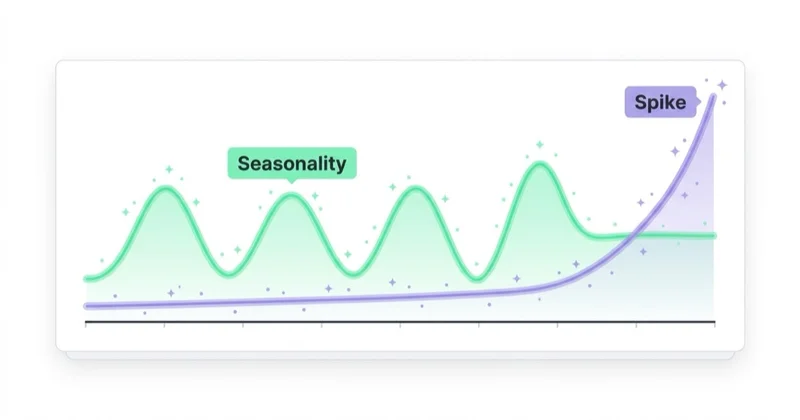
Google Trends is excellent for seeing when demand starts rising.
Use it for:
- holiday campaigns;
- seasonal products;
- tax, education or finance topics;
- travel planning;
- fitness and health trends;
- fashion seasons;
- home improvement cycles;
- B2B event cycles.
The practical value is timing. If interest starts rising six weeks before peak sales, content, stock, creative, landing pages and campaigns should be ready before that curve begins.
Content planning
Google Trends can help decide when to publish or refresh content.
Use it to identify:
- topics gaining attention;
- recurring seasonal questions;
- related rising searches;
- regional differences;
- news-driven spikes;
- evergreen topics with stable demand.
It should not be the only content planning tool. A topic may trend but have weak business value. Another topic may have lower search interest but much stronger conversion intent.
For content ideation, read What to Write Blog Posts About? and What Is Evergreen Content and Why Do You Need It on Your Blog?.
Keyword research support
Google Trends can show whether a keyword cluster is growing or declining, but it should be paired with volume and intent data.
Use Trends to ask:
- Is this keyword group seasonal?
- Is the category growing over time?
- Is the term more popular in one region?
- Is a new term replacing an old term?
- Are related queries emerging?
Then validate with Keyword Planner, Search Console, SERP analysis and SEO tools.
For keyword strategy, read What Are Keywords and How to Use Them in Marketing? and What Is a Keyword Matrix and How to Use It?.
Campaign timing
For paid campaigns, Trends helps plan when demand begins, not only when sales peak.
Useful questions:
- When should awareness campaigns start?
- When should remarketing lists be warmed up?
- When should landing pages be updated?
- When should budgets increase?
- Which regions should get earlier coverage?
- Is the trend stable or a short news spike?
For example, if searches for a product category start increasing in March but sales peak in May, campaign assets should not be prepared in late April.
Market and regional comparison
Google Trends can show which regions over-index for a topic. This can support:
- local SEO planning;
- regional landing pages;
- localized paid campaigns;
- store expansion hypotheses;
- content localization;
- media planning.
Do not confuse relative regional interest with market size. A smaller region can show high relative interest but still produce fewer total searches or sales than a larger region.
What Google Trends does not do
Google Trends does not show:
- exact search volume;
- exact monthly searches;
- SEO difficulty;
- CPC;
- competition level;
- conversion rate;
- revenue;
- audience demographics in full detail;
- ranking opportunities by itself;
- whether a query converts.
It also does not explain intent fully. A spike could mean purchase intent, curiosity, controversy, news, entertainment or research. Always check the search results, related queries and business data.
Google Trends vs Keyword Planner
Google Trends and Keyword Planner answer different questions.
| Tool | Best for | Limitation |
|---|---|---|
| Google Trends | Seasonality, direction, regional interest, rising topics | No exact volume |
| Keyword Planner | Keyword ideas, average monthly search estimates, CPC and paid search planning | Built for Google Ads, ranges and forecasts require interpretation |
| Search Console | Real queries and pages for an existing site | Only your property data, not full market demand |
| GA4 | User behavior and conversion data | Does not show total search demand |
| SEO tools | Competitive visibility, keyword difficulty, SERP analysis | Third-party estimates vary |
| Social tools | Platform-specific attention and creative trends | Not the same as Google Search intent |
Keyword Planner is better when the question is "how many searches might this keyword get and what could clicks cost?" Google Trends is better when the question is "is interest rising, seasonal or regional?"
Best Google Trends alternatives by use case
For search volume: Google Keyword Planner
Use Keyword Planner when planning Google Ads or estimating search demand. It can help discover new keyword ideas, see average monthly search estimates and review cost-related signals for paid search.
It is not a perfect SEO volume source, but it is closer to volume planning than Google Trends.
For existing SEO performance: Google Search Console
Search Console is the best source for real Google Search queries and pages from an owned website.
Use it to see:
- queries that already generate impressions;
- pages gaining or losing clicks;
- CTR changes;
- average position trends;
- content refresh opportunities;
- mismatches between query and landing page.
Trends shows the market pattern. Search Console shows how the site participates in that pattern.
For behavior and conversion: GA4
GA4 helps answer what users do after arriving.
Use it for:
- landing page engagement;
- conversions;
- key events;
- ecommerce behavior;
- channel performance;
- campaign traffic;
- funnel analysis.
A trend without conversion data is only interest. GA4 helps connect interest with outcomes.
For business truth: CRM, ecommerce and sales data
Marketing tools can show demand signals, but business systems show value.
Use:
- CRM lead status;
- pipeline value;
- closed revenue;
- ecommerce orders;
- return rate;
- margin;
- customer lifetime value;
- stock availability.
This is especially important when a trend looks exciting but the category is low-margin, hard to fulfill or weak commercially.
For social and creator trends: TikTok Creative Center and platform tools
Google Trends is search-focused. Social platforms move differently. TikTok, Instagram, YouTube and Reddit can surface trends before they become search demand.
For TikTok specifically, use TikTok Creative Center: What It Is and How to Use It alongside Google Trends when the audience discovers products through short-form content.
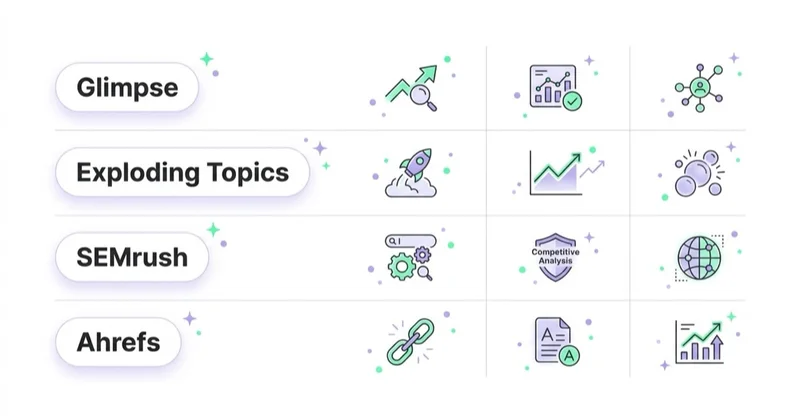
For SEO competition: Ahrefs, Semrush, Sistrix or similar tools
Third-party SEO tools can help estimate keyword difficulty, competitor visibility, backlinks, SERP features and ranking opportunities. Their numbers are estimates, but they add competitive context that Google Trends does not provide.
How to use Google Trends for content strategy
A practical workflow:
- Choose a topic cluster.
- Compare broad topic interest over 3-5 years.
- Check seasonality by country or region.
- Review related rising queries.
- Validate keywords in Keyword Planner or SEO tools.
- Inspect SERPs for intent.
- Check Search Console for existing pages and queries.
- Map content to funnel stage.
- Publish or refresh content before the demand curve rises.
- Measure results in Search Console, GA4 and business data.
This avoids a common mistake: writing about a trend after the peak has already passed.
How to use Google Trends for ecommerce
In ecommerce, Trends can support planning, but it should not replace product and sales data.
Use it for:
- seasonal category planning;
- gift guide timing;
- collection launches;
- content calendars;
- category landing page refreshes;
- promotional timing;
- inventory hypotheses;
- regional paid media tests;
- product naming research.
Example:
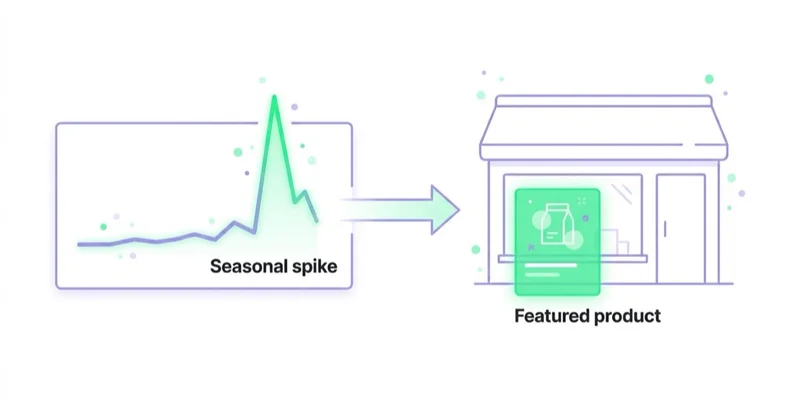
If interest in "garden furniture" starts rising in early spring, product category pages, buying guides, images, feed data, paid campaigns and stock planning should be ready before the peak. Waiting until the chart reaches 100 is usually too late.
Pair Trends with How to Audit an Ecommerce Store, product feed data and actual sales reports.
How to interpret rising and breakout queries
Related queries can be marked as top or rising. Rising queries show terms with the biggest growth. Some may appear as breakout, meaning the growth is especially large from a low base.
Use rising queries carefully:
- check whether the topic is news-driven;
- inspect search results;
- compare multiple time ranges;
- check whether the term has commercial intent;
- validate with keyword tools;
- see whether competitors already cover it;
- decide whether the topic fits the brand.
Not every breakout query deserves content. Some are short-lived, irrelevant or too news-dependent.
How we approach this at Space Ads
We use Google Trends mainly to sense timing, not to count volume. It shows when interest is climbing, seasonally or around a fresh trend, and in advertising timing can weigh as much as budget. The win is getting onto a rising wave early: while demand is still ramping, competitors haven't bid the price up yet, so reach is cheaper. Wait for the peak and you're bidding in the crowd, when CPMs are at their worst. For seasonal clients we therefore plan budget scaling ahead of the Trends curve instead of reacting once the peak is already on. Absolute numbers we pull from Keyword Planner, since Trends only deals in relative values. It answers "when", not "how much".
Common mistakes
| Mistake | Why it hurts | Better approach |
|---|---|---|
| Treating 0-100 as search volume | Leads to false estimates | Use Trends for relative interest only |
| Changing time ranges without noticing | Charts become incomparable | Keep settings consistent |
| Comparing regions as market size | Relative interest is not population-adjusted demand | Combine with volume and sales data |
| Chasing every spike | Creates reactive content | Separate news spikes from durable trends |
| Ignoring intent | High interest may not convert | Inspect SERPs and behavior data |
| Using only one tool | Decisions become shallow | Combine Trends, Keyword Planner, GSC and business data |
| Publishing after peak | Content misses demand | Plan before the curve rises |
Google Trends checklist
Before using a trend in strategy, answer:
- What region is selected?
- What time range is selected?
- Is this a search term or topic?
- Is the trend seasonal or news-driven?
- Are related queries relevant?
- Does Keyword Planner show demand?
- Does Search Console show existing opportunity?
- What does the SERP intent look like?
- Does the topic have business value?
- Is there enough time to publish before the peak?
- Can results be measured after launch?
FAQ
Does Google Trends show exact search volume?
No. Google Trends shows relative search interest on a normalized scale, not exact search counts.
What does 100 mean in Google Trends?
It marks the highest relative interest point for the selected term or topic, region and time range. It is not a count of searches.
Is Google Trends good for SEO?
Yes, as a supporting tool. It is useful for seasonality, topic direction and related queries, but SEO decisions should also use Search Console, keyword tools, SERP analysis and business priorities.
What is the best alternative to Google Trends?
There is no single best alternative. Keyword Planner is better for search volume and CPC estimates. Search Console is better for an existing site's queries. GA4 is better for behavior and conversions. SEO tools are better for competitive analysis.
Should ecommerce teams use Google Trends?
Yes, especially for seasonal planning, category demand signals, content calendars and campaign timing. It should be paired with inventory, margin, revenue and product availability data.
Can Google Trends predict sales?
Not by itself. It can show interest patterns that may correlate with demand, but sales depend on price, availability, competition, offer, brand, channel mix and conversion rate.
Is a breakout query always worth targeting?
No. Breakout can mean fast growth from a small base. Check intent, durability, relevance and commercial value before creating content or campaigns.
Should social trends be checked separately?
Yes. Search trends and social trends move differently. TikTok, Instagram, YouTube, Reddit and other platforms can surface demand before or without Google Search growth.
Conclusion
Google Trends is a strong tool when used for the right job. It helps identify direction, timing, seasonality, regional differences and emerging interest. It is weak when treated as a keyword volume tool or a sales forecast.
The best strategy is to use Google Trends as an early signal, then validate with Keyword Planner, Search Console, GA4, SEO tools and business data. Trends can show what people are starting to care about. The rest of the research determines whether that attention is worth turning into content, campaigns, stock, landing pages or product strategy.
Sources and further reading
- Google Trends Help - FAQ about Google Trends data
- Google Trends Help - Compare Trends search terms
- Google Trends Help - Find related searches
- Google Ads Help - Use Keyword Planner
- Google Ads Help - Refine new keywords in Keyword Planner
- Search Console Help - Performance report
Continue learning
Continue reading
What Is Inbound Marketing and How to Use It?
Inbound marketing attracts potential customers through useful content, SEO, education, trust, email, CRM and customer experience instead of only interruptive promotion.

Is It Worth Building a WordPress Store with WooCommerce?
WooCommerce is worth it when a store needs WordPress content flexibility, SEO control and ownership. Learn when it beats hosted ecommerce platforms and when it creates risk.

Content marketing, a way to build a professional image of the company
Content marketing is a long-term strategy for building trust, demand and search visibility through useful content. This 2026 guide explains strategy, topic clusters, E-E-A-T, AI search, distribution, measurement and practical use cases for e-commerce, B2B and services.


































