
WCAG 2.2 is the latest version of the Web Content Accessibility Guidelines published by W3C. It contains testable success criteria at three conformance levels — A, AA and AAA. For a commercial team, many of those criteria also describe familiar usability defects: focus hidden behind a sticky footer, a label that disappears when the user types, an error that does not identify the field, or a target that is difficult to operate on a phone. Removing these barriers is necessary for accessibility and can also make transactional journeys easier for a wider group of users. The effect on conversion depends on the site and should be measured rather than assumed.
TL;DR
- WCAG 2.2 was published on 5 October 2023, with an update published on 12 December 2024, and W3C states that content conforming to WCAG 2.2 also conforms to WCAG 2.1 and WCAG 2.0.
- The nine criteria new in WCAG 2.2 are unusually commercial. Focus not obscured, dragging movements, target size, consistent help, redundant entry and accessible authentication all live in checkout, forms and login.
- One criterion was removed. W3C states WCAG 2.2 removed 4.1.1 Parsing, so a validator error is no longer an accessibility failure on its own.
- The European harmonised standard and the current W3C version are not in step. W3C notes that EN 301 549 currently uses WCAG 2.1, which is why "which version do we build to" is a question with two defensible answers.
- The European Accessibility Act covers specified products and consumer services, including e-commerce, consumer banking, e-books, parts of passenger transport and electronic communications. Member States had to transpose it by 28 June 2022 and apply their measures from 28 June 2025.
- The directive includes exemptions and limitations. Microenterprises providing services are exempt, and the text also addresses fundamental alteration, disproportionate burden, excluded content and transition arrangements. National implementation still needs to be checked.
- Whether it applies to a specific business is a legal question. That call belongs to the client's lawyers, not to a marketing agency, and this article does not make it.
- Automated scanners cannot decide conformance. W3C states that evaluation tools cannot determine accessibility, only assist in doing so, and that human judgement is required.
- Combine manual and automated evaluation. Keyboard and zoom checks expose barriers in real tasks, automated tools find repeatable technical defects, and screen-reader evaluation should involve someone proficient with that technology.
- Use one delivery backlog but preserve accessibility as an acceptance requirement. A blocker or a requirement identified in the applicable remediation scope should not wait for a CRO experiment.
The overlap is not a coincidence
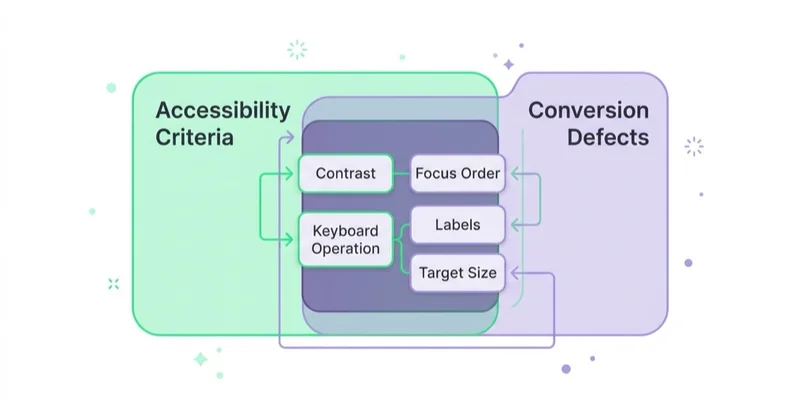
Accessibility criteria and conversion defects overlap because they describe the same thing from different angles. A success criterion says this interface must be operable and understandable without assumptions about the user. A conversion audit says this interface loses people at step three. When someone cannot see which field has focus, cannot tell that the grey text was a label, or cannot reach the "apply" button with a thumb, both statements are true at once.
The same implementation ticket can often remove an accessibility barrier and reduce friction for other users. That is why accessibility checks belong inside a UX audit and the product definition of done. A formal conformance assessment can still require a different scope, evidence standard and specialist sign-off; combining delivery backlogs does not make those deliverables interchangeable.
If you need the ground floor on conversion work first, start from what conversion rate optimization is or the complete conversion optimization guide. This article assumes that context and goes at the overlap directly.
| Accessibility requirement | What it says | What it costs you when it fails |
|---|---|---|
| Contrast (Minimum), 1.4.3 | At least 4.5:1 for normal text, at least 3:1 for large-scale text | Grey-on-white legal copy, prices and shipping terms nobody reads before abandoning |
| Non-text Contrast, 1.4.11 | At least 3:1 against adjacent colours | Ghost buttons and input borders that read as disabled, so people do not click them |
| Keyboard, 2.1.1 | All functionality operable through a keyboard interface | Custom dropdowns, size pickers and modals that dead-end anyone not using a mouse |
| Focus Order, 2.4.3 | Focusable components receive focus in an order that preserves meaning | Tab order jumping from the address field into the footer, so forms get half-filled |
| Labels or Instructions, 3.3.2 | Labels or instructions are provided when content requires user input | Placeholder-only fields where the label vanishes on typing and the user cannot verify what they entered |
| Error Identification, 3.3.1 | The error is identified and described to the user in text | "Something went wrong" on a payment step, which converts a fixable typo into an abandoned order |
| Error Suggestion, 3.3.3 | Suggestions for correction are provided when known | Rejected phone or postcode formats with no example of the accepted one |
| Target Size (Minimum), 2.5.8 | Pointer targets at least 24 by 24 CSS pixels, with defined exceptions | Quantity steppers, filter checkboxes and remove-from-cart controls that miss on a phone |
Every row above is a defect a merchant would want fixed even if no standard existed. That is the argument in one table.
Short glossary
- Success criterion — a single testable requirement in WCAG, identified by number and assigned a conformance level.
- Conformance level — A, AA or AAA; AA is a common practical and procurement target, but the applicable requirement comes from the relevant law, contract or policy.
- CSS pixel — the reference unit WCAG measures sizes in, so a target size requirement is independent of screen density.
- Focus indicator — the visible marker showing which control the keyboard is currently on.
- Screen reader — software that renders the page as speech or braille, driven by the accessibility information the markup exposes.
- EN 301 549 — the European standard for accessibility requirements for ICT products and services, referenced in European procurement and regulation.
- Directive — an EU act that binds Member States to a result and takes legal effect through national laws, not directly.
What WCAG 2.2 added, and why those nine matter commercially
WCAG 2.2 added nine success criteria and removed one. The removal is worth knowing so nobody wastes a sprint on it: W3C states that WCAG 2.2 removed 4.1.1 Parsing, so raw HTML validator output is no longer an accessibility criterion in its own right.
The nine additions are where the commercial case sits, because they are concentrated in exactly the places where money changes hands.
| New in WCAG 2.2 | Level | The commercial surface it lands on |
|---|---|---|
| 2.4.11 Focus Not Obscured (Minimum) | AA | Sticky headers, sticky checkout footers, cookie banners and chat widgets covering the field being typed into |
| 2.4.12 Focus Not Obscured (Enhanced) | AAA | The stricter version of the same problem |
| 2.4.13 Focus Appearance | AAA | Focus indicators that are technically present but visually invisible |
| 2.5.7 Dragging Movements | AA | Size and price sliders, image zoom, seat and table maps, drag-to-reorder baskets — each needs a single-pointer alternative |
| 2.5.8 Target Size (Minimum) | AA | Mobile controls: steppers, chips, filter rows, close buttons |
| 3.2.6 Consistent Help | A | Help, contact and returns information that moves around between pages, so people cannot find it at the moment of doubt |
| 3.3.7 Redundant Entry | A | Asking for the same data twice in one flow — re-typing an email, re-entering an address that was already given |
| 3.3.8 Accessible Authentication (Minimum) | AA | Login and one-time codes: blocking paste, blocking password managers, puzzles as a gate |
| 3.3.9 Accessible Authentication (Enhanced) | AAA | The stricter version of the same |
Read that list beside a checkout defect list and the overlap becomes clear. Focus Not Obscured covers author-created sticky elements that hide the active control. Redundant Entry addresses unnecessary repetition in a process. Accessible Authentication protects users from avoidable cognitive-function tests, and Target Size reduces the precision required to operate small controls. Each can interrupt a transaction, although analytics alone rarely proves which WCAG failure caused an individual abandonment.
For 2.5.8 specifically, the criterion is "the size of the target for pointer inputs is at least 24 by 24 CSS pixels", with defined exceptions — including spacing between undersized targets, an equivalent control elsewhere on the page, targets constrained by the line height of surrounding text, sizes determined by the user agent, and cases where a particular presentation is essential. Those exceptions matter in practice: inline links inside a paragraph are not a violation, and a designer who reads only the headline number will over-correct.
The version question, and the honest answer
There is a gap worth being straight about with clients. WCAG 2.2 is the current W3C Recommendation, and W3C notes that in the European context EN 301 549 currently uses WCAG 2.1. So a procurement document, a tender or a national implementing law may point at 2.1 while the guidelines themselves have moved on.
For a new build, WCAG 2.2 AA is usually the more durable engineering target. W3C designed the versions to be backwards compatible and states that content conforming to 2.2 also conforms to 2.1 and 2.0. That does not replace a legal or contractual review: a tender, national law or formal statement may prescribe a particular standard, evaluation method or evidence format. It does mean a team can implement the newer criteria without losing compatibility with the earlier WCAG success criteria.
What it looks like in a cart and in a form
Abstract criteria are easy to nod at and hard to ship. These are the failures we actually find.
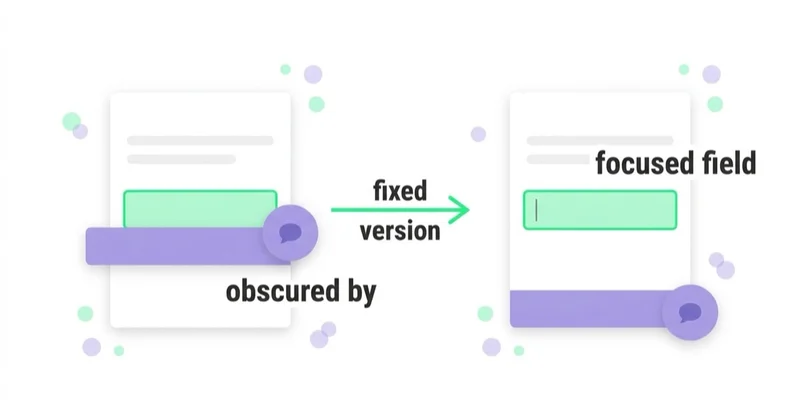
The focused field is covered. A sticky order summary, a promo bar, a cookie notice or a support bubble sits over the bottom of the viewport. On a phone, the keyboard rises, the focused input scrolls up under the sticky element, and the user types into something they cannot see. This is a single CSS decision with an outsized cost, and it is invisible in every desktop screenshot ever attached to a design review.
The label is a placeholder. Placeholder-only fields look clean in a mockup and fail twice: the prompt vanishes when the user types, and low-contrast placeholder text can be difficult to read while it is visible. In a longer checkout, users can no longer verify what each completed field represents. Use a persistent visible label associated with the control; keep the placeholder for an example, if one is useful.
Errors do not say what to do. Two failure modes: an error that names no field, and an error that names the field but not the accepted format. Phone numbers, postcodes, VAT numbers and card expiry dates are where this bites, because the format is a local convention the user cannot guess. Say which field, say what is wrong, and show an accepted example.
Something essential requires dragging. Size and colour selectors built as carousels that only respond to swipe, price filters as drag-only sliders, quantity as a drag control. Each needs a plain single-pointer path — tap the value, tap the plus button, enter the number.
Login becomes a memory or transcription test. Blocking paste into a one-time-code field, preventing password managers from filling a control, or requiring an image puzzle can exclude users and add avoidable friction. Security controls still matter, but they should be implemented with accessible authentication methods rather than by assuming that memorisation or manual transcription proves identity.
The keyboard cannot finish the job. Custom dropdowns without keyboard handling, modals that do not trap and return focus, "close" buttons reachable only by mouse. Anyone who has ever filled a long form with the keyboard alone knows within thirty seconds whether the build was tested that way.
Most of these are also plain usability defects, and several appear in our list of landing page mistakes that kill conversions with no accessibility framing at all. That is the point.
The European Accessibility Act, in the terms a marketing team needs
The European Accessibility Act is a directive. The European Commission describes it as aiming to improve the functioning of the internal market for accessible products and services by removing barriers created by different rules in Member States. A directive binds Member States to a result and takes legal effect through their national laws, which is why there is no single "EAA compliance checklist" that is correct in every country.
The directive covers specified products and services. In practical terms, the scope includes areas such as:
- computers and operating systems
- payment terminals, ATMs, ticketing and check-in machines
- smartphones
- television equipment for digital television services
- telephony services and related equipment
- audiovisual media services and consumer equipment
- passenger transport services by air, bus, rail and water
- banking services
- e-books
- e-commerce
This list is a summary, not a scope test. The directive applies to defined products placed on the market and services provided to consumers after the relevant date, and it contains exclusions. Microenterprises providing services are exempt; other provisions address third-party content outside an operator's control, archives, fundamental alteration, disproportionate burden and transition arrangements. Whether a particular business, service or page falls within the national implementing law is a question for qualified legal counsel. An agency can document the technical state and remediation work, but that is not a legal opinion.
The dates are public and uncontroversial. Member States had to adopt and publish the measures necessary to comply with the directive by 28 June 2022, and those measures apply from 28 June 2025. The directive also contains transition provisions for arrangements that predate that application date — another question that belongs with counsel rather than in a marketing document.
One clarification saves time in practice: organisations addressing European accessibility requirements commonly use WCAG together with EN 301 549. As of July 2026, W3C notes that the current EN 301 549 uses WCAG 2.1 and that a future version is expected to use WCAG 2.2. A harmonised standard can create a presumption of conformity only to the extent and under the conditions recognised in EU law, so an engineering target and a legal conformity assessment should not be treated as the same statement.
How to run a useful first review
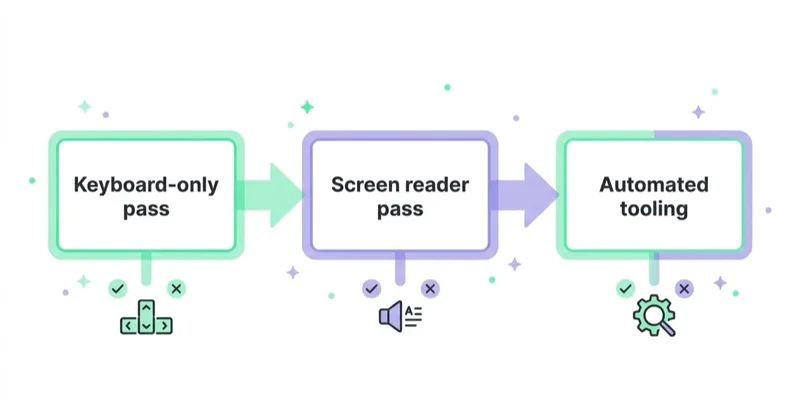
Use manual and automated checks as complementary layers. The sequence can follow the team's workflow; what matters is that a scanner is not mistaken for a conformance assessment and that each important user journey is tested in operation.
Pass one — keyboard only. Put the mouse away and complete the money path: land on a product or landing page, choose a variant, add to cart, get through checkout to the payment step, and complete the primary form. Watch four things. Can you always see where focus is? Does focus move in an order that matches the visual layout? Can you reach and operate every control, including custom pickers and modals? Does anything cover the focused element — especially with a mobile keyboard open?
Pass two — zoom and reflow. Increase text size and zoom the page while completing the same journey. Check whether content reflows, whether sticky controls consume the usable viewport, whether information overlaps, and whether the next action remains reachable. Test landscape and a narrow viewport where the interface changes shape.
Pass three — screen reader with a proficient tester. VoiceOver, NVDA, TalkBack and Narrator have their own interaction models. A person still learning the tool can mistake unfamiliar operation for a product defect, so meaningful evaluation should involve an experienced researcher or user of the technology. Check labels and roles, reading and focus order, state changes, errors, dialogs and completion of the task.
Pass four — automated tooling. Run a scanner across representative templates and interface states to catch failures that repeat at scale: missing accessible names, detectable contrast issues, invalid ARIA, structural errors and missing page language. W3C is explicit that evaluation tools assist an assessment; they cannot determine accessibility on their own, and human judgement remains necessary.
| What a manual pass catches | What a scanner catches |
|---|---|
| Focus obscured behind sticky elements, with the keyboard open | Contrast ratios computed across every template |
| Focus order that technically works but destroys meaning | Missing or empty alt attributes |
| Alternative text that exists and describes the wrong thing | Inputs with no associated label element |
| Errors that are visible but never announced | Broken heading hierarchy and missing page language |
| Authentication that blocks paste or password managers | ARIA attributes used with invalid values |
| A dragging-only control with no single-pointer alternative | Duplicate IDs and other template-wide defects |
The layers are complementary. A clean automated report does not outweigh a checkout that cannot be completed with a keyboard, just as a manual journey through one page does not reveal a template defect repeated across thousands of URLs. This first review produces a remediation backlog; it is not, by itself, a formal WCAG conformance evaluation.
Method depth — how many evaluators, how to write a finding, how to prioritise a backlog — belongs to audit practice rather than to accessibility specifically, and we covered it in UX audit: heuristic evaluation, usability testing and behaviour data. Speed sits next door: focus and interaction defects often surface alongside interaction-latency problems, and the measurement side of that is in Core Web Vitals: LCP, INP and CLS.
How Space Ads approaches this
Our working model is one evidence-based backlog with two clearly labelled dimensions: accessibility and expected business impact. We start with critical journeys and representative components, combine keyboard, zoom, assistive-technology and automated checks, and document the affected success criterion, evidence, user consequence and recommended state. Repeated defects are routed to shared components rather than patched URL by URL.
We keep the technical and legal claims separate. WCAG findings describe observed barriers and test results; they do not determine whether a national law applies to the client or certify legal compliance. That decision belongs to qualified counsel and, where required, an accessibility specialist responsible for the formal assessment.
A verified blocker is remediated rather than placed in an A/B test against the broken state. Experiments remain useful where the team has two accessible solutions and genuinely does not know which one better supports completion. After implementation, the affected criteria and journeys are retested and added to release checks so that third-party widgets, consent layers and design-system changes do not recreate the defect.
Putting it into the backlog
- Define the money paths — the two or three journeys that produce revenue or qualified enquiries. Everything below applies to those first, not to the whole site.
- Run the keyboard pass on each path, on a phone as well as a desktop, and record what you saw as a written finding rather than a note.
- Run the screen reader pass on the same paths, listening specifically for labels, announced errors and button purpose.
- Run the scanner across templates, then de-duplicate: one template defect is one ticket, not four hundred URL-level rows.
- Sort the findings into three buckets — conversion and accessibility, accessibility only, conversion only. The first bucket is the one you take to a stakeholder meeting.
- Separate remediation obligations from CRO priority. Fix blockers and items required by the agreed conformance scope; then use user impact, frequency and implementation cost to sequence the remaining work.
- Fix defects, test choices. Never spend an experiment slot on something already known to be broken.
- Add the checks to definition of done — keyboard operability, visible focus, labelled fields, contrast on new components — and re-run the manual passes after each significant release. Sticky elements, chat widgets and consent banners are the usual source of regressions, and they are usually added by someone outside the product team.
Common mistakes
| Mistake | What to do instead |
|---|---|
| Treating accessibility as a compliance project parallel to CRO | One audit, one backlog; most findings belong in both columns |
| Buying an overlay widget and calling the problem solved | Fix the underlying markup and interaction; an overlay does not change what assistive technology receives |
| Accepting a clean automated report as conformance | W3C states tools cannot determine accessibility; add the keyboard and screen reader passes |
| Building to WCAG 2.1 because a procurement document says 2.1 | Build to 2.2 AA — W3C states 2.2 conformance also satisfies 2.1 and 2.0 |
| Placeholder text used as the field label | Persistent visible labels; placeholders are for examples, not for names |
| Blocking paste into one-time-code fields | Allow paste and password managers; measure the abandonment the block causes |
| "Something went wrong" as an error message | Name the field, say what is wrong, show an accepted example |
| Letting an agency answer whether a regulation applies to you | Send the audit to your lawyers and let them answer it |
| A one-off remediation with no definition-of-done change | Add the checks to release criteria, or you will pay for the same fixes next year |
FAQ
What is WCAG 2.2?
WCAG 2.2 is the current version of the Web Content Accessibility Guidelines published by the W3C. It defines testable success criteria at three conformance levels — A, AA and AAA — covering perceivable, operable, understandable and robust content. It was published on 5 October 2023, with an update published on 12 December 2024, and W3C states that content conforming to WCAG 2.2 also conforms to WCAG 2.1 and WCAG 2.0.
What changed between WCAG 2.1 and WCAG 2.2?
WCAG 2.2 added nine success criteria and removed one. The additions are Focus Not Obscured (Minimum and Enhanced), Focus Appearance, Dragging Movements, Target Size (Minimum), Consistent Help, Redundant Entry, and Accessible Authentication (Minimum and Enhanced). The removal is 4.1.1 Parsing, which is no longer a success criterion.
Does accessibility actually affect conversion rate?
The mechanisms overlap almost entirely on transactional pages. Visible focus, sensible focus order, keyboard operability, persistent field labels, specific error messages and adequate tap targets are simultaneously accessibility requirements and the things a conversion audit finds when a checkout leaks. Any specific uplift depends on the site, the traffic mix and the defect, and should be measured on your own funnel rather than taken from a published figure.
What does the European Accessibility Act cover?
The European Accessibility Act is an EU directive covering defined products and consumer services. Its scope includes certain consumer computer equipment, self-service terminals, smartphones, equipment used to access audiovisual media services and e-readers, as well as electronic communications, access to audiovisual media, specified passenger-transport elements, consumer banking, e-books and e-commerce services. It takes effect through national implementing laws, and the directive includes exemptions and transition provisions.
When did the European Accessibility Act start to apply?
Member States had to adopt and publish the measures necessary to comply with the directive by 28 June 2022, and those measures apply from 28 June 2025. The directive also includes transition provisions for arrangements predating that date. Whether and how any of this applies to a particular business is a matter for its legal advisers.
Which WCAG level should we target?
WCAG 2.2 AA is a practical target for many commercial websites and is often used in procurement and public commitments. W3C states that 2.2 conformance is backwards compatible with 2.1 and 2.0. The binding target may still be defined by a law, contract or formal assessment scope, so confirm it before making a compliance claim. Selected AAA criteria can be adopted where they solve an important user need, but full AAA conformance is not normally a blanket project target.
Can an automated accessibility scanner tell us if we are compliant?
No. W3C states that evaluation tools cannot determine accessibility and can only assist in doing so, and that human judgement is required because tools cannot check all aspects automatically. Scanners are good at contrast, missing alternative text, unlabelled inputs and heading structure across many pages. They cannot tell you whether a keyboard user can finish a checkout, whether alternative text describes the right thing, or whether an error is announced.
Do we need a separate accessibility audit, or is it part of a UX audit?
It is more efficient as part of one audit, because the same walkthrough of the same money paths produces both sets of findings. A dedicated accessibility audit makes sense when a legal or procurement requirement calls for a formal conformance statement, which is a different deliverable from a prioritised backlog and usually needs specialist sign-off.
Sources and further reading
- Web Content Accessibility Guidelines (WCAG) 2.2 — the standard itself, including success criteria and conformance levels.
- WCAG 2 Overview, W3C WAI — publication dates, version relationships and the note that EN 301 549 currently uses WCAG 2.1.
- Understanding Success Criterion 2.5.8: Target Size (Minimum) — the 24 by 24 CSS pixel requirement and its exceptions.
- Selecting Web Accessibility Evaluation Tools, W3C WAI — what automated tools can and cannot determine.
- European Accessibility Act, European Commission — overview and transposition monitoring.
- Directive (EU) 2019/882, EUR-Lex — the binding EU text, including scope, exemptions and transition provisions.
- Accessibility of products and services, EUR-Lex summary — the transposition and application dates.
State as of July 2026. Standards are revised and national implementing laws differ; check the current text and take legal questions to counsel.
In short
- WCAG 2.2 is a testable standard at levels A, AA and AAA, and most of what it requires on transactional pages is what a conversion audit would demand anyway.
- The nine criteria new in 2.2 sit in checkout, forms and login — obscured focus, dragging, target size, consistent help, redundant entry and authentication.
- Target WCAG 2.2 AA: W3C states it also satisfies 2.1 and 2.0, so the older reference in EN 301 549 is not a reason to aim lower.
- The European Accessibility Act covers defined products and services, including e-commerce and consumer banking; national measures apply from 28 June 2025 and include exemptions and transition rules.
- Applicability is a legal question for the client's lawyers; an agency's job is to describe the standard, test against it and cost the fixes.
- Combine keyboard and zoom checks, proficient assistive-technology evaluation and automated scanning; W3C states tooling cannot determine conformance and human judgement is required.
- Keep one delivery backlog, but preserve accessibility as an acceptance requirement and distinguish formal remediation obligations from CRO hypotheses.
Continue reading

What Is Color Psychology in Web Design?
Color psychology supports web design when it improves hierarchy, readability, trust and action clarity, not when it is treated as a universal colour formula.
The latest trends in designing websites / e-commerce platforms
Modern website and ecommerce design is less about chasing visual trends and more about making the offer fast, accessible, mobile-friendly, crawlable, measurable and easy to buy from. This guide explains how Core Web Vitals, WCAG-informed UX, CRO, structured content, AI search readiness, product data and platform architecture should shape a redesign.
How Much Does a Landing Page Cost?
A landing page can cost a few hundred dollars or more than $10,000 because the scope may cover only implementation—or research, copy, design, tracking, integrations and optimisation. Compare deliverables, not just quotes.


































