Negative Keywords in Google Ads are exclusions that prevent ads from showing on searches that do not fit the offer, margin, location, funnel stage or business model. Regular keywords help ads enter auctions. Negative keywords do the opposite: they keep ads out of auctions where the search is unlikely to create value.
They matter more as Google Ads relies more on broad match, Smart Bidding, Performance Max and AI-assisted expansion. Automation can find demand that a manual keyword list would miss, but it also needs boundaries. A disciplined negative keyword process lets an account scale broader matching while reducing waste from job searches, DIY intent, free resources, irrelevant categories, unsupported locations and low-value segments.
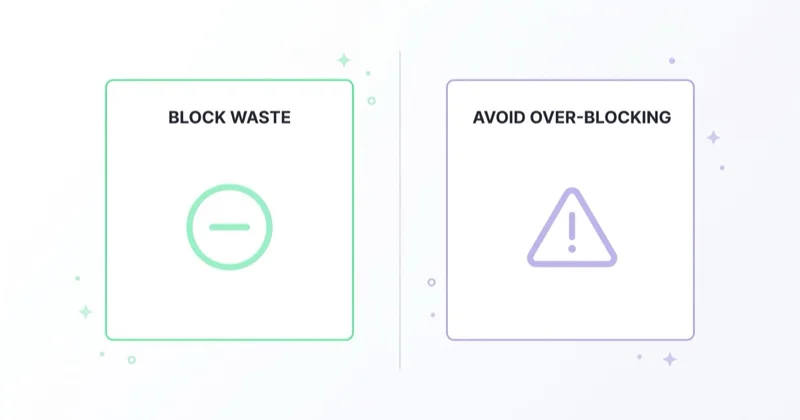
The goal is not to block as much traffic as possible. The goal is to protect budget while leaving enough room for profitable discovery.
TL;DR
- Negative keywords block searches. They do not create demand; they prevent ads from appearing for terms that should not trigger the campaign.
- Negative match types work differently from positive match types. Negative broad, phrase and exact use stricter exclusion logic than many advertisers expect.
- Close variants need attention. Google says negative keywords do not match close variants or other expansions; casing and misspellings are handled automatically, but singular/plural forms and synonyms may require separate exclusions.
- The search terms report is the core workflow. It shows actual searches that triggered ads and helps identify recurring waste patterns.
- Search terms insights are not the same report. Insights group searches into themes and subthemes, while the search terms report is better for query-level decisions.
- Over-blocking is a real cost. A broad negative at the wrong level can suppress valuable auctions without appearing as wasted spend.
Why negative keywords matter more with automation
Google Ads has shifted toward broader matching and algorithmic interpretation of intent. Broad match can work well when conversion data is clean and bidding has enough signal. Performance Max and newer AI-assisted Search features can also expand reach beyond the exact phrases an advertiser would manually choose.
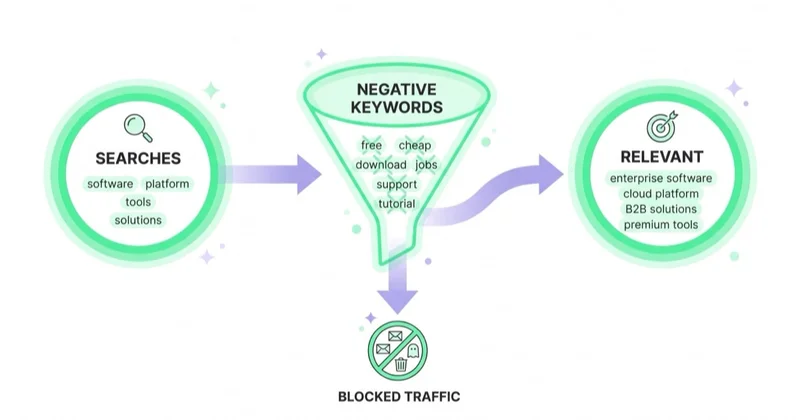
That expansion creates a tradeoff. The system can discover profitable queries, but it can also spend on adjacent intent, education-only searches, competitor support queries, job seekers, irrelevant locations, low-margin categories or product variants outside the offer.
Negative keywords are one of the clearest controls left for Search intent. They are especially important when:
- broad match is active;
- conversion tracking includes leads of mixed quality;
- the offer has many adjacent meanings;
- the industry attracts research, student, DIY or hiring searches;
- Performance Max or AI-assisted Search expands query coverage;
- budgets are tight and there is little room for repeated learning on obvious waste;
- CRM data shows that some queries create leads but not revenue.
The right question is not "which terms look irrelevant at first glance?" The better question is "which query patterns repeatedly fail the business goal, and at what level should they be excluded?"
How negative match types work
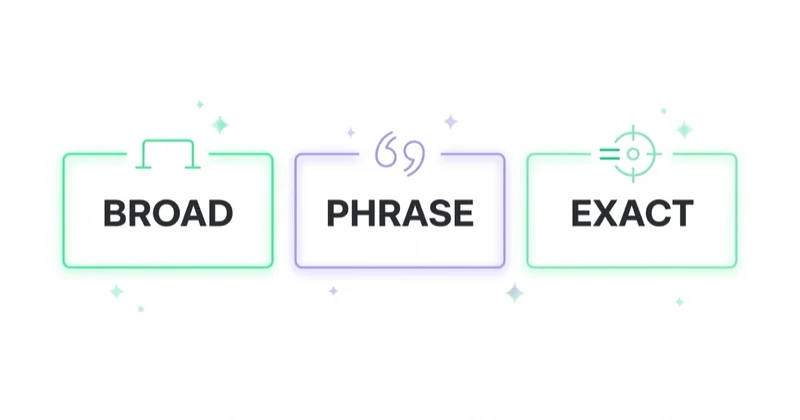
Search campaigns use three negative match types: broad, phrase and exact. The names are familiar, but the behavior is not symmetrical with positive keywords.
| Negative match type | Blocks a search when... | Practical use |
|---|---|---|
| Negative broad | the search contains all negative keyword terms, in any order | broader theme control without requiring exact order |
| Negative phrase | the search contains the negative terms in the same order | repeated phrases that should be blocked with extra words around them |
| Negative exact | the search matches the negative term exactly, without extra words | precise exclusions with the lowest over-blocking risk |
Example: a negative broad keyword running shoes can block "blue running shoes" and "shoes running," but it may still allow "running shoe" because that is not the same full term set. A negative phrase "running shoes" blocks searches containing that phrase in order. A negative exact [running shoes] blocks only the exact search "running shoes."
Important details from Google documentation:
- negative keywords do not match close variants or expansions in the same way positive keywords can;
- casing and misspellings are automatically accounted for, so separate capitalization and typo variants usually are not needed;
- singular/plural versions and synonyms may need separate exclusions;
- negative broad requires all terms to be present;
- negative phrase requires the same order;
- negative exact is the narrowest option;
- very long searches can behave differently if the negative keyword appears after the 16th word;
- symbols and search operators can be ignored or invalid depending on the character.
The practical rule: exact and phrase are safer for precision, while broad is useful for themes that are clearly outside scope. Old broad negatives should be audited regularly because business scope changes.
Where negative keywords should be added
The level matters as much as the word itself.
| Level | Scope | Use case |
|---|---|---|
| Account-level negative keywords | eligible Search and Shopping inventory in relevant campaign types | global exclusions that should apply broadly |
| Negative keyword lists | reusable lists applied to selected campaigns | shared patterns such as jobs, DIY, competitor policy or brand separation |
| Campaign-level negatives | one campaign | exclusions tied to that campaign's objective |
| Ad group-level negatives | one ad group | routing traffic between themes inside a campaign |
Useful list types include:
- universal junk: jobs, career, salary, internship, course, template, PDF, definition, forum, free;
- intent separation: DIY, how to, tutorial, repair, used, wholesale, review, comparison, depending on the offer;
- structure separation: brand/non-brand, category separation, region separation, model or product-line separation;
- business-model protection: B2B vs B2C, new vs used, retail vs wholesale, service vs product;
- policy or brand exclusions: terms the business does not want associated with paid traffic.
Not every list should be attached everywhere. "Reviews" may be waste in a direct-response campaign but valuable in a comparison campaign. "Used" may be irrelevant for a new-product retailer and valuable for a dealer selling used inventory. A negative keyword is only correct in relation to a campaign goal.
Search terms report vs search terms insights
The search terms report shows actual searches that triggered ads and how those searches performed. It is the main place to find negative keyword opportunities because it connects real queries to spend, conversions, match type and campaign structure.
Search terms insights are different. Google describes them as grouped themes and subthemes based on search terms in a selected date range, with theme labels generated from recent data. They are useful for seeing demand patterns, but they should not replace query-level review when deciding what to exclude.
A practical review should look at:
- cost by query or theme;
- conversion count and conversion value;
- CRM lead quality where available;
- match type and triggering keyword;
- campaign and ad group;
- geography;
- device where relevant;
- repeated wording patterns;
- whether the query should be blocked, routed elsewhere or used for content.
The search terms report does not always expose every low-volume query because of privacy thresholds, so decisions should be based on visible patterns, account structure and business knowledge rather than a single isolated click.
How to decide what to exclude
Negative keyword decisions should have a business reason. Common reasons include:
- the search is for a different product or service;
- the intent is informational while the campaign is sales-led;
- the query is about jobs, careers, courses, training or salary;
- the person is looking for a free template, free tool or DIY instruction;
- the location is outside the service area;
- CRM data marks leads from the query pattern as unqualified;
- the category has too little margin;
- the query belongs in another campaign;
- the query creates support traffic instead of new demand;
- the query contains a brand or competitor term that should be isolated.
Not every informational query is worthless. Some should become SEO content, AEO content, remarketing audiences or upper-funnel campaigns. The negative decision is about this campaign's job, not about whether the topic has any marketing value.
Examples by industry
These are starting points, not paste-ready lists.
| Industry | Negative themes to review |
|---|---|
| Local services | jobs, salary, course, DIY, free, forum, definition, out-of-area locations |
| Ecommerce | manual, PDF, used, parts, repair, wholesale, marketplace names, product variants outside stock |
| B2B SaaS | free, template, open source, jobs, salary, definition, student, tutorial, competitor support |
| Healthcare | jobs, school, symptoms-only, home remedies, forum, images, medications not offered |
| Legal | jobs, law school, free forms, pro bono, definition, salary, unrelated practice areas |
| Finance and insurance | jobs, calculator-only queries, unsupported products, servicing, login, complaint searches |
| Real estate | private listings, rental terms, tax templates, jobs, courses, unsupported locations |
The exact choice depends on the offer. A "free consultation" search may be relevant for a law firm, but "free legal template" may be waste. "Used" may be useful for a car dealership and harmful for a fashion ecommerce store selling new products only.
Performance Max, Shopping and automated campaigns
Search provides the clearest negative keyword workflow. Shopping, Performance Max and other automated campaign types require additional controls because query matching is also influenced by product feeds, landing pages, assets, categories, search themes, final URL expansion, audience signals and conversion values.
For ecommerce, negative keyword work should be paired with:
- Merchant Center feed quality;
- product titles and descriptions;
- Google product categories;
- availability and price accuracy;
- custom labels;
- campaign or asset group segmentation;
- brand exclusions where available;
- search terms insights and reporting;
- product-level margin or value signals.
For lead generation, PMax and automated campaigns often need landing-page control, URL exclusions, asset review and offline conversion feedback. If the system is expanding into poor query themes, another negative keyword may not be enough. The landing page, conversion value or campaign objective may be sending the wrong signal.
The broader guide to Performance Max campaigns covers those controls in more detail.
Over-blocking: the quiet failure
Wasted spend is visible. Over-blocking is harder to see because blocked auctions do not appear as a cost line. An account can look efficient while it is quietly losing scale.
Warning signs include:
- volume dropped after negative list changes;
- broad account-level negatives were added months ago and never reviewed;
- a shared list is attached to campaigns with different goals;
- valuable categories receive little traffic despite demand;
- exact-match campaigns are too clean while broad discovery is blocked;
- brand/non-brand separation is blocking legitimate generic traffic;
- "junk" terms are not junk for every campaign that uses the list;
- new products, services or locations launched without updating exclusions.
Every negative keyword audit should work in two directions: what should be added, and what should be removed, narrowed or moved to a lower level. Sometimes the best fix is changing a broad negative to phrase, moving an exclusion from account level to campaign level, or removing a shared list from a campaign where it no longer fits.
A practical weekly workflow
- Review the search terms report for the last 7-30 days, depending on spend.
- Filter by cost with no conversions, low conversion value, weak CRM quality or wrong campaign.
- Group recurring patterns rather than reacting to every isolated query.
- Decide the level: account, list, campaign or ad group.
- Choose the match type: broad for clearly irrelevant themes, phrase/exact for precision.
- Check singular/plural forms and synonyms separately.
- Document the reason for important exclusions.
- Recheck after 7-14 days for volume, cost, query mix and conversion quality.
- Review old lists monthly for over-blocking.
- Share insights with SEO, content and landing-page teams when queries reveal useful demand.
This process also improves content strategy. Search terms often reveal pages the business should build, FAQs prospects expect, categories that need clearer landing pages and objections that should be handled before the click.
Space Ads operating approach
At Space Ads, negative keywords are treated as an intent-control system, not a spreadsheet to paste into every account. Across daily reviews of 25+ client accounts and roughly 14M monthly data points analyzed through Space Ads OS, the same two problems appear repeatedly: obvious waste that was never excluded and old exclusions that are now suppressing valuable traffic.
The review starts with campaign structure, match types, search terms, conversion quality, CRM data, product margin and the campaign's role in the funnel. Only then does the exclusion decision make sense. A query that is waste in a high-CPC lead generation campaign may be a good topic for SEO or remarketing. A query that looks cheap may be damaging if CRM data marks it as unqualified.
When an account is spending on irrelevant queries or losing volume after aggressive exclusions, a marketing audit can identify both issues. Ongoing Google Ads work sits under Google Ads management, with broader media optimization under performance marketing.
Common mistakes
| Mistake | Better approach |
|---|---|
| Pasting a universal list without analysis | Build exclusions from offer, search terms and CRM quality |
| Excluding after one weak click | Look for recurring cost, intent and quality patterns |
| Assuming negative broad behaves like positive broad | Remember that all negative broad terms must be present |
| Ignoring singular/plural and synonyms | Add separate variants when they should be blocked |
| Keeping old lists forever | Audit, narrow or remove exclusions as the offer changes |
| Applying one shared list to every campaign | Match each list to campaign objective and funnel stage |
| Treating PMax like Search | Review feed, URLs, assets, search themes and conversion values |
| Only adding negatives | Also check for over-blocking and lost scale |
FAQ
What are negative keywords in Google Ads?
Negative keywords are terms added to exclude searches from triggering ads. They help keep budget away from irrelevant, low-intent or unsupported searches such as jobs, free templates, DIY instructions, wrong locations or products outside the offer.
How do negative match types work?
Negative broad blocks a search when all terms in the negative keyword appear, in any order. Negative phrase blocks searches containing the terms in the same order. Negative exact blocks only the exact search without extra words. These rules differ from positive keyword matching.
Do negative keywords match close variants?
Google says negative keywords do not match close variants or other expansions. Casing and misspellings are handled automatically, but singular/plural forms and synonyms may need to be added separately when they should be excluded.
Where should negative keywords be added?
The level should match the scope of the problem. Global exclusions can use account-level negatives or shared lists. Campaign-specific issues should be added at campaign level. Ad group negatives are useful for routing traffic between closely related themes.
Are negative keywords needed with Smart Bidding?
Yes. Smart Bidding optimizes bids, but it still benefits from clear intent boundaries. With broad match and automation, negative keywords help remove recurring queries that spend budget without creating value.
Can negative keywords hurt performance?
Yes. Negatives that are too broad, too old or applied at the wrong level can block valuable searches. Because blocked impressions do not show up as spend, over-blocking should be audited deliberately.
In short
Negative Keywords in Google Ads are one of the most practical controls for keeping automated and broad matching aligned with business intent. They reduce waste, protect budgets and improve the signal quality that bidding systems receive.
The best process combines search terms analysis, CRM quality, careful match-type selection, the right exclusion level and regular over-blocking audits. Good negative keyword work is not a one-time setup. It is a recurring operating habit.
Sources
- Google Ads Help - Negative keywords
- Google Ads Help - Search terms report
- Google Ads Help - Smart Bidding
- Google Ads Help - Keywords in Search Network campaigns
Continue learning
- What are keyword match types in Google Ads and how to choose them
- Google Ads Smart Bidding: tCPA, tROAS and Maximize Conversions
- Performance Max campaigns: what to know and how to create them
- What is Google Ads audit and how to do it
- Quality Score in Google Ads and how to improve it
- What is keyword n-gram analysis and how to use it
Continue reading
What Is Keyword N-Gram Analysis and How to Use It?
Keyword n-gram analysis breaks Google Ads search terms into recurring word patterns to find wasted spend, profitable intent, negatives and landing page ideas.
Gemini Ad Formats: When the Ad Is Generated, Not Written
Google is testing and announcing Gemini-powered ad experiences across AI Mode and Search. Learn what each format does, what remains uncertain and how to prepare data, content and measurement.
Google Ads Experiments: Testing That Produces a Decision
A useful Google Ads experiment starts with a decision, an effect worth detecting and enough statistical power. Learn how to choose the test, split, metric and interpretation.