
YouTube Ads are video and visual ad placements bought through Google Ads or enterprise tools such as Display & Video 360. They can appear on YouTube and, depending on campaign type and settings, on Google video partner inventory. They are used for reach, awareness, consideration, product education, remarketing, lead generation and sales support.
YouTube advertising is not simply "Search with video". Search captures people who already express demand. YouTube can create demand, explain a product, build familiarity, re-engage warm audiences and support later conversion paths. The biggest performance variable is usually not a hidden campaign setting. It is whether the video makes the offer, problem, proof and next step clear quickly enough.
TL;DR
- YouTube Ads are managed mainly in Google Ads, with enterprise buying also possible through tools such as Display & Video 360.
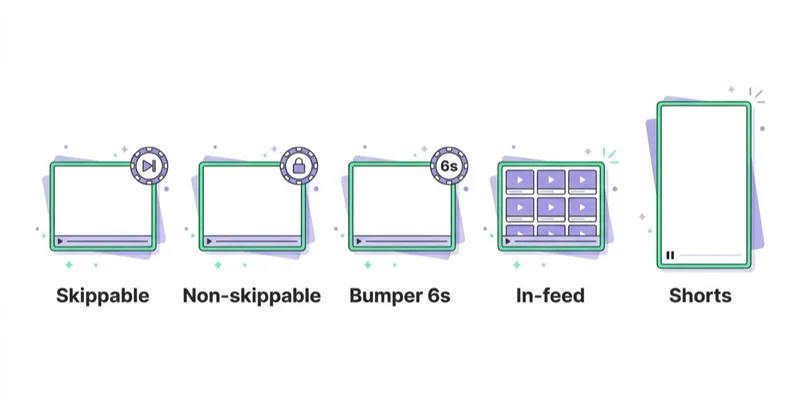
- Core formats include skippable in-stream, non-skippable in-stream, bumper ads, in-feed video ads, YouTube Shorts ads and masthead ads.
- A video ad must normally be hosted on YouTube before it can be used in Google Ads video formats.
- The right format depends on the goal: reach, views, consideration, traffic, leads, sales, remarketing or product education.
- Creative matters more than most setup details. The first seconds, visual clarity, brand cue, proof and CTA decide whether people stay.
- Demand Gen and Performance Max changed how YouTube fits into Google Ads. YouTube is now often part of broader visual, AI-assisted campaign systems.
- YouTube measurement should include view quality, view rate, CPV, quartiles, clicks, conversions, engaged views, assisted impact and creative learnings.
- For ecommerce, YouTube works best with product demos, comparisons, UGC, creator-style assets and remarketing, not generic brand videos alone.
What are YouTube Ads?
YouTube Ads are paid ad formats that use YouTube inventory to reach people while they watch, browse or discover video content. In Google Ads, these ads can be part of Video campaigns, Demand Gen campaigns, Performance Max campaigns and other campaign systems depending on objective and setup.
YouTube Ads can help:
- introduce a brand;
- explain a product;
- show a service in context;
- educate before a purchase;
- promote an offer;
- drive traffic;
- collect leads;
- re-engage website visitors;
- support ecommerce launches;
- increase brand search demand;
- build remarketing audiences.
The channel is powerful because it combines sight, sound, motion, audience signals and intent signals from the Google ecosystem. It is risky when advertisers treat it like cheap reach without investing in the creative and measurement system.
YouTube Ads vs Google Search Ads
| Area | YouTube Ads | Google Search Ads |
|---|---|---|
| User behaviour | Watching, browsing, discovering | Actively searching |
| Main creative | Video, thumbnail, headline, CTA | Text, assets, landing page |
| Funnel role | Awareness, consideration, remarketing, demand creation | Demand capture |
| Main risk | Weak creative or poor audience fit | Poor keyword and intent control |
| Measurement challenge | Assisted impact and view quality | Search intent and conversion efficiency |
| Best use | Explain, demonstrate, remind, build trust | Capture high-intent queries |
Both channels can work together. A user may first see a YouTube ad, later search the brand, compare alternatives and convert through Search, Shopping, Performance Max, direct or remarketing.
For search-led strategy, read What Are Keyword Match Types in Google Ads and How to Choose Them?.
Main YouTube ad formats
Skippable in-stream ads
Skippable in-stream ads can play before, during or after other videos. Viewers can skip after five seconds. This format is flexible because it can support awareness, consideration, traffic and conversion-oriented campaigns.
The first five seconds matter because that is the point where many users decide whether to continue. A good opening should show the problem, product, result, offer or tension immediately.
Non-skippable in-stream ads
Non-skippable in-stream ads are designed to deliver the full message. Google documentation describes them as 15 seconds or less. They can be useful for short reach campaigns, launch reminders and simple brand messages.
Because users cannot skip, the creative must be especially disciplined. A forced view does not equal attention or goodwill.
Bumper ads
Bumper ads are six seconds or less and cannot be skipped. They are useful for short reminders, campaign reinforcement and simple memory structures.
Good bumper ads usually communicate one idea:
- a brand cue;
- one product benefit;
- one sale message;
- one event date;
- one visual memory hook;
- one retargeting reminder.
Trying to explain a complex B2B product in six seconds usually fails.
In-feed video ads
In-feed video ads appear where users are discovering content on YouTube. The user chooses to watch by clicking or interacting with the thumbnail and headline area.
This format depends heavily on:
- thumbnail clarity;
- title relevance;
- topic fit;
- audience intent;
- promise of value;
- the quality of the first few seconds after the click.
In-feed can work well for tutorials, product explainers, webinars, reviews, demos and consideration content.
YouTube Shorts ads
YouTube Shorts ads appear in the short-form video experience. They need vertical creative, fast context and a native-feeling structure.
Shorts creative should usually:
- start with motion or a clear visual problem;
- avoid long logo intros;
- use readable on-screen text;
- work without perfect sound attention;
- show the product or outcome quickly;
- feel closer to creator content than a traditional TV spot;
- have a direct next step.
Repurposing a horizontal brand video into a cropped vertical asset is usually weak. Shorts needs creative designed for the surface.
Masthead ads
Masthead ads appear in highly visible YouTube Home feed placements and are usually used for large-scale awareness campaigns. They are not the standard starting point for most advertisers because they are typically planned as premium reach activity.
Which YouTube campaign type should be used?
The answer depends on the business goal.
| Goal | Campaign or approach to consider | Notes |
|---|---|---|
| Efficient views | Video views campaign | Useful when the goal is view volume and consideration |
| Broad reach | Video reach or CPM-led setup | Good for simple awareness messages |
| Leads or sales | Conversion-focused video or Demand Gen | Needs conversion tracking and strong landing pages |
| Social-style visual demand | Demand Gen | Uses YouTube, Discover and Gmail style placements depending on setup |
| Full Google ecosystem automation | Performance Max | YouTube may be part of the asset mix |
| Enterprise media buying | Display & Video 360 or YouTube reservation | Used for larger planning, inventory and control needs |
The campaign type should follow the job. Do not choose YouTube only because it is cheaper than Search. Choose it because video can explain, demonstrate, remind or create demand better than text alone.
For the newer Google Ads visual campaign model, read What Is a Demand Gen Campaign in Google Ads and How to Launch One.
How to launch YouTube Ads
1. Define the business objective
Before opening Google Ads, define the role of YouTube:
- reach a new audience;
- explain a product category;
- launch a product;
- support a seasonal campaign;
- re-engage site visitors;
- warm up cold leads;
- drive demo requests;
- increase ecommerce sales;
- support brand search.
The objective determines the format, bidding, creative and measurement plan.
2. Prepare conversion tracking
For traffic, lead generation or sales campaigns, tracking must be ready before launch. That usually means:
- GA4 configured correctly;
- Google Ads conversion actions;
- Google Tag Manager or direct tagging;
- enhanced conversions where appropriate;
- consent mode where legally required;
- UTM naming for campaign analysis;
- clear primary and secondary conversions.
Without reliable measurement, YouTube can look ineffective or artificially effective depending on attribution settings.
For tracking foundations, read Enhanced Conversions in Google Ads: What They Are and How to Set Them Up and What Are UTM Parameters and How to Create UTM URLs for Google Analytics?.
3. Build videos for the placement
Create separate assets where possible:
- horizontal video for classic YouTube placements;
- vertical video for Shorts;
- shorter bumper cutdowns;
- longer explainer or demo versions;
- product-led versions;
- testimonial or proof versions;
- remarketing versions;
- seasonal versions.
One master video rarely covers every stage. A six-second bumper, a 20-second in-stream ad and a 45-second product demo have different jobs.
4. Choose format and bidding
For view-focused campaigns, CPV bidding can be relevant. Google defines cost per view differently by format, for example skippable in-stream views can be counted when someone watches at least 30 seconds or to the end if the ad is shorter, or interacts with the ad.
For reach-focused campaigns, CPM or target CPM logic may be more relevant. For conversion-focused campaigns, automated bidding such as Maximize conversions or Target CPA may be used depending on campaign type, account data and objective.
The important point is to align bidding with the desired behaviour. Do not optimise for views if the business needs qualified leads, and do not judge a reach campaign only by last-click sales.
5. Select audiences and signals
YouTube targeting can use signals such as:
- demographics;
- affinity segments;
- in-market segments;
- custom segments;
- remarketing lists;
- Customer Match where eligible;
- website visitors;
- YouTube channel interactions;
- topics;
- placements where available;
- keywords or content signals depending on campaign type.
The more automated the campaign, the more important the creative and conversion data become. The more controlled the targeting, the more important scale and audience quality become.
6. Match the landing page
A YouTube ad can create curiosity quickly. The landing page must continue the same idea.
Check:
- same offer;
- same product;
- same claim;
- fast mobile loading;
- clear CTA;
- proof near the top;
- simple form if lead generation;
- product availability if ecommerce;
- no surprise pricing or irrelevant page.
Many YouTube campaigns fail after the click because the page feels disconnected from the video.
7. Launch with a testing plan
Do not launch one video and call it a test. Test meaningful creative differences:
- problem-first vs product-first opening;
- founder voice vs customer voice;
- short demo vs testimonial;
- vertical vs horizontal;
- price-led vs value-led;
- direct CTA vs softer next step;
- different first five seconds.
The goal is not only to find a winning ad. It is to learn what the audience responds to.
Creative structure for YouTube Ads
A useful YouTube ad usually includes five elements.
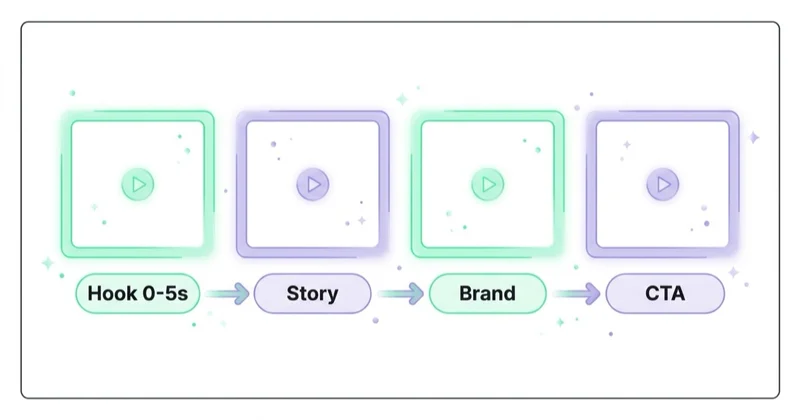
Hook
The hook creates immediate relevance. It can be a problem, visual contrast, product use, bold statement, question or outcome.
Weak: "Welcome to our company."
Better: "Most teams waste Google Ads budget before the first conversion report is even checked."
Context
The viewer needs to know what is being discussed. This is especially important for B2B, SaaS and high-consideration purchases.
Proof
Proof can be:
- product demonstration;
- real interface;
- customer quote;
- before-and-after;
- data point;
- expert explanation;
- recognisable use case;
- review snippet;
- physical product in use.
Avoid unsupported performance promises.
Offer
The viewer should understand what is available: product, service, audit, demo, guide, collection, consultation, trial or event.
Next step
The CTA should match the funnel stage. Cold users may need a guide, product page, comparison or video series. Warm users may be ready for a demo, purchase or consultation.
YouTube Ads for ecommerce
YouTube can be valuable for ecommerce when it shows what product pages cannot communicate quickly.
Good ecommerce use cases:
- product demonstrations;
- before-and-after content;
- unboxing;
- size and scale explanation;
- styling ideas;
- comparison against alternatives;
- seasonal launches;
- creator UGC;
- reviews;
- collection storytelling;
- cart and product-view remarketing.
Weak ecommerce YouTube ads often show only a packshot, music and a discount. That can work for simple offers, but it does not usually build strong product understanding.
For product creative, read Are Product Videos Worth Using? and Is Video Marketing Worth Using Online?.
YouTube Ads for B2B and services
YouTube can work in B2B when it is used for education and trust, not only lead volume.
Good B2B use cases:
- problem explanation;
- product demo;
- webinar promotion;
- founder or expert POV;
- case study summary;
- comparison content;
- retargeting after pricing or service pages;
- event promotion;
- recruitment marketing;
- thought leadership distribution.
B2B YouTube campaigns should measure lead quality, pipeline influence and assisted conversions. Cheap leads are not useful if they do not match the sales process.
Measurement and reporting
YouTube Ads reporting should match the goal.
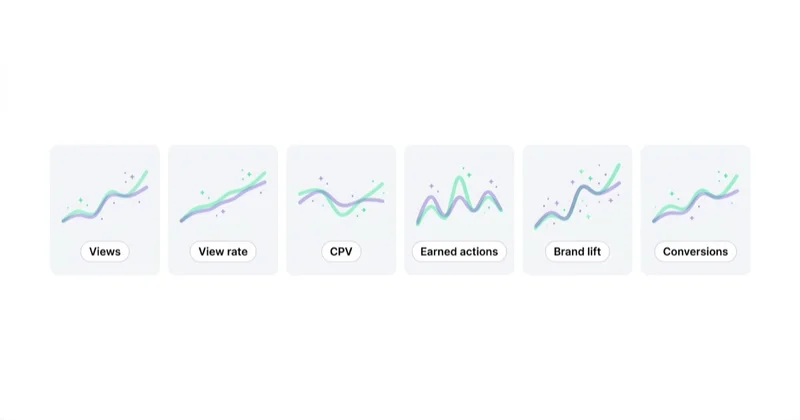
For awareness:
- reach;
- impressions;
- frequency;
- CPM;
- view rate;
- video played to 25, 50, 75 and 100 percent;
- brand lift where available.
For consideration:
- TrueView views or video views;
- CPV;
- view rate;
- earned actions;
- site visits;
- engaged sessions;
- remarketing audience growth;
- search lift or brand search movement where measurable.
For performance:
- clicks;
- conversions;
- conversion value;
- cost per conversion;
- engaged-view conversions;
- view-through contribution;
- assisted conversion paths;
- landing page conversion rate;
- audience and creative quality.
Avoid judging every YouTube campaign by last-click ROAS. Some campaigns are built to influence demand before the final click happens elsewhere.
How we approach this at Space Ads
On YouTube the first few seconds decide everything. Most formats can be skipped after five, so the brand, the core message and the hook have to land at once, not after a calm intro nobody waits for. We build the creative back to front: what has to stick comes first, the rest after. We design for sound-off and for mobile, since that's how most people watch. Targeting leans on audience signals rather than tight, rigid narrowing — the system finds similar viewers better on its own. And we don't judge video on last-click cost: it rarely closes the sale alone, but it warms up the people who buy later, elsewhere.
Common mistakes
| Mistake | Why it hurts | Better approach |
|---|---|---|
| Long logo intro | Users skip before the message appears | Start with problem, product or outcome |
| One video for every format | Creative does not fit Shorts, in-stream and bumper | Create format-specific cuts |
| No vertical assets | Shorts inventory is underused or poorly served | Produce native vertical video |
| Weak landing page | Interest does not convert | Match the video promise on the page |
| Measuring only clicks | YouTube often assists later demand | Review views, engaged views and paths |
| No remarketing plan | Warm audiences are wasted | Build sequences and follow-up campaigns |
| Over-targeting | Campaign cannot scale or learn | Balance relevance and volume |
| Unsupported claims | Trust and policy risk increase | Use clear proof and accurate language |
30-day launch plan
Week 1: Strategy and tracking
Define the campaign goal, audience, offer, landing page and measurement plan. Confirm GA4, Google Ads conversions, enhanced conversions and consent requirements.
Week 2: Creative production
Build at least three meaningful creative angles and the required aspect ratios. Prepare thumbnails, headlines, CTAs and short cutdowns.
Week 3: Campaign setup
Choose the campaign type, bidding, audiences, exclusions, budget and conversion goals. Keep the structure simple enough to read results.
Week 4: Optimisation
Review delivery, view quality, creative splits, landing page behaviour and conversion paths. Do not optimise only by pausing the highest CPV ad. Look for the ad that brings the best audience and business outcome.
FAQ
What are YouTube Ads?
YouTube Ads are paid video and visual ad placements bought through Google Ads or enterprise media tools. They can appear on YouTube and, depending on format and settings, Google video partner inventory.
Does a YouTube ad have to be uploaded to YouTube?
For Google Ads video formats, the video generally needs to be hosted on YouTube. It may be public or unlisted depending on the use case and setup.
Which YouTube ad format is best?
There is no single best format. Bumper and non-skippable ads are useful for reach, skippable in-stream is flexible, in-feed works well for discovery and consideration, and Shorts needs native vertical creative.
Are YouTube Ads good for sales?
They can be, especially with remarketing, strong creative, conversion tracking and a landing page that matches the video. Cold YouTube traffic may need more time and follow-up than Search traffic.
What is CPV in YouTube Ads?
CPV means cost per view. Google counts views differently by format, such as watching a skippable in-stream ad for a defined duration or interacting with the ad.
Should YouTube be run through Demand Gen?
Demand Gen can be a strong option when the goal is visual demand creation across YouTube, Discover and Gmail style surfaces. It is not always the right choice for every YouTube-only objective, so campaign type should follow the goal.
How long should a YouTube ad be?
The length should match the job. Bumpers are six seconds or less, non-skippable in-stream ads are short, and consideration content can be longer when the topic needs explanation. The first seconds matter in every case.
Conclusion
YouTube Ads work best when media strategy and creative strategy are planned together. The campaign settings decide where and how the ad can run, but the video decides whether the audience understands, trusts and remembers the message.
Use YouTube to explain what Search cannot show, demonstrate what a landing page cannot quickly prove and re-engage people who need another reason to act. For strong results, build placement-specific creative, measure beyond clicks and connect YouTube with Search, Demand Gen, Performance Max, remarketing, analytics and landing page testing.
Planning and running YouTube campaigns within Google Ads — from format to measurement — is something you can outsource to us.
Sources and further reading
- Google Ads Help: About Video campaigns
- Google Ads Help: About video ad formats
- Google Ads Help: About Video views
- Google Ads Help: Cost-per-view definition
- Google Ads Help: About YouTube ads and view metrics
- Google Ads Help: About Demand Gen campaigns
- Google Ads Help: Optimise your Video campaign for more conversions
Continue learning
- What Is a Demand Gen Campaign in Google Ads and How to Launch One
- Performance Max Campaigns: What to Know and How to Create Them
- What Is the Google Display Network and How to Use It?
- Are Product Videos Worth Using?
- Is Video Marketing Worth Using Online?
- What Is Remarketing and How to Launch Retargeting Ads?
Continue reading
Margin-Based Conversion Value in Google Ads: When Ecommerce Should Use It
If Google Ads receives gross revenue as conversion value, value-based bidding optimises toward gross revenue. For ecommerce stores with different product margins, a value closer to gross margin or contribution margin can give Shopping and Performance Max a better signal.
Returns and Conversion Adjustments in Google Ads for Ecommerce
Returns, cancellations and partial refunds change the real value of ecommerce orders after the purchase. If Google Ads only sees gross revenue from the conversion day, campaigns can optimise toward products that look efficient before returns but weak after them.
How to Use Google Shopping Campaigns Effectively?
Google Shopping performance depends on Merchant Center health, feed quality, campaign structure, margin, stock, landing pages and measurement, not bidding alone. This guide explains how to use Shopping, Standard Shopping and Performance Max so product budget follows profitable demand rather than the whole catalogue equally.


































