
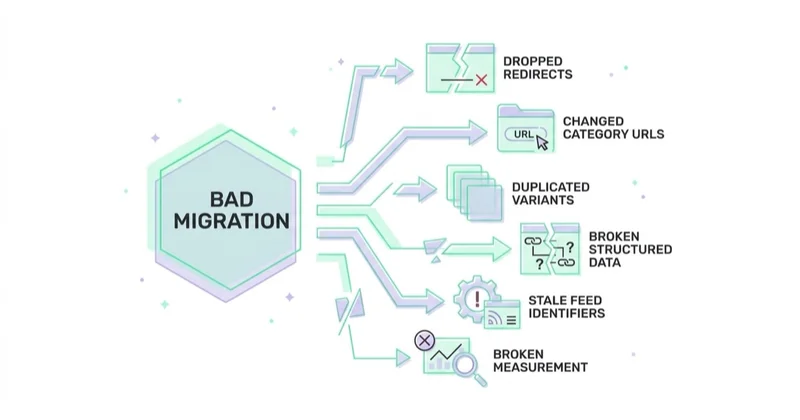
E-commerce replatforming is moving a live store from one platform to another: catalogue, customers, orders, content, URLs, integrations and measurement. It fails in predictable places, and almost none of them are the platform you chose. Visibility is lost when redirects are incomplete, category URLs change without a map, variants duplicate on import, structured data stops validating, product feeds carry identifiers that no longer exist, and conversion tracking is rebuilt differently enough that nobody can tell whether the launch worked. Each of those is a workstream with an owner, not a line item in a quote.

TL;DR
- Treat migration as a project with parallel workstreams, not as "we will move the data". The workstreams are inventory, URL mapping, data transfer and verification, integration parity, pre-production testing, cutover, and post-launch verification.
- The URL decision comes before the build, not after. Every URL structure change multiplies the redirect map and the risk carried into launch.
- Map redirects URL by URL, including the ones nobody remembers — paginated category pages, filtered URLs that earned links, old campaign landing pages, image paths and downloadable assets. Redirect only to a genuinely equivalent destination.
- Protect the URLs that already create demand. Category, product and editorial pages can all carry valuable rankings, links and revenue; prioritise them using Search Console, analytics, server logs and backlink data rather than assumptions about page type.
- Integration parity is a launch gate, not a post-launch task. Payments, couriers, order management, invoicing, feeds and consent all have to work before traffic arrives.
- The cutover has an order of operations. Doing the right things in the wrong sequence produces the same outcome as not doing them.
- Plan the rollback before you need it: a reversible traffic switch, the old store kept deployable, a recoverable data snapshot, named rollback triggers and one decision owner.
- Sometimes the answer is not to migrate. When the constraint is process, offer or user experience rather than the platform, a UX audit is the cheaper diagnosis.
- Ownership of code, data and infrastructure is a separate question — covered in vendor lock-in in e-commerce: what you actually own.
Why "we will migrate the data" is the wrong scope
Most replatforming quotes describe a data transfer with a launch date attached. That framing hides the work that actually decides the outcome. Data transfer is the most mechanical part of a migration: exports exist, importers exist, and a mismatch is visible immediately. What is neither mechanical nor visible is everything that depends on identity — which URL is which page, which variant is which SKU, which product ID a feed refers to, which event name a report is built on.
Identity is what search engines, ad platforms and analytics all key on. A store can arrive on a new platform with every product present and every order preserved, yet still lose visibility and measurement continuity because important URLs changed without equivalent redirects, the redirect map was written from a sitemap alone, or the product feed began emitting new IDs. Google explicitly recommends keeping a Merchant Center product ID stable: changing it makes the offer a new product and disconnects its previous performance history.
So the useful scope statement is not "migrate the store". It is: keep every identity stable, or map it explicitly, and prove the map works before traffic depends on it. Everything in this article follows from that one sentence.
There is a second reason the framing matters commercially. A migration described as a data transfer gets quoted as one line and delivered by one person. A migration described as seven workstreams gets an owner per workstream, a launch gate, and a rollback plan — which is why the same project delivered under the second framing tends to be uneventful.
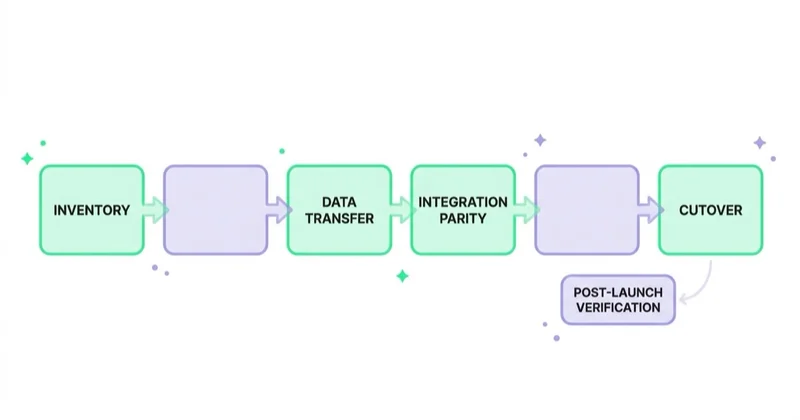
The seven workstreams
1. Inventory — what exists before anything moves
Nothing can be mapped that has not been listed. The inventory is the least glamorous workstream and the one that determines whether the rest is possible.
- URLs. Not the sitemap alone — it contains only the URLs the store deliberately publishes there. Combine a full crawl with server logs, Search Console performance and link data, analytics landing pages, CMS exports and the backlink profile. Choose a lookback period that covers the business's seasonal cycle. The resulting set is the migration inventory; each URL needs an equivalent destination, a justified consolidation, or a deliberate
404/410response when no replacement exists. - Products and variants. Product count is easy; variant identity is not. Record how variants are keyed today (SKU, option combination, parent-child relationship), because that key is what the importer will either preserve or silently invent.
- Customers. Accounts, addresses, consent records with their timestamps, marketing preferences, loyalty balances, store credit, gift-card liabilities.
- Orders. Order history, statuses, returns and refunds, invoices, subscription state and payment tokens. Some of this is not portable in a meaningful sense — subscription tokens held by a payment provider often need re-authorisation rather than migration.
- Content. Category descriptions, editorial pages, blog posts, help and policy pages, plus the media library with its file paths.
- Historical redirects. The redirects already running on the old store from previous changes. These are the single most commonly dropped asset in a replatform, because they are invisible in the CMS and live in a config file or a plugin table.
- Integrations. Every connected system, with direction, frequency and credentials holder.
2. The URL decision and a 1:1 redirect map
Two questions, in this order. First: does the URL structure change at all? Second: for every old URL, what is the single best destination?
The cheapest migration keeps URL structure identical. Every deviation is paid for in redirect volume, crawl budget, internal-link rewriting and risk. Sometimes the deviation is unavoidable — a platform may impose a path prefix on products or collections. When it is, decide it once, early, and write it into the build spec rather than discovering it during import.
Rules that keep the map honest:
- One old URL, one relevant decision. Redirect it to the closest equivalent new page. Several old pages may legitimately point to one new page when their content has genuinely been consolidated. Sending unrelated products and categories to the homepage or a generic search page can be treated as a soft 404 and is poor for users.
- Permanent redirects for permanent moves. Use a 301 (or 308) for structural changes; reserve temporary codes for genuinely temporary states.
- No loops; minimise chains. Old → intermediate → new is a chain, so point the old URL directly to the final destination wherever possible. Google can follow redirect chains, but each hop adds latency and another failure point.
- Include the unglamorous URLs. Paginated category pages, sort and filter URLs that earned links, image paths, PDF assets, old campaign landing pages, feed endpoints, and any legacy domain still resolving.
- Rewrite internal links, do not rely on redirects. A redirect keeps a user and a crawler moving; an internal link pointing at a redirect wastes both crawl budget and clarity. Menus, category descriptions, editorial content and email templates all need the new URLs.
- Keep canonical tags self-referential on the new templates, and check them on paginated and filtered views specifically — that is where platforms generate surprises.
Category pages deserve special attention because they often capture broad commercial queries and connect large parts of the internal-link graph. Product pages, buying guides and other editorial assets may be equally valuable in a different store. Rank migration priorities by organic clicks, impressions, backlinks, assisted conversions and revenue rather than by URL type alone. Decide the taxonomy before the build, not during content entry.
3. Data transfer and verification
Import is a claim. Verification is what makes it a fact. Every entity needs a reconciliation step with a number that has to match, and the reconciliation belongs to someone by name.
- Counts. Products, variants, categories, customers, orders, invoices, content pages — before and after, with the delta explained rather than rounded away.
- Relationships. Variants attached to the right parent, products in the right categories, orders attached to the right customer, invoices attached to the right order.
- Variant collisions. The classic failure: an importer that keys variants on an option label instead of a SKU creates near-duplicate products, or merges two genuinely different SKUs into one. Check the total variant count and then spot-check the products with the most option combinations.
- Prices, tax rates and currencies. Including per-market pricing, rounding rules, and any price-with-tax versus price-without-tax convention change.
- Media. Image presence, but also image paths — because those paths are URLs, and old ones need redirects too.
- Consent records. Timestamps and scope have to survive, not just the boolean.
- Structured data. Product, offer availability, price, review and breadcrumb markup rendered from the new templates and tested on representative rendered URLs, not only in a template preview. Validation confirms syntax and feature eligibility; it does not confirm that the values are true, so compare price, currency, availability and identifiers with the page and feed as well.
4. Integration parity before launch
Parity means: every integration that worked on the old store works on the new one, in the same direction, at the same frequency, with the same edge-case behaviour — and is proven with a real transaction before traffic arrives.
The list is longer than it looks: payment methods (each one, not just card), couriers and pickup points, order management or ERP synchronisation, invoicing, email and SMS, reviews, product feeds to Merchant Center and Meta, consent management, and analytics. In many European stores the order-management layer is the real hub, and a migration that satisfies the storefront while breaking the sync into that hub has broken the business rather than the website.
Edge cases are where parity actually gets tested, and they are what generic connectors leave out: partial refunds, exchanges, split shipments from multiple locations, pre-orders, bundles, backorders, and cancellations after fulfilment. Each needs a scripted test with an expected result.
5. Pre-production testing
Staging exists so that launch day has no discoveries. Three categories of test earn their cost:
- Functional, end to end. Place real orders on staging for each payment method and each shipping method, then take one through a partial refund and one through a full return, and confirm the order-management system and invoicing agree with the storefront.
- Search-facing. Crawl staging and diff it against the crawl of production: title and meta coverage, heading structure, canonical tags, indexability directives, internal link graph, orphan pages, structured data validity, hreflang if multilingual. Confirm the redirect map resolves correctly against a staging build before it has to work in public.
- Performance and accessibility. On staging, compare lab measurements and diagnostic traces for the templates that carry traffic — home, category, product, cart and checkout — under consistent test conditions. Core Web Vitals are field metrics based on real visits, so verify them after launch as enough field data becomes available. Treat a material lab regression as a launch risk, and run automated and manual accessibility checks on the same journeys.
One discipline makes staging reliable: keep it out of public search and keep production-ready indexation rules in a separate launch configuration. Authentication or network access control is stronger protection than robots.txt; a crawler block is not access control, and a noindex directive still requires a crawler to access the page before it can see the directive. If staging uses noindex, removing it must be a named, checklisted launch step. Test the production robots.txt, canonical tags and robots meta directives immediately after the traffic switch.
6. Cutover — order of operations
The launch is a sequence, and the sequence matters more than the speed. A workable order:
- Prepare a reversible traffic switch. If DNS will change, lower its TTL well in advance. If the domain stays the same, document how the load balancer, reverse proxy or hosting route will switch between the old and new origin.
- Freeze catalogue and content changes on the old store at a stated time, and tell the merchandising and customer service teams the freeze is on.
- Run the final data delta — orders and customers created since the last sync — and reconcile counts again.
- Deploy, with traffic still on the old store. Verify redirects against a sample of the highest-value URLs, verify robots directives, verify canonical tags on live templates.
- Switch traffic. Remove any development-only
noindexor crawler block from the production configuration, test representative rendered pages, publish the new sitemap and submit it in Search Console. Use Search Console's Change of Address only when the move changes domains or subdomains; it is not required for a platform change on the same URLs or an HTTP-to-HTTPS move. - Verify measurement immediately. Fire a test purchase and confirm the events, parameters, consent signals and server-side tagging all behave — before the first real order depends on it.
- Re-point the feeds and confirm item identifiers are unchanged. Merchant Center treats a changed ID as a new product, which can require a new review and separates the offer from its previous performance history.
- Confirm transactional email and invoicing are sending from the new store, not silently from the old one.
- Keep the old store deployable. Do not delete, do not cancel hosting, do not drop the database.
7. The first days after launch
The launch is not the end of the workstream; it is the start of the monitoring one. What to watch, and why:
- Indexation. Track the Page indexing report for a rise in "not found", "redirect error", "duplicate without user-selected canonical" and "excluded by noindex". Use URL Inspection on a representative sample of high-value pages rather than waiting only for aggregate charts. Expect some fluctuation while search engines recrawl and process the move; investigate patterns and affected templates instead of treating every daily change as an incident.
- 404 and redirect errors from the server, not only from search tooling. Server logs show what crawlers and users actually hit, including URLs no crawl ever discovered.
- Structured data. Validity per template, and specifically whether price and availability are being emitted correctly for products that are out of stock or on promotion.
- Feeds. Disapproval counts and reasons in Merchant Center, item coverage against catalogue size, and identifier consistency. If the store's identifiers changed, the feed workstream needs its own attention — the mechanics are in what is a product feed and how to use it.
- Conversion measurement. Compare order counts in the store admin against conversions in analytics and in each ad platform, daily, for the first weeks. A measurement gap discovered a month later cannot be reconstructed.
- Performance. Real-user field data on the traffic-carrying templates, complemented by repeatable lab tests. Field Core Web Vitals are aggregated over time, so they are a confirmation signal rather than an immediate launch-day alarm.
- Revenue by landing page. The most sensitive early-warning signal available: a specific category or product cluster dropping while the rest holds is a URL or index problem, not a market problem.
Glossary
- Replatforming — moving a live store from one e-commerce platform to another, including catalogue, customers, orders, content, URLs, integrations and measurement.
- Redirect map — the explicit old-URL-to-new-URL table implemented at launch so that existing links, rankings and bookmarks resolve to an equivalent page.
- 301 redirect — a permanent redirect, the correct response for a URL that has moved for good; temporary codes signal to search engines that the old URL may return.
- Canonical URL — the version of a page a site declares as the one to index, used to consolidate duplicates created by parameters, pagination or variants.
- Variant collision — an import error in which variants are keyed on the wrong attribute, producing duplicated products or merged SKUs.
- Integration parity — the state in which every connected system works on the new platform in the same direction, frequency and edge-case behaviour as on the old one.
- Reconciliation — comparing counts and relationships before and after transfer, and explaining every difference rather than accepting it.
- Rollback window — the period after the cutover during which returning to the old store is still technically possible, kept open deliberately.
The comparison question people ask first
Before a migration, the question is usually phrased as a platform choice — Shopify vs WooCommerce, hosted vs self-hosted, platform vs custom build. It is a reasonable question and it is not where migrations fail. Platform choice determines your constraints for the next few years; migration execution determines whether you arrive with your traffic intact. Teams routinely spend months on the first question and days on the second, then attribute the resulting traffic loss to the platform.
The comparison is still worth making on the dimensions that affect the migration itself, rather than on feature lists:
| Dimension | Hosted platform (e.g. Shopify) | Self-hosted open source (e.g. WooCommerce) | Custom build |
|---|---|---|---|
| Control over URL structure | Partial — some path patterns are imposed | High | Complete |
| Redirect management | Built-in, bulk import usually available | Plugin or server config | Server config, fully scriptable |
| Import tooling maturity | Strong for standard catalogues | Varies by plugin | Written for your data model |
| Handling of non-standard variants | Constrained by the platform model | Extendable within the framework | Designed around your catalogue |
| Structured data control | Theme-level, sometimes app-dependent | Theme and plugin-level | Explicit |
| Integration approach | App ecosystem | Plugin ecosystem | Built per integration |
| Where migration risk concentrates | Taxonomy and URL shape changes | Plugin behaviour and data quality | Scope and timeline |
| Ongoing cost shape | Subscription, apps, per-order fees | Hosting plus maintenance capacity | Build investment, then maintenance |
If the platform decision itself is still open, the two long-form comparisons already published are is it worth building a WordPress store with WooCommerce and is it worth building an online store on Magento, and how to start an online store covers the greenfield case. This article assumes the decision is made and the store is already live.
What a bad migration costs — and the mechanism
Every loss below has the same shape: an identity changed without a map, and something downstream kept referring to the old one.
| Typical mistake | Consequence | How to avoid it |
|---|---|---|
| Redirect map built from the sitemap only | URLs with links, rankings or traffic but no sitemap entry return 404 | Build the URL set from a crawl plus server logs, Search Console and the backlink profile |
| Historical redirects from earlier changes dropped | Links accumulated over years break silently; no error surfaces in the CMS | Export the existing redirect table from the old platform and carry it into the new map |
| Category URLs renamed to match a new taxonomy | The store's highest-value search pages lose their history | Decide taxonomy before the build; where a change is unavoidable, redirect 1:1 and rewrite internal links |
| Unrelated URLs redirected to the homepage or one generic category | Poor destination for users and potentially treated as a soft 404 | Redirect to an equivalent or genuinely consolidated page; otherwise return a genuine 404 or 410 |
| Redirect chains created by staging or protocol changes | Slower crawling, diluted signals, occasional loops | Collapse chains to a single hop and test the map before cutover |
| Variants imported on the wrong key | Duplicate products, merged SKUs, cannibalised product pages, feed disapprovals | Reconcile variant counts and spot-check the products with the most option combinations |
| Structured data not re-implemented per template | Rich results disappear; price and availability stop being trusted | Validate Product, Offer and BreadcrumbList markup on live URLs per template |
| Product feed re-published with new internal IDs | Merchant Center treats the offers as new, previous performance history is disconnected and review may be required | Keep item IDs stable; if they must change, plan the transition and monitor processing and disapprovals |
| Measurement rebuilt with different event names | New data is not comparable to old; nobody can prove whether the launch worked | Document the event model before launch and verify parity with a test purchase at cutover |
| Staging noindex shipped to production, or staging left indexable | Whole site excluded from search, or a duplicate site competing with it | Make both a checklisted cutover step with a named owner |
| Internal links left pointing at redirects | Wasted crawl budget, ambiguous signals, slower consolidation | Rewrite menus, category copy, editorial content and email templates to new URLs |
| Launch scheduled into peak season | Every incident lands when it is most expensive and rollback is least acceptable | Launch during a predictable lower-traffic period and define the rollback window around operational risk |
How to plan a migration you can roll back
A rollback plan is not pessimism; it is what makes a decisive launch possible. The plan needs five things, all decided before cutover:
- Technical reversibility. The old store remains deployable, its infrastructure remains available, and a tested traffic-switch procedure exists. If DNS changes, its TTL is lowered in advance. Preserve a recoverable database snapshot and avoid destructive cleanup until the window closes.
- A reversible redirect layer. The map implemented in a way that can be switched off in one action rather than unpicked page by page.
- Named rollback triggers, written down and measurable: checkout error rate above a stated threshold, payment method failing, order sync to the order-management system stopped, sitewide indexability broken, revenue by landing page down beyond a stated band for a stated period.
- One decision owner. A named person who can call the rollback without a meeting, and a stated window in which they hold that authority.
- A data plan for the gap. Orders placed on the new store during the window must be reconcilable into the old one if you go back. This is the part most rollback plans forget, and it is the reason some rollbacks become impossible after a few hours of trading.
Two things do not roll back cleanly, and knowing which they are keeps the plan honest: emails already sent from the new store, and index changes already crawled. Both argue for a short, well-monitored decision window rather than an open-ended one.
When not to replatform
A replatform is the most expensive available answer to a lot of questions it does not answer. It is the wrong project when:
- The constraint is the user experience, not the platform. If the diagnosis points at unclear offer, weak product pages, friction in cart and checkout, or mobile navigation, those are fixable on almost any platform — and a migration will make them temporarily worse. A UX audit produces a prioritised backlog for a fraction of a rebuild, and the CRO mechanics are covered in conversion optimization for e-commerce, B2B and SaaS.
- The constraint is product data. Thin titles, missing attributes, inconsistent categorisation and a weak feed depress both organic and paid performance, and they migrate with you unchanged.
- The constraint is measurement. If nobody trusts the numbers, a new platform gives you untrustworthy numbers on a new stack, plus a broken baseline.
- The constraint is the offer. Pricing, shipping terms, returns policy and assortment do not improve because the storefront was rebuilt.
- No diagnosis has been made. "The platform is holding us back" without a named constraint and a cost attached to it is a hypothesis. Start with how to audit an e-commerce store and let the findings decide the project.
- There is no internal owner or maintenance budget. A new platform with nobody accountable degrades faster than an old one somebody knows.
- Peak season falls inside the plan. If the rollback window overlaps the trading period that funds the year, the schedule is the risk, whatever the platform.
The honest version of this section: a migration is worth doing when a named constraint has a cost attached, that cost recurs, and the new platform removes it. Anything short of that is a rebuild looking for a justification.
How Space Ads approaches replatforming
Space Ads approaches replatforming as coordinated workstreams rather than a single data-transfer task. The URL inventory and redirect map become build requirements; payment, delivery, order-management, invoicing, feed, consent and measurement flows receive named owners and acceptance tests. The scope and delivery model are described in the “How we work” section of our e-commerce development page. The practical principle is simple: prove continuity before launch. A product existing in the new catalogue does not prove that its URL, feed ID, structured data, tracking and operational integrations still represent the same product correctly.
Launch checklist
Four weeks out. URL inventory assembled from four sources. Redirect map drafted and reviewed. Taxonomy and URL structure frozen in the build spec. Integration list complete with direction, frequency and credentials holder. Event model documented.
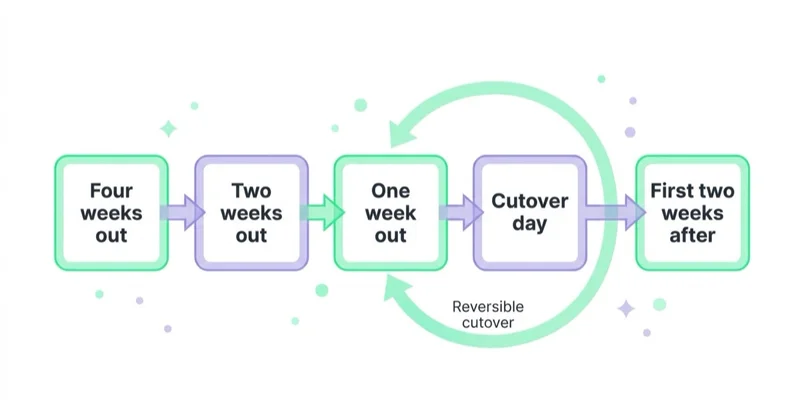
Two weeks out. Full import into staging. Reconciliation of counts and relationships, deltas explained. Crawl diff of staging against production. Structured data validated and checked against visible product data per template. Repeatable lab performance tests on traffic-carrying templates. Scripted transaction tests per payment and shipping method, plus partial refund and return.
One week out. Redirect map tested against the staging build. Internal links rewritten. Traffic-switch procedure tested and DNS TTL lowered if DNS will change. Rollback triggers, decision owner and window agreed in writing. Freeze time communicated to merchandising and customer service.
Cutover day. Freeze on. Final delta sync and reconciliation. Deploy with traffic still on the old store, then verify redirects, robots and canonicals. Switch traffic. Confirm the production indexation configuration. Publish and submit the new sitemap; submit Change of Address only for a qualifying domain move. Run a test purchase and verify measurement. Re-point feeds and confirm identifiers. Confirm transactional email and invoicing. Leave the old store deployable.
First two weeks after. Daily: page indexing report, server 404 and redirect errors, feed disapprovals, order counts against analytics and ad platforms, revenue by landing page. Weekly: structured data validity, field performance data, internal link and orphan-page check.
Closing the window. Only after reconciliation passes and revenue by landing page has stabilised: decommission the old store, and keep an exported copy of its database and redirect table regardless.
Common mistake, and what to do instead
| Common mistake | What to do instead |
|---|---|
| Scoping the project as "migrate the data" | Scope it as seven workstreams with an owner and a gate each |
| Deciding URL structure during content entry | Decide it before the build and write it into the spec |
| Treating the redirect map as a launch-week task | Make it the first deliverable, and test it against staging |
| Verifying the import by eye | Reconcile counts and relationships per entity, with deltas explained |
| Leaving integrations to be finished after launch | Make parity a launch gate with scripted tests per integration |
| Rebuilding measurement from scratch | Document the existing event model and verify parity at cutover |
| Launching without a rollback plan | Agree triggers, a decision owner, a window and a data plan for the gap |
| Deleting the old store once the new one is live | Keep it deployable until reconciliation passes, then archive the database and redirect table |
| Judging the launch on total traffic | Judge it on revenue by landing page, indexation status and feed coverage |
| Migrating to fix conversion problems | Diagnose first; if the constraint is offer or experience, fix that instead |
FAQ
What is e-commerce replatforming?
E-commerce replatforming is moving a live store from one platform to another, including the catalogue with variants, customers, orders and invoices, content, URL structure, integrations and measurement. It differs from a redesign because identity changes: URLs, product identifiers and event definitions may all be reassigned. Managing those identities — keeping them stable or mapping them explicitly — is what determines whether search visibility, feed coverage and reporting continuity survive the move.
How do you migrate an e-commerce site without losing SEO?
Keep URL structure identical where possible; where it must change, implement a 1:1 permanent redirect for every old URL to an equivalent new one, with no chains and no bulk redirects to the homepage. Build the old URL set from a crawl, server logs, Search Console data and the backlink profile rather than from the sitemap alone. Carry forward redirects that already existed, rewrite internal links to the new URLs, re-implement structured data per template, and monitor the page indexing report and server 404s daily after launch.
Shopify vs WooCommerce — which is better for a store that is replatforming?
The Shopify vs WooCommerce comparison decides your constraints for the next few years, not whether the migration succeeds. On the dimensions that affect a migration, the trade is this: Shopify provides managed infrastructure, mature import tooling and built-in bulk redirect management, but imposes some URL path patterns and puts certain capabilities behind paid apps. WooCommerce gives full control over URL structure, templates and structured data, at the cost of maintaining hosting, plugins and security yourself, with import quality varying by plugin. A move in either direction is justified when a named constraint — maintenance capacity, plugin instability, per-order economics, performance under campaign traffic — has a recurring cost attached. It is not justified by a feature list, and it will not fix conversion problems that live in the offer or the checkout.
How long should a store keep its old redirects?
Google recommends keeping site-move redirects for as long as possible and generally for at least one year, giving its systems time to recrawl the old and new URLs and transfer signals. Users may continue to arrive through backlinks, bookmarks, printed materials and email archives long after that period, so keeping useful redirects indefinitely is often the better business decision. Export the map and treat it as maintained infrastructure that must survive the next migration.
Will a replatform improve conversion rate?
Not by itself. A migration can enable conversion improvements when the old platform imposes a measured constraint — for example, an inflexible checkout, poor mobile performance or an integration that blocks a better delivery proposition. But the platform change is not the improvement: the new customer experience is. Launch data can also be harder to compare if tracking, consent behaviour or traffic mix changes. Define the conversion hypothesis and measurement baseline before the rebuild; if the problem can be solved on the current platform, a UX audit and prioritised backlog may be the faster route.
What is integration parity and why is it a launch gate?
Integration parity means every connected system — payments per method, couriers and pickup points, order management or ERP, invoicing, email and SMS, reviews, product feeds, consent management, analytics — works on the new platform in the same direction, at the same frequency, with the same edge-case behaviour as on the old one. It is a launch gate because a storefront that takes orders while the order-management sync is broken creates an operational incident that grows with every transaction, and because edge cases like partial refunds and split shipments are where generic connectors stop.
What happens to product feeds after a migration?
Product feeds can lose continuity when item identifiers change. Google Merchant Center requires a stable ID for each product and treats a changed ID as a new product; previous performance history is no longer associated with it, and review may be required before ads and listings serve normally. Keep IDs stable where possible. If a change is unavoidable, map it deliberately, keep valid identifiers such as GTIN, brand and MPN consistent, and monitor processing, disapprovals and item coverage after the switch.
Can a migration be rolled back after launch?
Partially, and only if it was planned for. Technical rollback requires the old store to remain deployable, a tested way to switch traffic back, and a recoverable data state; a low DNS TTL matters only when DNS is part of that switch. Emails already sent and search-engine crawls cannot be undone. The limiting factor is usually transactional data: orders, payments, inventory changes and customer updates created on the new store must be reconciled if the old one returns. That is why the rollback window needs explicit triggers, close monitoring and one decision owner.
When should a store not replatform?
When the named constraint is not the platform. If the problem is unclear offer, friction in checkout, weak product data, untrustworthy measurement or a pricing and shipping proposition that does not compete, those all migrate unchanged and the rebuild delays the fix. A replatform is justified when a specific constraint has a recurring cost attached, that cost has been measured, and the new platform removes it. Without a diagnosis, an audit is the cheaper first project.
Who should own a replatforming project internally?
One person with authority over scope and the launch decision, supported by named owners per workstream — catalogue and content, URLs and search, integrations and operations, measurement. The reason is sequencing: most migration damage comes from decisions taken in the wrong order by people who did not know they were making them, such as a taxonomy change entered during content work or a feed re-published under new IDs. A named owner per workstream turns those into decisions with a reviewer.
Sources and further reading
- Google Search Central — Site moves with URL changes
- Google Search Central — Redirects and Google Search
- Google Search Console Help — Page indexing report
- Google Merchant Center Help — Product data specification
- Google Merchant Center Help — ID attribute: keep a stable product identifier
- Schema.org — Product
- web.dev — Core Web Vitals (LCP, INP, CLS)
Documentation checked July 2026. Platform vendors and Google revise these pages and their reporting names — verify against the current version before relying on a specific label or threshold.
Continue learning
- How to audit an e-commerce store
- Vendor lock-in in e-commerce: what you actually own
- What is a product feed and how to use it
- Conversion optimization for e-commerce, B2B and SaaS
- E-commerce development with migration and measurement planned as their own workstreams
In short
- Replatforming fails in the workstreams, not in the platform choice; identity management is the whole game.
- The URL decision belongs in the build spec, and the redirect map is the first deliverable, not a launch-week task.
- Build the old URL set from a crawl, server logs, Search Console and backlinks — never from the sitemap alone.
- Import is a claim; reconciliation of counts and relationships is what turns it into a fact.
- Integration parity is a launch gate, verified with scripted tests including partial refunds and split shipments.
- Plan the rollback before cutover: low TTL, old store deployable, named triggers, one decision owner, a data plan for the gap.
- If the constraint is process, offer or user experience rather than the platform, an audit is the cheaper and faster project.
Continue reading
Auto Parts Ecommerce: Marketing Around the Fitment Problem
Auto parts marketing starts with fitment data. Learn how to connect the catalogue, vehicle selector, product feed, SEO and returns data so customers find parts that genuinely fit.
Local Inventory Ads: The Format Decided by Your Stockroom
Local inventory ads connect nearby demand with products available in physical stores. Learn how to prepare store data, pickup options, landing pages and offline measurement without promising stock the customer cannot buy.
The Shopify Marketing Stack: What to Install and What to Remove
A Shopify marketing stack should connect customer data, storefront experience, merchandising, lifecycle and acquisition without duplicating events or adding unmanaged risk. Use this framework to choose, govern and remove apps safely.


































