
Starting an online store is not only about choosing a platform and uploading products. A store needs a business model, product data, pricing, payment methods, shipping, returns, legal policies, analytics, customer service and a traffic plan. The platform matters, but the economics matter more: margin, fulfilment cost, acquisition cost, conversion rate and repeat purchase potential.
The best online store is a system. The website, product pages, checkout, stock, delivery, data, advertising and support process have to work together. A store can look professional and still fail if there is no plan for profitable traffic, customer trust and operational delivery.
TL;DR
- An online store needs more than a website. It needs offer, operations, payments, shipping, policies, analytics and marketing.
- Choose the platform after defining the business model. Shopify, WooCommerce, marketplaces and custom builds solve different problems.
- Product data is strategic. Titles, descriptions, images, variants, availability, identifiers and feed quality affect SEO, ads and conversion.
- Payments and delivery should match customer expectations in the target market.
- Legal and trust elements must be ready before launch. Requirements vary by country, so local legal review may be needed.
- GA4 ecommerce tracking, ad conversions, Merchant Center and product feed basics should be ready from day one.
- The most common mistake is launching without a traffic and sales plan.
What an online store really is
An online store is a commercial system for selling products or services through digital channels. It includes:
- product catalogue;
- product pages;
- cart;
- checkout;
- payments;
- shipping or fulfilment;
- returns and refunds;
- customer communication;
- analytics;
- marketing channels;
- stock and order management;
- policies and compliance;
- post-purchase experience.
The storefront is only the visible layer. The business succeeds or fails because of the whole operating model.
Step 1: Define the business model
Before choosing a platform, answer:
- What will be sold?
- Who is the target customer?
- Why will they buy from this store instead of alternatives?
- What is the gross margin?
- What is the expected average order value?
- How often can a customer buy again?
- What are the fulfilment costs?
- What is the likely return rate?
- What acquisition cost can the business afford?
- Which markets and currencies will be served?
- Is the offer seasonal?
- Are there legal or compliance restrictions?
This is not theoretical. It determines platform, content, payment methods, shipping, marketing budget and analytics.
Step 2: Choose the ecommerce model
There are several ways to sell online.
Own online store
An owned store gives the most control over brand, customer experience, data, SEO, checkout and content.
Best for:
- building a long-term brand;
- owning customer relationships;
- SEO and content marketing;
- remarketing;
- custom landing pages;
- controlled analytics;
- higher-margin products.
Main challenge: the store must generate its own traffic.
Marketplace
Marketplaces such as Amazon, eBay, Etsy or local marketplace platforms can provide demand, but the seller gives up some control.
Best for:
- validating demand;
- reaching marketplace search traffic;
- selling standardised products;
- entering new markets;
- using existing logistics or trust systems.
Main challenge: competition, fees, limited branding and less customer ownership.
Social commerce
Social commerce uses platforms such as TikTok Shop, Facebook Shop, Instagram Shop or live shopping features.
Best for:
- creator-led products;
- impulse purchases;
- community-first brands;
- short-form video discovery;
- catalogue promotion;
- product launches.
Main challenge: platform dependency and less control than an owned store.
For social commerce context, read TikTok Shop: What It Is and How It Works, What Is Facebook Shop and How to Set It Up? and How to Set Up and Manage an Instagram Shop.
Step 3: Choose a platform
Platform choice should follow requirements, not popularity.
Common options:
- Shopify;
- WooCommerce;
- BigCommerce;
- Adobe Commerce;
- Magento/OpenMage-style stacks;
- headless commerce;
- local SaaS platforms;
- marketplace-only model;
- custom development.
Shopify
Shopify is often strong when the business wants a hosted ecommerce platform, fast setup, app ecosystem and fewer infrastructure decisions. Shopify's own launch checklist emphasises store setup, organisation, testing, launch, additional sales channels and promotion.
Good fit:
- fast start;
- standard ecommerce;
- teams without internal development resources;
- app-based integrations;
- hosted checkout and infrastructure.
Watch out for:
- app costs;
- theme limitations;
- platform-specific structure;
- transaction/payment cost implications;
- customisation constraints for unusual workflows.
WooCommerce
WooCommerce is strong when the business wants WordPress flexibility, content control and a self-hosted ecommerce stack.
Good fit:
- content-led ecommerce;
- SEO-driven growth;
- existing WordPress site;
- custom templates;
- flexible product or content architecture;
- ownership of hosting and code.
Watch out for:
- hosting quality;
- plugin governance;
- updates;
- security;
- performance;
- maintenance responsibility.
For a deeper comparison, read Is It Worth Building a WordPress Store with WooCommerce?.
Custom or headless commerce
Custom commerce can be justified when requirements are genuinely complex:
- unusual product configuration;
- enterprise integrations;
- marketplace model;
- multi-brand or multi-country setup;
- advanced B2B pricing;
- custom checkout logic;
- high traffic and performance demands.
It is rarely the best starting point for a simple store because cost and maintenance increase quickly.
Step 4: Prepare product data
Product data is the foundation of store quality.
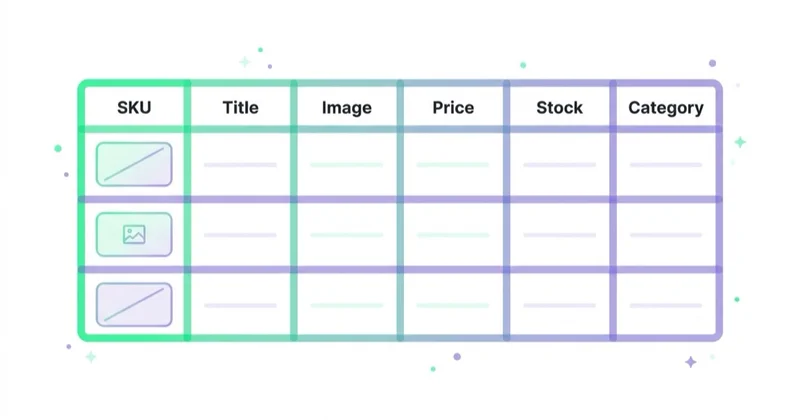
Each product should have:
- product name;
- product type;
- SKU or internal ID;
- brand;
- price;
- currency;
- availability;
- variants;
- images;
- description;
- specifications;
- dimensions or size guide;
- material or ingredients where relevant;
- delivery and returns information;
- warranty;
- identifiers such as GTIN or MPN where available;
- category assignment;
- structured data;
- feed-ready attributes.
This matters for users, SEO, Google Merchant Center, Shopping ads, free listings, product recommendations and AI search. Weak product data creates problems across the whole growth system.
For copywriting detail, read How to Write a Product Description That Sells and What It Must Include.
Step 5: Build trustworthy product pages
A product page should answer buyer questions without forcing them to search elsewhere.
Include:
- clear product title;
- strong images;
- price and availability;
- main benefits;
- detailed description;
- specification table;
- variants;
- size or compatibility guidance;
- delivery information;
- returns policy summary;
- reviews or proof;
- FAQ;
- related products;
- clear add-to-cart button.
Product photography and video matter because ecommerce buyers cannot touch the product. For visuals, read Product Photography: How to Take Product Photos and Packshots and Are Product Videos Worth Using?.
Step 6: Configure payments
Payment setup should match the target market.
Common payment categories:
- credit and debit cards;
- digital wallets;
- bank transfers;
- local payment methods;
- buy now, pay later;
- subscription payments;
- invoice payments for B2B;
- cash on delivery in some markets.
Stripe's guidance on accepting online payments highlights the need to choose a payment processor or gateway, integrate it with the website or storefront, test and monitor the payment flow.
Payment checklist:
- test successful payments;
- test failed payments;
- test refunds;
- check tax and invoice logic;
- check payment emails;
- check mobile checkout;
- monitor fraud rules;
- define chargeback handling;
- ensure payment method labels are clear.
A payment method that users expect can improve conversion. Too many confusing options can create friction.
Step 7: Plan shipping, fulfilment and returns
Shipping is not an afterthought. It affects conversion, margin, customer satisfaction and repeat purchase.
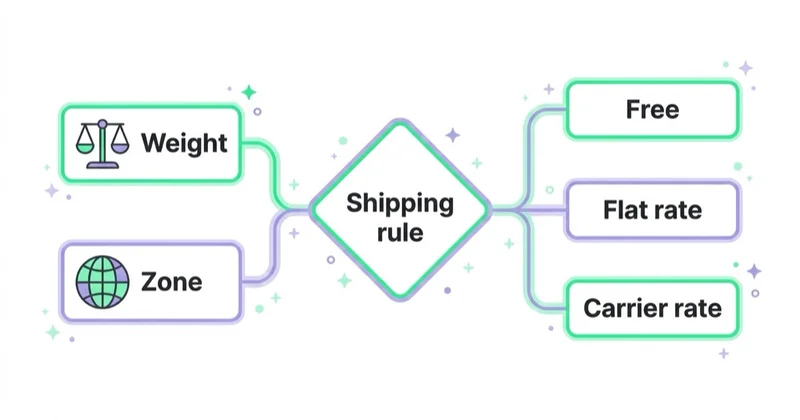
Define:
- shipping regions;
- delivery methods;
- delivery cost;
- free shipping threshold;
- processing time;
- carrier integration;
- tracking emails;
- packaging;
- return window;
- refund rules;
- exchange process;
- damaged item process;
- customer support workflow.
Hidden delivery costs are a major checkout friction point. Communicate shipping rules before checkout where possible.
Step 8: Prepare legal and trust elements
Legal requirements vary by country and product category. This article is not legal advice. The store should use qualified local legal review where needed.
Common trust and compliance elements:
- terms and conditions;
- privacy policy;
- cookie and consent setup;
- returns and refunds policy;
- delivery policy;
- contact details;
- company details;
- payment security information;
- warranty information;
- complaint process;
- age restrictions where relevant;
- accessibility considerations;
- marketing consent rules;
- product safety or labelling requirements.
These pages are not only compliance documents. They also reduce purchase anxiety.
For advertising and analytics consent, read Consent Mode v2: What It Is and How to Implement It.
Step 9: Set up analytics before launch
Do not launch first and measure later.
Prepare:
- GA4;
- ecommerce events;
- Google Tag Manager;
- Google Ads conversion tracking;
- Meta Pixel and Conversions API where relevant;
- Search Console;
- Merchant Center;
- product feed;
- UTM rules;
- dashboard;
- backend revenue comparison;
- consent testing;
- checkout event testing.
For the analytics layer, read What Is Ecommerce Analytics and Why Is It So Important? and How to Use Google Data Studio (Looker Studio).
Step 10: Prepare Merchant Center and product feeds
For many stores, Google Merchant Center is essential. It supports product data used for Shopping ads, free listings and other Google surfaces.
Product feed quality affects visibility and approval.
Prepare:
- product title;
- description;
- product URL;
- image URL;
- price;
- availability;
- brand;
- GTIN, MPN or identifiers where available;
- condition;
- shipping;
- returns information;
- category;
- variant relationships;
- product images that meet requirements.
Google's Merchant Center product data specification defines how product information should be formatted. The website, feed and structured data should stay consistent.
For a dedicated guide, read What Is Google Merchant Center and How to Manage It?.
Step 11: Create a traffic plan
An online store without traffic does not sell.
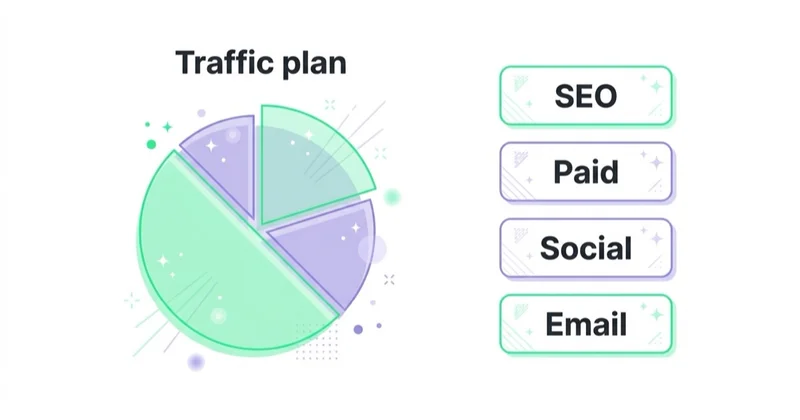
Possible acquisition channels:
- SEO;
- Google Search;
- Google Shopping;
- Performance Max;
- Meta Ads;
- TikTok Ads;
- email marketing;
- influencer and creator partnerships;
- affiliate marketing;
- marketplace visibility;
- content marketing;
- social organic;
- remarketing;
- PR;
- referral programmes.
Do not launch every channel at once unless the team can manage them. Start with channels that match the product, margin, search demand and creative resources.
For example:
- high-intent products with search demand: Google Shopping and Search;
- visual products: Meta, TikTok, Pinterest and creator content;
- complex B2B products: content, Search, retargeting and lead nurturing;
- repeat-purchase products: email and retention from day one.
Step 12: Optimise conversion
Traffic is expensive. The store needs to convert.
Focus on:
- mobile speed;
- clear navigation;
- search and filters;
- product page clarity;
- product images;
- trust signals;
- delivery cost visibility;
- guest checkout;
- payment methods;
- error-free forms;
- clear return policy;
- fast support;
- abandoned cart recovery.
For conversion work, read What Is Conversion Rate and How to Increase It? and How to Audit an Ecommerce Store.
A 60-day launch plan
Days 1-10: Strategy and requirements
- define offer and audience;
- calculate margin and target CAC;
- choose ecommerce model;
- list required integrations;
- define product data structure;
- choose target markets;
- decide platform shortlist.
Days 11-25: Platform and catalogue
- choose platform;
- configure domain and basic theme;
- add products and categories;
- prepare product images;
- write product descriptions;
- configure variants;
- build policy pages;
- prepare navigation.
Days 26-40: Operations
- configure payments;
- configure shipping;
- test tax and invoice logic;
- set return process;
- prepare transactional emails;
- test fulfilment;
- set customer support process;
- connect stock or warehouse systems if needed.
Days 41-50: Measurement and marketing foundations
- implement GA4 ecommerce events;
- test checkout tracking;
- set up Search Console;
- set up Merchant Center;
- prepare product feed;
- configure Google Ads and Meta basics;
- define UTM rules;
- build launch dashboard.
Days 51-60: QA and launch
- test mobile checkout;
- place test orders;
- test refunds;
- check page speed;
- review policies;
- verify email delivery;
- check feed approval;
- test ad conversions;
- prepare launch campaigns;
- remove password or go live;
- monitor first orders closely.
Pre-launch checklist
Before going live:
- Products are accurate.
- Prices and availability are correct.
- Images load on mobile.
- Product descriptions answer buyer questions.
- Shipping costs are visible.
- Returns policy is clear.
- Checkout works on mobile and desktop.
- Payments are tested.
- Refunds are tested.
- Transactional emails are correct.
- Analytics events fire correctly.
- Consent banner is tested.
- Merchant Center feed is prepared.
- Search Console is connected.
- Robots and sitemap are correct.
- Customer support process is ready.
- Legal pages are live.
- Backup and access rules are documented.
How we approach this at Space Ads
When you set up a store, the thing skipped most often — and regretted most — is measurement. Tracking gets bolted on "later", after launch, by which point the early data is gone for good: you can't optimise, or even fairly judge, a campaign on data you never collected. For us the foundations go in from day one — conversion tracking with value, consent mode, a clean product feed, fast mobile. None of that is an add-on for later; it's the precondition for ads to have anything to learn from. So the store ships ready to measure as much as to sell: if conversions don't register correctly on the first day of paid traffic, the budget burns on learning the system won't keep. Better to push launch a week than to open without measurement.
Common mistakes
| Mistake | Why it hurts | Better approach |
|---|---|---|
| Choosing platform first | Technology may not fit business model | Define requirements first |
| No traffic plan | Store launches to silence | Plan acquisition before launch |
| Weak product pages | Low conversion and trust | Add descriptions, specs, images and FAQs |
| No analytics at launch | Early learning is lost | Set up GA4 ecommerce and conversions first |
| Hidden delivery costs | Checkout abandonment | Communicate shipping early |
| No return clarity | Low trust | Summarise returns near purchase decision |
| Ignoring margin | Scaling can lose money | Track gross margin, CAC and LTV |
| Too many apps or plugins | Bloat and maintenance risk | Keep a controlled stack |
| No customer support process | Lost sales and poor reviews | Define response ownership |
| Launching all channels at once | Team loses control | Prioritise channels by fit |
FAQ
How much does it cost to start an online store?
It depends on platform, design, product count, integrations, payment setup, legal work, content, photography, analytics and marketing. Budget for both launch cost and ongoing operating cost.
Is Shopify or WooCommerce better for a new store?
Shopify is often easier for hosted, standard ecommerce. WooCommerce is often better when WordPress content, SEO flexibility and ownership matter. The right choice depends on the business model, technical resources and future requirements.
Can an online store launch without stock?
Yes, depending on the model: dropshipping, print-on-demand, pre-orders, digital products or marketplace fulfilment. Each model has risks around margin, delivery time, quality control and customer support.
Does every store need a blog?
No, but many stores need buying guides, category content, product FAQs, comparisons or educational content. The content should help customers choose, not exist only for SEO.
Should ads or SEO come first?
Both should be planned early. Ads can generate faster data and sales. SEO builds long-term demand capture. The priority depends on budget, margin, search demand and time horizon.
What should be measured from day one?
Track traffic sources, product views, add-to-cart, checkout steps, purchases, revenue, conversion rate, AOV, channel cost, margin and refunds.
What is the biggest mistake when starting an online store?
Launching a store without a clear plan for profitable traffic. A good-looking website does not create customers by itself.
Is marketplace selling easier than an owned store?
It can be easier to access demand, but marketplaces usually reduce control over branding, customer data and margins. Many brands use marketplaces and owned stores together.
Conclusion
Starting an online store is a business project, not only a web design task. The platform is important, but it is only one part of the system.
The store needs a clear offer, strong product data, trustworthy pages, reliable payments, predictable fulfilment, legal clarity, accurate analytics and a realistic traffic plan. When those parts are aligned, the store can learn and grow. When they are missing, even a polished storefront can struggle.
Start with the business model, then choose the technology. That order prevents many expensive mistakes.
Sources and further reading
- Shopify Help Center: General checklist for starting a new Shopify store
- WooCommerce Documentation
- WooCommerce: WordPress Ecommerce
- Stripe: How to accept online payments
- Stripe Docs: Payments
- Google Merchant Center Help: Product data specification
- Google Search Central: Product structured data
Continue learning
- Is It Worth Building a WordPress Store with WooCommerce?
- How to Write a Product Description That Sells and What It Must Include
- What Is Ecommerce Analytics and Why Is It So Important?
- What Is Google Merchant Center and How to Manage It?
- How to Audit an Ecommerce Store
- What Is Conversion Rate and How to Increase It?
Continue reading
Is It Worth Building a WordPress Store with WooCommerce?
WooCommerce is worth it when a store needs WordPress content flexibility, SEO control and ownership. Learn when it beats hosted ecommerce platforms and when it creates risk.
What Is Q-Commerce and Why Is It Growing?
Q-commerce is quick commerce: fast local fulfilment built on nearby inventory, dense demand, mobile UX and last-mile economics that actually work.
What Is M-Commerce and How to Use It in Your Business?
M-commerce is the full commercial journey shaped by mobile behavior: mobile pages, apps, payments, checkout, social traffic, lead forms and interrupted multi-session decisions. This guide explains how to improve speed, UX, measurement and paid-media landing paths so mobile traffic can create real revenue or qualified demand.


































